Preparations for a RAM user to use Graph Database
Before a Resource Access Management (RAM) user can manage Graph Database (GDB), you must grant the required permissions to the RAM user. This topic describes how to grant a RAM user access to the GDB console and authorize GDB to import data from Object Storage Service (OSS).
Grant a RAM user access to the console
The following operations must be performed using an Alibaba Cloud account.
Log on to the RAM console as a RAM administrator.
In the left-side navigation pane, choose .
On the Users page, find the required RAM user, and click Add Permissions in the Actions column.

You can also select multiple RAM users and click Add Permissions in the lower part of the page to grant permissions to the RAM users at a time.
Configure the Resource Scope parameter.
Account: The authorization takes effect on the current Alibaba Cloud account.
Resource Group: The authorization takes effect on a specific resource group.
ImportantIf you select Resource Group for the Resource Scope parameter, make sure that the required cloud service supports resource groups. For more information, see Services that work with Resource Group. For more information about how to grant permissions on a resource group, see Use a resource group to restrict a RAM user to managing only specific ECS instances.
Configure the Principal parameter.
The principal is the RAM user to which you want to grant permissions. The current RAM user is automatically selected.
Select an access policy.
The following table describes the GDB-related permissions.
Access policy name
Description
AliyunGDBFullAccess
Grants full permissions to operate the GDB console. This permission is the preferred choice for full access.
AliyunGDBReadOnlyAccess
This permission grants access to the GDB console only.
AliyunCloudMonitorFullAccess
Grants permissions to view monitoring information. This permission is the preferred choice for monitoring.
Click OK.
Click Close.
Authorize GDB to access OSS
You can use an Alibaba Cloud account or a RAM user that has the AliyunGDBFullAccess permission to perform the following operations.
- Log on to the GDB console.
Click Data Import - OSS Authorization.
The authorization is complete when the message The service-linked role was created successfully. GDB can now access your OSS is displayed.
After you authorize GDB to access OSS, the system automatically creates the AliyunServiceRoleForGDB service-linked role. To import data from OSS, you need the Alibaba Cloud Resource Name (ARN) of this role. You can obtain the ARN using one of the following methods:
Log on to the RAM console to view the ARN.
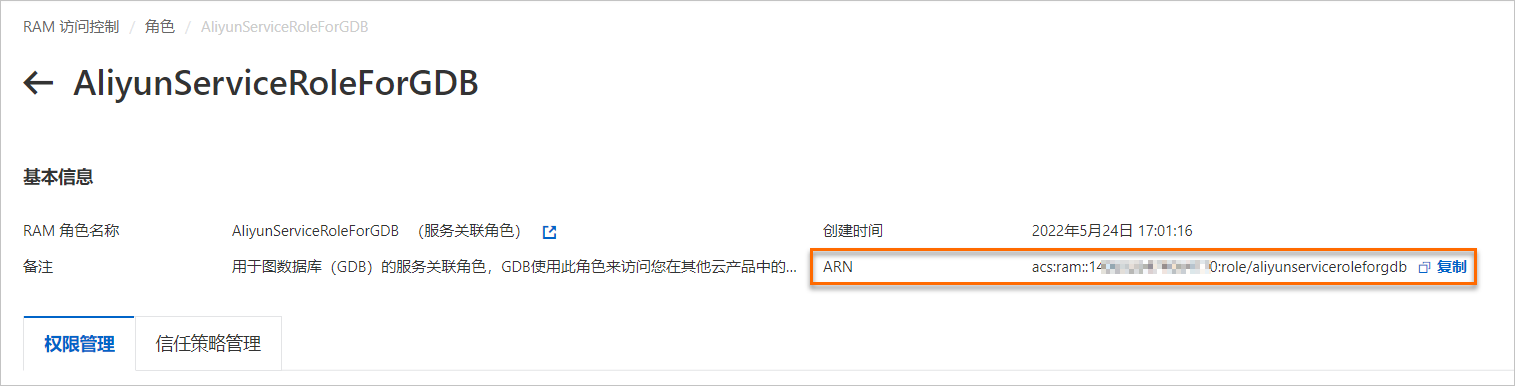
If a RAM user cannot log on to the RAM console, you can obtain the ARN by replacing
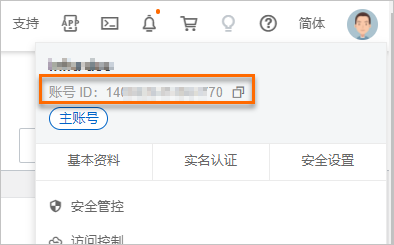
<Aliuid>in the following example with the UID of your Alibaba Cloud account:acs:ram::<Aliuid>:role/aliyunserviceroleforgdbFor example, if the UID of your Alibaba Cloud account is
123456789, the ARN isacs:ram::123456789:role/aliyunserviceroleforgdb.NoteLog on to the Alibaba Cloud Management Console. Move the pointer over the profile picture in the upper-right corner to obtain the UID of your Alibaba Cloud account.