Workspaces
This topic describes how to use workspaces in the Genomics Analysis Platform.
All operations in the Genomics Analysis Platform are performed within a workspace. You can use workspaces to manage genetic data, analysis applications, and running tasks. This helps you meet business requirements such as data isolation, access control, and cost accounting.
Create a workspace
On the Workspaces page, click Create Workspace. Enter the required information to create your workspace.
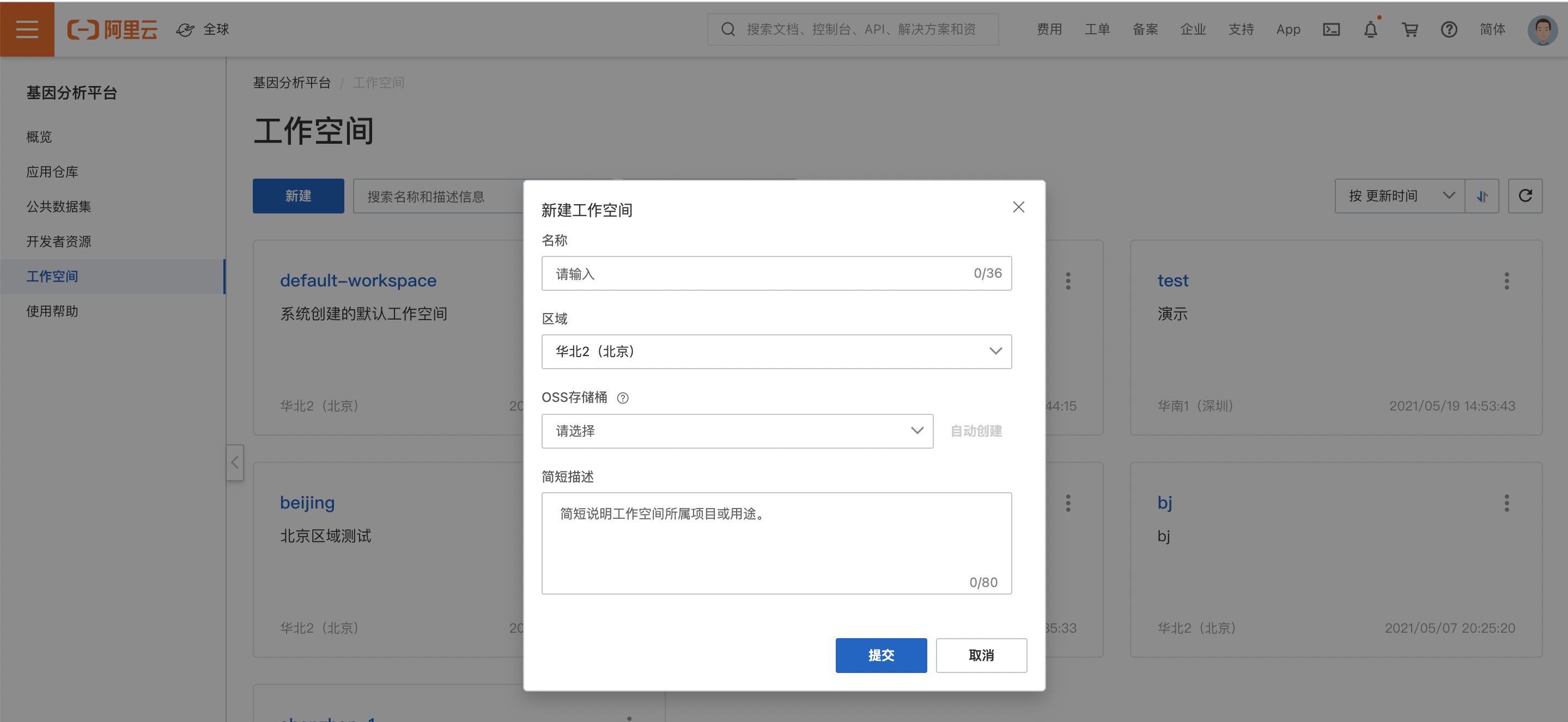
Name: A unique identifier for the workspace. The name must be unique within a region. It must be 2 to 64 characters long and can contain letters, digits, underscores (_), and hyphens (-). The name cannot start with a digit or a hyphen. For more information about the limit on the total number of workspaces in a single region, see Total number of workspaces.
Region: The region where the workspace resides. It must be one of the available regions supported by the Genomics Analysis Platform. If you already use Object Storage Service (OSS) to store genetic data, select the same region where your OSS bucket is located.
OSS Bucket:
Select an existing OSS bucket from the drop-down list to associate with the workspace. The bucket must be in the same region as the workspace, and you must have read and write permissions for it. This OSS bucket will be the default input/output location for data management and task operations in the workspace.
Alternatively, you can use the Automatic Creation feature to create a new OSS bucket in the workspace's region. The bucket name follows this format: "gstor-<workspace_name>-<region-id>-<random_id>".
WarningOSS buckets are an Object Storage Service product. They are associated with workspaces in the Genomics Analysis Platform, but are not resources of the platform. OSS buckets belong to the Alibaba Cloud user and are authorized for use by the Genomics Analysis Platform for analysis and computation. You must use the OSS product to perform operations such as uploading, downloading, and deleting files in OSS.
Short Description: A brief description of the workspace's purpose.
Workspace overview
A workspace provides features for Data Management, Application Configuration, and Analysis Tasks.
Data Management: Manages genetic data files in OSS, including operations such as uploading, downloading, and deleting. This feature provides entity tables to store genetic data files and their metadata, such as sample names and library types, in a structured, CSV-like format.
Application Configuration: Manages genetic analysis applications, including installing public applications and creating or editing personal applications. This feature provides application templates that you can use to run large-scale sample analyses in batches from the console.
Analysis Tasks: Manages genetic analysis tasks, including creating, querying, stopping, and resuming running tasks. This feature provides a submission function to manage batches of running tasks, such as tracking their completion status or stopping and resuming them in batches.
Clean up a workspace
You can delete resources managed within a workspace, such as data tables, application configurations, and running tasks. After a workspace no longer contains any managed platform resources, you can delete it.
The OSS bucket associated with a workspace and the genetic data files it contains are not resources managed by the Genomics Analysis Platform. Deleting a workspace does not delete the data in the associated OSS bucket. To avoid unnecessary charges, go to the OSS console to delete any genetic analysis files generated by the workspace that are no longer needed.