Graph algorithms
Graph Compute introduces a graph algorithm feature, which provides an integrated solution for queries and analytics. This feature lets you perform full-graph data analysis quickly and efficiently.
Introduction
Graph Compute now includes a graph algorithm feature that runs algorithms directly on your data within the service, simplifying full-graph data analysis. After you create a Graph Compute instance, you gain access to a high-performance, integrated engine for both graph queries and analytics. This approach is more convenient than other solutions because it eliminates separate data pipelines and streamlines data flow.
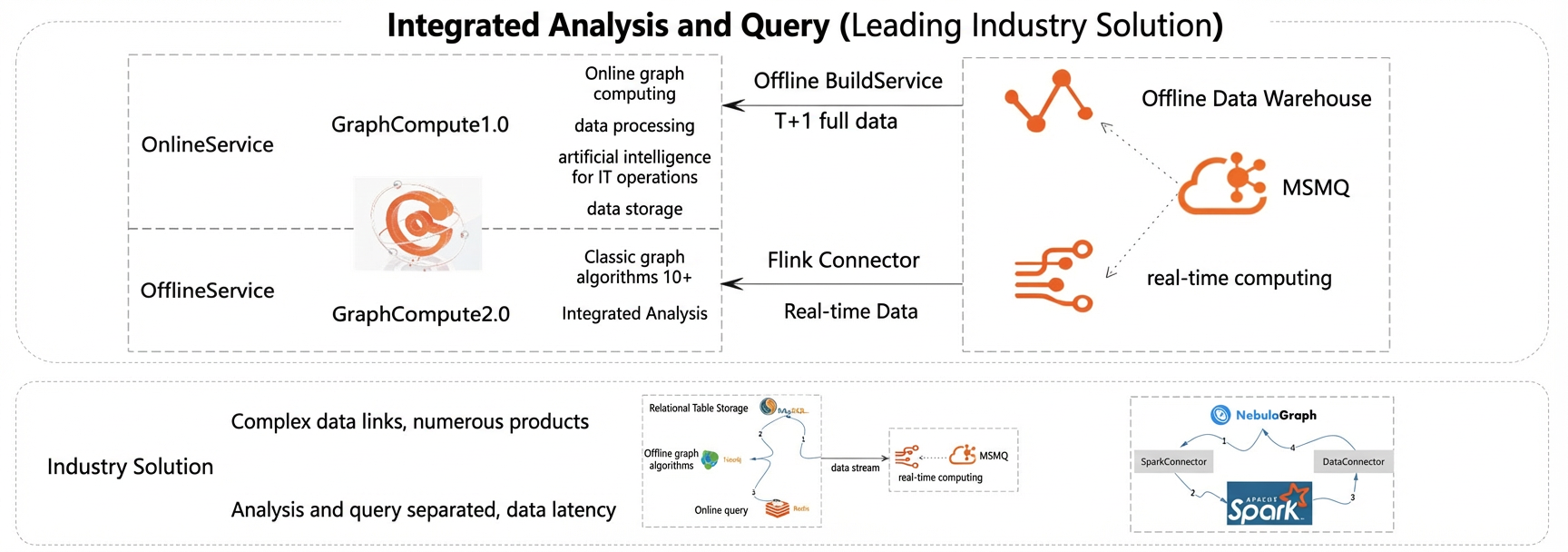
This release introduces three core graph algorithms, with more classic algorithms to be added in the future.
Algorithm overview
1) Centrality algorithm: PageRank
PageRank is a classic algorithm used to rank web pages. The input is a directed graph where each vertex represents a web page. If a link exists from page A to page B, a directed edge connects vertex A to vertex B.
The basic principles of the algorithm are as follows:
-
Initialization: The value of each vertex represents its PageRank score (DOUBLE type). At the start, all vertices have a value of
1/TotalNumVertices. -
Iteration formula:
PageRank(i) = 0.15/TotalNumVertices + 0.85 * sum, wheresumis the total ofPageRank(j)/out_degree(j)for all verticesjthat point to vertexi.
2) Community detection: Weakly connected components
The weakly connected components (WCC) algorithm finds sets of connected vertices in both directed and undirected graphs. If a path exists between two vertices, they are considered connected. A set of mutually connected vertices forms a component. Unlike strongly connected components (SCC), the WCC algorithm does not consider the direction of edges in a path. For example, in a directed graph with an edge from (a) to (b), vertices a and b are in the same component even if there is no edge from (b) to (a).
This algorithm computes the component membership for each vertex. The result for each vertex is the component ID, which is the lowest vertex ID within that component. The algorithm propagates this lowest vertex ID along edges to all other vertices in the same component.
3) Pathfinding: SSSP (unweighted and weighted)
The single source shortest path (SSSP) algorithm calculates the shortest distance from a designated source vertex to all other vertices in a graph. Dijkstra's algorithm is a classic method for solving the SSSP problem in a directed graph.
Dijkstra's algorithm uses vertices to update shortest distance values. Each vertex maintains its current shortest distance value to the source vertex. When this value changes, it adds the weight of an edge to the new value and sends a message to notify its adjacent vertices. In the next iteration, the adjacent vertices update their current shortest distance values based on the received messages. The iteration ends when the current shortest distance values of all vertices no longer change.
-
Initialization: The distance from the source vertex
sto itself is 0 (d[s]=0). The distance from all other verticesutosis set to infinity (d[u]=∞). -
Iteration: If an edge exists from vertex
uto vertexv, the shortest distance from the source tovis updated using the formulad[v]=min(d[v], d[u]+weight(u, v)). The iteration stops when the shortest distance values for all vertices no longer change.
Procedure
Prerequisites
To perform a full-graph analysis, you must create a Graph Compute instance, create a graph configuration, and either bulk import your graph data or write data using an API.
1) Create a Graph Compute instance. Click this link to activate an instance. For initial testing, you can select the [Dedicated Analysis] specification to test the feature.
2) Create a graph configuration. For instructions, see the best practice guide Quickly build a friend recommendation graph application with Graph Compute.
Graph algorithm configuration
After you complete the prerequisites, you can configure a graph algorithm task. The following sections explain how to configure and validate the single source shortest path, weakly connected components, and PageRank algorithms based on a friend relationship dataset. Go to the Instance Details > Graph Algorithm > Algorithm Analysis page to create and edit algorithm configurations. You can also configure a daily schedule for recurring tasks.
1) Single source shortest path
Specify the Edge Set Selection. You can select any edge table in your graph with index optimization disabled. You can select multiple edge tables. For algorithms that use edge weights, such as single source shortest path, you can select an edge property to represent its weight. For example, you can use an edge's score property to represent its weight. If you do not select a weight property, the weight of each edge defaults to 1.
For the single source shortest path algorithm, you must specify the sourceIdLabel and sourceIdValue advanced parameters. These parameters define the field name and corresponding value of the source vertex for the algorithm.
In this example, set Configuration Name to sssp_1017 and select relation for Edge Set Selection. In the advanced parameters, set sourceIdLabel to user and sourceIdValue to -9222864281912809073. The result field is automatically named sssp_1017_result.
2) Weakly connected components
For this algorithm, you only need to specify the Edge Set Selection. Select an edge table in your graph with index optimization disabled. You do not need to configure a weight property.
In this example, set Configuration Name to cc_1017, and select relation for Edge Set Selection. The result field is automatically named cc_1017_result.
3) PageRank
Specify the Edge Set Selection. Select an edge table in your graph with index optimization disabled.
For the PageRank algorithm, you must specify the maxIteration advanced parameter, which defines the maximum number of iterations.
In this example, set Configuration Name to pagerank_1017, select relation for Edge Set Selection, and set the maxIteration advanced parameter to 30. The result field is automatically named pagerank_1017_result.
4) Run the task
Click the Run button for the algorithm configuration. A billing prompt appears. Click OK to run the task. You can view the run history on the Historical Tasks page for the configuration. This feature is in public preview and is currently free of charge.
5) View the results
Saving the configuration automatically creates a new result vertex. The name of this vertex is the value you specified for the result field. After the task completes successfully, the system writes the results back to this vertex, making them available for online queries.
Query analysis results
1) Single source shortest path
The result vertex for this algorithm is of the KV type. The distance field indicates the shortest distance from the source vertex to the current vertex. A value of Long.MaxValue (2^63-1) indicates that no path exists between the source vertex and the current vertex. You can query a vertex by its ID: g("user_relation_graph").V("user#-9222864281912809073").hasLabel("sssp_1017_result")
2) Weakly connected components
The result vertex for this algorithm is of the inverted index type. The componentId field indicates the ID of the weakly connected component:
You can query a vertex by its ID: g("user_relation_graph").V("user#-1328036738095129493").hasLabel("cc_1017_result")
Use an inverted index query to find all vertices that belong to a specific component ID: g("user_relation_graph").V().hasLabel("cc_1017_result").indexQuery("{\"match\":{\"component_id\":\"user#-1000713713241257875\"}}")
3) PageRank
The result vertex for this algorithm is of the KV type. The score field indicates the PageRank score. You can query a vertex by its ID: g("user_relation_graph").V("user#-9222864281912809073").hasLabel("pagerank_1017_result")
Use cases
1) PageRank – Improve search coverage
Goal: Search is a critical component of service platforms. By improving search capabilities, users can directly find sub-services, which enhances the user experience and increases conversion rates.
Problem: Searches for long-tail keywords yield few or no results, and simple text matching is often ineffective.
Solution: Upgrade the search mechanism to use the PageRank algorithm. This incorporates richer item information and user click behavior to improve the diversity of search results.
Result: The click-through rate (CTR) for global search improved by over 2% (calculated as clicks on recommended results / impressions of recommended results), and the rate of searches with no results decreased by over 20%.
2) Weakly connected components - Account consolidation
Goal: Identify and merge accounts that likely belong to the same person who may have registered multiple e-commerce accounts to gain illicit benefits.
Solution: Establish strong connections between accounts based on predefined rules. For example, accounts that share the same phone number are highly likely to belong to the same person.
Algorithm: strongly or weakly connected components algorithm
Outcome: Replaces legacy GraphX and Spark systems, improving performance by more than 10 times.
Extension: This method can be used for entity consolidation to identify communities of interest or a single entity. Examples include grouping accounts with the same name or consolidating accounts for corporate clients.
Billing
The graph algorithm feature is in public preview and is free to use. After the feature is generally available, you will be charged on a pay-as-you-go basis according to the resources consumed by the algorithms.