Dual Service
ApsaraDB for HBase is ideal for services that handle terabytes or petabytes of data. While it already offers a primary-standby disaster recovery solution to ensure high availability, the Dual Service feature delivers greater stability and low-glitch performance for random read operations on large datasets.
Use cases
Dual Service is ideal for real-time online services that require low random read latency, such as a P999 latency of less than 50 ms. Common applications include user recommendation engines and real-time risk control systems.
Key features
- Low-glitch performance
- Automatic failover
- High resource utilization
How it works
-
Low-glitch performance
- The probability of two independent clusters experiencing a glitch at the same time is an order of magnitude lower than for a single cluster. By serving the same data from two separate clusters, Dual Service dramatically improves stability under an eventual consistency model. When a client sends a request, Dual Service first directs it to the primary cluster. If no response is received within a configured period (glitch timeout), the service sends a parallel request to the standby cluster. The service then uses whichever response returns first, minimizing latency for the client.
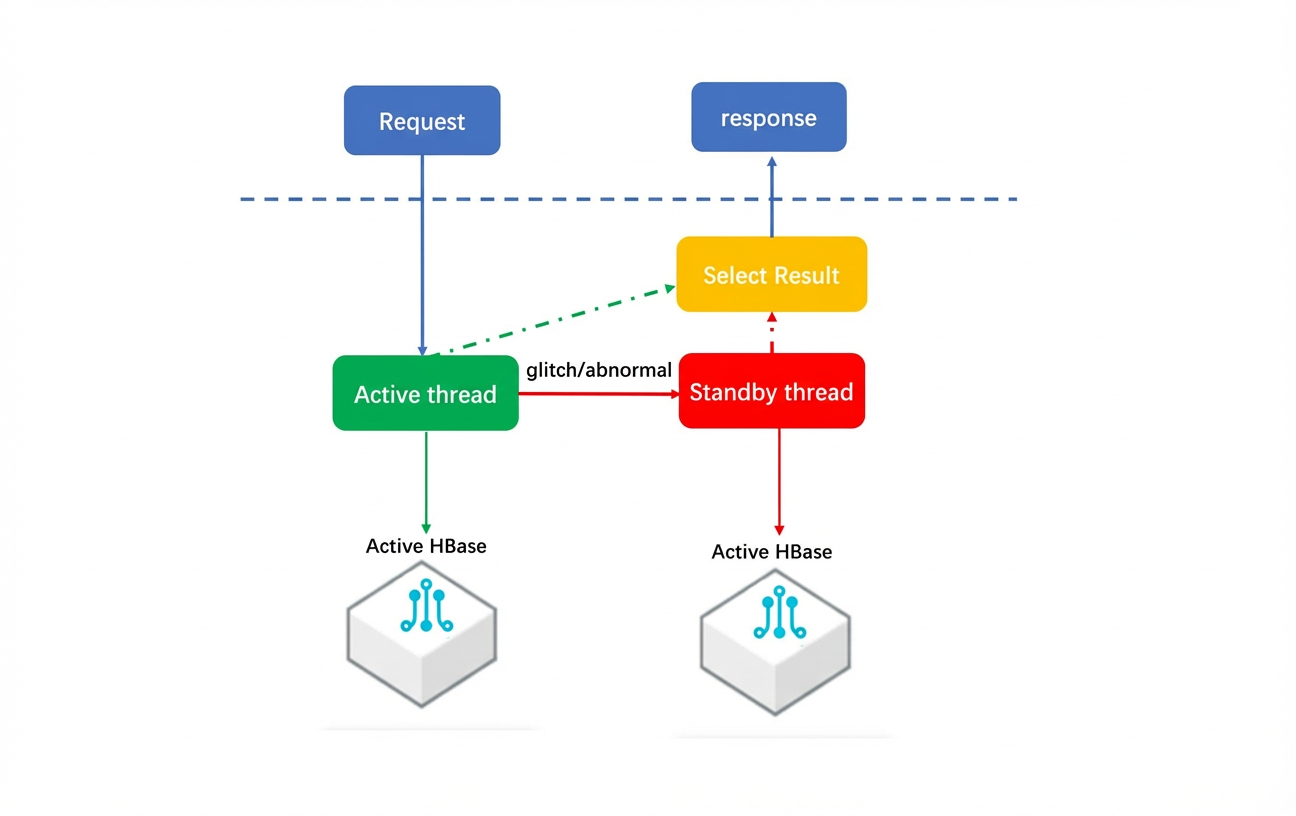
- The probability of two independent clusters experiencing a glitch at the same time is an order of magnitude lower than for a single cluster. By serving the same data from two separate clusters, Dual Service dramatically improves stability under an eventual consistency model. When a client sends a request, Dual Service first directs it to the primary cluster. If no response is received within a configured period (glitch timeout), the service sends a parallel request to the standby cluster. The service then uses whichever response returns first, minimizing latency for the client.
-
Glitch comparison
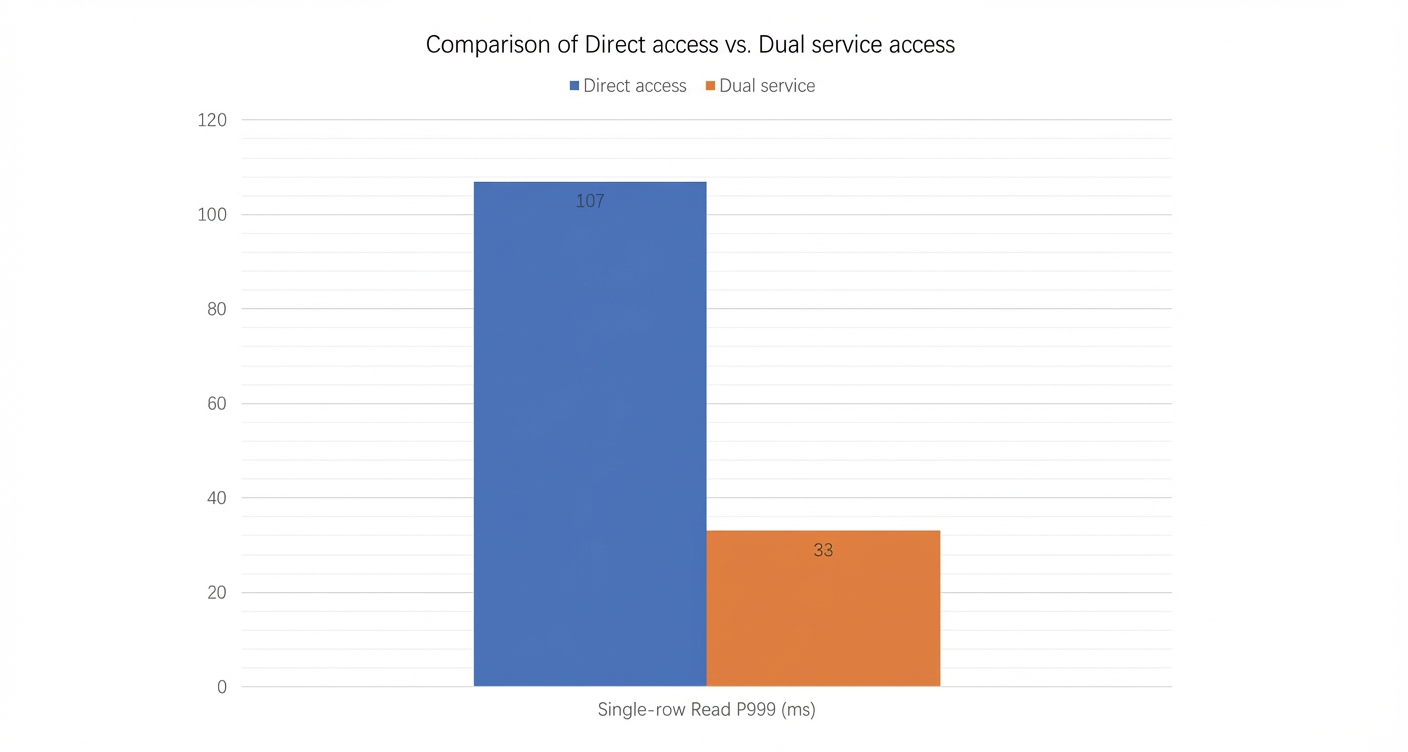
-
Automatic failover
- Dual Service provides automatic failover, which is transparent to your application. A failover is typically triggered in the following scenarios:
- Datacenter-level failures, such as network or power outages, which make the primary cluster unreachable and cause all requests to fail.
- A complete cluster outage caused by a software bug.
- Cluster access timeouts caused by slow or faulty disks.
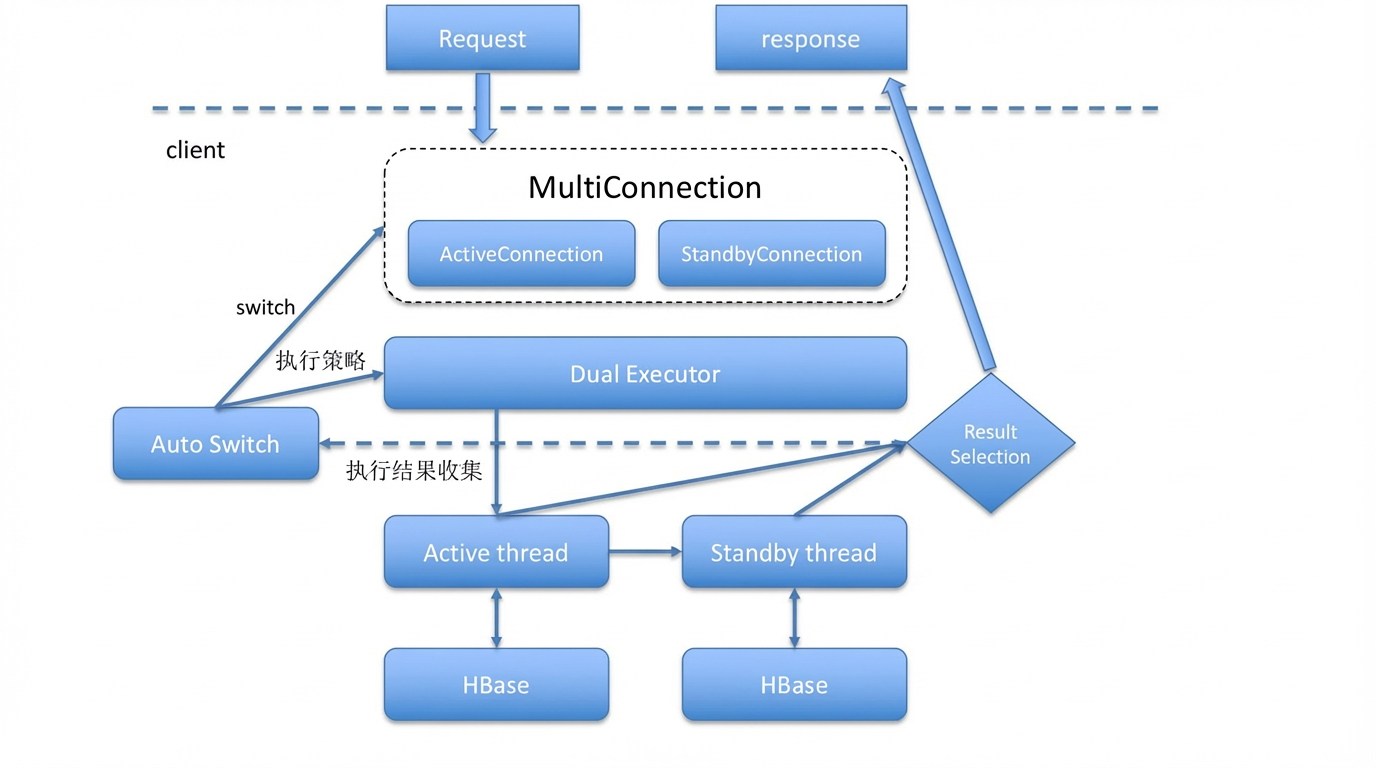
- Dual Service provides automatic failover, which is transparent to your application. A failover is typically triggered in the following scenarios:
-
Failure test results
- Throughput comparison during a single-node failure
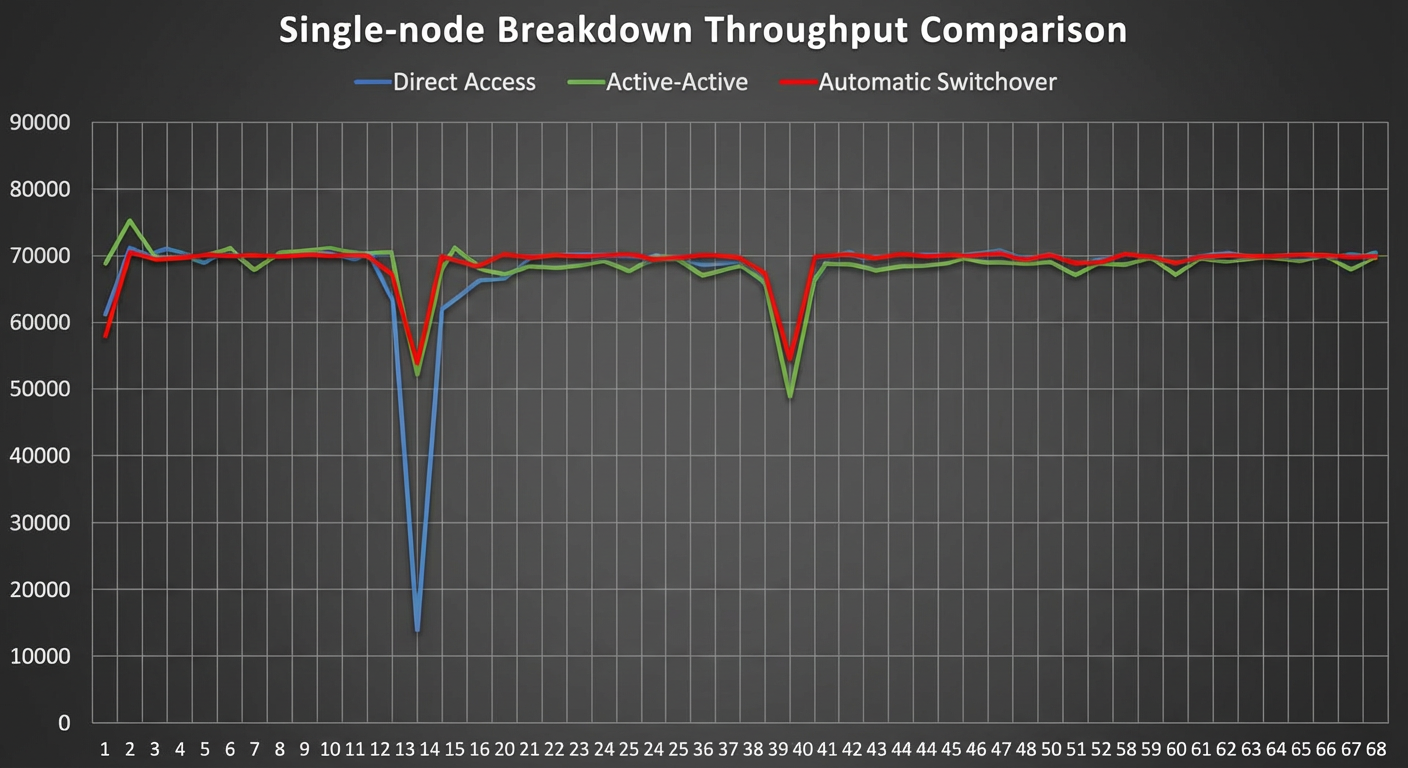
- Average response time comparison during a single-node failure
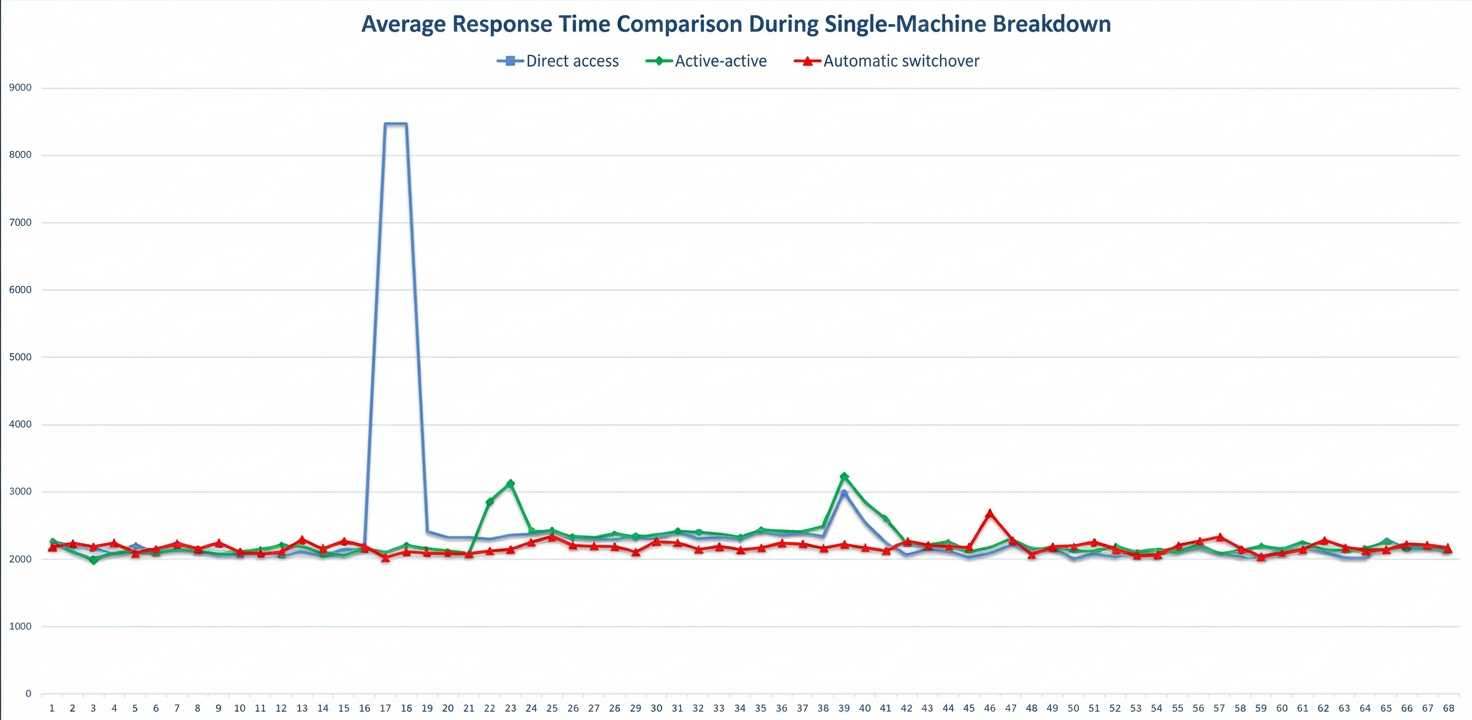
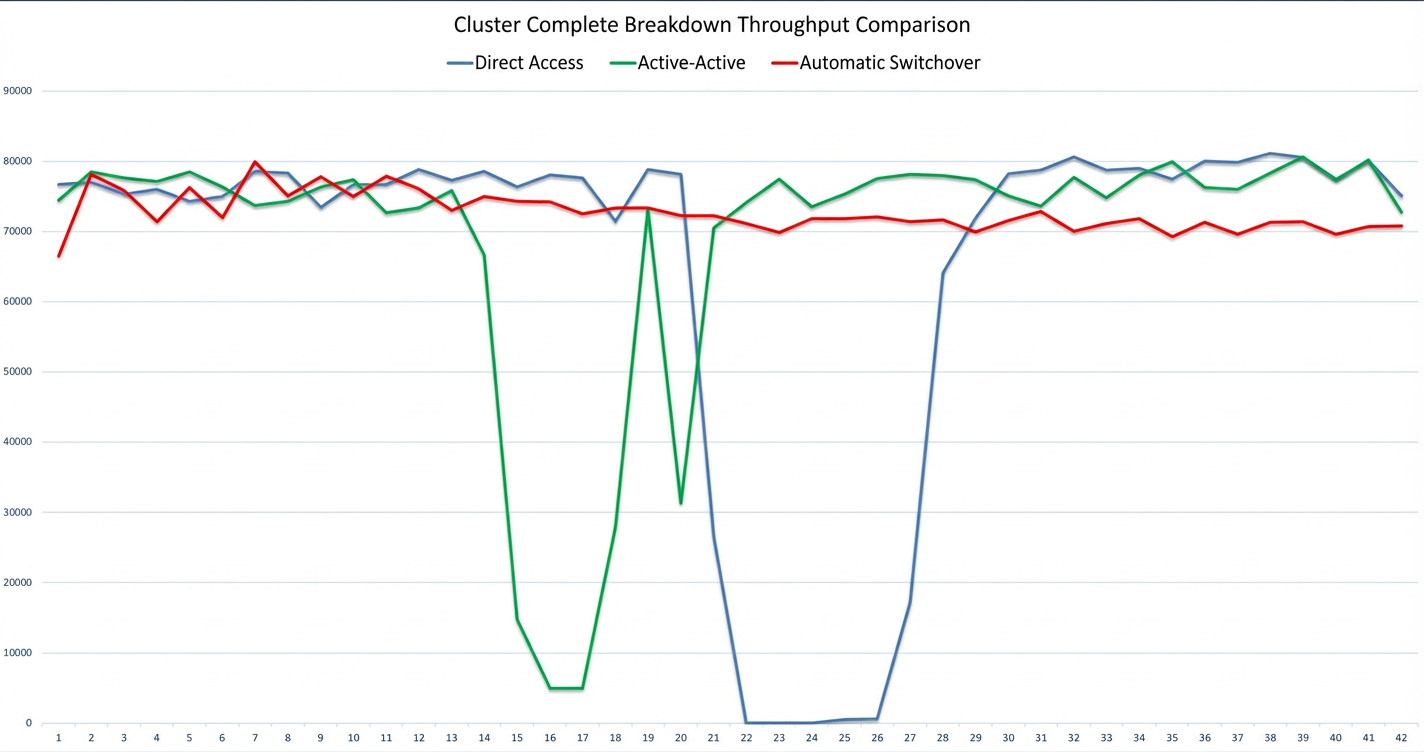
- Throughput comparison during a cluster failure

- Average response time comparison during a cluster failure
- Throughput comparison during a single-node failure
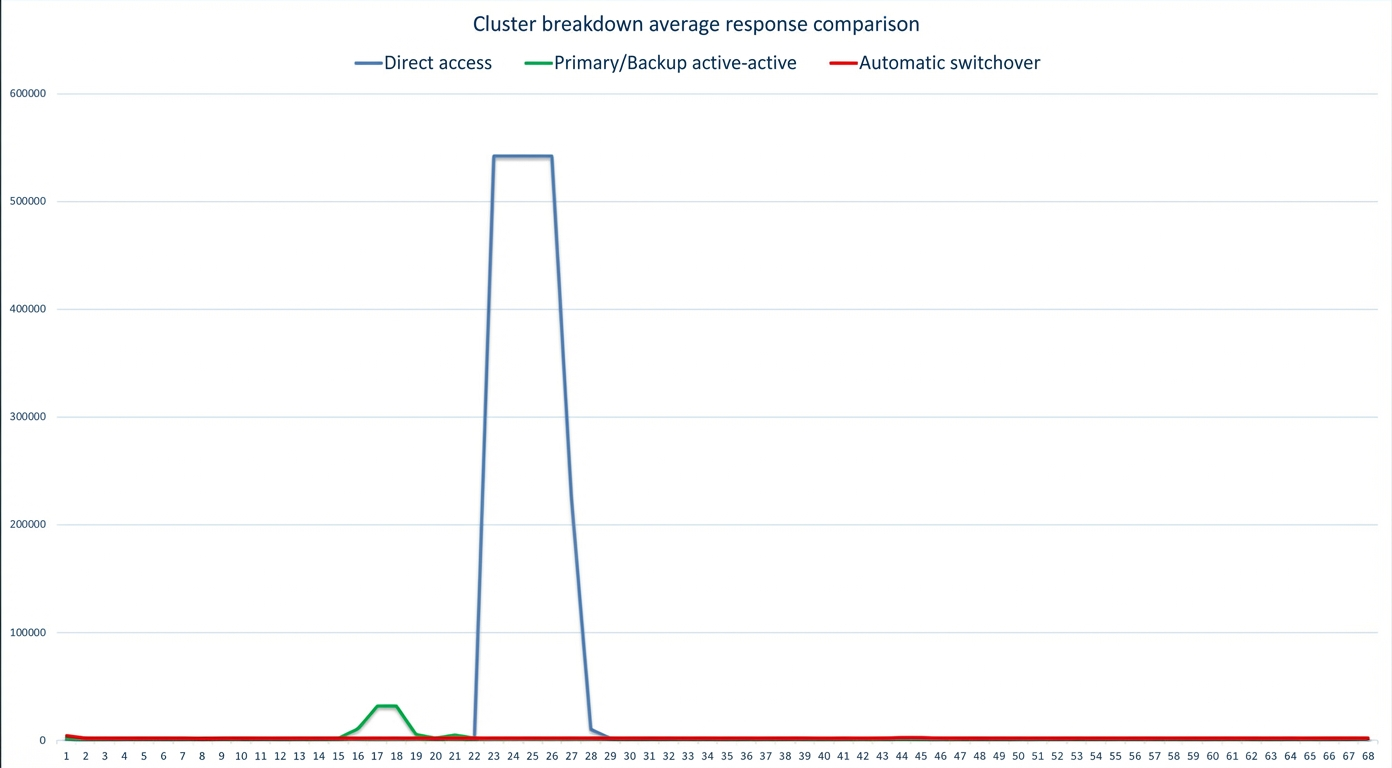
Get started
-
Prerequisites
-
- Set up a primary-standby disaster recovery solution for your ApsaraDB for HBase clusters. For more information, see Primary-Standby Disaster Recovery.
- On the High-Availability Management page, get the high availability connection string and high availability instance ID.
- Use the following client dependencies:
For HBase 1.x:
<dependency>
    <groupId>com.aliyun.hbase</groupId>
    <artifactId>alihbase-client</artifactId>
    <version>1.8.8</version>
</dependency>
For HBase 2.x:
<dependency>
    <groupId>com.aliyun.hbase</groupId>
    <artifactId>alihbase-client</artifactId>
    <version>2.8.3</version>
</dependency>
<dependency>
    <groupId>com.aliyun.hbase</groupId>
    <artifactId>alihbase-endpoint</artifactId>
    <version>2.8.3</version>
</dependency>
-
Configure client parameters
You can configure the client parameters in two ways.
Method 1: Configuration file
<configuration>
      <!-- High availability connection string -->
    <property>
        <name>hbase.zookeeper.quorum</name>
        <value>HOST:PORT</value>
    </property>
    <!-- High availability instance ID -->
    <property>
        <name>haclient.cluster.id</name>
        <value>ha-xxxxxx</value>
    </property>
    <!--
    If you need to connect to ApsaraDB for HBase Enhanced Edition, set the username and password.
    The default for both is root. Adjust these values as required.
    -->
    <property>
        <name>hbase.client.username</name>
        <value>testuser</value>
    </property>
    <property>
        <name>hbase.client.password</name>
        <value>password</value>
    </property>
    <!-- Enable Dual Service -->
    <property>
        <name>hbase.dualservice.enable</name>
        <value>true</value>
    </property>
    <!-- Enable Dual Service for all tables -->
    <property>
        <name>hbase.dualservice.table.enable</name>
        <value>true</value>
    </property>
    <!-- You can also enable Dual Service at the table level -->
    <property>
        <name>${tablename}.hbase.dualservice.enable</name>
        <value>true</value>
    </property>
    <!-- Set the glitchtimeout in milliseconds. If a request to the primary cluster exceeds this time, Dual Service sends a parallel request to the standby cluster. -->
     <property>
        <name>hbase.dualservice.glitchtimeout</name>
        <value>xxx</value>
    </property>
    <!-- Set the glitchtimeout at the table level in milliseconds -->
    <property>
        <name>${tablename}.hbase.dualservice.glitchtimeout</name>
        <value>xxx</value>
    </property>
  <!-- Enable automatic failover -->
  <property>
        <name>hbase.autoswitch.enable</name>
        <value>true</value>
    </property>
</configuration>
Method 2: Code
Create a Configuration object and add the required parameters.
Configuration conf = HBaseConfiguration.create();
conf.set("hbase.zookeeper.quorum", "HOST:PORT");
conf.set("haclient.cluster.id", "ha-xxxxxx");
// Set credentials if they differ from the default (root/root).
conf.set("hbase.client.username", "testuser");
conf.set("hbase.client.password", "password");
conf.setBoolean("hbase.dualservice.enable", true);
// Enable Dual Service for all tables.
conf.setBoolean("hbase.dualservice.table.enable", true);
// You can also enable Dual Service at the table level.
conf.setBoolean("${tablename}.hbase.dualservice.enable", true);
// Set the glitchtimeout in milliseconds. If a request to the primary cluster exceeds this time, Dual Service sends a parallel request to the standby cluster.
conf.setInt("hbase.dualservice.glitchtimeout", xxx);
// Set the glitchtimeout at the table level in milliseconds.
conf.setInt("${tablename}.hbase.dualservice.glitchtimeout", xxx);
conf.setBoolean("hbase.autoswitch.enable", true);
// API for switching clusters.
ClusterSwitcher clusterSwitcher = new ClusterSwitcher(conf);
clusterSwitcher.switchToStandby();
Limitations
Dual Service supports only the following operations:
- get
- delete
- put
- batchGet
- batchDelete
- batchPut
- small scan (for 2.x clients, you must call setLimit for the scan and set the limit to a value less than 500)