Access using the Java API
The Search service is fully compatible with the open source Apache Solr APIs. Use the SolrJ client library to query Search indexes and retrieve HBase data without learning a proprietary API.
Prerequisites
Before you begin, ensure that you have:
-
A Search instance in ApsaraDB for HBase
-
Maven or Gradle configured in your Java project
How it works
-
Get the cluster connection address from the Search instance details page.
-
Add the SolrJ dependency to your project.
-
Connect to the Search service using
CloudSolrClient(internal network) orHttpSolrClient(local debugging over the Internet). -
Query the index to get document IDs, convert each ID to an HBase rowkey, then fetch the original data from the HBase table.
Step 1: Get the cluster connection address
On the details page of the Search instance, click Database Connection to view the Client Address section.
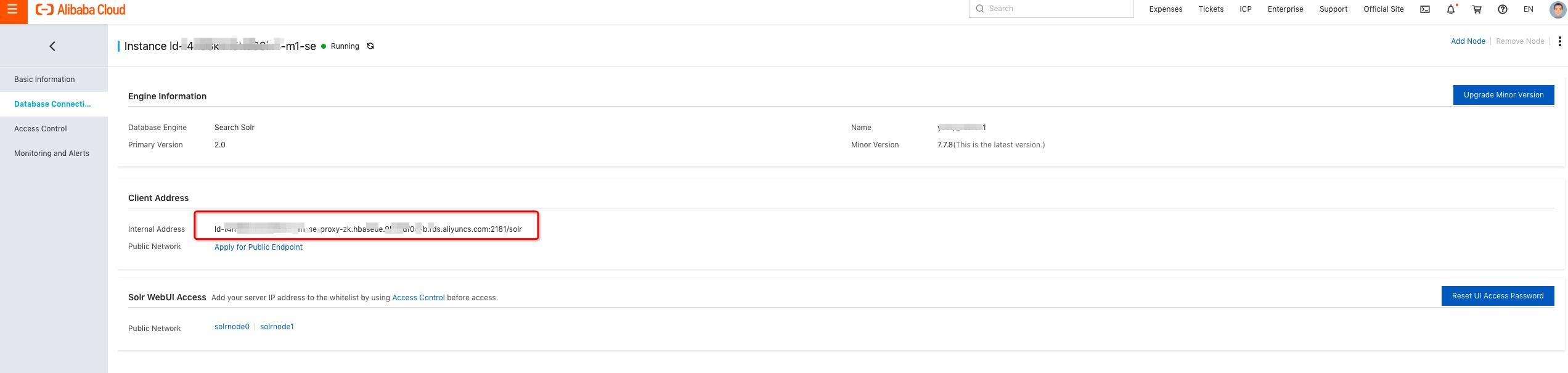
Public IP addresses are not supported for the Search service. To access the service over the Internet, contact customer service in the ApsaraDB for HBase Q&A DingTalk group.
Step 2: Add the SolrJ dependency
The Search service is compatible with the open source Solr protocol, so you can use the standard SolrJ dependency.
Maven (pom.xml):
<dependency>
  <groupId>org.apache.solr</groupId>
  <artifactId>solr-solrj</artifactId>
  <version>7.7.3</version>
</dependency>
Gradle (build.gradle):
implementation 'org.apache.solr:solr-solrj:7.7.3'Step 3: Query the index and retrieve data
Choose a client
| Client | Use when | Notes |
|---|---|---|
CloudSolrClient |
Accessing over an internal network (recommended) | Thread-safe; can be shared across multiple threads |
HttpSolrClient |
Local debugging over the Internet | Requires the host IP address to be added to the whitelist in the RAM console |
Query the index and convert IDs to rowkeys
The following example connects to the Search service using CloudSolrClient, queries an index, and converts the returned document IDs to HBase rowkeys for further data retrieval.
import java.util.Collections;
import java.util.Optional;
import org.apache.solr.client.solrj.impl.CloudSolrClient;
import org.apache.solr.client.solrj.SolrQuery;
import org.apache.solr.client.solrj.response.QueryResponse;
import org.apache.solr.common.SolrDocument;
import org.apache.solr.common.SolrDocumentList;

// Replace <your-zk-host> with the ZooKeeper address from the Client Address section.
String zkHost = "<your-zk-host>:2181/solr";

try (CloudSolrClient solrClient = new CloudSolrClient.Builder(
        Collections.singletonList(zkHost), Optional.empty()).build()) {

    // Build and execute the query.
    SolrQuery solrQuery = new SolrQuery("name_s:bobo AND age_i:18");
    QueryResponse response = solrClient.query("your_index_name", solrQuery);
    SolrDocumentList documentList = response.getResults();

    System.out.println("Matching documents: " + documentList.getNumFound());

    for (SolrDocument doc : documentList) {
        String id = (String) doc.getFieldValue("id");

        // Convert the document ID to an HBase rowkey.
        byte[] rowkey = org.apache.hadoop.hbase.util.Bytes.toBytes(id);

        // Use the rowkey to fetch the original data from the HBase table.
        // Options: native HBase Java API, or Thrift (supports C#, Python, Go).
    }
}CloudSolrClientis thread-safe and can be shared across multiple threads. Thetry-with-resources block ensures the client is closed automatically after use.
For a complete working example, see the SolrQueryDemo on GitHub.
Use HttpSolrClient for Internet access
For local debugging when a direct internal network connection is unavailable, use HttpSolrClient with the HTTP endpoint. First, add the host IP address to the whitelist in the RAM console.
import org.apache.solr.client.solrj.impl.HttpSolrClient;

// Replace <host-ip> with your host IP address after adding it to the RAM whitelist.
String httpUrl = "http://<host-ip>:8983/solr/";
try (HttpSolrClient solrClient = new HttpSolrClient.Builder(httpUrl).build()) {
    SolrQuery solrQuery = new SolrQuery("name_s:bobo AND age_i:18");
    QueryResponse response = solrClient.query("your_index_name", solrQuery);
    SolrDocumentList documentList = response.getResults();

    for (SolrDocument doc : documentList) {
        String id = (String) doc.getFieldValue("id");
        byte[] rowkey = org.apache.hadoop.hbase.util.Bytes.toBytes(id);
        // Use the rowkey to fetch data from the HBase table.
    }
}
What's next
After retrieving the rowkeys, fetch the original data using one of the following:
-
Native HBase Java API — for Java applications
-
Thrift — for applications written in other languages, such as C#, Python, or Go