This topic describes how to use the Fuse-DFS tool to map Apsara File Storage for HDFS to a local file system.
Prerequisites
You have created a file system and added a mount target.
You have installed JDK 1.8 or later on all nodes of the Hadoop cluster. We recommend that you use Hadoop 2.7.2 or later. This topic uses Apache Hadoop 2.8.5 as an example.
You have downloaded the Hadoop source package that matches your Hadoop cluster version. For more information, see Download Hadoop source package.
Background information
Fuse-DFS is a module of the Hadoop project. It lets you map a Hadoop Distributed File System (HDFS) to a UNIX file system using Filesystem in Userspace (FUSE). The official precompiled versions of Hadoop do not include the Fuse-DFS module. To use this feature, you must manually compile the module and add it to the Hadoop client. For the official Fuse-DFS documentation, see MountableHDFS.
When you use the Fuse-DFS tool with Alibaba Cloud Apsara File Storage for HDFS, additional configuration is required. For more information, see Step 2: Configure Fuse-DFS.
The steps in this topic use the CentOS 7 operating system as an example.
Step 1: Attach an Apsara File Storage for HDFS instance to a Hadoop cluster
Mount the Apsara File Storage for HDFS instance on your Hadoop cluster. For more information, see Mount an Apsara File Storage for HDFS file system.
Step 2: Configure Fuse-DFS
On the Hadoop client, install dependencies and load the FUSE module.
Run the following command to install the dependencies.
yum -y install fuse fuse-devel fuse-libsRun the following command to load the FUSE module.
modprobe fuse
Decompress the Hadoop source package.
tar -zxvf hadoop-2.8.5-src.tar.gzModify and compile the code.
When you use Fuse-DFS to mount Apsara File Storage for HDFS to a local file system, Fuse-DFS changes the mount target address prefix from
dfs://tohdfs://. This change causes the mount to fail. To resolve this issue, you must modify the source code and recompile the module.Run the following command to open the fuse_options.c file. Change
#define NEW_HDFS_URI_LOCATION "hdfs://"to#define NEW_HDFS_URI_LOCATION "dfs://".vim hadoop-2.8.5-src/hadoop-hdfs-project/hadoop-hdfs-native-client/src/main/native/fuse-dfs/fuse_options.c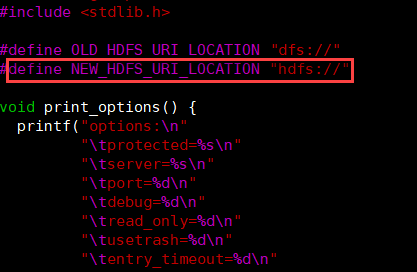
Run the following command to compile the hadoop-hdfs-native-client submodule in the hadoop-hdfs-project module of the Hadoop source code.
cd hadoop-2.8.5-src/ mvn clean package -pl hadoop-hdfs-project/hadoop-hdfs-native-client -Pnative -DskipTestsImportantThe name and location of the hadoop-hdfs-native-client submodule may vary depending on the Hadoop version. For example, in Hadoop 2.7.x, this module is located in the hadoop-hdfs-project/hadoop-hdfs submodule. In Hadoop 2.8.x and later versions, it is located in the hadoop-hdfs-project module.
Configure Fuse-DFS.
Copy the compiled Fuse-DFS package to the bin folder of the Hadoop client. For example:
cp hadoop-2.8.5-src/hadoop-hdfs-project/hadoop-hdfs-native-client/target/main/native/fuse-dfs/fuse_dfs ${HADOOP_HOME}/binConfigure environment variables for the Hadoop client.
Run the
vim /etc/profilecommand to open the configuration file and add the following content.export OS_ARCH=amd64 export LD_LIBRARY_PATH=${JAVA_HOME}/jre/lib/${OS_ARCH}/server:${HADOOP_HOME}/lib/native export CLASSPATH=$CLASSPATH:`${HADOOP_HOME}/bin/hadoop classpath --glob`Run the following command to apply the configuration.
source /etc/profile
Step 3: Use Fuse-DFS
Create a directory.
mkdir /mnt/dfs_mountMount the Apsara File Storage for HDFS file system to the local file system.
fuse_dfs dfs://f-xxxxx.cn-xxx.dfs.aliyuncs.com:10290/ /mnt/dfs_mountReplace
dfs://f-xxxxx.cn-xxx.dfs.aliyuncs.comwith the mount target address of your Apsara File Storage for HDFS file system.Verify the mount.
If you can view the files and directories in Apsara File Storage for HDFS from the local directory, the file system is mounted successfully.
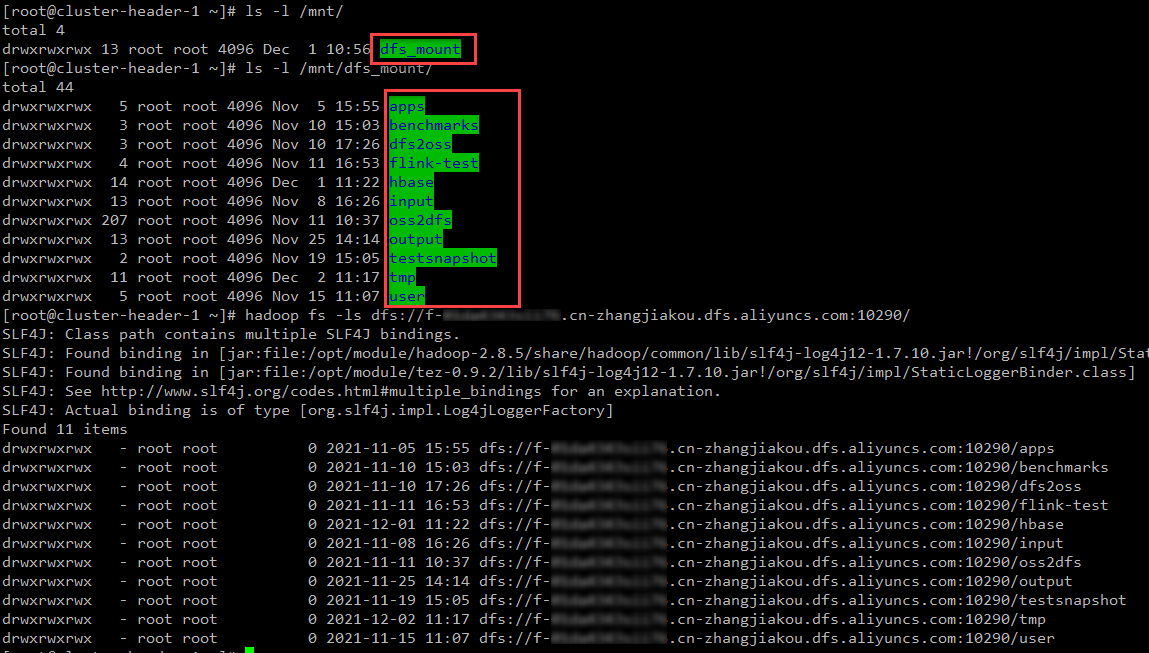 Important
The mount is not persistent. You must remount the Apsara File Storage for HDFS file system each time the client restarts. We recommend configuring an automatic mount on startup.
After the file system is mounted successfully, you can access the Apsara File Storage for HDFS file system from your local machine to read and write data.
Run the following commands to create a file in the local directory to which the Apsara File Storage for HDFS file system is mapped. You can then view the newly created file in the Apsara File Storage for HDFS file system.
cd /mnt/dfs_mountmkdir fuse_testecho "hello dfs" > fuse_test/fuse.txt
Optional: Unmount the directory.
fusermount -u /mnt/dfs_mount