Step 1: Set up a VPC
Setting up a Virtual Private Cloud (VPC) is the first step to protect your core business services with Alibaba Cloud disaster recovery. In just a few simple steps, you can create a completely isolated and dedicated network environment in the cloud.
Hybrid cloud disaster recovery involves replicating servers from your primary on-premises data center in real time to a dedicated, secure network environment in the cloud. If a major failure occurs at the primary data center, all servers can fail over to the VPC to ensure business continuity.
Key considerations
When you set up a VPC, consider the Alibaba Cloud region for your disaster recovery center, the type of network connection to the Alibaba Cloud VPC, and the CIDR block for the VPC.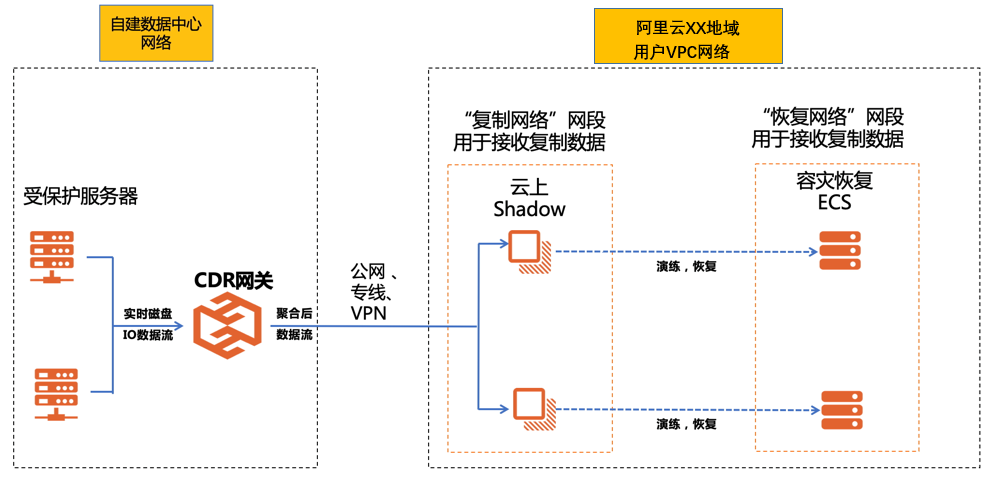
These three factors guide your VPC configuration.
-
Region selection
All Alibaba Cloud data centers feature robust infrastructure. Select an appropriate Alibaba Cloud region as your disaster recovery target based on your actual requirements, such as physical distance (for example, a business unit might require the disaster recovery center to be more than 100 km away from the primary data center), network performance (such as latency of less than 50 ms), and network cost (leased lines typically become more expensive as the distance increases).
-
Connectivity between your data center and the Alibaba Cloud VPC
You can connect your primary on-premises data center to your Alibaba Cloud VPC using the public network, a VPN, or a leased line.
-
Public network (standard business broadband): This option is suitable for scenarios where the daily data change volume is small and systems in the primary data center do not need to frequently access cloud resources. Alibaba Cloud's encrypted data upload channels ensure data security, and compressed data streams allow the public network to carry significant data flows.
-
VPN (Alibaba Cloud VPN Gateway): This option is suitable for scenarios where the daily data change volume is small but the primary data center needs a constant connection to services within the Alibaba Cloud VPC. For example, if you deploy a primary domain controller in your on-premises data center and a secondary domain controller on Alibaba Cloud, the two servers require a persistent connection.
-
Leased line (Express Connect): This option is suitable for scenarios with large data volumes and complex applications. It typically requires advance capacity planning based on the daily data change volume.
-
-
VPC CIDR block
Your VPC requires two core CIDR blocks:
-
replication network CIDR block: Transfers replicated data from on-premises to the cloud. You can use any CIDR block.
-
recovery network CIDR block: This block is used for ECS instances recovered during a disaster recovery drill or a failover. For simple scenarios, the recovery network can use the same CIDR block as your source data center. This ensures that servers recovered on the cloud use the same IP addresses as the source, so applications can run without configuration changes.
NoteThe vSwitches for the replication network and the recovery network must be in the same availability zone.
Therefore, for simple scenarios, create a VPC whose CIDR block completely covers the CIDR block of your source site. Then, within this VPC, create a vSwitch with the same CIDR block as your source site to serve as the recovery network vSwitch. Finally, create another vSwitch with a different CIDR block to serve as the replication network vSwitch.
-
Example
Assume a primary site has the following characteristics:
-
The primary site is in Shanghai and requires the disaster recovery center to be at least 100 km away.
-
The volume of daily data changes at the primary data center is 20 GB.
-
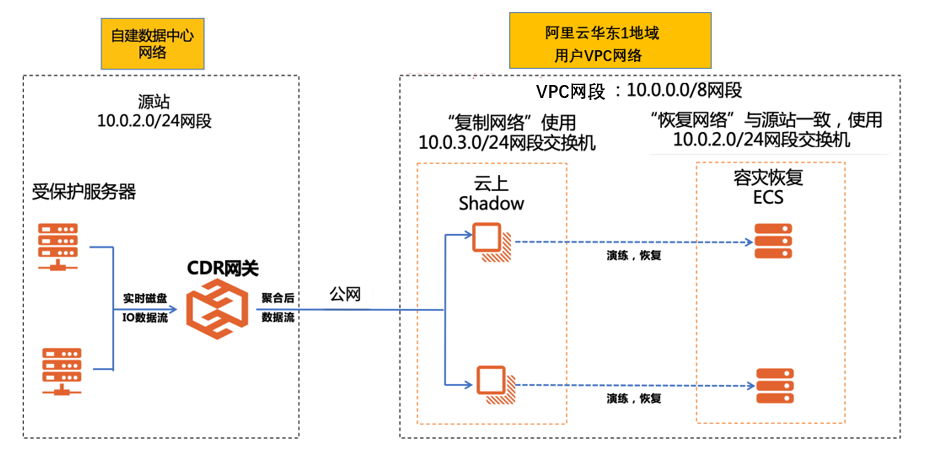
The CIDR block for the servers at the primary site is 10.0.2.0/24.
Based on the preceding conditions and the three key considerations, the recommended plan is as follows:
-
Select the Alibaba Cloud China (Hangzhou) region, which is 120 km from the primary data center, as the disaster recovery center.
-
Use the public network to connect to Alibaba Cloud instead of a VPN or a leased line because the daily data change volume is small.
-
Because the on-premises data center uses the 10.0.2.0/24 CIDR block, you can:
-
Create a VPC on Alibaba Cloud with the 10.0.0.0/8 CIDR block.
-
Within this VPC, create a vSwitch with the 10.0.2.0/24 CIDR block, which is identical to the source site's CIDR block. This vSwitch will serve as the recovery network vSwitch.
-
Within the same VPC, create another vSwitch with the 10.0.3.0/24 CIDR block to serve as the replication network vSwitch.
-
The following figure shows the plan:
Procedure
Based on the preceding example, follow these steps to set up the VPC.
Log on to the VPC console.
-
In the left-side navigation pane, click Virtual Private Cloud.
-
In the top navigation bar, select a region. In this scenario, select the China (Hangzhou) region.
-
Click Create VPC.
-
On the Create VPC page, create the VPC, the recovery network vSwitch, and the replication network vSwitch.
-
Create the VPC and the recovery network vSwitch.
-
In the VPC section, enter a Name for the VPC, select Customize IPv4 CIDR Block, and enter 10.0.0.0/8 as the IPv4 CIDR block.
-
In the vSwitch section, enter a Name for the vSwitch, select an Availability Zone, and then select 10.0.2.0/24 for the IPv4 CIDR Block. This vSwitch will serve as the recovery network.
ImportantYou cannot change a vSwitch's CIDR block after creation.
-
-
Click Add to create the vSwitch for the replication network.
Enter a Name for the replication network vSwitch, select an Availability Zone, and then select 10.0.3.0/24 for the IPv4 CIDR Block.
ImportantEnsure that this vSwitch is in the same availability zone as the recovery network vSwitch.
-
Click OK.
The VPC and its vSwitches are created.
-