DROP LOGICAL PARTITION TABLE
Use DROP TABLE to drop a logical partitioned table. The syntax and behavior are identical to dropping a non-partitioned table. Logical partitioned tables do not involve partition deletion operations. To clean up partitions, you only need to delete the partition data.
Syntax
DROP TABLE [ IF EXISTS ] table_name [, ...];DROP TABLE accepts a comma-separated list of table names, so you can drop multiple tables in a single statement.Parameters
Parameter | Description |
| Suppresses the error if the table does not exist. Useful in deployment and cleanup scripts where the table may or may not be present. If omitted and the table does not exist, the statement returns: |
| The name of the table to drop. |
Examples
Drop a single table
DROP TABLE holo_test;Drop multiple tables
DROP TABLE holo_test, holo_test2;Drop a table safely in scripts
Use IF EXISTS when writing deployment or cleanup scripts to prevent errors if the table does not exist.
DROP TABLE IF EXISTS holo_test;Drop a table that has dependent objects
If a view depends on the table, add CASCADE to drop the table and all its dependent objects.
DROP TABLE IF EXISTS holo_test CASCADE;Delete a table using HoloWeb
To delete a table visually, use the HoloWeb console:
-
Go to the HoloWeb console. For more information, see Connect to HoloWeb to run queries.
-
In the top menu bar of the HoloWeb page, click Metadata Management.
In the Instances Connected list on the left side of the Metadata Management page, right-click the table and select Delete Table.
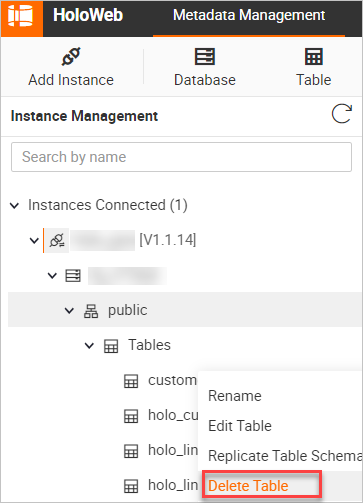
In the dialog box, click OK.
FAQ
Error: `ERROR: cannot drop table xxx because other objects depend on it. Detail: view xxx depends on table xxx. Hint: Use DROP ... CASCADE to drop the dependent objects too.`
A view depends on the table. Run DROP TABLE with CASCADE to drop the table and all dependent views at the same time:
DROP TABLE [ IF EXISTS ] <table_name> [, ...] CASCADE;