Billing rules for Hologres subscription instances
Subscription is a prepaid billing method where you pay for resources before you use them. Hologres subscription instances support upgrades and downgrades, allowing you to scale resources to meet your business needs. This topic describes the billing rules for Hologres subscription instances.
Billing details
The following table describes the billable items for dedicated subscription instances.
The fees for dedicated subscription instances do not include the costs of advanced features, such as Serverless Computing, backup and recovery, and cross-region snapshot replication. The compute, storage, and network resources used by these advanced features are billed on a pay-as-you-go basis.
If your storage usage exceeds the purchased storage capacity, the excess usage is automatically billed on a pay-as-you-go basis. For more information about pay-as-you-go pricing, see Pay-as-you-go.
Resource type | Resource unit | Resource specification | Unit price | Unit | Description |
Compute | CU |
| The price varies based on the region. Details are as follows:
| CU*month | 1 CU = 1 core and 4 GB of memory |
Reserved compute resources for an instance | CU | Compute group instance | The price varies based on the region. Details are as follows:
| CU*month | 1 CU = 1 core and 4 GB of memory |
Elastic compute resources for a compute group (including scheduled and automatic scaling) | CU | Compute group instance | The price varies based on the region. Details are as follows:
| CU/hour | Billed hourly (1 CU = 1 core and 4 GB of memory) |
Gateway resources | Item | Compute group instance | The price varies based on the region. Details are as follows:
| * Months | None |
Serverless Computing compute resources | CU |
| This item is billed on a pay-as-you-go basis. No separate subscription price is available. Details are as follows:
| CU*hour | 1 CU = 1 core and 4 GB of memory |
Storage | GB | Standard storage (locally redundant storage) | The price varies based on the region. Details are as follows:
| GB*month | None |
Standard storage (zone-redundant storage) |
| ||||
Infrequent Access storage (locally redundant storage) | The price varies based on the region. Details are as follows:
| ||||
Infrequent Access storage (zone-redundant storage) |
| ||||
Backup set storage | The price varies based on the region. Details are as follows:
| GB*hour | The size of a backup set varies based on the backup policy and the amount of differential data. Therefore, backup set storage is always billed on a pay-as-you-go basis. Even for a subscription instance, backup set storage is billed based on actual usage. | ||
Network | GB | Network traffic fees for cross-region snapshot replication | This item is billed on a pay-as-you-go basis. No separate subscription price is available. Details are as follows:
| GB | None |
Billing formula: Subscription fee = Compute usage × Unit price × Number of months + Storage usage × Unit price × Number of months.
Examples:
If you estimate that you need 500 GB of Standard storage and 128 CUs of compute resources per month for six months and create an instance in the China (Hangzhou) region, the subscription fee is 128 × 170 × 6 + 500 × 1 × 6 = CNY 133,560.
If you purchase 100 GB of Infrequent Access storage resources but your storage usage reaches 200 GB in a specific hour, the system charges you for the excess storage usage in that hour on a pay-as-you-go basis. If your instance is in the China (Hangzhou) region, the fee is (200 - 100) × 0.00030 = CNY 0.03.
NotePay-as-you-go storage resources are billed hourly. The price varies by region.
Upgrade and downgrade fees
Upgrade/Downgrade type | Fee description |
Upgrade | Billing formulas:
For more information, see Billing rules for resource upgrades. |
Downgrade | For information about the refund amount for a downgrade, see Unsubscription rules. |
Instance expiration and overdue payments
The following figure shows the process for instance expiration and overdue payments.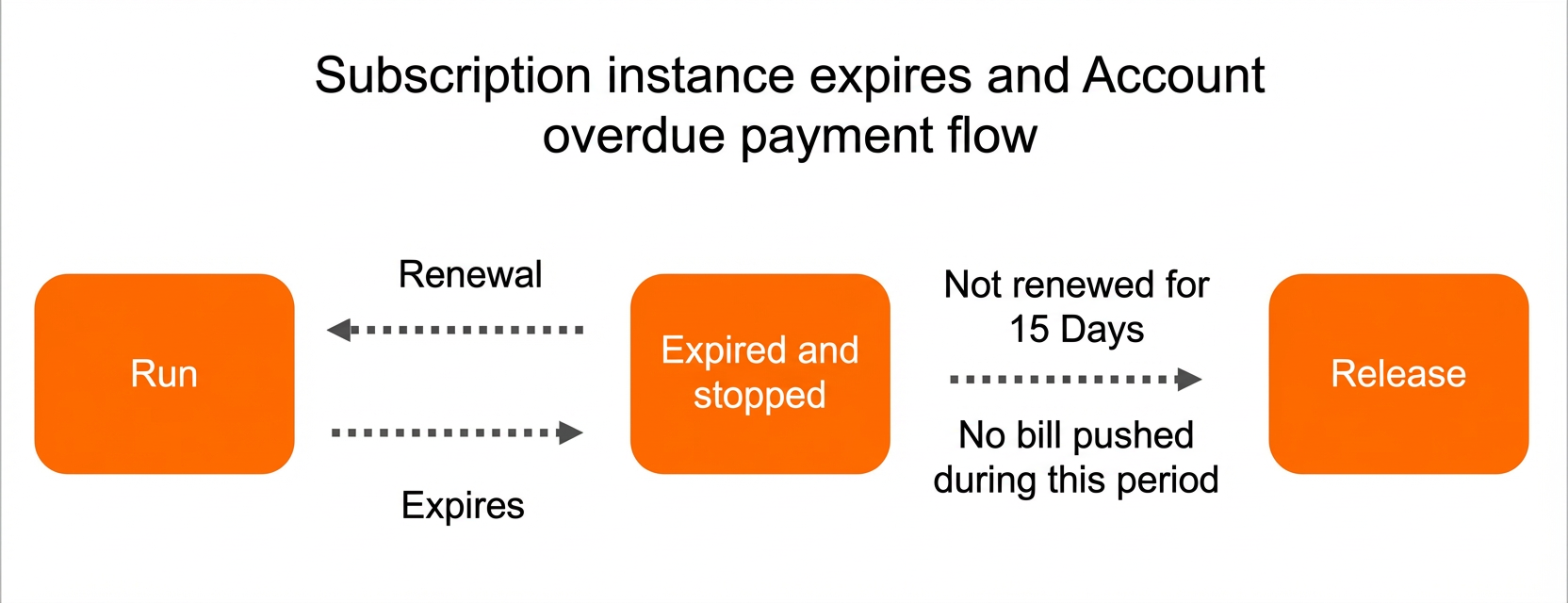
Assume that you purchase a Hologres instance using the subscription billing method and pay for four months of compute and storage resources. The instance starts running after the payment is successful. The following information describes what happens when the instance expires or your account has an overdue payment.
Instance expiration:
You can use the purchased Hologres service for four months from the date of purchase.
After four months, the instance expires and is suspended. You must renew the instance to continue using it.
If you do not renew the instance within 15 days, the system releases the instance. The instance is deleted from the console, and all data in the instance cannot be recovered.
If you unsubscribe from the instance, it is released immediately after the unsubscription is successful.
NoteThe system does not send you bills within 15 days after the instance is suspended.
Overdue payments:
You can continue to use the instance for 24 hours after an overdue payment occurs. If you add funds to your account during this period, the instance will not be suspended.
If your account payment is overdue for more than 24 hours, the instance is locked. You cannot access the locked instance, and it is stopped immediately after it expires.
If you add funds to your account within 15 days after the instance expires, you can continue to use the instance. Otherwise, the system releases the instance. After the instance is released, your business data is permanently deleted and cannot be recovered.
Hologres supports converting between the subscription and pay-as-you-go billing methods.
Suspension notifications
The following table shows the reminder times for instance suspension and release.
Billing Method | Expiration suspension reminder time | Suspension release reminder time |
Subscription | 7 days before expiration | 7 days before release |
3 days before expiration | 3 days before release | |
1 day before expiration | 1 day before release |
For example, if you purchase a Hologres instance using the subscription billing method and pay for two months, the system sends you the following notifications before the instance is suspended or released:
The system sends you expiration reminders by text message, phone call, or email 7 days, 3 days, and 1 day before the instance expires.
The instance is suspended immediately after it expires.
If you do not renew the instance within 15 days after it expires, the system releases the instance.
The system sends you release reminders by text message, phone call, or email 7 days, 3 days, and 1 day before the instance is released.
Unsubscribe from a subscription instance
If you no longer need a Hologres subscription instance, you can log on to the Unsubscribe page to unsubscribe from the instance. For more information about the unsubscription rules and procedure, see Unsubscription rules.
If an instance has expired and is suspended, you must renew it before you can unsubscribe.
To unsubscribe from a subscription instance, you must use the Unsubscribe page. You cannot delete a subscription instance from the Hologres console. Additionally, you cannot use the Resource Group Management feature in the Security Center of the HoloWeb console to unsubscribe from an expired instance.
If you request to unsubscribe from an instance, the instance is released immediately after the unsubscription is successful.
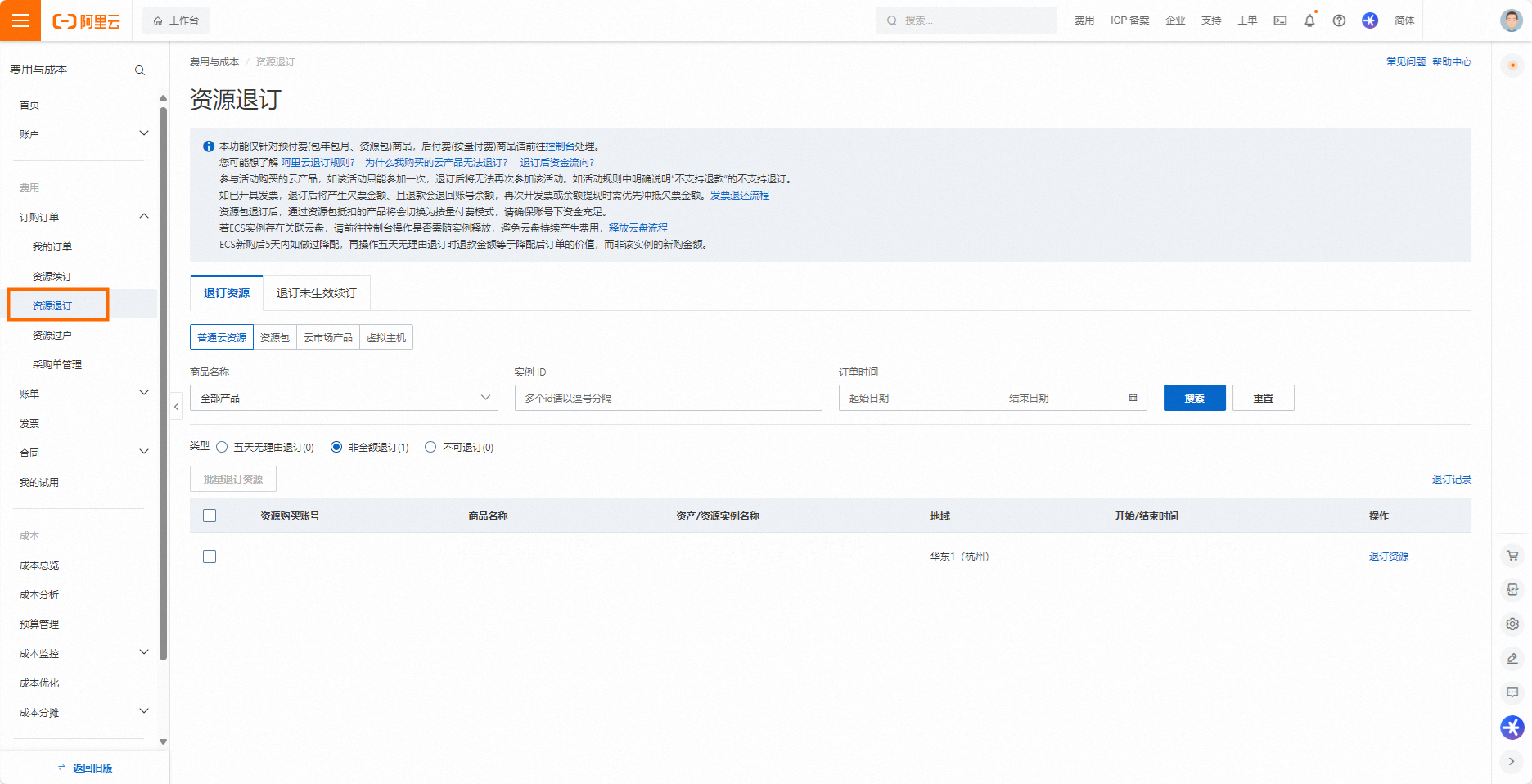
Go to the Unsubscribe page.
On the Unsubscribe page, choose .
On the Regular Cloud Resource tab, filter the resources by product name, instance ID, or order time to find the resource you want to unsubscribe from. Then, click Unsubscribe Resource or Batch Unsubscribe Resources.
On the Unsubscribe Resource page, review the resource information, confirm the unsubscription terms and refund amount, and then follow the prompts to unsubscribe.