Failure recovery
Hologres provides single-instance fast recovery to automatically restore service when a compute node fails. Learn about the trigger conditions, recovery behavior, and supported instance specifications.
Implementation logic
-
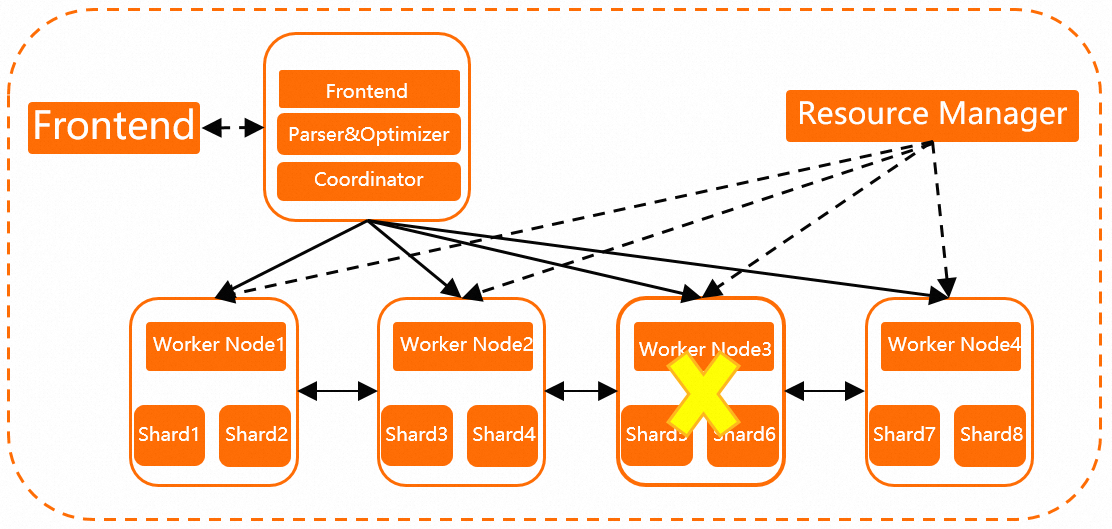
In versions earlier than Hologres V2.0, compute nodes (the worker nodes shown in the following diagram) are container-scheduled, and the resource manager performs regular health checks. If a compute node fails to respond within 1 minute due to out-of-memory (OOM) errors, hardware faults, or software bugs, the resource manager automatically starts a new compute node and migrates shards from the faulty node. For example, if Worker Node 3 becomes unresponsive, the resource manager starts Worker Node 4 to replace it. Data is stored in Apsara Distributed File System and does not need to be migrated between compute nodes. Compute nodes are lightweight and stateless, which enables fast recovery. By default, single-instance fast recovery is enabled for every Hologres instance. If a node encounters an exception, the instance recovers automatically without manual O&M. Queries that attempt to access a node during recovery fail immediately. Recovery typically takes about one minute but may take longer if the node hosts a large number of tables.
-
In Hologres V2.0 and later, high-specification instances can leverage spare resources on worker nodes to accelerate recovery and reduce the impact on online services. When a worker node becomes faulty, metadata of its shards is quickly loaded onto other healthy worker nodes. This mechanism requires the total number of worker nodes to meet a minimum threshold. The allowed number of simultaneous faulty worker nodes depends on the total number of worker nodes on the instance.
-
The following table describes the mapping between instance specifications and the allowed number of faulty worker nodes.
Number of CUs
Number of instance nodes
Allowed number of faulty worker nodes
160 ≤ Number of CUs < 320
10 ≤ Number of nodes on an instance < 20
1
320 < Number of CUs
20 ≤ Number of nodes on an instance
2
-
Metadata of the shards originally allocated to a faulty worker node is temporarily loaded onto other healthy worker nodes to ensure quick recovery.
Sample scenario
By default, shard metadata is evenly distributed across all worker nodes of an instance. In this example, the instance has 10 worker nodes and 10 shards, with one shard loaded on each worker node.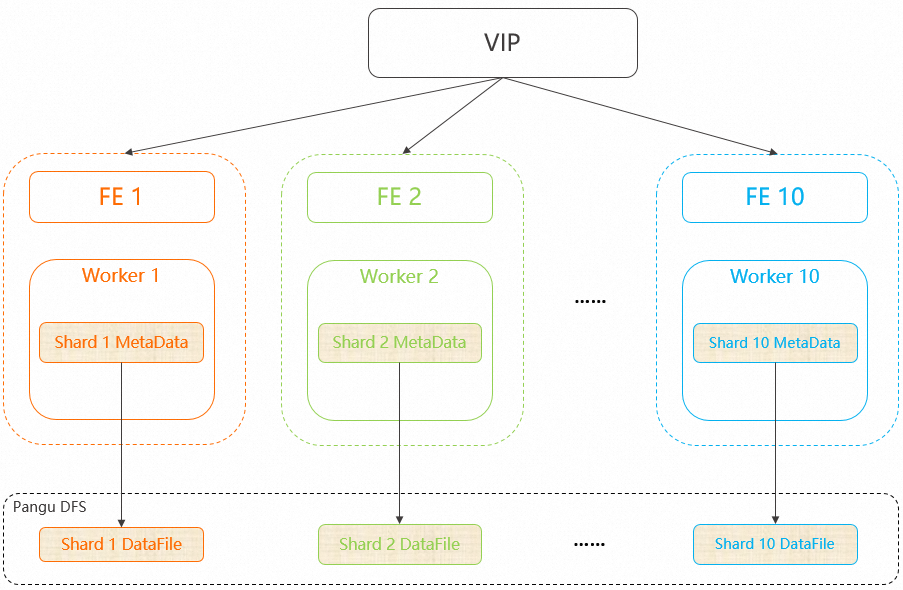
If Worker 2 fails, the instance loads the metadata of Shard 2 onto Worker 1 within 10 seconds after the failure is detected.
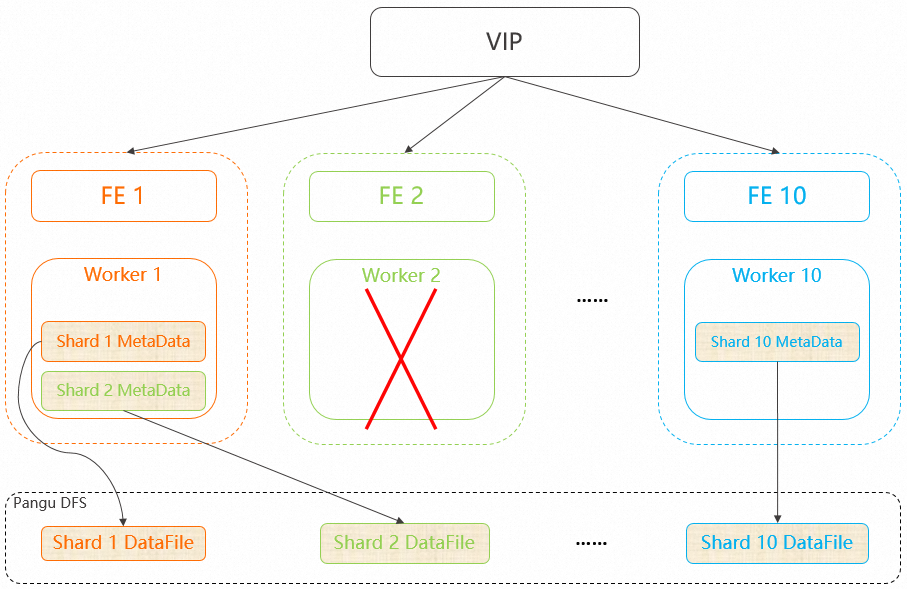
After Worker 2 restarts, the system does not automatically move the metadata of Shard 2 back to Worker 2. Shard 2 remains on Worker 1. If load imbalance occurs after a fast recovery, you can use the Rebalance function to rebalance the instance. For more information, see Rebalance.