App filing FAQ
The Alibaba Cloud ICP Filing system supports app filing. This topic answers common questions about the app filing process.
What is the app filing process?

For details about the app filing process, see ICP filing process.
If your domain name has already completed an ICP filing with another service provider, you must complete a transfer filing with Alibaba Cloud before submitting an app filing.
How do I submit an app filing if my domain name and server are under a different Alibaba Cloud account?
If your server is under a different Alibaba Cloud account than the one you want to use for the app filing, complete cross-account authorization before you submit the app filing:
-
After the authorization is complete, log on to the account you want to use for the app filing, go to the Alibaba Cloud ICP Filing system, and click Start Filing to submit the app filing.
-
App filing and website filing are separate but parallel requirements. You do not need to complete a website filing before you can submit an app filing.
App filing timeline
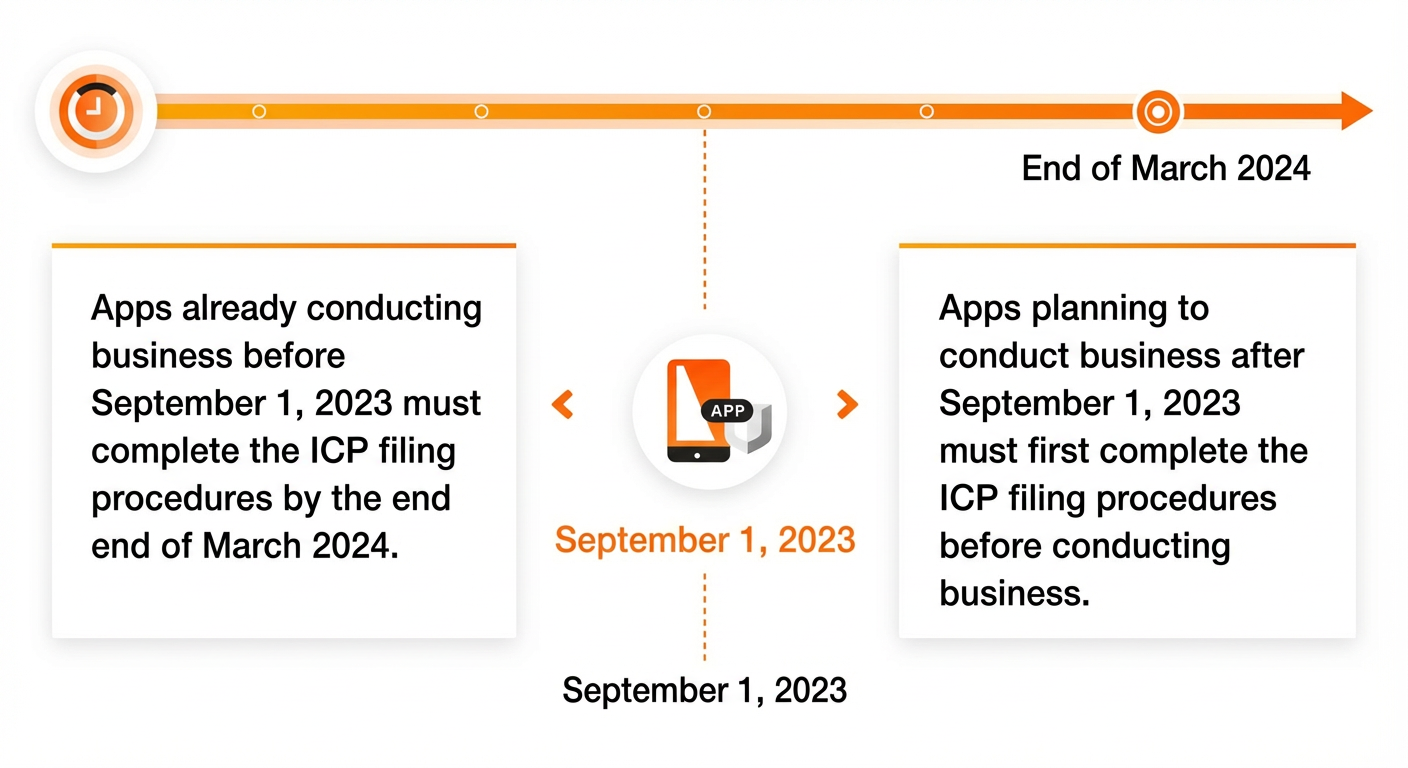
Does my app require a filing?
Per the "Notice on the Filing of Mobile Internet Applications" from the Ministry of Industry and Information Technology (MIIT), an app filing is required for apps that run on operating systems like Android and iOS, or on open platforms like mini programs and quick apps.
If you have a native app that runs on platforms like Android or iOS and uses an Alibaba Cloud cloud product for its backend server, you can file the app through the Alibaba Cloud ICP Filing system.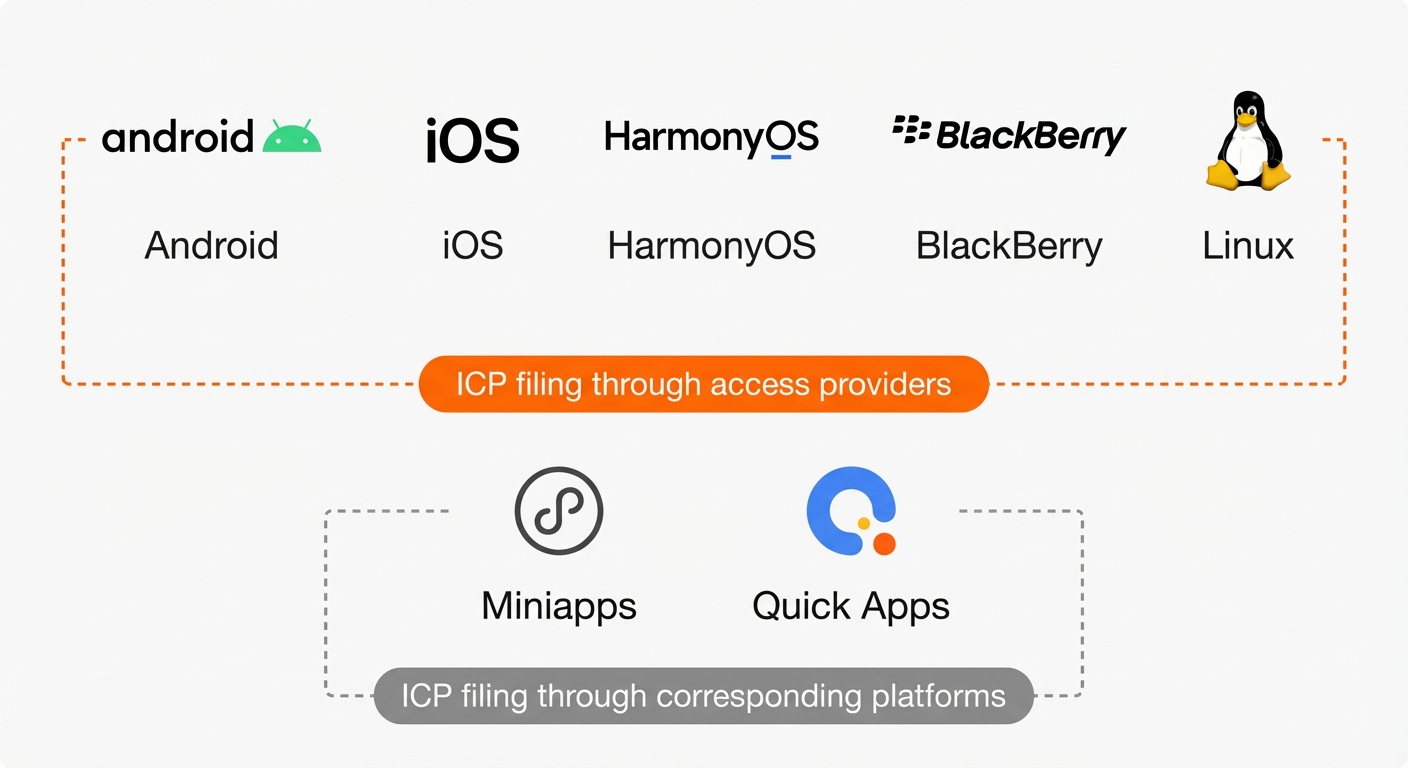
App filing for domains with a website filing
Yes. Website filing numbers and app filing numbers are different.
Filing for multi-platform apps
-
If the app uses the same name on different platforms, you only need to file once to receive a single filing number.
-
If the app uses different names on different platforms, you must file each version separately. You will receive a separate filing number for each.
Filing process for multi-platform apps
If your app runs on multiple platforms, you can add each platform during the app filing process.
Click Add Running Platform to select from the following platforms:
Android
iOS
HarmonyOS
Linux
Others
Domain differences in app vs. website filings
The domain provided in an app filing is the specific domain that the app uses to connect to its backend server at runtime.
Similarities
The domain must comply with the requirements of the "Notice on the Filing of Mobile Internet Applications". After a successful filing, the domain listed in the filing information can access Alibaba Cloud resources.
Differences
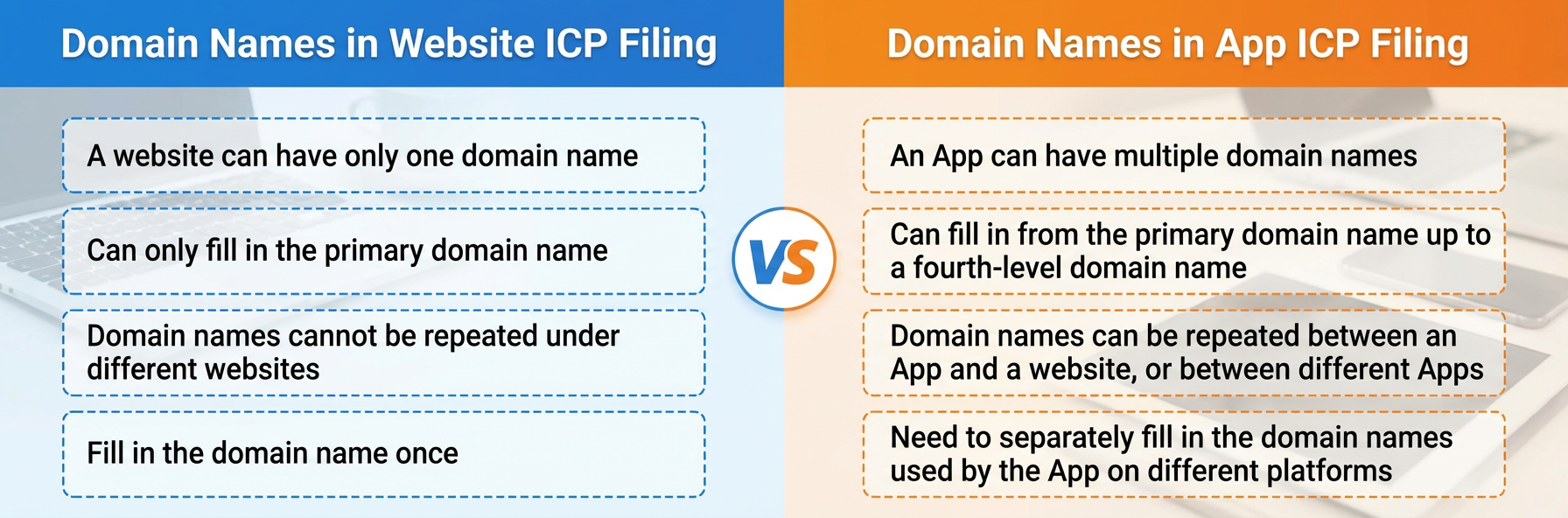
-
What is a fourth-level domain?
For example, if aliyun.com and aliyun.com.cn are second-level domains, then b.a.aliyun.com and b.a.aliyun.com.cn are fourth-level domains.
-
Which domains to file: root or all subdomains?
We recommend that you list all domains the app uses.
Relationship between app and website filings
Apps and websites are both types of internet information services. They are separate but parallel requirements:
-
For an entity that has already completed a website filing:
You can use your existing entity information and add the required app details to submit the filing.
-
For an entity that has not completed a website filing:
You must provide both the entity's information and the app's information to complete the filing application. You can complete both the website filing and the app filing in a single application.

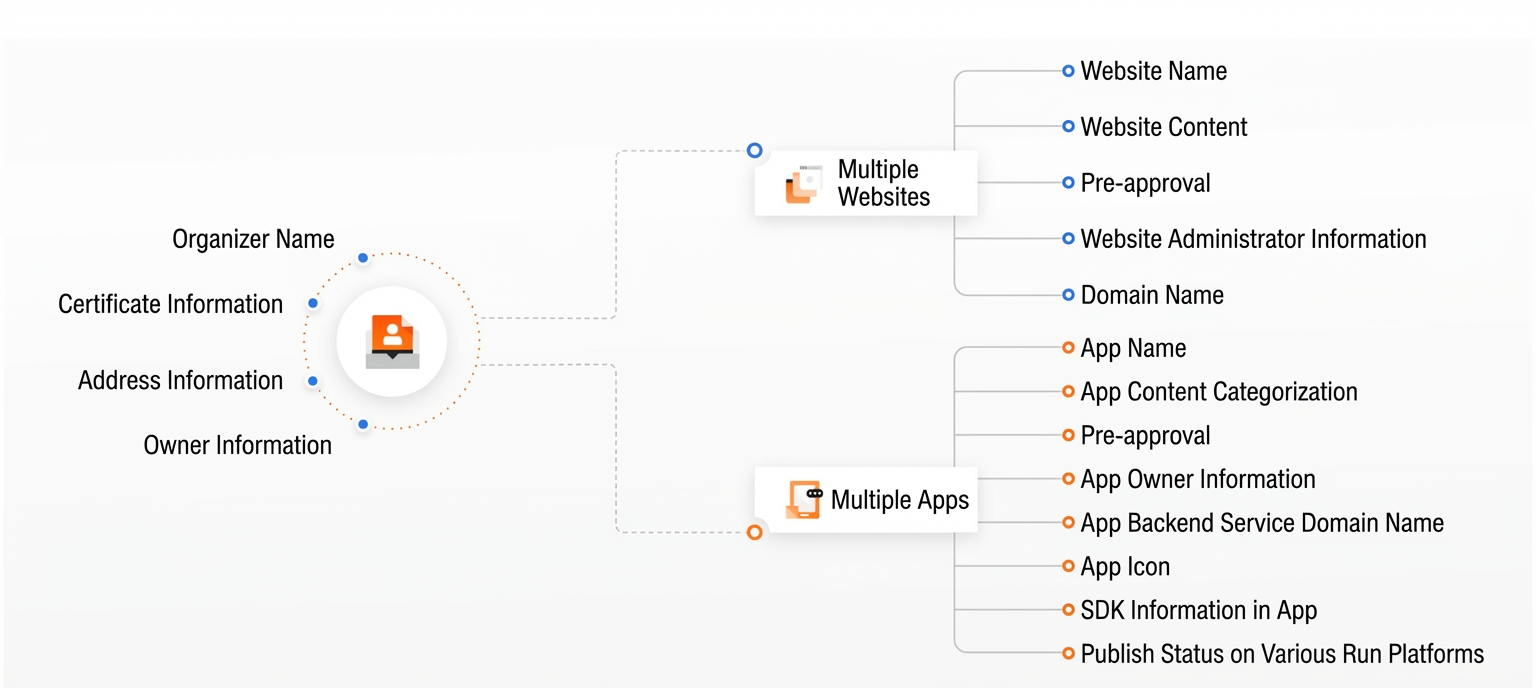
If you need to submit ICP filings for multiple websites or apps, first check if the rules of your regional communications administration allow filing for multiple websites or apps in a single order.
-
If this is not supported, you must complete the filing for one website or app before submitting orders for the others one by one.
-
If this is supported, you can submit them together in a single order.
Required information for an app filing
You must provide the following information: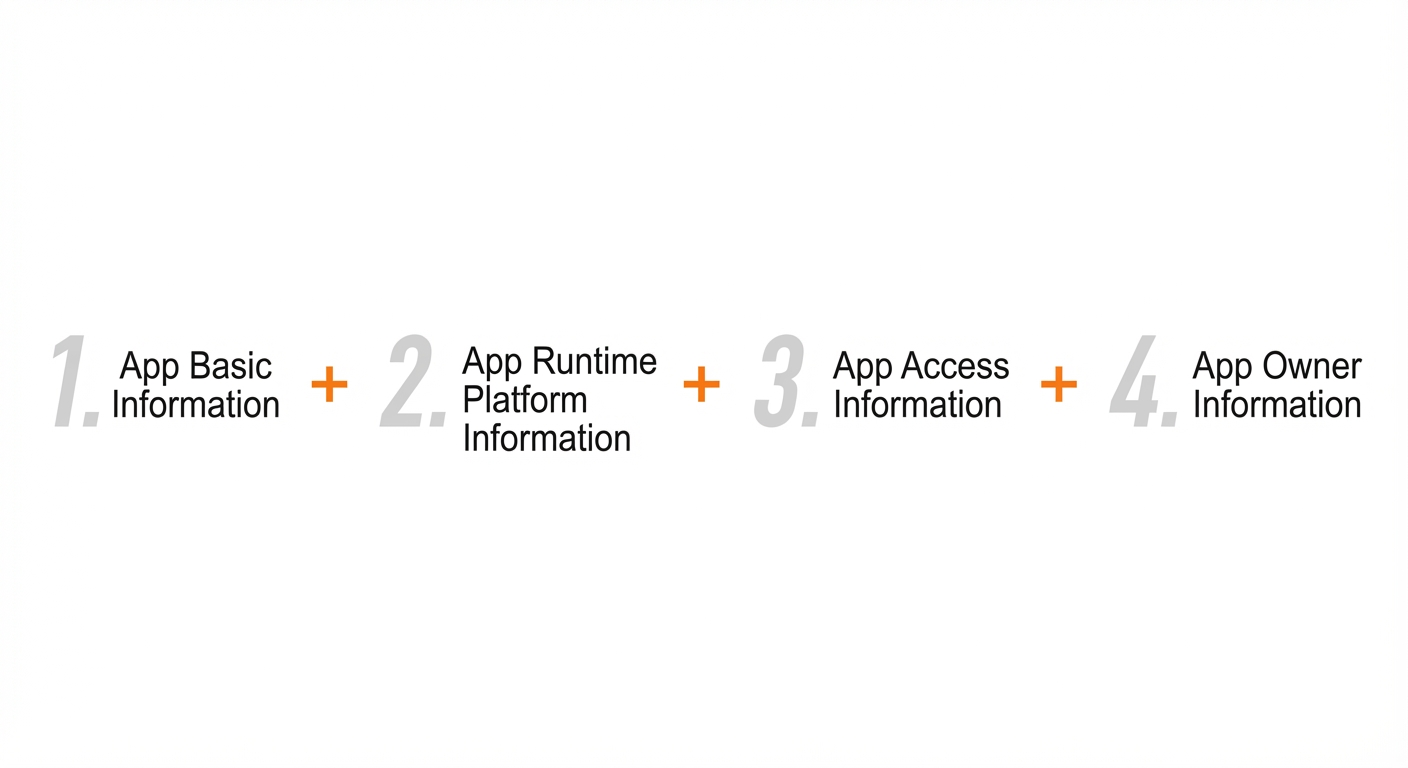
1. Basic app information
|
Parameter |
Description |
|
App Name |
The name displayed below the app icon after installation. This name must be unique for each entity. |
|
App Icon |
The graphic displayed on the device screen after the app is installed. |
|
App Content Category |
The primary category of the app's services. |
|
App Language |
The primary language of the app's user interface at runtime. |
|
Provides an external SDK |
Indicates whether the app also provides an SDK for other apps to call. |
|
Third-party SDKs used |
The public SDKs embedded in the app, such as payment, location, or login services, and their specific service providers. |
2. App platform information
This section uses the Android platform as an example. You must provide the following identifying information for the app platform. For instructions on how to obtain this information, see Provide app identifying information.
|
Parameter |
Description |
|
Package Name |
Also known as package ID, this is the unique identifier for an Android app. For example, the package name for the Alibaba Cloud app is com.alibaba.aliyun. |
|
Public Key |
The public key used to sign the app before it is packaged and released. |
|
Certificate MD5 Fingerprint |
The MD5 fingerprint value of the digital certificate generated for verification after the app is signed. |
|
Android Platform Backend Domain |
The specific domain that the app uses to connect to its backend server when running on the Android platform. |
If the same app uses different identifying information for various distribution channels, you can enter multiple sets of package names with their corresponding public keys and fingerprints. Obtaining this information may require assistance from your app developers.
3. App access information
|
Parameter |
Description |
|
Cloud products used by the app |
The specific cloud product instances, such as ECS or application servers, that host the app's backend service on Alibaba Cloud. |
|
Domain for accessing Alibaba Cloud |
An app's backend service can be hosted by multiple cloud service vendors. You must enter the domain used to access the cloud product instances deployed on Alibaba Cloud. |
4. Person-in-charge information
|
Parameter |
Description |
|
Identity document information |
The name, identity document type, and identity document number of the person in charge. |
|
Contact information |
The mobile phone number, emergency mobile phone number, and email address of the person in charge. |
If an app provides services in regulated industries such as news, publishing, education, film and television, or religion, you must also submit approval documents from the relevant authorities to the provincial communications administration when filing.
Filing an app with Alibaba Cloud for an existing filing
If your domain already has an ICP filing with another service provider, such as e-Surfing Cloud or Tencent Cloud, and you need to file for an app through Alibaba Cloud, follow these steps:
-
Complete a transfer filing: If your domain already has a filing with another service provider, you must first complete a transfer filing (also known as adding a new service provider) with Alibaba Cloud. This is because Alibaba Cloud cannot directly access filing information from other providers.
To do this, log on to the Alibaba Cloud ICP Filing system. On the My Filings page, select an entry point based on your account status. If your account has no existing filings, click Start Filing. If your account already has filings, click Add/Transfer Other Services. The transfer filing process is similar to a first-time filing and requires you to complete the order and upload all necessary documents.
For detailed instructions on transfer filings, see Transfer a filing from another service provider to Alibaba Cloud and Transfer filing FAQ.
-
Submit the app filing: After the transfer filing is complete, the system automatically identifies the filing type and generates an order. You can then follow the standard app filing process.
App filing with an international site account
No. App filings must be submitted using an Alibaba Cloud China site account. If you are using an Alibaba Cloud International site account, you must first register for an Alibaba Cloud China site account and then submit your app filing through the Alibaba Cloud ICP Filing system.