FAQ about canceling an ICP filing
This topic answers common questions about canceling an ICP filing.
Key questions
Concepts and operations
|
| Impacts and threats
|
| Compliance and other scenarios
|
More questions about basic concepts of canceling an ICP filing | More about the impacts and threats of canceling an ICP filing |


Basic concepts of canceling an ICP filing
How do I cancel the filing for a website with multiple domain names?
After removing Alibaba Cloud from the service provider list, how do I cancel the ICP filing?
What is the difference between canceling an entity filing and canceling a website filing?
Can I cancel an ICP filing and apply for a new one at the same time?
How long after cancellation does the website become inaccessible?
After canceling an entity filing, can I use the original account to apply for a new filing?
How do I cancel the filing for a website with multiple domain names?
Keep some domain names and cancel the filing for others: Go to the My ICP Filings page, click Modify for the desired website, and then delete the domain names for which you want to cancel the filing from the domain name information section.
Cancel the filing for all domain names: To do this, you must cancel the website filing. Go to the My ICP Filings page and click Cancel Website Filing for the desired website.
How do I check the progress of my ICP filing cancellation?
Method 1: Log on to the Alibaba Cloud ICP Filing system and check the order status on the My Orders page.
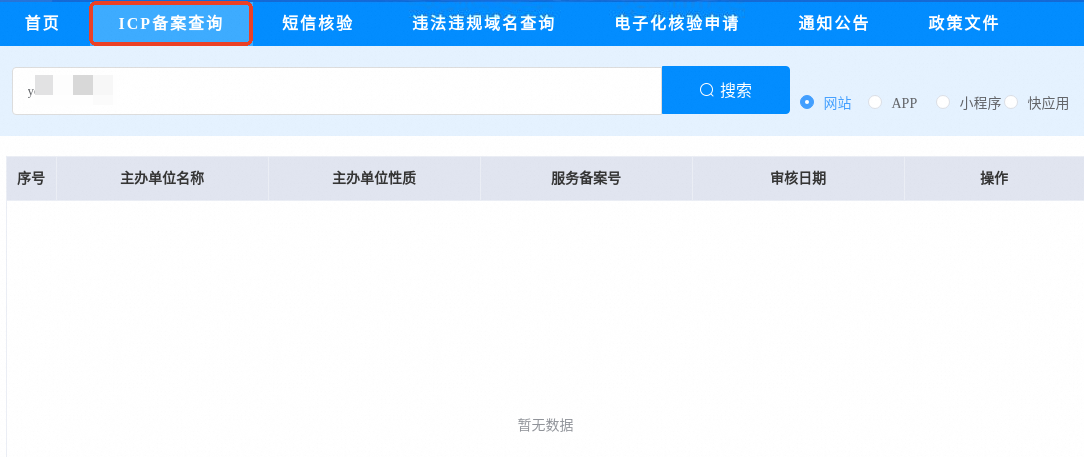
Method 2: Go to the MIIT ICP Filing system, and enter your information on the ICP Filing Query page. If your filing information is not found, the cancellation was successful.
How do I check the status of a previously canceled ICP filing or its expiration date?
The preceding question describes how to check the progress of a cancellation that is still in process. This question describes what you can still look up after an ICP filing is canceled or has expired.
What you can query: The ICP Filing Query page of the MIIT ICP Filing Management System shows only whether a domain name currently has valid ICP filing information.
What you cannot query: You cannot query the exact expiration date of an ICP filing, and the system keeps no historical cancellation records. If the ICP filing is canceled or has expired, the query returns no record.
How to interpret the result: If no record is returned, the domain name currently has no valid ICP filing. This confirms that the cancellation has taken effect and that you can submit a new ICP filing application. For more information, see Can I cancel an ICP filing and apply for a new one at the same time?
The My Orders page of the Alibaba Cloud ICP Filing system keeps only the cancellation orders that are submitted under the current Alibaba Cloud account. It does not provide the expiration date or the historical cancellation records of an ICP filing.
What is the difference between canceling an ICP filing and removing Alibaba Cloud from the service provider list?
Cancel an ICP filing: Removes the entity, website, or app information from the MIIT ICP filing record. After the cancellation is complete, all filing information for the website, app, or entity is deleted.
Remove Alibaba Cloud from the service provider list: Removes the association between your ICP filing and Alibaba Cloud. The domain name can no longer be used to access an Alibaba Cloud server, but this does not affect its use with other service providers or its filing status with the MIIT.
After removing Alibaba Cloud from the service provider list, how do I cancel the ICP filing?
After you remove Alibaba Cloud from the service provider list, Alibaba Cloud no longer retains the filing information for the website or app domain name. This results in a shell entity filing. You can cancel the ICP filing as described in Cancel the ICP filing for a shell entity.
What is the difference between canceling an entity filing and canceling a website filing?
|
Category |
Use cases |
Processing time |
|
Cancel entity |
|
1 to 20 business days. The actual time depends on the processing speed of your local communications administration. |
|
Cancel website |
|
|
|
Cancel app |
|
Can I cancel an ICP filing and apply for a new one at the same time?
No, you cannot. Log on to the MIIT ICP Filing Management System and check the ICP Filing Query page. You can submit a new filing application only after the query result shows "No data available".
How long after cancellation does the website become inaccessible?
When your cancellation request is approved by the communications administration, the original website becomes inaccessible immediately. To continue hosting your website on an Alibaba Cloud server in the Chinese mainland, log on to the ICP Filing system to submit a new filing application as soon as possible.
After canceling an entity filing, can I use the original account to apply for a new filing?
Yes, you can. After you cancel an entity filing, the original Alibaba Cloud account is no longer associated with any filing information. You can use this account to apply for a new filing, regardless of whether the new entity is the same as the previous one. For more information, see ICP filing procedure.
After you cancel an entity filing, the Add/Access Service button in the Alibaba Cloud ICP Filing system is applicable only for adding new websites or apps under an existing entity. This button may still be visible after the cancellation, but it cannot be used to submit a new filing for a canceled entity. If you submit an application through this button, the application may be returned. To submit a new domain name application, go through the initial ICP filing process instead.
Impacts and threats of canceling an ICP filing
Does canceling a website filing affect other websites under the same entity?
What happens if I do not cancel the ICP filing after my domain name expires?
Do I need to cancel the ICP filing if I have sold or transferred the domain name to someone else?
Is the ICP filing automatically canceled when the domain name expires?
Can I still use my company mailbox after canceling the ICP filing?
Can I still access my website or app after canceling the ICP filing?
What should I do if I receive an ICP filing audit warning notification?
Does canceling a website filing affect other websites under the same entity?
No, it does not. Canceling a website filing only removes the filing information for that specific website. Other websites, apps, and mini programs under the same entity can still be accessed normally. If your app or mini program uses the domain name whose filing you want to cancel, we recommend that you update the domain name in your app or mini program settings before canceling the filing, to avoid any impact on access to your app or mini program.
What happens if I do not cancel the ICP filing after my domain name expires?
Your domain name could be registered by another party and used for illegal activities, while the filing information remains associated with you. In this case, you may face regulatory checks and be held legally responsible.
Do I need to cancel the ICP filing if I have sold or transferred the domain name to someone else?
Yes. You must cancel the filing information as soon as possible. This prevents you from being held responsible if the new owner uses the domain name for illegal activities while the filing is still in your name. For more information, see Steps to cancel an ICP filing online.
Is the ICP filing automatically canceled when the domain name expires?
If the website becomes inaccessible after the domain name expires, the ICP filing is automatically canceled. If the website is still accessible after the domain name expires, you must cancel the filing manually.
Can I still use my company mailbox after canceling the ICP filing?
After the ICP filing for the domain name associated with your company mailbox is canceled, you can no longer log on to the web version of Alibaba Mail using the primary or secondary domain names (such as www.yourdomain.com or mail.yourdomain.com).
You can log on to your mailbox in the following ways:
Log on to the web version of Alibaba Mail.
Use an email client (such as Outlook or Foxmail) or the Alibaba Mail app to log on. Sending and receiving emails are not affected.
Can I still access my website or app after canceling the ICP filing?
Whether your website or app remains accessible after you cancel the ICP filing depends on where your server is located:
Server in the Chinese mainland: Users in the Chinese mainland will no longer be able to access the website or app. According to regulations, domain names without an ICP filing are not allowed to provide internet information services in the Chinese mainland.
Server outside the Chinese mainland (including Hong Kong (China) and other regions): Servers outside the Chinese mainland do not require an ICP filing. After the ICP filing is canceled, the website or app remains accessible. However, access restrictions may apply in some regions.
What should I do if I receive an ICP filing audit warning notification?
If you receive an ICP filing audit warning notification and your domain name is no longer under your current Alibaba Cloud account (for example, the domain name expired and was registered by another party), we recommend that you cancel the website filing in the Alibaba Cloud ICP Filing system as soon as possible, before Alibaba Cloud is removed from the service provider list.
If Alibaba Cloud has already been removed from the service provider list, you can cancel the ICP filing by canceling the shell entity filing. For more information, see Steps to cancel an ICP filing and Cancel the ICP filing for a shell entity.
Compliance and other scenarios
If my business license is canceled, do I need to cancel the ICP filing?
My domain name has expired. Do I need to cancel the ICP filing?
I forgot which account my domain name is under. How can I cancel the ICP filing?
After canceling an ICP filing, can I delete the Filing Service Code (CP) and apply for a new one?
Do you need to cancel an ICP filing if your business license is canceled?
If your business license is canceled, the associated entity information becomes invalid. You must immediately unregister the ICP filing entity information.
How do I handle ICP filing cancellation before and after my company is deregistered?
Whether the ICP filing can be canceled online depends on whether you can still log on to the Alibaba Cloud account that holds the filing and whether the filing is still associated with Alibaba Cloud.
Best timing: before your company is deregistered: We recommend that you log on to the Alibaba Cloud ICP Filing system and cancel the ICP filing online before the deregistration of your company is complete. At this stage, you can still log on to the account and the filing has not been removed from the service provider list. The entire cancellation can therefore be completed online. For more information, see Steps to cancel an ICP filing.
If the best timing has passed: cancel the ICP filing offline: Online cancellation becomes unavailable not because your company is deregistered, but because you can no longer log on to the Alibaba Cloud account, Alibaba Cloud has already been removed from the service provider list, or the entity has become a shell entity. In these cases, you must cancel the ICP filing offline. Download the ICP filing cancellation application form of the provincial communications administration to which the filing was submitted. Then mail the completed form, a copy of the certificate of the filing entity, and a cancellation application letter to the communications administration. The copy of the certificate and the cancellation application letter must bear the official seal of the entity, and the cancellation application letter must state the full name of the filing entity, the ICP filing number, and the reason for cancellation. For the application form of each province, the complete list of materials, and the mailing address, see Cancel the ICP filing of another organization or a shell entity.
If the ICP filing is not canceled in time after your company is deregistered and you then receive an ICP filing audit warning notification, you may no longer be able to log on to the account, or Alibaba Cloud may already have been removed from the service provider list. You must then handle the cancellation offline, which takes significantly longer. For more information, see What should I do if I receive an ICP filing audit warning notification?
My domain name has expired. Do I need to cancel the ICP filing?
If you want to keep using the domain name: Renew it within the grace period specified by your domain name registrar (usually 30 days). Otherwise, the ICP filing may be automatically canceled.
If you no longer use the domain name: Cancel the ICP filing online as soon as possible. This prevents you from being held responsible if someone else uses the domain name for illegal activities while the filing is still in your name. For more information, see Cancel an ICP filing online.
I forgot which account my domain name is under. How can I cancel the ICP filing?
Transfer the filing information to a new Alibaba Cloud account through an offline transfer.
Log on to the new Alibaba Cloud account, go to the ICP Filing system, and submit a cancellation request. For more information, see Steps to cancel an ICP filing.
What should I do if I canceled the filing by mistake?
Log on to the MIIT ICP Filing system and enter your information on the ICP Filing Query page to check the status:
If your website or app has existing filing information: Log on to the Alibaba Cloud ICP Filing system, click Add/Access Service, enter the website domain name or app name, and perform the add access operation. After access is successfully added, the original filing number remains unchanged.
If no website or app filing information exists: This means the filing number for the website or app has been canceled. You cannot recover the filing information. You must apply for a new ICP filing. A new filing number is generated after the new filing is successful.
In which cases should I avoid canceling an ICP filing, or be unable to file again afterwards?
Before you submit a cancellation request, check the following scenarios and consequences:
The domain name has expired and is not renewed: An expired domain name that is not renewed no longer meets the domain name validity requirement for ICP filing. The domain name cannot be added to an ICP filing again. The action that you must take depends on the state of the filing. If the filing is still under your Alibaba Cloud account and Alibaba Cloud has not been removed from the service provider list, cancel the ICP filing online as soon as possible. For more information, see My domain name has expired. Do I need to cancel the ICP filing? If Alibaba Cloud has already been removed from the service provider list, the entity has become a shell entity, or the domain name has been registered by another party, you cannot complete the cancellation online in Alibaba Cloud. In this case, cancel the ICP filing offline. For more information, see Cancel the ICP filing of another organization or a shell entity.
Consequences of not canceling the ICP filing: If another party registers the domain name and uses it for illegal activities while the ICP filing still points to your entity, you may face regulatory checks and be held responsible. For more information, see What happens if I do not cancel the ICP filing after my domain name expires? and Do I need to cancel the ICP filing if I have sold or transferred the domain name to someone else?
A cancellation cannot be undone. After a cancellation request is submitted, the request cannot be withdrawn. After an entity filing is canceled, all website and app filing information under the entity is cleared. To file again, you must apply for a new Filing Service Code (CP) and enter all the materials again. For more information, see After canceling an ICP filing, can I delete the Filing Service Code (CP) and apply for a new one?
After canceling an ICP filing, can I delete the Filing Service Code (CP) and apply for a new one?
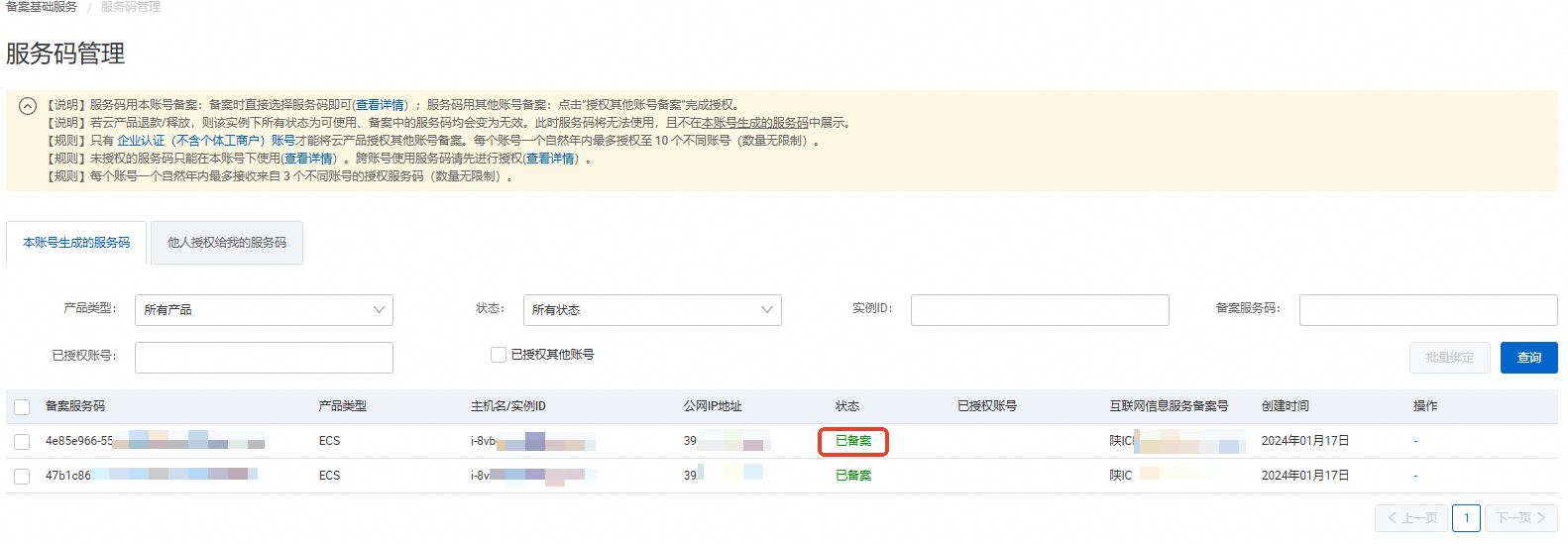
No, you cannot. Filing Service Codes (CPs) cannot be refunded or reused. After you cancel an ICP filing, you can check the status of the CP in the CP Management console. If the status is Filed, the CP can no longer be used.