PSB filing information
According to the Administrative Measures for the Security Protection of International Interconnection of Computer Information Networks, after your website or app receives an official filing number, you must complete the PSB filing within 30 days of launch. Failure to do so will affect your business.
A PSB filing is different from an ICP filing issued by the MIIT. For more information about the ICP filing process, see ICP filing process.
Prerequisites
To understand the PSB filing procedure, go to the National Internet Security Management Service Platform and download the Website Filing Guide.
PSB filing information registration
Apply for PSB filing on the National Internet Security Management Service Platform. To submit a new application for a website or app, you must first register and log in to the platform. For the specific procedure, see Register your information for PSB filing.
New website application
In the left-side navigation pane of the National Internet Security Management Service Platform, choose .
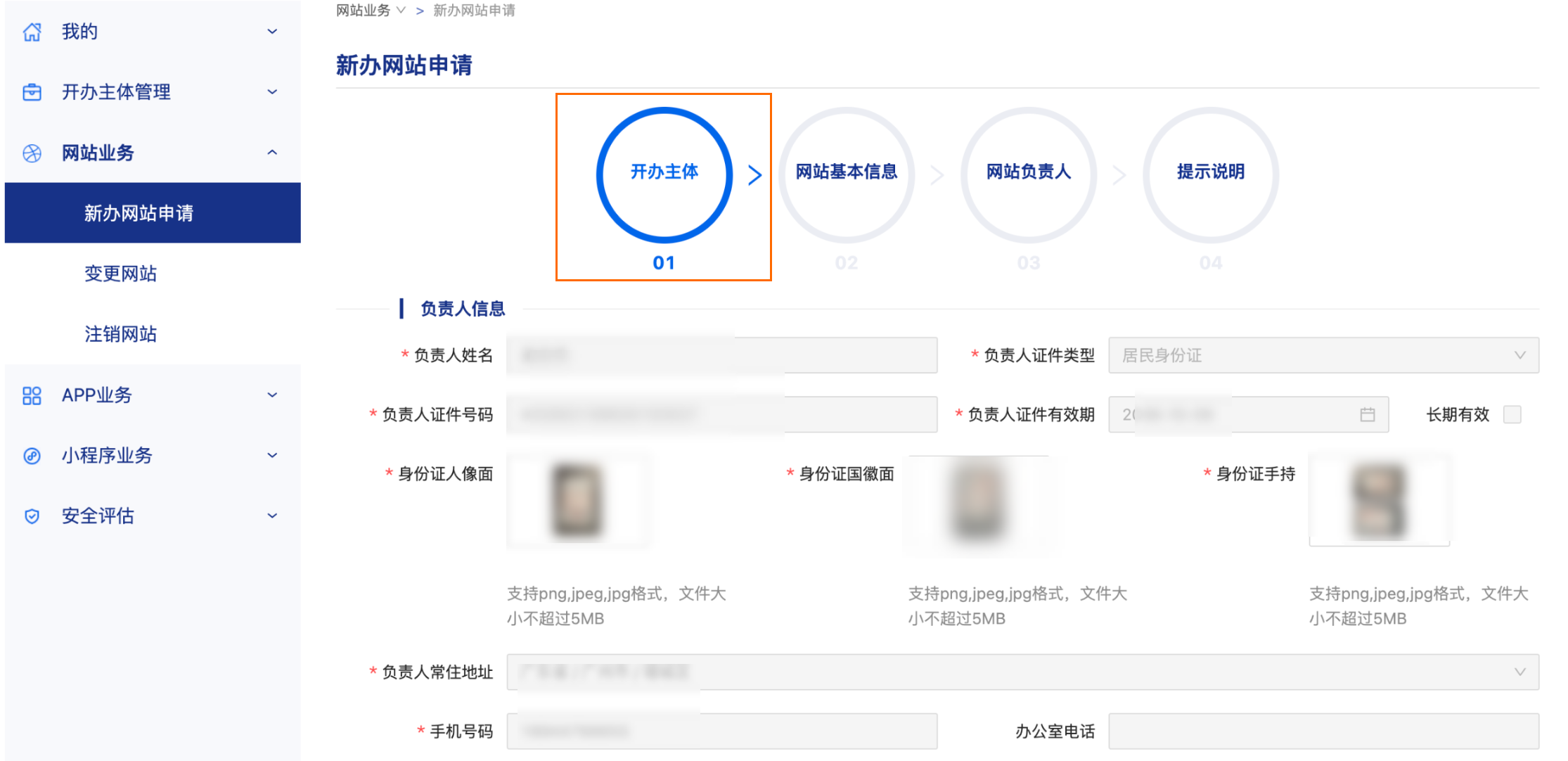
On the New Website Application page, in the Entity wizard, enter the Contact Person Information and click Next.
 Note
If you have already entered the entity information, the platform automatically retrieves the contact person's information. For more information, see PSB filing. Ensure the entity's contact person information is consistent with what you used for your filing.
On the New Website Application page, in the Basic Website Information wizard, fill in the required information as described in the following table, and then click Next.
NoteThe following table describes only some of the configuration items.
Parameter
Description
Website information
Website Name: We recommend that you use the same name that you used for your ICP filing.
MIIT ICP Filing Number and Website Launch Date: You can visit the MIIT website and search for your domain name, entity name, or filing number to find your Approval Date and MIIT ICP Filing Number (also known as the ICP filing/license number).
Primary Domain Name: The domain name you are filing for.
ImportantDuring the review period for a new website, you must ensure that reviewers can access the site at all times. Otherwise, the review will fail.
If your service is deployed on a subdomain, you only need to file for the primary domain name.
Domain name certificate: To obtain a certificate, see Domain name certificate.
NoteIf you cannot find your domain name after logging in to your Alibaba Cloud account, it may be because the domain name is not registered under that account. For assistance, see Retrieve the logon name for the account that owns your domain name.
Domain name certificate validity period: The period from the registration date to the expiration date shown on the domain name certificate.
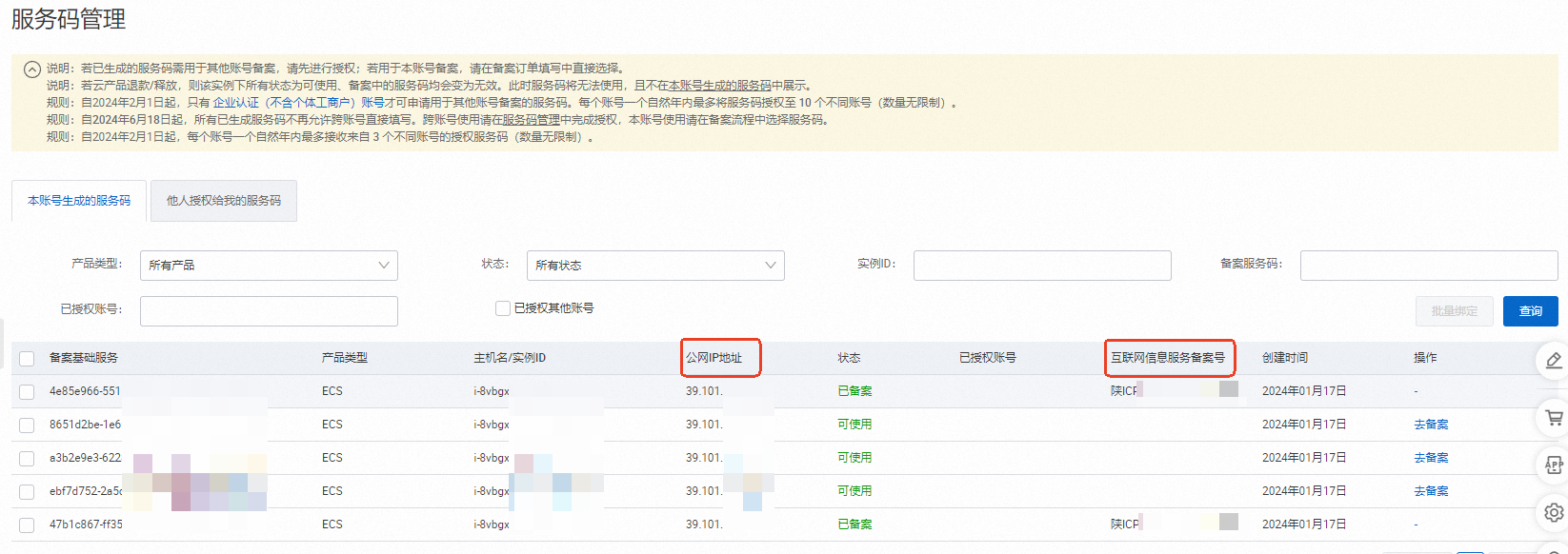
IP: Log in to the ICP Filing console with your Alibaba Cloud account. On the Service Code Management page, find the public IP address that corresponds to your ICP filing number. This is the IP address of the server you are filing for.
Access provider
If you purchased the server for this filing from Alibaba Cloud and the domain name's ICP filing was also processed by Alibaba Cloud, click Query Access Provider. Then, fill in the following Alibaba Cloud information.

Access provider name: Alibaba Cloud Computing Co., Ltd.
Access provider region: Xihu District, Hangzhou, Zhejiang Province, China
Hosting type: rented virtual space
Provider's jurisdiction: Chinese mainland (default)
Access provider phone number: 4008013260
Access provider organization code/Access provider code: 673959654
You can also go to the WHOIS query page, enter the domain name you want to check, and click Query to find the domain name registrar and other related information.
Domain name registrar
If the domain name for your PSB filing was registered through Alibaba Cloud, click Query Domain Name Registrar. Then, fill in the following Alibaba Cloud information.

Domain name registrar name: Alibaba Cloud Computing Co., Ltd. (formerly HiChina)
Domain name registrar region: Yuhang District, Hangzhou, Zhejiang Province, China
Registrar's jurisdiction: Chinese mainland (default)
Domain name registrar phone number: 010-65985888
You can also go to the WHOIS query page, enter the domain name you want to check, and click Query to find the domain name registrar and other related information.
Service type
Select the services your website provides, for example, Basic Network Services (A), Online Sales (B), Lifestyle Services (C), or Social and Entertainment (D).
If your website does not offer interactive services, set Provides Interactive Internet Services to No.
If so, select the specific services your website provides.
Publication of information on hazardous materials
Does the service involve publishing information about controlled items?: Select the option that applies to your website.
Relevant pre-approvals:
If your "entity type" is "Organization" and you have pre-approved items, provide the information as required.
If your "entity type" is "Individual", select No.
Website language
Select the language or languages used on your website.
On the New Website Application page, in the Website contact person wizard, fill in the contact person's information, and then click Next.
NoteIf your entity type is Individual, you can select the Same as entity contact person checkbox, and the platform automatically prefills the information.
If your entity type is Organization, fill in the contact person's information as required.
On the New Website Application page, in the Instructions wizard, click Submit.
After your PSB filing is successful, you must log in to the National Internet Security Management Service Platform within 30 days and place the PSB filing information at the bottom of your webpage.
The following is a sample code snippet:
<p><img src="/assets/image/head-logo.png" width="20"/> <a href="https://beian.mps.gov.cn/#/query/webSearch?code=61011302001964" rel="noreferrer" target="_blank">Shaanxi PSB Filing No. 6101130200****</a></p>
New app application
In the left-side navigation pane of the National Internet Security Management Service Platform, choose .
On the Add new app page, in the Entity wizard, if you have already entered the entity information (for more information, see PSB filing), the platform automatically retrieves the entity's contact person information. If you have not entered the contact person information, fill in the Contact Person Information and click Next.
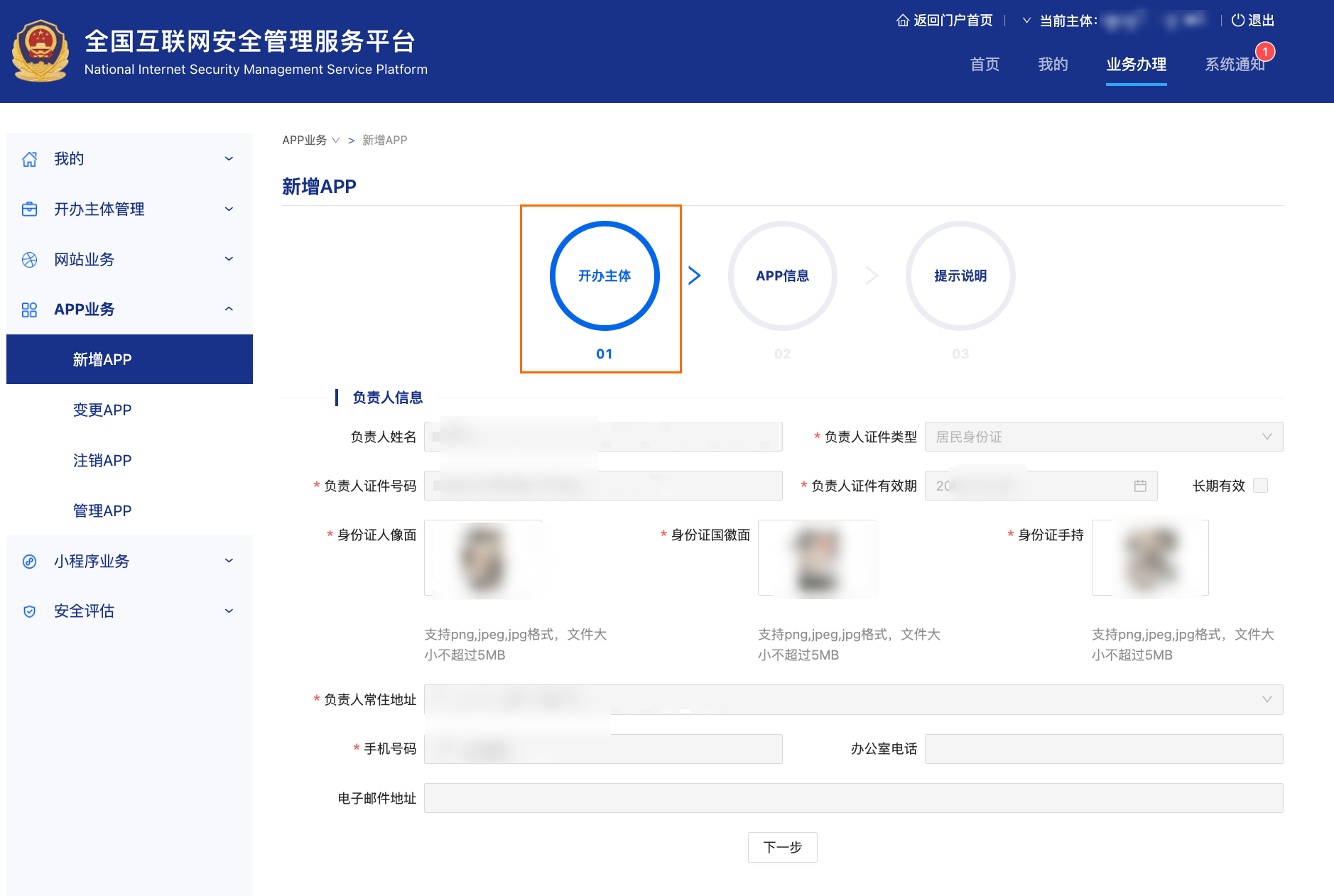
On the Add new app page, in the App information wizard, fill in the app information as required. When you are finished, click Next.
On the Add new app page, in the Instructions wizard, click Submit.
Query PSB filing number
After your PSB filing is successful, log in to the PSB filing number query system. Select Website Domain Name, enter the website domain name that you want to query, and then click Query. The following figure shows an example: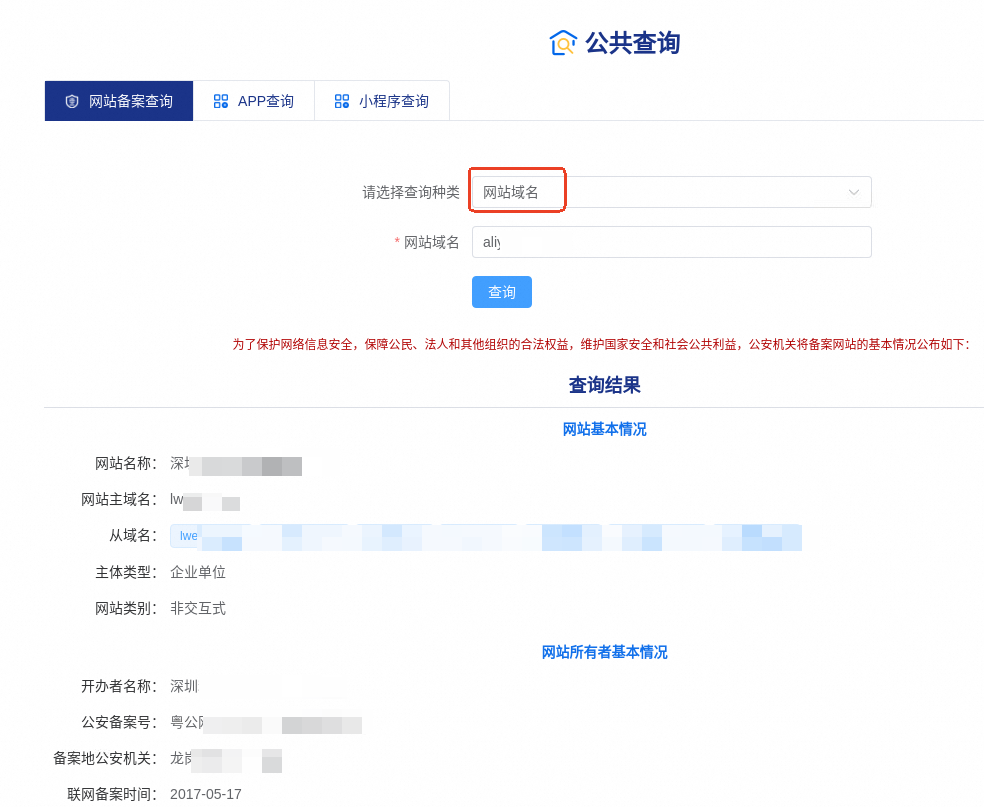
Security assessment
To perform a security assessment, you can visit the National Internet Security Management Service Platform to download and follow the "Security Assessment Guide".
Handler login configuration
If an individual other than the legal representative needs to handle the PSB filing for a company, you can designate them as a handler on the National Internet Security Management Service Platform. The handler can then use their personal account to log in and manage filing tasks.
Log in to the National Internet Security Management Service Platform by using the account of the legal representative. If this is your first time logging in, you must first complete the registration. For more information, see Register your information for PSB filing.
On the platform, find the handler management feature and designate the user's personal account as the handler.
After the handler is designated, they can log in to the platform with their personal account to manage PSB filing tasks for the company.
Reference information
Technical support provider information
If a third-party company provides website creation, content updates, or technical support, you must enter that company's name and phone number.
If you or your company is responsible for website creation, content updates, and technical support, enter your own company or personal name and phone number.
Server location and count
Your website server's physical location is the specific address of the region you selected when purchasing the server. For example, if your server's region is China (Beijing), the corresponding city is Beijing. To obtain the specific address of the server, contact Alibaba Cloud filing support through Intelligent online service.
For the number of servers, enter the actual number of servers you purchased from Alibaba Cloud.
You may also need to provide other materials, such as a server region certificate or documents for MLPS 2.0 compliance.
Server region certificate (data center certificate): This certificate requires information such as the contract number for your server purchase. Before you can download the certificate, you must first apply for a contract. For more information, see How to apply for a contract. After you successfully apply for a contract, download the Server Region Certificate and fill it out according to the template.
Website verification notice: Click to download the Website Verification Notice and fill it out according to the template.
Alibaba Cloud MLPS 2.0 compliance materials: Go to the MLPS 2.0 Compliance Solution page and fill in the required information. After your application is submitted, a specialist will respond within three business days and provide free professional guidance from a security architect.
After you fill out the server region certificate (data center certificate) and the website verification notice, if you need them to be officially stamped, contact Alibaba Cloud filing support through Intelligent online service.
Cybersecurity code for server location
Enter the cybersecurity code that corresponds to your server's region. The codes are as follows.
China (Qingdao): 370200000000
China (Beijing): 110000000000
China (Hangzhou): 330100000000
China (Shanghai): 310113
China (Shenzhen): 440300000000
Nature of website
Internet information services are categorized as either commercial or non-commercial.
Commercial information services: Services that provide information or website creation to users for a fee, such as online stores, online transaction platforms, and other paid services. The state requires a license for commercial internet information services.
Non-commercial information services: Services that provide public and shared information to users for free, such as personal websites and corporate promotional websites. The state requires a filing for non-commercial internet information services.
Website level
Select Level 2 for forums, microblogs, and blogs. For all other types of websites, select Level 3.
Access agreement/Server contract/Server agreement
To apply for a contract, see How to apply for a contract.