Integration process
If you have an existing mobile app, integrating the mobile SDK with your application server is the ideal method for online user verification. This document describes the mobile SDK integration process for Financial-grade Liveness Face Verification.
Integration
Alibaba Cloud provides SDKs for multiple programming languages, including Java, C#, Go, Python, Node.js/TypeScript, PHP, and C++. You can integrate an SDK to call the service's API operations. The SDKs simplify development by encapsulating the signature mechanism, timeout mechanism, and retry mechanism, and returning structured Response objects.
If the SDK-based approach does not meet your business needs, you can call the service APIs natively over HTTP or HTTPS. This requires you to build custom requests and handle the signature mechanism. The Alibaba Cloud SDKs already implement the signature algorithm. For more details, see V3 RPC-style request body & signature mechanism.
Background
The following sequence diagram shows the overall integration flow for a mobile app.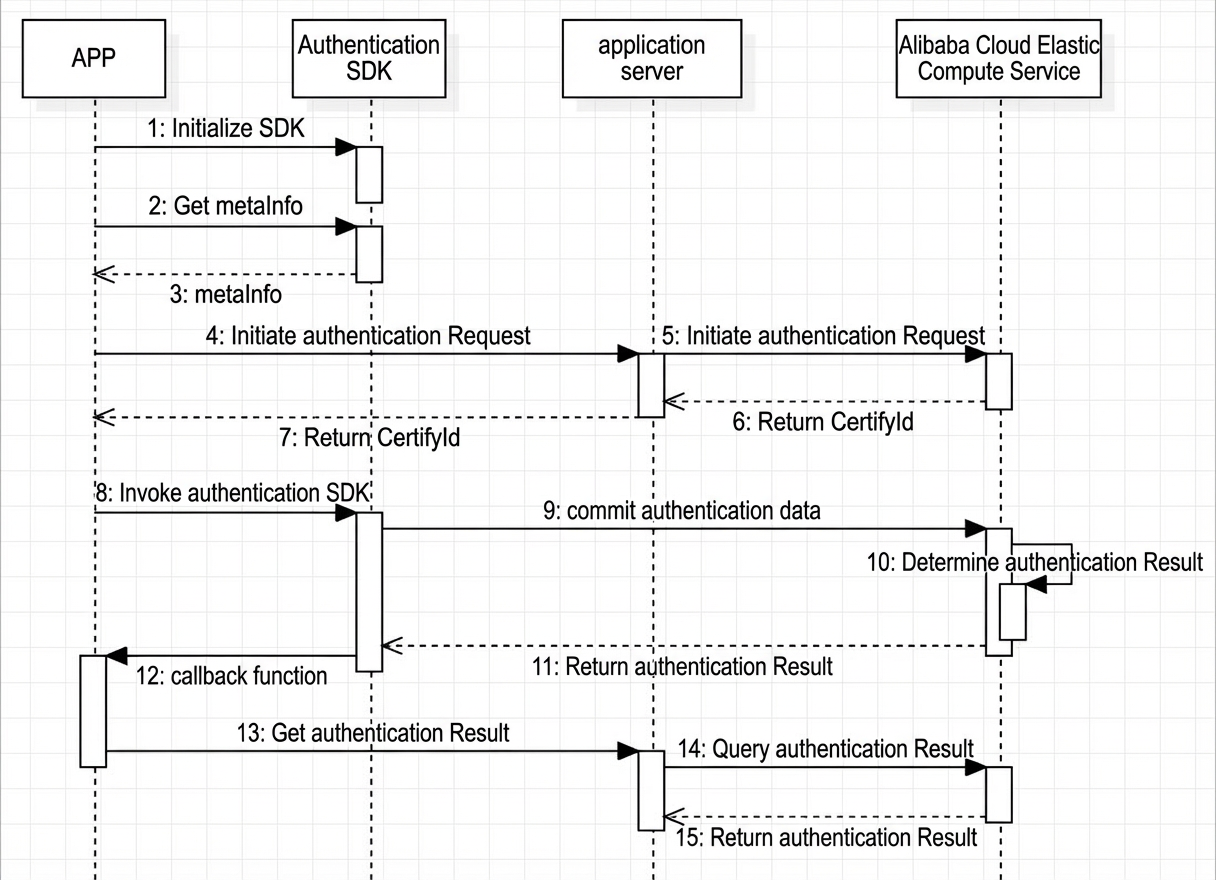
Table 1. System call sequence
Step | Description |
1 | Initialize the authentication SDK. |
2 | The app calls the authentication SDK to obtain the MetaInfo. |
3 | The authentication SDK returns MetaInfo. |
4 | The app sends an authentication request with the MetaInfo to the application server. |
5 | The application server calls the authentication request API on the Alibaba Cloud backend. |
6 | The Alibaba Cloud backend returns a CertifyId to the application server. |
7 | The application server passes the CertifyId to the app. |
8 | The app calls the authentication SDK with the CertifyId. |
9 | The authentication SDK sends the user-submitted authentication materials to the Alibaba Cloud backend. |
10 | The Alibaba Cloud backend determines the authentication result based on the submitted materials. |
11 | The Alibaba Cloud backend returns a completion status to the authentication SDK. |
12 | The authentication SDK triggers a callback function to signal the app to retrieve the authentication result. |
13 | The app queries the application server for the authentication result. |
14 | The application server queries the Alibaba Cloud backend for the authentication result. |
15 | The Alibaba Cloud backend returns the authentication result to the application server. |
Procedure
- Note
When adding a verification scenario, you can authorize Alibaba Cloud to access a specified OSS bucket to store images from the verification process. For more information, see Activate and authorize OSS storage.
Integrate the client SDK and server-side APIs.
Call the server-side initialization API InitFaceVerify.
Used to obtain the CertifyId required when the SDK starts the application. The CertifyId is the unique ID for real-person authentication and is used to link the various APIs in the authentication request. For more information, see InitFaceVerify - Initiate an authentication request.
Call the client SDK.
For platform-specific instructions, see the following topics:
Call the server-side query API DescribeFaceVerify.
After the verification is complete, you can call this API from your application server to retrieve the final verification status and verification materials. For more information, see DescribeFaceVerify - Get verification results.