Jushita-related API list
IDaaS provides several data synchronization API operations, all of which comply with the SCIM protocol. An SP can call these API operations to synchronize data to IDaaS. When an SP calls an IDaaS API operation, it must pass access_token. The commonly used API operations are categorized by organization, account, and group.
Prerequisites
Obtain the IDaaS-Base-URL
Replace "IDaaS-Base-URL" in this document with the primary domain of the current access address. Also replace the primary domain at the beginning of every API operation address in this document. The primary domain is the SSO address of the portal that users access in the IDaaS console.

Obtain the client-id and client-secret
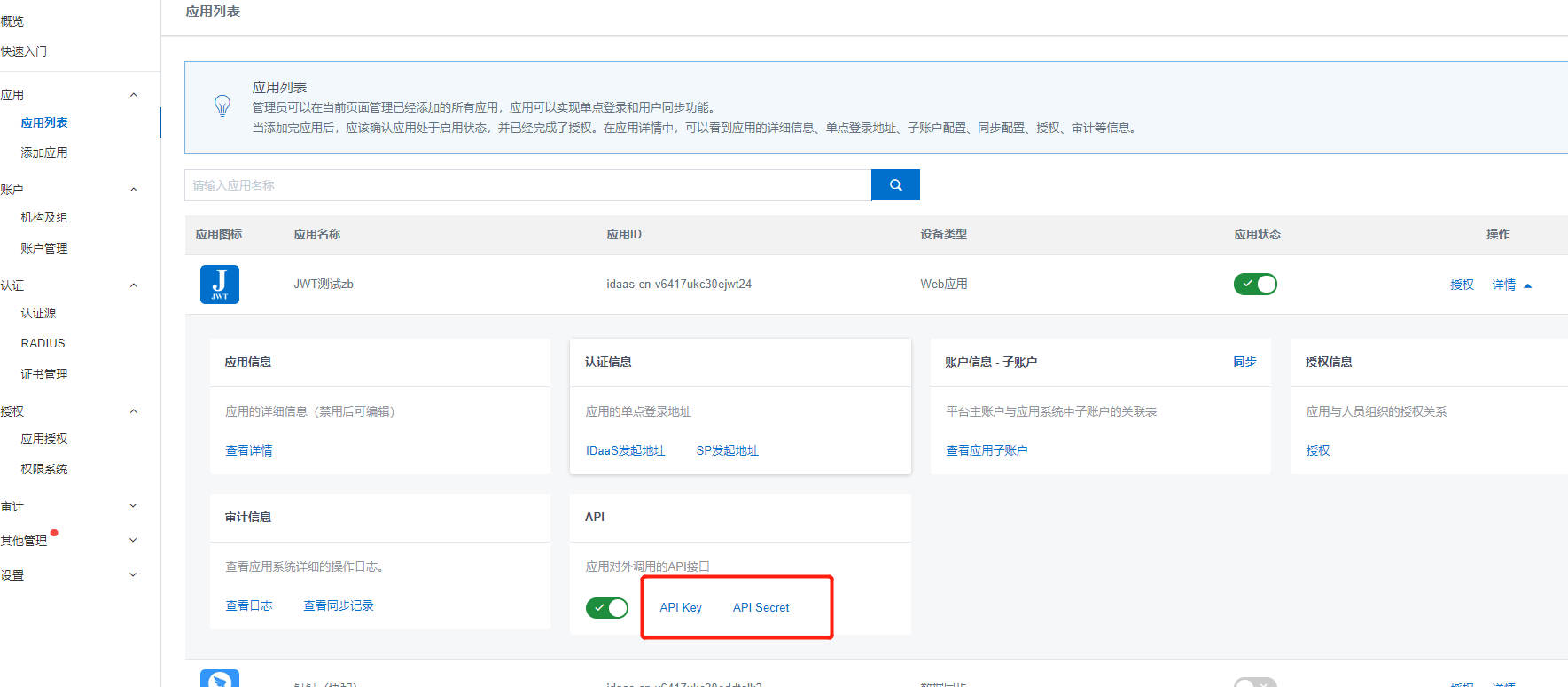
You need client-id and client-secret to obtain access_token. You can get both from the administrator console.
Add an application in the administrator console. On the application details page, you can enable the API. The two API values correspond to client-id and client-secret.
API operation list
Obtain access_token
The following API operations are related to organization operations:
Push an organization
Modify or move an organization
Delete an organization
Query an organization
Obtain the organization list
Obtain root node organization information
Obtain the direct children of an organization
The following API operations are related to account operations:
Push an account
Modify or move an account
Delete an account
Obtain account information
Query the account list
The following API operations are related to group operations:
Push an account group
Update an account group
Delete an account group
Others:
Obtain the list of organizations and accounts authorized for the application
API operation details
Obtain access_token
Before you call the following API operations, obtain access_token. You can pass access_token in two ways when you call an API operation:
After the URL value: URL?access_token={access_token}
In the header: Authorization bearer {access_token} (note the space between bearer and access_token)
How to obtain access_token: Send a POST request to the following URL. The request returns JSON that contains access_token.
{IDaaS-Base-URL}/oauth/token?client_id={client-id}&client_secret={client-secret}&scope=read&grant_type=client_credentials
client_id and client_secret are the API Key and API Secret of the application that you created.
Push an organization
After you add an organization in the SP, call this API operation to synchronize the information of the new organization to IDaaS.
When you synchronize data, follow the hierarchy. Synchronize the parent first, and then synchronize the children.
Request URI: /api/bff/v1.2/developer/scim/organization/createPOSTREST
Content-Type: application/json
Request Body:
{
    "organizationName": "Chengdu R&D Department",
    "externalId": "123456",
    "parentExternalId": "test3",
    "type": "DEPARTMENT",
    "sortNumber": "3",
    "enabled":true,
    "description": "Responsible for product R&D",
    "extendFields":{
         "test1":"123"
    }
}
The following table describes the request parameters:
Parameter | Value | Type | Remarks |
organizationName | {organizationName} | String | The organization name. Required. |
externalId | {externalId} | String | The unique ID of the organization. This ID is synchronized from the SP and is called the external ID in IDaaS. If you do not specify it, the IDP generates a random external ID. Optional. |
parentExternalId | {parentExternalId} | String | The unique ID of the parent organization. This ID is synchronized from the SP and is called the parent external ID in IDaaS. Find the external ID in the organization properties under "Organizations and Groups". Required. |
type | {type} | String | Self-built organizational unit: SELF_OU Self-built department: DEPARTMENT Externally synchronized organization: EXTERNAL_OU Default value: DEPARTMENT. Optional. |
rootNode | {rootNode} | boolean | If you set this parameter to true, the original root node in the IDP is updated. Optional. |
enabled | {enabled} | boolean | The organization status. true: enabled. false: disabled. Default value: true. Optional. |
sortNumber | {sortNumber} | int | The display order. Optional. |
description | {description} | String | The description of the current OU. The value cannot exceed 500 characters. Optional. |
extendFields | {extendFields} | Map<String,String> | The custom extended fields, which are defined in the IDP data dictionary. If a custom extended field is required, this parameter is required. |
Response Body:
{
"success": true,
"code": "200",
"message": null,
"requestId": "974CA7CA-1C98-4557-AC90-9425B2ED4719",
"data": {
    "externalId": "123456",
        "id": "123456"
        }
}
The following table describes the response parameters:
success indicates whether the request succeeded, code is the error code, and message is the error message of the API operation.
When success is true, the request succeeded. In this case, code is 200 and data returns the data. When the request fails, success is false and code is a semantic error code, such as InvalidParameter.ParentOUUuid.NotExist.
Parameter | Description |
externalId | The unique ID of the organization. This ID is synchronized from the SP and is called the external ID in IDaaS. If you do not specify it, the IDP generates a random external ID. |
id | The UUID of the organization on the IDaaS platform. |
The following table describes the error codes:
HttpCode (request status code) | code (error code) | message (error message) | Remarks |
200 | 200 | null | The request succeeded. |
400 | InvalidParameter | Example: The parent organization 123456 does not exist. | Invalid request parameter. |
400 | InvalidParameter.ExternalId.Exist | Example: Duplicate external ID, externalId: 123456. | Duplicate external ID. |
400 | InvalidParameter.Name.Exist | Example: Duplicate OU name, OrganizationName: R&D Department. | The organization name already exists. |
403 | Forbidden | You are not authorized to operate on this parent OU. | You are not authorized to perform the operation. |
Modify or move an organization
After you modify an organization in the SP, call this API operation to synchronize the modified organization information to IDaaS.
Request URI: /api/bff/v1.2/developer/scim/organization/updatePUTREST
Content-Type: application/json
Request Body:
{
    "description": "",
    "organizationName": "Chengdu R&D Department",
    "externalId": "123456",
    "parentExternalId": "test3",
    "enabled":false,
    "type": null,
    "sortNumber": "5",
    "extendFields":{
       "test1":"1235123"
    }
}
The following table describes the request parameters:
Parameter | Value | Type | Remarks |
externalId | {externalId} | String | The unique ID of the organization. This ID is synchronized from the SP and is called the external ID in IDaaS. Required. |
organizationName | {organizationName} | String | The organization name. Optional. |
parentExternalId | {parentExternalId} | String | The unique ID of the parent organization. This ID is synchronized from the SP and is called the parent external ID in IDaaS. Find the external ID in the organization properties under "Organizations and Groups". Optional. |
type | {type} | String | Self-built organizational unit: SELF_OU Self-built department: DEPARTMENT Externally synchronized organization: EXTERNAL_OU Default value: DEPARTMENT. Optional. |
enabled | {enabled} | boolean | The organization status. true: enabled. false: disabled. Optional. If you specify this parameter, this information is updated. |
sortNumber | {sortNumber} | int | The display order. Optional. If you specify this parameter, this information is updated. |
description | {description} | String | The description of the current OU. The value cannot exceed 500 characters. Optional. If you specify this parameter, this information is updated. |
extendFields | {extendFields} | Map<String,String> | Defined in the IDaaS data dictionary. If a custom extended field is required, this parameter is required. |
Response Body:
{
    "success": true,
    "code": "200",
    "message": null,
    "requestId": "C98418A3-63B5-49CA-9C85-A820A65D3247",
        "data": {
            "externalId": "123456",
            "id": "123456"
        }
}
The following table describes the response parameters:
success indicates whether the request succeeded, code is the error code, and message is the error message of the API operation.
When success is true, the request succeeded. In this case, code is 200 and data returns the data. When the request fails, success is false and code is a semantic error code, such as InvalidParameter.ParentOUUuid.NotExist.
The following table describes the response parameters:
success indicates whether the request succeeded, code is the error code, and message is the error message of the API operation.
When success is true, the request succeeded. In this case, code is 200 and data returns the data. When the request fails, success is false and code is a semantic error code, such as InvalidParameter.ParentOUUuid.NotExist.
Parameter | Description |
externalId | The unique ID of the organization. This ID is synchronized from the SP and is called the external ID in IDaaS. If you do not specify it, the IDP generates a random external ID. |
id | The UUID of the organization on the IDaaS platform. |
The following table describes the error codes:
HttpCode (request status code) | code (error code) | message (error message) | Remarks |
200 | 200 | null | The request succeeded. |
400 | InvalidParameter | Example: The description cannot exceed 500 characters. | Invalid request parameter. |
400 | EntityNotFound | The organization does not exist. | The OU to update is not found. |
400 | InvalidParameter.Name.Exist | Example: Duplicate OU name, OrganizationName: R&D Department. | The organization name already exists. |
400 | OperationDenied | An OU cannot be moved under its own child. | The operation is not allowed. |
403 | Forbidden | You are not authorized to operate on this parent OU. | You are not authorized to perform the operation. |
Delete an organization
After you delete an organization in the SP, call this API operation to also delete the organization in IDaaS.
Request URI: /api/bff/v1.2/developer/scim/organization/deleteDELETEREST
Content-Type: application/json
Request example:
/api/bff/v1.2/developer/scim/organization/delete?externalId=1694618271068407094The following table describes the request parameters:
Parameter | Value | Remarks |
externalId | {externalId} | The external ID of the organization in the IDaaS system. |
Response Body:
{
    "success": true,
    "code": "200",
    "message": null,
    "requestId": "30A38CA4-D640-4CBA-B85F-A0234D0181F1"
}
The following table describes the response parameters:
success indicates whether the request succeeded, code is the error code, and message is the error message of the API operation.
When success is true, the request succeeded. In this case, code is 200 and data returns the data. When the request fails, success is false and code is a semantic error code, such as InvalidParameter.ParentOUUuid.NotExist.
The following table describes the error codes:
HttpCode (request status code) | code (error code) | message (error message) | Remarks |
200 | 200 | null | The request succeeded. |
400 | InvalidParameter | Example: The external ID (externalId) cannot be empty. | Invalid request parameter. |
400 | EntityNotFound | The organization does not exist. | The OU to update is not found. |
400 | OperationDenied.OUContainsChildren | The OU has associations and cannot be deleted. | The organization has child organizations or accounts, so deletion is not allowed. |
403 | Forbidden | You are not authorized to operate on this OU. | You are not authorized to perform the operation. |
Query an organization
Query a single organization
Request URI: /api/bff/v1.2/developer/scim/organization/detailGETREST
Request example:
/api/bff/v1.2/developer/scim/organization/detail?externalId=1694618271068407094The following table describes the request parameters:
Parameter | Value | Remarks |
externalId | {externalId} | The external ID of the organization in the IDaaS system. |
Response Body:
{
    "success": true,
    "code": "200",
    "message": null,
    "requestId": "B5D4A6D1-9C51-4AC3-A413-4A27EE1C1474",
    "data": {
        "organizationName": "ceshiimport0009",
        "externalId": "9999",
        "parentExternalId": "764712910283009725",
        "type": "SELF_OU",
        "rootNode": false,
        "sortNumber": 0,
        "enabled": true,
        "description": null,
        "extendFields": {
            "4": "asd"
        }
    }
}
Response parameters:
success indicates whether the request succeeded, code is the error code, and message is the error message.
When success is true, the request succeeded. In this case, code is 200 and data returns the data. When the request fails, success is false and code is a semantic error code, such as InvalidParameter.ParentOUUuid.NotExist
Parameter | Description |
externalId | The external ID of the organization |
organizationName | The organization name |
parentExternalId | The external ID of the parent organization |
type | The type |
enabled | The organization status |
description | The description |
extendFields | The extended fields |
sortNumber | The display order of the organization |
rootNode | Indicates whether the organization is a root node |
Error codes:
HttpCode (request status code) | code (error code) | message (error message) | Remarks |
200 | 200 | null | The request succeeded |
400 | InvalidParameter | For example: The external ID (externalId) cannot be empty | A request parameter is invalid |
400 | EntityNotFound | The organization does not exist | The OU to update was not found |
403 | Forbidden | You do not have permission to operate on this parent OU | You do not have permission to perform this operation |
Query the organization list
The SP can call this API operation to query the list of all OUs, or the list of a specific OU and all of its child OUs.
Request URI: /api/bff/v1.2/developer/scim/organization/listGET
Request example:
Query all organizations of the company: /api/bff/v1.2/developer/scim/organization/list
Query the information about all organizations under a specific OU: /api/bff/v1.2/developer/scim/organization/list?id=5986176890912195413
Request parameters:
Parameter | Value | Type | Remarks |
externalId | {externalId} | String | The external ID of the organization in the IDaaS system. Optional |
If you do not specify a value, all organizations of the company are returned. If the ID is not empty, the information about the organizations under the corresponding OU is returned.
Response Body:
{
            "success": true,
            "code": "200",
            "message": null,
            "requestId": "3CCA4939-170C-46AA-BE11-F3DE924FC0E9",
            "data": {"organizations": [
                    {
                        "organizationName": "Chengdu R&D Department",
                        "externalId": "2858068028015036528",
                        "parentExternalId": "129733886490329012",
                        "type": "DEPARTMENT",
                        "rootNode": false,
                        "sortNumber": 0,
                        "enabled": true,
                        "description": "",
                        "extendFields": {}
                    },
                    {
                        "organizationName": "Chengdu Branch",
                        "externalId": "129733886490329012",
                        "parentExternalId": "6721629573848908864",
                        "type": "SELF_OU",
                        "rootNode": false,
                        "sortNumber": 0,
                        "enabled": true,
                        "description": "",
                        "extendFields": {}
                    },
                    {
                        "organizationName": "Testing R&D Department3-3",
                        "externalId": "test3-3",
                        "parentExternalId": "test3",
                        "type": "DEPARTMENT",
                        "rootNode": false,
                        "sortNumber": 3,
                        "enabled": true,
                        "description": "Organizations synchronized through SCIM",
                        "extendFields": {
                            "test1": "1235123"
                        }
                    },
                    {
                        "organizationName": "R&D Department3-4",
                        "externalId": "test3-4",
                        "parentExternalId": "test3",
                        "type": "DEPARTMENT",
                        "rootNode": false,
                        "sortNumber": 3,
                        "enabled": true,
                        "description": "R&D sub-department",
                        "extendFields": {
                            "test1": "123"
                        }
                    }
                    ]
            }
        }
Response parameters:
success indicates whether the request succeeded, code is the error code, and message is the error message.
When success is true, the request succeeded. In this case, code is 200 and data returns the data. When the request fails, success is false and code is a semantic error code, such as InvalidParameter.ParentOUUuid.NotExist
Parameter | Description |
organizations | The organization information returned |
├ externalId | The external ID of the organization |
├ organizationName | The organization name |
├ parentExternalId | The external ID of the parent organization |
├ type | The type |
├ rootNode | Indicates whether the organization is a root node |
├ sortNumber | The display order of the organization |
├ enabled | The organization status |
├ description | The description |
└ extendFields | The extended fields |
Error codes:
HttpCode (request status code) | code (error code) | message (error message) | Remarks |
200 | 200 | null | The request succeeded |
400 | EntityNotFound | For example: Organization 123456 does not exist | The OU that corresponds to the externalId was not found |
403 | Forbidden | You do not have permission to operate on this parent OU | You do not have permission to perform this operation |
Query the root node organization information
Queries the information about the root node organization of the current tenant.
Request URI: /api/bff/v1.2/developer/scim/organization/rootGETREST
Request example:
/api/bff/v1.2/developer/scim/organization/rootResponse Body:
{
        "success": true,
        "code": "200",
        "message": null,
        "requestId": "C757F8D6-E96A-4399-823C-E55AED4D59C3",
        "data": {
            "organizationName": "XXX Technology Co., Ltd.",
            "externalId": "6721629573848908864",
            "parentExternalId": null,
            "type": "SELF_OU",
            "rootNode": true,
            "sortNumber": 0,
            "enabled": true,
            "description": "",
            "extendFields": {}
        }
}
Response parameters:
success indicates whether the request succeeded, code is the error code, and message is the error message.
When success is true, the request succeeded. In this case, code is 200 and data returns the data. When the request fails, success is false and code is a semantic error code, such as InvalidParameter.ParentOUUuid.NotExist
Parameter | Description |
externalId | The external ID of the organization |
organizationName | The organization name |
parentExternalId | The external ID of the parent organization |
type | The type |
enabled | The organization status |
description | The description |
extendFields | The extended fields |
sortNumber | The display order of the organization |
rootNode | Indicates whether the organization is a root node |
Error codes:
HttpCode (request status code) | code (error code) | message (error message) | Remarks |
200 | 200 | null | The request succeeded |
400 | InvalidParameter | cannot get current enterpriseUuid (The information about the current tenant cannot be retrieved) | A request parameter is invalid |
400 | EntityNotFound | cannot get rootOU | The root OU was not found |
403 | Forbidden | You do not have permission to operate on this parent OU | You do not have permission to perform this operation |
Query the direct children of an organization
The SP can call this API operation to query all direct child OUs of a specified OU.
Request URI: /api/bff/v1.2/developer/scim/organization/childrenGET
Request parameters:
Parameter | Value | Type | Remarks |
externalId | {externalId} | String | The external ID of the organization in the IDaaS system. Required |
If you do not specify a value, all organizations of the company are returned. If the ID is not empty, the information about the organizations under the corresponding OU is returned.
Request example:
/api/bff/v1.2/developer/scim/organization/children?externalId=1Response Body:
{
"success": true,
"code": "200",
"message": null,
"requestId": "26AD790D-FB7D-4ED9-B07E-82448C929F88",
"data": {
    "organizations": [
        {
            "organizationName": "Sales Department",
            "externalId": "130015784",
            "parentExternalId": "1",
            "type": "DEPARTMENT",
            "rootNode": false,
            "sortNumber": 130015784,
            "enabled": true,
            "description": null,
            "extendFields": {
            }
        },
        {
            "organizationName": "R&D Department",
            "externalId": "129387071",
            "parentExternalId": "1",
            "type": "DEPARTMENT",
            "rootNode": false,
            "sortNumber": 129387071,
            "enabled": true,
            "description": null,
            "extendFields": {
            }
        },
        {
            "organizationName": "Testing Department",
            "externalId": "129083981",
            "parentExternalId": "1",
            "type": "DEPARTMENT",
            "rootNode": false,
            "sortNumber": 129083981,
            "enabled": true,
            "description": null,
            "extendFields": {
            }
        }
    ]
}
}
Response parameters:
success indicates whether the request succeeded, code is the error code, and message is the error message.
When success is true, the request succeeded. In this case, code is 200 and data returns the data. When the request fails, success is false and code is a semantic error code, such as InvalidParameter.ParentOUUuid.NotExist
Parameter | Description |
organizations | The organization information returned |
├ externalId | The external ID of the organization |
├ organizationName | The organization name |
├ parentExternalId | The external ID of the parent organization |
├ type | The type |
├ rootNode | Indicates whether the organization is a root node |
├ sortNumber | The display order of the organization |
├ enabled | The organization status |
└ description | The description |
└ extendFields | The extended fields |
Error codes:
HttpCode (request status code) | code (error code) | message (error message) | Remarks |
200 | 200 | null | The request succeeded |
400 | InvalidParameter | For example: The external ID (externalId) cannot be empty | A request parameter is invalid |
400 | EntityNotFound | The organization does not exist | The OU that corresponds to the externalId was not found |
403 | Forbidden | You do not have permission to operate on this parent OU | You do not have permission to perform this operation |
Push an account
After you add an account in the SP, call this API operation to synchronize the information about the new account to IDaaS.
Request URI: /api/bff/v1.2/developer/scim/account/createPOSTREST
Content-Type: application/json
Request Body:
{
    "externalId": "123456",
    "userName": "developer2",
    "displayName": "Developer3",
    "password": "Jdev@12345",
    "email": "test2@****.com",
    "phoneNumber": "",
    "description": "",
    "belongs": [
        "test1","test2"
        ],
    "extendFields": {
        "test":"123456",
        "test1":"woman"
    }
}
Request parameters:
Parameter | Value | Type | Remarks | Required |
userName | {userName} | String | The primary account of the Alibaba Cloud IDaaS platform | Required |
password | {password} | String | The password of the primary account of the Alibaba Cloud IDaaS platform | Optional. If this parameter is left empty, a random system-generated password is used. |
displayName | {displayName} | String | The display name of the user | Required |
externalId | {externalId} | String | The unique ID of the account | Optional. If you do not specify this parameter, an ID is randomly generated and returned in the result. |
{email} | String | The email address | Optional. | |
phoneNumber | {phoneNumber} | String | The mobile phone number. Only one phone number is allowed, and it must be unique. | Optional. |
phoneRegion | {phoneRegion} | String | The area code of the mobile phone number. If you do not specify this parameter, the default value 86 is used. | Optional |
belongs | {belongs} | Array | The collection of external IDs of the OUs to which the account belongs | Required. For details, see the request parameter example. |
locked | {locked} | boolean | Specifies whether to lock the account. Valid values: true (locks the account) and false (does not lock the account). A locked account cannot log on to IDaaS. | Optional. If you specify this parameter, the corresponding information is updated. |
enabled | {enabled} | boolean | The enabled status of the user. Valid values: true (enabled) and false (disabled). A disabled account cannot log on to IDaaS. | Optional. If you do not specify this parameter, the account is enabled by default. |
description | {description} | String | The description | Optional |
expireTime | {expireTime} | String | The expiration time. Format: yyyy-MM-dd. Example: 2020-01-12. | Optional |
extendFields | {extendFields} | Map<String,String> | The custom extended fields, which are defined in the data dictionary of the IDP. | Optional. If you specify this parameter, the corresponding information is updated. During an update, this parameter is required if the custom extended field is a required option. |
Response Body:
Failure example:
{
        "success": false,
        "code": "InvalidParameter",
        "message": "The password does not comply with the password policy / The email address (email): test@****.com already exists / The organization (belongs): 123456 does not exist",
        "requestId": "7BA02087-4789-4FA6-A414-45BAC671945E",
        "data": null
}
Success example:
{
        "success": true,
        "code": "200",
        "message": null,
        "requestId": "BF66FA08-E57B-4387-90C0-A72E41307239",
        "data": {
            "externalId": "123456"
        "id":"e717a0cd5b1059bda8a6dd35cfce8e48DxlBg123456"
        }
}
Response parameters:
success indicates whether the request succeeded, code is the error code, and message is the error message.
When success is true, the request succeeded. In this case, code is 200 and data returns the data. When the request fails, success is false and code is a semantic error code, such as InvalidParameter.ParentOUUuid.NotExist
Parameter | Description |
externalId | The unique ID of the account. This ID is synchronized from the SP, so it is called the external ID in IDaaS. If you do not specify this parameter, the IDP randomly generates an external ID. |
id | The UUID of the account on the IDaaS platform |
Error codes:
HttpCode (request status code) | code (error code) | message (error message) | Remarks |
200 | 200 | null | The request succeeded |
400 | InvalidParameter | For example: The account name cannot be empty | A request parameter is invalid |
400 | InvalidParameter.ExternalId.Exist | The externalId (external ID) is duplicated | The external ID is duplicated |
400 | InvalidParameter.Name.Exist | The account name (username) already exists | The account name already exists |
400 | InvalidParameter.DisplayName.Exist | The display name already exists | The display name already exists |
400 | InvalidParameter.Email.Exist | The email address (email) is already bound to another account | The email address (email) is already bound to another account |
400 | InvalidParameter.PhoneNumber.Exist | The mobile phone number (phoneNumber) is already bound to another account | The mobile phone number (phoneNumber) is already bound to another account |
400 | EntityNotFound | For example: The organization (belongs): 123456 does not exist | The OU that corresponds to the externalId was not found |
Modify or move an account
After you modify an account in the SP, call this API operation to synchronize the modified account information to IDaaS.
Request URI: /api/bff/v1.2/developer/scim/account/update PUTREST
Content-Type:application/json
Request Body:
{
    "externalId": "test-2",
    "userName": "test-2",
    "displayName": "test-3",
     "password": "Jzyt@123456",
     "email": "test2@****.com",
    "phoneNumber": "188****0900",
     "expireTime": "2117-01-01",
     "description": "123ttt",
     "locked":false,
    "belongs": [
        "test2"
        ],
    "extendFields": {
        "test":"t",
        "test1":"woman123"
    }
}
Request parameters:
Parameter | Value | Type | Remarks | Required |
userName | {userName} | String | The primary account of the Alibaba Cloud IDaaS platform | Optional. Specify either userName or externalId. |
password | {password} | String | The password of the primary account of the Alibaba Cloud IDaaS platform | Optional. If you specify this parameter, the corresponding information is updated. |
displayName | {displayName} | String | The display name of the user | Optional. If you specify this parameter, the corresponding information is updated. |
externalId | {externalId} | String | The unique ID of the account | Optional. Specify either userName or externalId. |
{email} | String | The email address | Optional. If you specify this parameter, the corresponding information is updated. | |
phoneNumber | {phoneNumber} | String | The mobile phone number. Only one phone number is allowed, and it must be unique. | Optional. If you specify this parameter, the corresponding information is updated. |
belongs | {belongs} | String | The collection of external IDs of the OUs to which the account belongs. The OUs must exist. | Optional. If you specify this parameter, the corresponding information is updated. For details, see the request parameter example. |
locked | {locked} | boolean | Specifies whether to lock the account. Valid values: true (locks the account) and false (does not lock the account). A locked account cannot log on to IDaaS. | Optional. If you specify this parameter, the corresponding information is updated. |
enabled | {enabled} | boolean | The enabled status of the user. Valid values: true (enabled) and false (disabled). A disabled account cannot log on to IDaaS. | Optional. If you do not specify this parameter, the account is enabled by default. |
description | {description} | String | The description | Optional. If you specify this parameter, the corresponding information is updated. |
expireTime | {expireTime} | String | The expiration time. Format: yyyy-MM-dd. Example: 2020-01-12. | Optional. If you specify this parameter, the corresponding information is updated. |
extendFields | {extendFields} | Map<String,String> | The custom extended fields, which are defined in the data dictionary of the IDP. | Optional. If you specify this parameter, the corresponding information is updated. During an update, this parameter is required if the custom extended field is a required option. |
Response Body:
Failure example:
{
        "success": false,
        "code": "InvalidParameter",
        "message": "The password does not comply with the password policy / The email address (email): test@****.com already exists / The organization (belongs): 123456 does not exist",
        "requestId": "7BA02087-4789-4FA6-A414-45BAC671945E",
        "data": null
}
Success example:
{
        "success": true,
        "code": "200",
        "message": null,
        "requestId": "BF66FA08-E57B-4387-90C0-A72E41307239",
        "data": {
        "externalId": "123456"
        "id":"e717a0cd5b1059bda8a6dd35cfce8e48DxlBg123456"
    }
}
Response parameters:
The success field indicates whether the request was successful. The code field is the error code, and the message field is the error message.
When success is true, the request was successful, code is 200, and the data field returns the data. When the request fails, success is false, and code is a semantic error code, such as InvalidParameter.ParentOUUuid.NotExist.
Response parameters:
The success field indicates whether the request was successful. The code field is the error code, and the message field is the error message.
When success is true, the request was successful, code is 200, and the data field returns the data. When the request fails, success is false, and code is a semantic error code, such as InvalidParameter.ParentOUUuid.NotExist.
Parameter | Description |
externalId | The unique ID of the organization. This ID is synchronized from the SP, so it is called the external ID in IDaaS. If you do not specify this parameter, the IDP randomly generates an external ID. |
id | The UUID of the organization on the IDaaS platform. |
Error codes:
HttpCode (request status code) | code (error code) | message (error message) | Remarks |
200 | 200 | null | The request was successful. |
400 | InvalidParameter | Example: The account name cannot be empty. | A request parameter is invalid. |
400 | InvalidParameter.ExternalId.Exist | The external ID in externalId is duplicated. | The external ID is duplicated. |
400 | InvalidParameter.Name.Exist | The account name (username) already exists. | The account name already exists. |
400 | InvalidParameter.DisplayName.Exist | The display name already exists. | The display name already exists. |
400 | InvalidParameter.Email.Exist | The email address (email) is already bound to another account. | The email address (email) is already bound to another account. |
400 | InvalidParameter.PhoneNumber.Exist | The mobile phone number (phoneNumber) is already bound to another account. | The mobile phone number (phoneNumber) is already bound to another account. |
400 | InvalidParameter.ExternalId.NotExist | The account cannot be found by externalId. | The account with the specified externalId is not found. |
400 | EntityNotFound | Example: The organization in belongs, 123456, does not exist. | The OU with the specified externalId is not found. |
Delete an account
When you delete an account in the SP, call this API operation to delete the account information in IDaaS.
Request URI: /api/bff/v1.2/developer/scim/account/delete DELETEREST
Request parameters:
Parameter | Value | Remarks |
externalId | {externalId} | The external ID of the account in the IDaaS system. |
Request example:
/api/bff/v1.2/developer/scim/account/delete?externalId=4544581305390943066Response Body:
{
    "success": true,
    "code": "200",
    "message": null,
    "requestId": "BF66FA08-E57B-4387-90C0-A72E41307239",
    "data": null
}
Response parameters:
The success field indicates whether the request was successful. The code field is the error code, and the message field is the error message.
When success is true, the request was successful, code is 200, and the data field returns the data. When the request fails, success is false, and code is a semantic error code, such as InvalidParameter.ParentOUUuid.NotExist.
Error codes:
HttpCode (request status code) | code (error code) | message (error message) | Remarks |
200 | 200 | null | The request was successful. |
400 | InvalidParameter | Example: The external ID (externalId) cannot be empty. | A request parameter is invalid. |
400 | EntityNotFound | The account does not exist. | The account to delete is not found. |
403 | OperationDenied | Example: The administrator admin cannot be deleted. | The delete operation is not allowed. |
Get account information
In the SP, call this API operation to get the account information in IDaaS.
Request URI:/api/bff/v1.2/developer/scim/account/detailGETREST
Content-Type:application/json
Request parameters:
Parameter | Value | Remarks |
externalId | {externalId} | The external ID of the account in the IDaaS system. Required. |
Request example:
/api/bff/v1.2/developer/scim/account/detail?externalId=123456&access_token=bcab-ae1.2123456461626-590-496789-73082615978Response Body:
{
    "success": true,
    "code": "200",
    "message": null,
    "requestId": "278D7B88-6C26-4C7F-90A7-F126CF52F3E1",
    "data": {
        "externalId": "123456",
        "username": "test-2",
        "displayName": "test-3",
        "phoneNumber": "188****0900",
        "email": "test2@****.com",
        "enabled": true,
        "locked": false,
        "description": "123ttt",
        "extendFields": {
            "test": "t",
            "test1": "woman123"
        },
        "belongs": [
            "test2"
        ]
    }
}
Response parameters:
The success field indicates whether the request was successful. The code field is the error code, and the message field is the error message.
When success is true, the request was successful, code is 200, and the data field returns the data. When the request fails, success is false, and code is a semantic error code, such as InvalidParameter.ParentOUUuid.NotExist.
Parameter | Value | Remarks |
externalId | {externalId} | The external ID of the account in the IDaaS system. |
username | {username} | The username. |
displayName | {displayName} | The display name. |
phoneNumber | {phoneNumber} | The mobile phone number. |
{email} | The email address. | |
locked | {locked} | Indicates whether the account is locked. Valid values: true (locked) and false (not locked). |
enabled | {enabled} | Indicates whether the account is available. Valid values: true (enabled) and false (disabled). |
belongs | {belongs} | The list of organizations to which the account belongs. |
extendFields | {extendFields} | The extended fields, which are the custom fields saved for the account. |
Error codes:
HttpCode (request status code) | code (error code) | message (error message) | Remarks |
200 | 200 | null | The request was successful. |
400 | InvalidParameter | Example: The external ID (externalId) cannot be empty. | A request parameter is invalid. |
400 | InvalidParameter.ExternalId.NotExist | The externalId does not exist. | The account is not found. |
Query the account list
In the SP, call this API operation to get the list of accounts in IDaaS.
Request URI: /api/bff/v1.2/developer/scim/account/listGETREST
Content-Type:application/json
Request parameters:
Parameter | Value | Remarks |
ouExternalId | {ouExternalId} | The ID of a specific organization. Optional. |
createStartDate | {createStartDate} | The start date of account creation. Format: yyyy-MM-dd. Example: 2018-01-01. Optional. |
createEndDate | {createEndDate} | The end date of account creation. Format: yyyy-MM-dd. Example: 2018-01-30. Optional. |
start | {start} | Optional. The start position for pagination. Default value: 0. |
limit | {limit} | Optional. The number of entries to return per page. Default value: 10. Maximum value: 100. |
Request example:
/api/bff/v1.2/developer/scim/account/list?ouExternalId=test&access_token=bcab-ae1.22461626-590-496789-73082615978Response Body:
{
    "success": true,
    "code": "200",
    "message": null,
    "requestId": "5709C39A-D53A-4D74-8765-7D763907877B",
    "data": {
        "total": 3,
        "accounts": [
            {
                "externalId": "3543180585310896590",
                "username": "developer2",
                "displayName": "Developer3",
                "phoneNumber": "",
                "email": "test2@****.com",
                "enabled": true,
                "locked": false,
                "description": "Synchronized from application {test-developer}",
                "extendFields": {
                    "test": "123456",
                    "test1": "woman"
                },
                "belongs": [
                    "test2",
                    "test1"
                ]
            },
            {
                "externalId": "test-2",
                "username": "test-2",
                "displayName": "test-3",
                "phoneNumber": "188****0900",
                "email": "test2@****.com",
                "enabled": false,
                "locked": false,
                "description": "123ttt",
                "extendFields": {
                    "test": "t",
                    "test1": "woman123"
                },
                "belongs": [
                    "test2"
                ]
            },
            {
                "externalId": "test-1",
                "username": "test-1",
                "displayName": "test-1",
                "phoneNumber": "",
                "email": "tangyuehan@idsmanager.com",
                "enabled": false,
                "locked": false,
                "description": "Synchronized from application {test-developer}",
                "extendFields": {},
                "belongs": [
                    "test2",
                    "test1"
                ]
            }
        ]
    }
}
Response parameters:
The success field indicates whether the request was successful. The code field is the error code, and the message field is the error message.
When success is true, the request was successful, code is 200, and the data field returns the data. When the request fails, success is false, and code is a semantic error code, such as InvalidParameter.ParentOUUuid.NotExist.
Parameter | Value | Remarks |
externalId | {externalId} | The external ID of the account in the IDaaS system. |
username | {username} | The username. |
phoneNumber | {phoneNumber} | The mobile phone number. |
{email} | The email address. | |
locked | {locked} | Indicates whether the account is locked. Valid values: true (locked) and false (not locked). |
enabled | {enabled} | Indicates whether the account is available. Valid values: true (enabled) and false (disabled). |
belongs | {belongs} | The list of organizations to which the account belongs. |
extendFields | {extendFields} | The extended fields, which are the custom fields saved for the account. |
Error codes:
HttpCode (request status code) | code (error code) | message (error message) | Remarks |
200 | 200 | null | The request was successful. |
400 | InvalidParameter | Example: Invalid createStartDate | A request parameter is invalid. |
Push an account group
When you add a group in the SP, call this API operation to push the group information to IDaaS.
Request URI: /api/bff/v1.2/developer/scim/group/createPOSTREST
Content-Type: application/json
Request Body:
{
    "externalId": "121-11",
    "displayName": "Test synchronization group11",
    "ouExternalId": "605016592710192945",
    "members": [
        {
            "accountExternalId":"",
            "username":"test1"
        }
    ],
    "extendFields": {
        "test":"123456"
    }
}
Request parameters:
Parameter | Value | Type | Remarks |
externalId | {externalId} | String | The external ID of the account group in the IDaaS system. The value must be unique. Optional. If you do not specify this parameter, the system randomly generates a value and returns it in the result. |
displayName | {displayName} | String | The display name of the group. Required. |
ouExternalId | {ouExternalId} | String | The external ID of the organizational unit (OU) to which the group belongs. Required. |
description | {description} | String | The description. Optional. |
members | {members} | String | The group members, which are the external IDs and usernames of existing accounts. accountExternalId is the external ID of the account, and username is the account name. |
extendFields | {extendFields} | Map | The custom extended fields. Optional. |
Response Body:
{"success": true,
        "code": "200",
        "message": null,
        "requestId": "BF66FA08-E57B-4387-90C0-A72E41307239",
        "data": {
        "externalId":"123456"
        }
}
The success field indicates whether the request was successful. The code field is the error code, and the message field is the error message.
When success is true, the request was successful, code is 200, and the data field returns the data. When the request fails, success is false, and code is a semantic error code, such as InvalidParameter.ParentOUUuid.NotExist.
Error codes:
HttpCode (request status code) | code (error code) | message (error message) | Remarks |
200 | 200 | null | The request was successful. |
400 | InvalidParameter | Example: The group name cannot be empty. | A request parameter is invalid. |
400 | InvalidParameter.DisplayName.Exist | The group name already exists in the current OU. | The display name already exists. |
400 | InvalidParameter.ExternalId.Exist | The externalId already exists. | The externalId already exists. |
400 | EntityNotFound | The OU does not exist. | The OU to which the group belongs does not exist. |
403 | Forbidden | You are not authorized to perform operations on this group. | You are not authorized to perform operations on this group. |
Update an account group
When you update a group in the SP, call this API operation to push the group information to IDaaS.
Request URI: /api/bff/v1.2/developer/scim/group/updatePUTREST
Content-Type: application/json
Request Body:
{
    "externalId": "121",
    "description": "tttttest",
    "displayName": "testt121",
    "extendFields": {
        "test":"ttttest"
    }
}
Request parameters:
Parameter | Value | Type | Remarks |
externalId | {externalId} | String | The external ID of the account group in the IDaaS system. The value must be unique. Required. |
displayName | {displayName} | String | The display name of the group. Optional. If you specify this parameter, the value is updated. |
description | {description} | String | The description. Optional. If you specify this parameter, the value is updated. |
extendFields | {extendFields} | Map | The custom extended fields. Optional. If you specify this parameter, the value is updated. |
Response Body:
{
    "success": true,
    "code": "200",
    "message": null,
    "requestId": "BF66FA08-E57B-4387-90C0-A72E41307239",
    "data": null
}
Response parameters:
The success field indicates whether the request was successful. The code field is the error code, and the message field is the error message.
When success is true, the request was successful, code is 200, and the data field returns the data. When the request fails, success is false, and code is a semantic error code, such as InvalidParameter.ParentOUUuid.NotExist.
Error codes:
HttpCode (request status code) | code (error code) | message (error message) | Remarks |
200 | 200 | null | The request was successful. |
400 | InvalidParameter | Example: The externalId parameter of the group cannot be empty. | A request parameter is invalid. |
400 | InvalidParameter.DisplayName.Exist | The group name already exists in the current OU. | The display name already exists. |
400 | InvalidParameter.ExternalId.NotExist | The externalId does not exist. | The externalId does not exist. |
403 | Forbidden | You are not authorized to perform operations on this group. | You are not authorized to perform operations on this group. |
Delete an account group
When you delete a group in the SP, call this API operation to delete the group in IDaaS.
Request URI: /api/bff/v1.2/developer/scim/group/deleteDELETEREST
Content-Type:application/json
Request parameters:
Parameter | Value | Remarks |
externalId | {externalId} | The external ID of the account group in the IDaaS system. |
Response Body:
{
    "success": true,
    "code": "200",
    "message": null,
    "requestId": "BF66FA08-E57B-4387-90C0-A72E41307239",
    "data": null
}
Response parameters:
The success field indicates whether the request was successful. The code field is the error code, and the message field is the error message.
When success is true, the request was successful, code is 200, and the data field returns the data. When the request fails, success is false, and code is a semantic error code, such as InvalidParameter.ParentOUUuid.NotExist.
Error codes:
HttpCode (request status code) | code (error code) | message (error message) | Remarks |
200 | 200 | null | The request was successful. |
400 | InvalidParameter | Example: The externalId parameter of the group cannot be empty. | A request parameter is invalid. |
400 | EntityNotFound | Example: The group information cannot be found. | The group information is not found. |
400 | OperationDenied.GroupContainsChildren | Example: The group has associated members, such as sub-members, and cannot be deleted. | The group has associated members, such as sub-members, and cannot be deleted. |
403 | Forbidden | You are not authorized to perform operations on this group. | You are not authorized to perform operations on this group. |
Get the list of organizations and accounts authorized for an application
Get the external IDs of the organizations and accounts that are directly authorized for an application based on the UUID of the application.
Request URI: /api/bff/v1.2/developer/scim/application/authorized/listGETREST
Request example:
/api/bff/v1.2/developer/scim/application/authorized/list?applicationUuid=1694618271068407094Request parameters:
Parameter | Value | Remarks |
applicationUuid | {applicationUuid} | The unique identifier of the application in IDaaS. |
Response Body:
{
"success": true,
"code": "200",
"message": null,
"requestId": "2230CE9E-4674-407C-A006-D29ACD9DADDB",
"data": {
    "ouExternalIds": [
        "1",
        "129387071",
        "4122068885249961546"
    ],
    "accountExternalIds": [
        "4484474128951618300",
        "5812895747601718104"
    ]
}
}}
Response parameters:
The success field indicates whether the request was successful. The code field is the error code, and the message field is the error message.
When success is true, the request was successful, code is 200, and the data field returns the data. When the request fails, success is false, and code is a semantic error code, such as InvalidParameter.ParentOUUuid.NotExist.
Parameter | Description |
ouExternalIds | The list of external IDs of the authorized organizations. |
accountExternalIds | The list of external IDs of the authorized accounts. |
Error codes:
HttpCode (request status code) | code (error code) | message (error message) | Remarks |
200 | 200 | null | The request was successful. |
400 | InvalidParameter | Example: The applicationUuid cannot be empty. | A request parameter is invalid. |
400 | EntityNotFound | Example: The applicationUuid is invalid. | The application with the specified applicationUuid is not found. |
403 | Forbidden | Example: You are not authorized to perform operations on the parent OU. | You are not authorized to perform the operation. |