Basic settings
Manage an application's General configurations in IDaaS, especially enabling or disabling API access and the security mechanism and procedure for key rotation.
General configurations
Each application has configurations that span features or run in parallel with them. These configurations are managed in General configurations.
Go to the Applications menu, find the application that you want to manage, and click Manage, and then open General configurations.
In the current version, administrators can enable or disable API access and rotate keys.
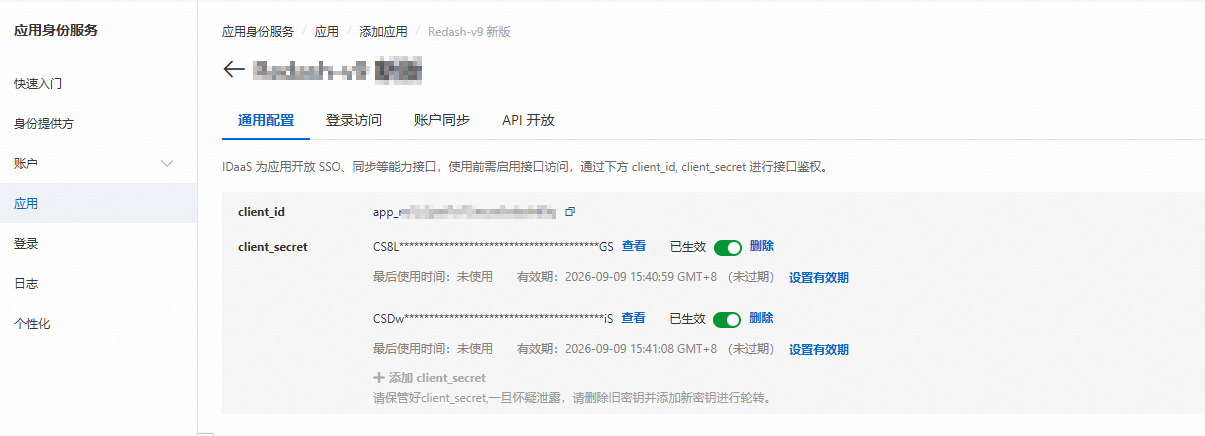
API access
For each application, IDaaS can enable a set of APIs that different features can call. The APIs include:
-
APIs for single sign-on (SSO) based on the OpenID Connect (OIDC) protocol
-
APIs for account synchronization
-
APIs for permission management
future release
These APIs must all share the client_id and client_secret configured here. You can call them only after you obtain an access_token.
By default, client_id is the same as application_id. It starts with "app_" and is approximately 26 characters long. client_secret is a random string that starts with CS and is 44 to 46 characters long.
Key rotation
To secure application access, IDaaS lets administrators manage an application's API access status and rotate its key (client_secret). Each application can have a key rotation policy with a custom cycle.
Core mechanism: dual-secret support
-
Each application can have at most two valid client_secret.
-
At any time, at least one client_secret must be enabled.
-
This design lets the old and new keys remain valid in parallel during rotation, ensuring a smooth business transition. After you confirm that the old key is completely disabled, you can safely delete it.
Set the key validity period
-
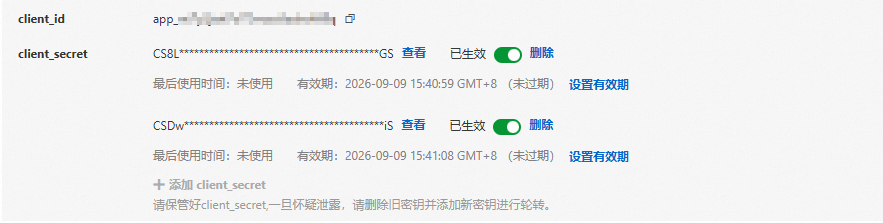
On the application key management page, find the Set Validity Period option and click it.
-
In the dialog box that appears, select the required expiration time:
-
3 Months. When you select the fixed three-month validity period, the system automatically displays a prompt and calculates and shows the expiration date by calendar month. For example, if the current date is September 18, the validity period ends on October 18.
-
6 Months. The system calculates and shows the expiration date by calendar month. For example, if the current date is September 18, the validity period ends on March 18 of the following year.
-
1 Year. The system calculates and shows the expiration date by calendar month. For example, if the current date is September 18, the validity period ends on September 18 of the following year.
-
Custom. Specify a date and time. The custom validity period follows the same logic as Bearer Token. The validity period is limited to 1 day to 3 years, and dates within 1 day or beyond 3 years cannot be selected. Quick selection mode is used consistently. Bearer Token does not support permanent validity.
Note-
A client secret whose parameters are passed through backend configuration is permanently valid by default.
-
Expired secrets, or secrets that expire within 3 days, are marked with a red reminder. Secrets that expire in less than 15 days are marked with a yellow reminder.
-
-
Click OK to save the settings.
Key rotation procedure
Follow these steps to rotate a key securely:
-
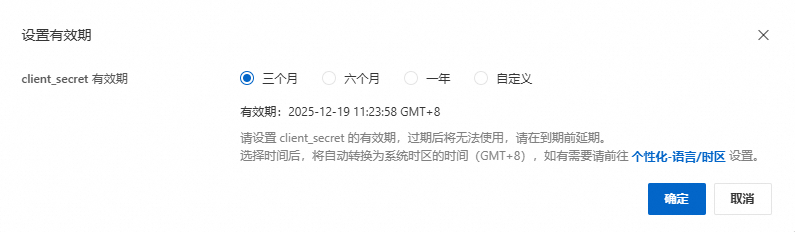
Create a new key: On the application's key management page, create a new client_secret. The system automatically enables the new key.
-
Update the application configuration: In the configuration of your application that uses the key, replace the old client_secret with the newly created key.
-
Disable the old key (verification phase): Return to the IDaaS application key management page, find the old client_secret, and perform the Disable operation. Before you disable the key, the system displays the timestamp when the key was last used. Check the timestamp carefully, and disable the key only after you confirm that no business or system is using it.
-
Monitor and verify: After you disable the old key, closely monitor the status and logs of your application to ensure that all features work as expected and are not affected by the key change.
-
Delete the old key (final cleanup): (Recommended) Observe the application for a period of time, such as a few days or a week, and thoroughly verify that disabling the old key has no impact on the application. You can then safely Delete the historical client_secret.
Basic information
|
Field name |
Description |
|
Application ID |
The application resource identifier. It is for reference only and cannot be changed. |
|
Source |
The creation template used to create the application. It cannot be changed. The available values are Application Template, Standard Protocol, and Custom Application. |
|
Application name |
The display name of the application. |
|
Application icon |
The display icon of the application. It must be in PNG or JPG format and no larger than 1 MB. A 256 × 256 pixel square icon is recommended. |