Application onboarding guide
Updated at:
An application in IDaaS represents any business application, system, or service — from an HR platform your team logs into every morning to an internal developer portal. Once integrated, IDaaS enables single sign-on (SSO) and account synchronization for that application.
Application types
IDaaS supports four integration types, listed in recommended order. Start with the highest-priority option that fits your application.
| Priority | Integration type | When to use |
|---|---|---|
| 1 | Application Marketplace | Your application is listed in the Application Marketplace. IDaaS provides pre-integrated templates — activate and configure in minutes. New templates are added continuously. |
| 2 | Standard protocols | Your application is not in the Application Marketplace but supports standard protocols, such as SAML or OpenID Connect (OIDC). Standard configuration only — no custom development required. |
| 3 | Custom applications | Your application supports neither the Application Marketplace nor standard protocols. Develop the integration against IDaaS standards. |
| 4 | Legacy compatibility Future version | Your application cannot be integrated using any of the methods above. IDaaS provides a password autofill feature that securely stores passwords to enable SSO. |
Integration flow
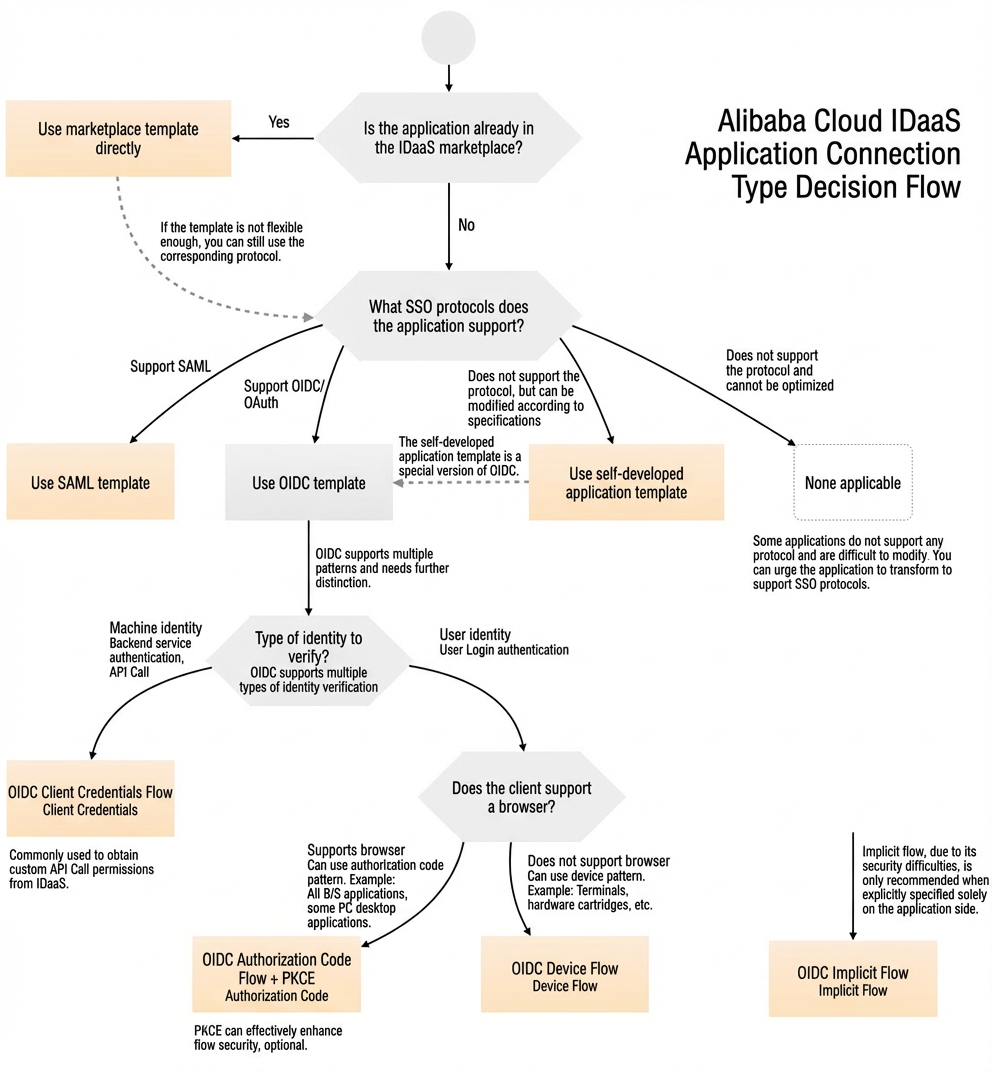
If you want to integrate an application with IDaaS for unified access and account management, refer to the following flowchart to determine the appropriate integration type.
What's next
Choose the integration type that matches your application, then follow the corresponding guide linked in the table above.
Is this page helpful?