Integrate verification code authentication
The verification code authentication feature enables quick logon using Short Message Service (SMS) verification codes. You can also use this feature to send verification codes or notification text messages. This topic describes the integration steps.
Enable verification code authentication
Create an application, select SMS authentication as the authentication method, and then select the SMS signature to use for authentication.
By default, a signature for Alibaba Cloud IDaaS is available. To add a custom signature, go to SMS Management.
By default, the SMS template for quick logon is used.
Get the application key
The application key is used to sign request parameters. The hash algorithm is HmacSHA256+Hex. The key is required for API calls.
Configure an SMS brute-force attack prevention policy
You can control the frequency of sending text messages to prevent frequent, malicious calls to the SMS verification code API.
You can control the frequency based on two dimensions: client IP address and phone number. The phone number is required, while the client IP address is optional. Throttling is enabled only when data for the corresponding dimension is provided. You can adjust the limits as needed.
Verification code authentication flows
The following sections describe three common scenarios for verification code authentication.
Normal flow
A user successfully logs on in a single attempt.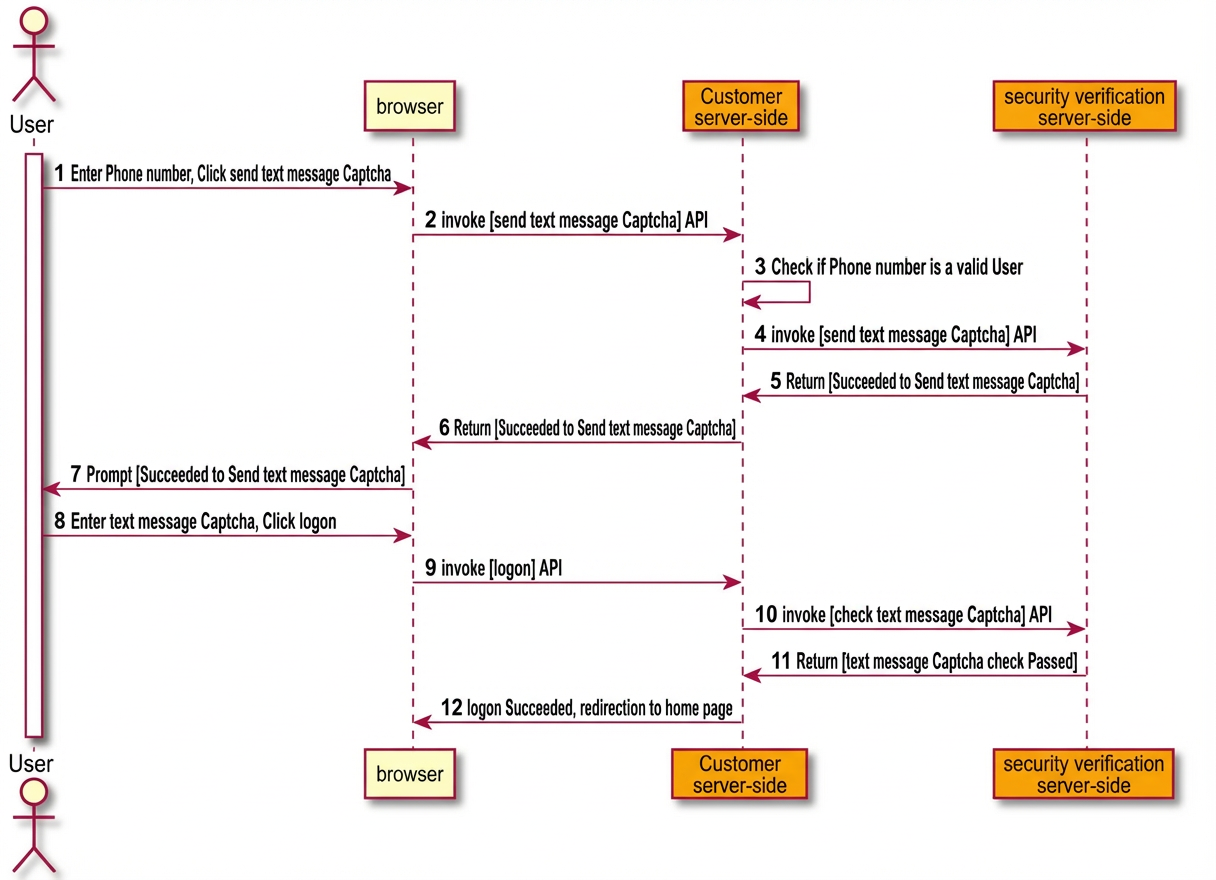
CAPTCHA flow
A user requests a verification code too frequently. The user must pass a CAPTCHA check before they can receive another verification code.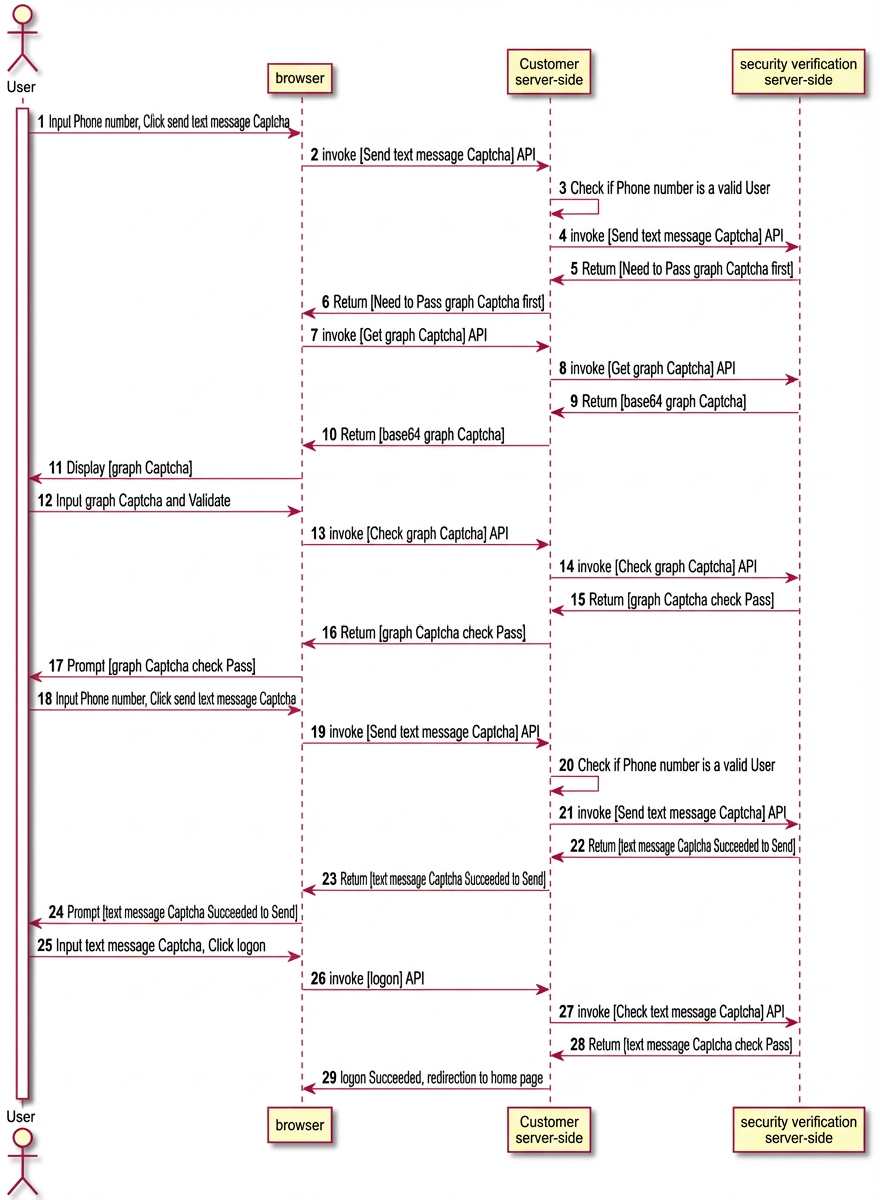
Blocking flow
A user has requested a verification code too many times. The user is blocked from requesting another code for a period of time.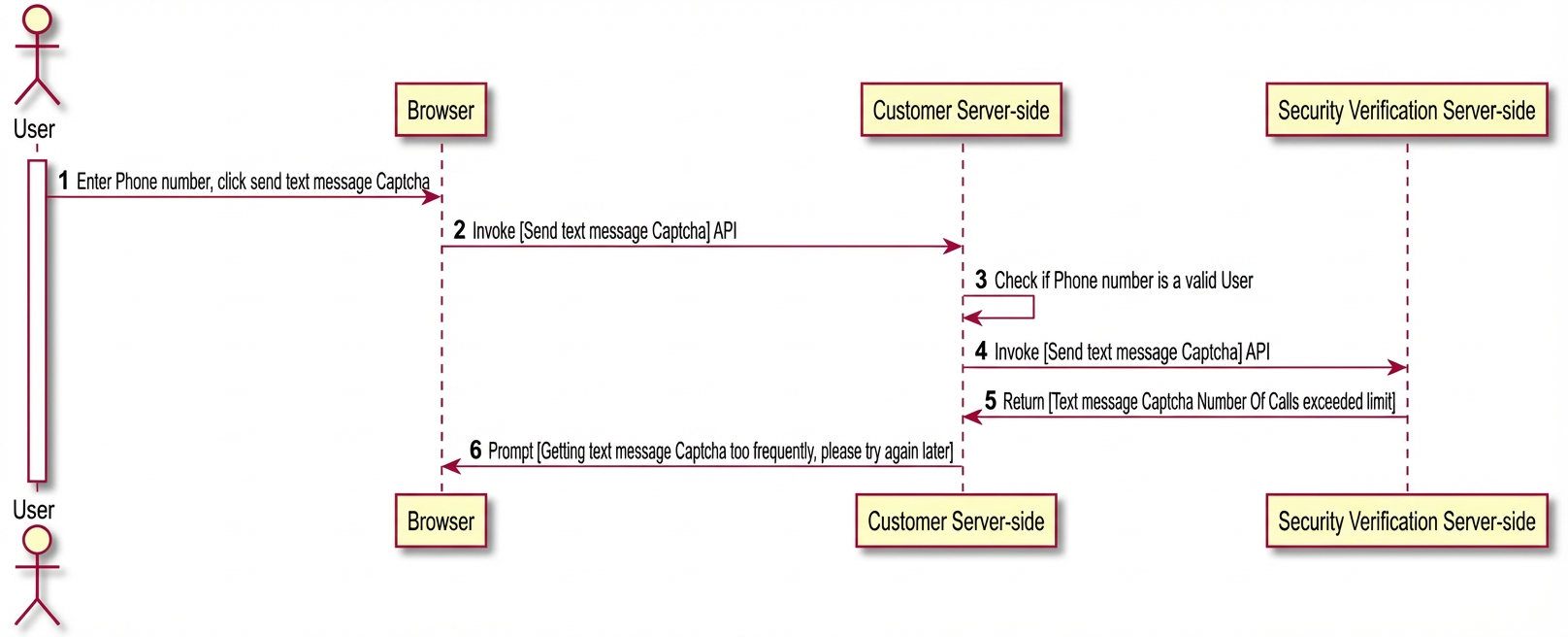
Verification code authentication API
A single API is used for verification code authentication. The `DoraemonAction` parameter specifies the action to perform. The request parameters and response vary based on the value of `DoraemonAction`. Specific request parameters are passed in the `MobileExtendParamsJson` parameter.
Request parameters
Name |
Type |
Required |
Example |
Description |
ApplicationExternalId |
String |
Yes |
A0000001 |
The application ID. This ID is specified when you create the application. You can find it on the application's product page. |
ServiceCode |
String |
Yes |
SMS |
The identifier for the authentication method. This is fixed to `SMS`. |
DoraemonAction |
String |
Yes |
SendSmsCode |
Related to SMS authentication. `SendSmsCode`: Sends an SMS verification code. `VerifySmsCode`: Checks an SMS verification code. `GetCaptchaCode`: Gets a CAPTCHA. `VerifyCaptchaCode`: Checks a CAPTCHA. Related to text messages. Send a text message. |
MobileExtendParamsJson |
String |
Yes |
eyJpZCI6ImI4NzkyOD |
The business parameters are first converted to a JSON string and then Base64-encoded. |
MobileExtendParamsJsonSign |
String |
Yes |
2d1adaf****8bfad |
The signature of the `MobileExtendParamsJson` parameter. The signature is generated using the application key. |
XClientIP |
String |
No |
10.11.XXX.XX |
The originating IP address of the client. We recommend that you pass this parameter. The security authentication service uses this parameter for intelligent threat detection. This parameter is also required for the SMS brute-force attack prevention policy that is based on the client IP address. |
Common status codes
Name |
Description |
Params.Illegal |
The parameter is invalid. This usually means the verification code flag is invalid. For example, the flag does not exist, has expired (after 5 minutes), has been checked too many times (3 times), or has already been authenticated. |
Operation.Failure.SmsAuth.Overflow.Captcha |
The number of calls exceeds the limit. A CAPTCHA is required. |
Operation.Failure.SmsAuth.Overflow.Pause |
The number of calls exceeds the limit. The API cannot be called again for a short period. |
Send an SMS verification code
The DoraemonAction is set to SendSmsCode.
MobileExtendParamsJson parameters
Name |
Type |
Required |
Example |
Description |
id |
String |
No |
b87928958d93caca4 |
The verification code flag. |
businessId |
String |
Yes |
QUICK_LOGIN |
The business flag. `QUICK_LOGIN` indicates a quick logon. |
phoneRegion |
String |
No |
86 |
The phone area code. The default value is `86`. |
phoneNumber |
String |
Yes |
186****2909 |
The phone number. |
Response data
Name |
Type |
Example |
Description |
Success |
boolean |
true |
Indicates whether the operation was successful. |
Code |
String |
Opreation.Success |
The status code. For more information, see the preceding table. |
Message |
String |
Opreation.Success |
The detailed description. |
RequestId |
String |
1C0EE50A-B3BB-42FD-AB59 |
The request ID. |
Data |
String |
- |
The business data. |
Data
Name |
Type |
Example value |
Description |
id |
String |
b87928958d93caca405aaf |
The verification code flag. This is required for validation. |
Check an SMS verification code
Set `DoraemonAction` to `VerifySmsCode`.
MobileExtendParamsJson parameters
Name |
Type |
Required |
Example |
Description |
id |
String |
Yes |
b87928958d93caca4 |
The verification code flag. |
answer |
String |
Yes |
2319 |
The value of the SMS verification code. |
Response Data
Name |
Type |
Example |
Description |
Success |
boolean |
true |
Indicates whether the operation was successful. |
Code |
String |
Opreation.Success |
The status code. For more information, see the preceding table. |
Message |
String |
Opreation.Success |
The detailed description. |
RequestId |
String |
1C0EE50A-B3BB-42FD |
The request ID. |
Data |
String |
The business data. |
Data
Name |
Type |
Example value |
Description |
id |
String |
b87928958d93caca405aaf |
The verification code flag. |
matched |
Boolean |
true |
Indicates whether the verification code matches. |
reachFailedCountThreshold |
Boolean |
false |
Indicates whether the failure threshold is reached. If `true`, you must call the API to send an SMS verification code again. |
Get a CAPTCHA
Set `DoraemonAction` to `GetCaptchaCode`.
MobileExtendParamsJson parameters
Name |
Type |
Required |
Example |
Description |
id |
String |
No |
b87928958d93caca4 |
The verification code flag. |
Response data
Name |
Type |
Example |
Description |
Success |
boolean |
true |
Indicates whether the operation was successful. |
Code |
String |
Opreation.Success |
The status code. For more information, see the preceding table. |
Message |
String |
Opreation.Success |
The detailed description. |
RequestId |
String |
1C0EE50A-B3BB-42FD-AB59 |
The request ID. |
Data |
String |
The business data. |
Data
Name |
Type |
Example |
Description |
id |
String |
b87928958d93caca405aaf |
The CAPTCHA flag. This is required to check the CAPTCHA. |
question |
String |
iVBORw0KGgoAAAANS |
The Base64-encoded CAPTCHA image. |
To display the Base64-encoded CAPTCHA image, add the prefix `data:image/png;base64,` to the value of this parameter.
Check a CAPTCHA
Set `DoraemonAction` to `VerifyCaptchaCode`.
MobileExtendParamsJson parameters
Name |
Type |
Required |
Example |
Description |
id |
String |
Yes |
b87928958d93caca4 |
The CAPTCHA flag. |
answer |
String |
Yes |
2319 |
The value of the CAPTCHA. |
Response data
Name |
Type |
Example |
Description |
Success |
boolean |
true |
Indicates whether the operation was successful. |
Code |
String |
Opreation.Success |
The status code. For more information, see the preceding table. |
Message |
String |
Opreation.Success |
The detailed description. |
RequestId |
String |
1C0EE50A-B3BB-42FD-AB59 |
The request ID. |
Data |
String |
The business data. |
Data
Name |
Type |
Example |
Description |
id |
String |
b87928958d93caca405aaf |
The verification code flag. |
matched |
Boolean |
true |
Indicates whether the verification code matches. |
reachFailedCountThreshold |
Boolean |
false |
Indicates whether the failure threshold is reached. If `true`, you must call the API to send an SMS verification code again. |
Send a text message
Set `DoraemonAction` to `Send`.
MobileExtendParamsJson parameters
Name |
Type |
Required |
Example |
Description |
signName |
String |
Yes |
Alibaba Cloud IDaaS |
The SMS signature. It must be approved in advance. |
templateCode |
String |
Yes |
QUICK_LOGIN |
The SMS template. It must be approved in advance. |
templateParams |
String |
No |
{"code":"AKtT"} |
The template parameters, in a JSON string format. |
phone |
String |
Yes |
86-1390000**** |
The phone number, in the format of `Area code-Number`. |
JAVA SDK
Maven dependencies
<dependency>
    <groupId>com.aliyun</groupId>
    <artifactId>aliyun-java-sdk-idaas-doraemon</artifactId>
    <version>[1.3.1,)</version>
</dependency>
<dependency>
<groupId>com.aliyun</groupId>
<artifactId>aliyun-java-sdk-core</artifactId>
<version>[4.4.3,)</version>
</dependency>Sample application
Before you run the sample application, configure the AccessKey for a Resource Access Management (RAM) user, the application ID, and the application key in the application.yml file.
idaas:
  doraemon:
		# An AccessKey of an Alibaba Cloud account has access permissions on all APIs. This poses a high security threat. We strongly recommend that you create and use a RAM user to access APIs or perform daily O&M. Log on to the RAM console to create a RAM user.
    # We strongly recommend that you do not hard-code the AccessKey ID and AccessKey secret in your code. This can lead to key leakage.
    accessKeyId:
    accessKeySecret:
    applicationExternalId:
    applicationExternalSecret: