You can call advanced interfaces to operate directly on documents. In this topic, the demo object refers to the object instantiated from the JavaScript Software Development Kit (JS-SDK).
This document is no longer maintained. We recommend that you use the new version of Intelligent Media Management.
For a comparison between the new and legacy versions of Intelligent Media Management, see Usage guide for new and legacy versions.
For more information about document preview in the new version of Intelligent Media Management, see WebOffice frontend development.
The interfaces provided by the JS-SDK are styled similar to Visual Basic for Applications (VBA) and are compatible with VBA interfaces and parameters.
Call flow
Wait for the ready state.
await demo.ready() // Wait for the demo to be ready before calling advanced interfaces.Obtain the application object for the document type.
You can determine the current document type based on WordApplication, ExcelApplication, PPTApplication, or PDFApplication.
// The document is a Word document.
const wordApp = demo.WordApplication()
// The document is an Excel spreadsheet.
const excelApp = demo.ExcelApplication()
// The document is a PowerPoint presentation.
const pptApp = demo.PPTApplication()
// The document is a PDF document.
const pdfApp = demo.PDFApplication()
// Automatically detect the document type.
const app = demo.Application
Call an advanced interface.
This topic provides an example of how to export text to a PDF file.
// Export the Word document as a PDF document.
  async function exportPdf() {
    await wordApp.ActiveDocument.ExportAsFixedFormat()
  }
Release objects
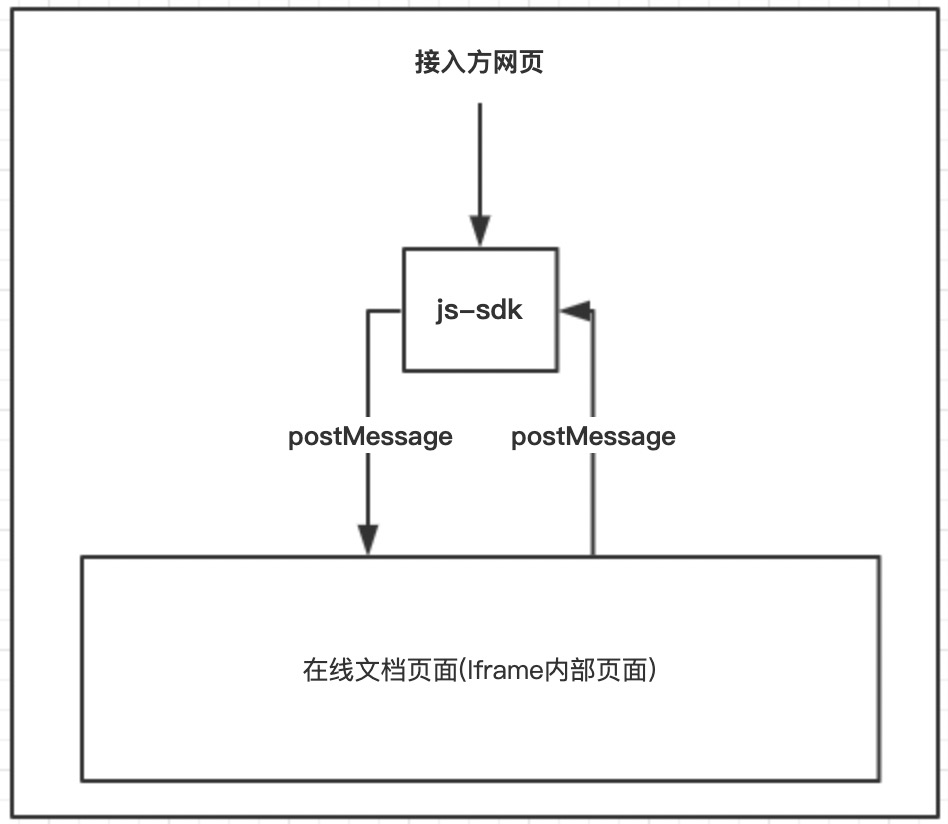
Cross-domain security restrictions in iframes prevent direct calls to internal functions and variables. The advanced interface objects provided by the JS-SDK are mappings of the iframe's internal objects and communicate using postMessage. The following figure shows this process. As a result, you must manually release some objects.
Objects that require manual release are specified in the documentation. You must follow the instructions in the documentation.
You can release objects individually or in batches.
Release an object individually
Code example
const app = demo.ExcelApplication()
// For example, get the WorkSheet object from a spreadsheet.
const sheet = demo.Sheets.Item("sheet1")
// The returned sheet object is a mapping object. It has all the properties and methods of the internal iframe object. These properties and methods are mapped to the iframe.
sheet.Activate() // Switch the sheet.
//...do something
// When the object is no longer needed, release it manually. This notifies the iframe to destroy the corresponding object.
sheet.Destroy()
Release objects in a batch
To destroy multiple objects, you can release them in a batch within a specified range.
Code example
const stack1 = app.Stack()
//do something
stack1.End() // Release the objects in the stack1 range.