Due to the cross-domain security restrictions of iframes, the functions and variables inside iframes cannot be directly called. The objects of advanced operations provided by the JS-SDK are mappings of the internal objects of iframe. The JS-SDK operations and the internal objects of iframe communicate by using the postMessage method. Therefore, some objects need to be manually released.
Note
Objects that need to be manually released are described in the documentation.
The following figure shows the relationship between the website that requests document editing and the online document editing in iframe.
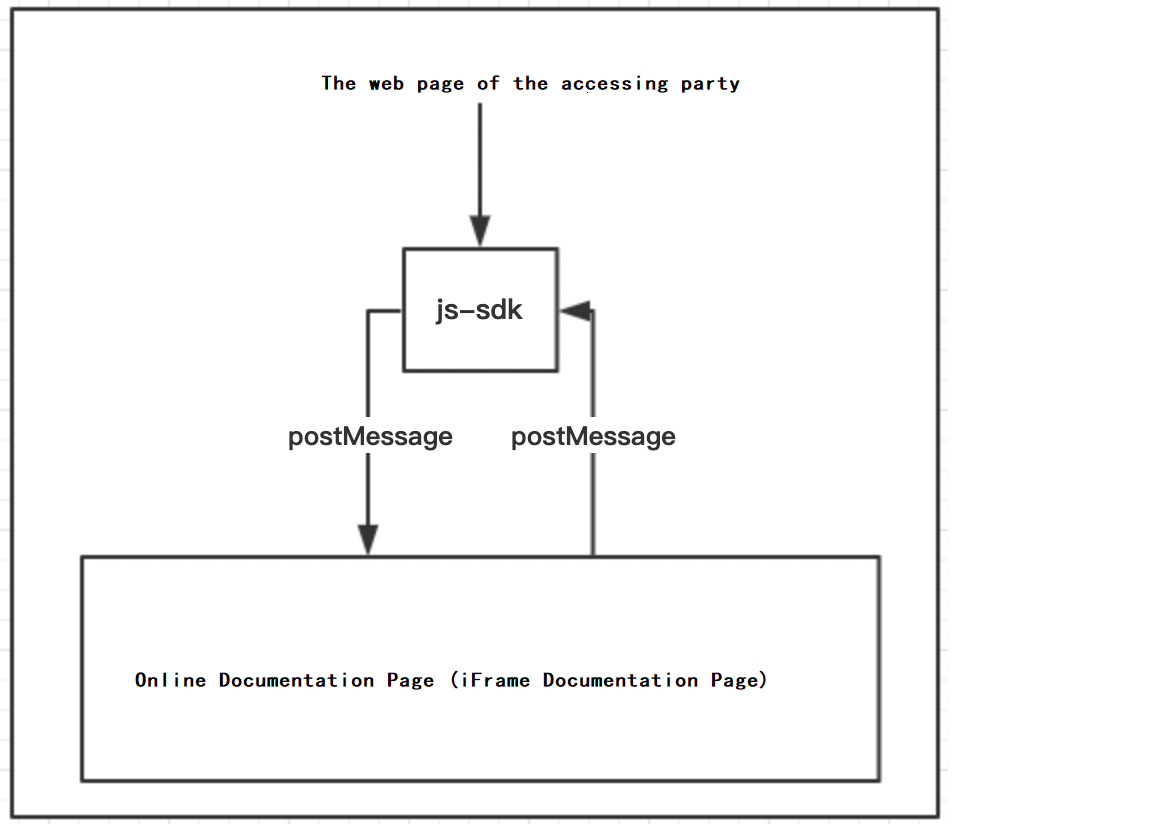
Manually release an object
Example
const app = instance.ExcelApplication();

// For example, obtain a worksheet object in a table document.
const sheet = instance.Sheets.Item('sheet1');

// The worksheet object that you obtain is a mapping object that has all the properties and methods of the internal object of iframe. All the properties and methods of the object are mapped to the iframe.
sheet.Activate(); // Change the worksheet.

//...do something

// If you do not need to modify the object, you can manually release it.
// In this case, iframe is notified to release the corresponding internal object.
sheet.Destroy();
Release multiple objects at the same time
If needed, you can release multiple objects by range.
Sample code:
const stack = app.Stack();

//...do something

stack.End(); // All objects in the stack range are released
.
该文章对您有帮助吗?