Lightweight HD
Lightweight HD is a feature of Intelligent Media Management (IMM) that reduces video bitrate and file size while maintaining or improving perceived visual quality. This helps lower storage and bandwidth costs and is ideal for scenarios such as online playback and media asset storage, where both quality and cost efficiency matter.
Overview
Lightweight HD uses intelligent encoding optimization algorithms to significantly enhance visual experience at the same bitrate—or greatly reduce bitrate while preserving clarity. This effectively cuts bandwidth and storage costs. Compared with traditional transcoding solutions, Lightweight HD delivers “lighter streams, higher definition” playback across multiple devices and scenarios.
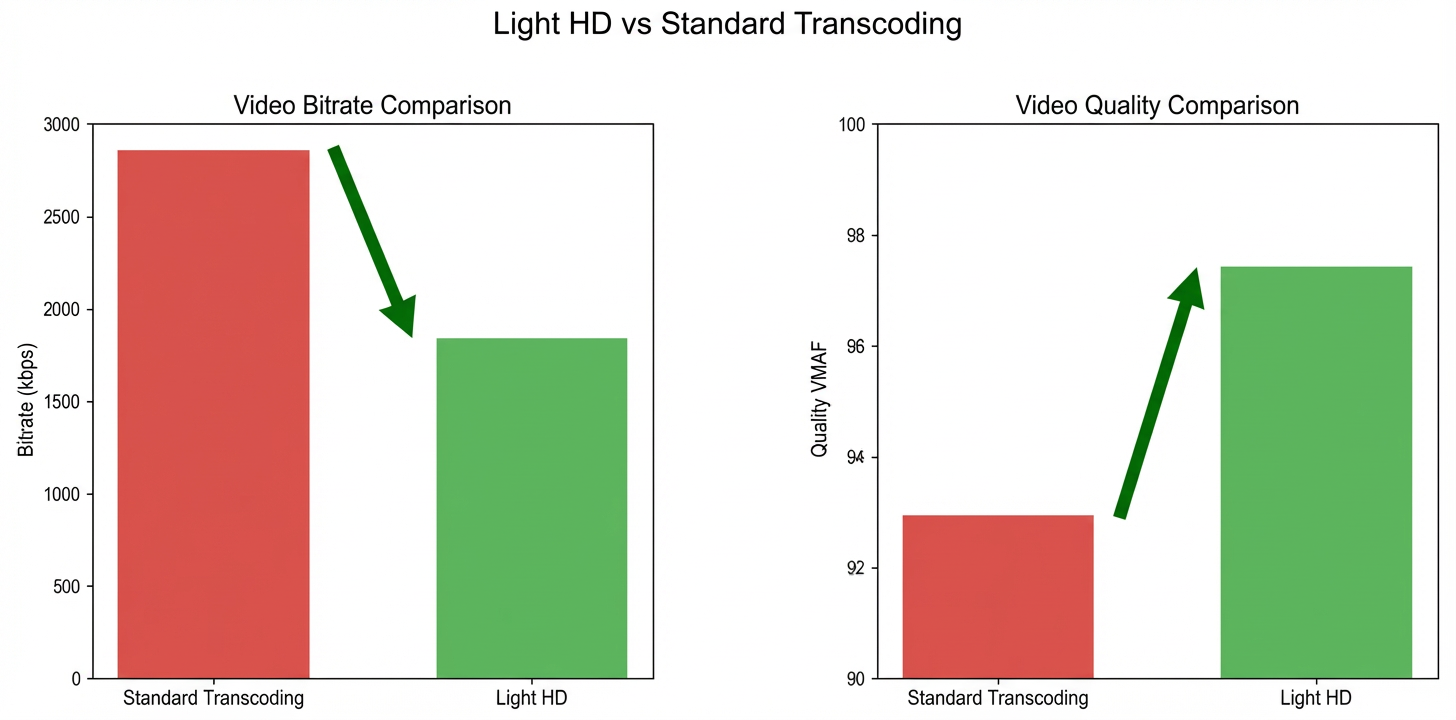
Take a 1920×1080 video as an example. The following table shows a comparison before and after using Lightweight HD:
|
Transcoding method |
Standard transcoding |
Lightweight HD |
|
File size |
4359295B |
2803244B |
|
Bitrate |
2858 kbits |
1838 kbits |
|
Quality score (VMAF) |
92.938 |
97.417 |
Scenarios
-
Cross-device compatibility: Transcoding converts videos into formats supported by different devices—such as smartphones, tablets, computers, and smart TVs—to ensure smooth playback.
-
Streaming playback: Streaming services transcode videos into multiple formats and bitrates. This allows dynamic adaptation to users’ network conditions and improves viewing experience.
-
Video compression: Transcoding reduces file size while preserving quality. This makes storage and transmission more efficient, especially under limited network bandwidth.
Billing details
The pricing for Lightweight HD will change on June 10, 2026. Plan your usage in advance to avoid service disruption.
|
Billing Item Description |
Standard transcoding (CNY/second) |
Lightweight HD transcoding (CNY/second) |
|
H.264-LD |
0.00036 |
0.00108 |
|
H.264-SD |
0.00050 |
0.0015 |
|
H.264-HD |
0.00090 |
0.0027 |
|
H.264-2K |
0.00200 |
0.006 |
|
H.264-4K |
0.00450 |
0.0135 |
|
H.264-8K |
0.01350 |
0.054 |
|
H.265-LD |
0.00150 |
0.0045 |
|
H.265-SD |
0.00250 |
0.0075 |
|
H.265-HD |
0.00500 |
0.015 |
|
H.265-2K |
0.00800 |
0.024 |
|
H.265-4K |
0.01600 |
0.048 |
|
H.265-8K |
0.04800 |
0.192 |
Supported audio and video formats
Category | Format |
Audio | All mainstream formats, such as AAC, MP3, WAV, FLAC, WMA, AC3, and OPUS. |
Video | All mainstream formats, such as MP4, MPEG-TS, MKV, MOV, AVI, FLV, M3U8, WebM, WMV, RM, and VOB. |
How to use
Prerequisites
Create an AccessKey. For more information, see Create an AccessKey.
Activate Object Storage Service (OSS) and create a bucket. For more information, see Create a bucket.
Activate Intelligent Media Management (IMM). For more information, see Activate IMM.
Create a project in the IMM console. For more information, see Create a project.
NoteYou can also call an API operation to create a project. For more information, see Create a project.
You can call the ListProjects operation to list all projects that are created in a specified region.
Step 1: Upload a file
Use the OSS console to upload your media file to the bucket in the same region as your IMM project.
On the upload page, File ACL defaults to Inherit Bucket. Click Scan Files to select the media file you want to upload. Uploaded files must not exceed 5 GB. For files larger than 5 GB, use ossutil, the OSS SDK, or the OSS API.
Step 2: Use IMM Lightweight HD
Invoke the Create Media Transcoding Job API to create a video transcoding job and enable VideoSlim.
Parameter details
The following examples show API requests for different scenarios. You can test or call them directly in the OpenAPI Explorer. These examples use the IMM project test-project and the video file oss://test-bucket/video-demo/seaside-skyscrapers.mov.
For more information about ApsaraVideo Media Processing features and usage, see ApsaraVideo Media Processing.
-
For best playback compatibility, transcode videos to MP4 or HLS format. Only H.264/H.265 codecs are supported. PixelFormat must be yuv420p, and bit depth must be 8-bit.
-
Video transcoding affects quality. Adjust Bitrate or CRF (Constant Rate Factor) to balance quality and file size. Higher bitrate or lower CRF means better quality and larger file size.
-
With the same codec (H.264/H.265), Lightweight HD saves 30% on storage and bandwidth costs compared to standard transcoding and delivers noticeably better subjective quality.
-
Note: Lightweight HD does not support multi-output or video stitching.
-
To avoid overwriting output files, use variables in the
Targets.URIparameter to generate dynamic filenames. For available variables, see TargetURI template.
H.264 VBR configuration with Lightweight HD
Use H.264 encoding without changing resolution, frame rate, or other video parameters.
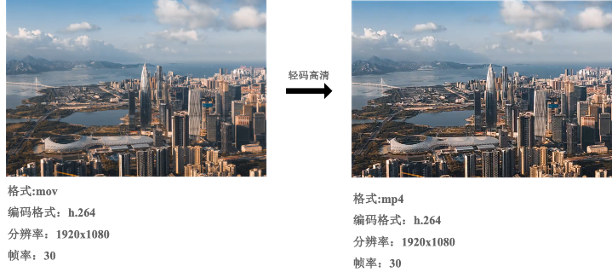
Transcoding details
-
Video format: mov → mp4
-
Video settings: Codec is H.264, Bitrate is 3000 kbps, VideoSlim enabled, original resolution and frame rate preserved
-
Audio settings: AAC codec, 96 kbps bitrate, stereo, 44.1 kHz sample rate
-
Output path: oss://test-bucket/video-demo/seaside-skyscrapers.mp4
-
Completion notification: Send an MNS message to the MNS topic “test-mns-topic”
For an SDK example, see OpenAPI Explorer. Enable VideoSlim and adjust parameters as needed before testing.
Request parameters
{
  "ProjectName": "test-project",
  "Notification": {
    "MNS": {
      "TopicName": "test-mns-topic"
    }
  },
  "Sources": [
    {
      "URI": "oss://test-bucket/video-demo/seaside-skyscrapers.mov"
    }
  ],
  "Targets": [
    {
      "Audio": {
        "TranscodeAudio": {
          "Bitrate": 96000,
          "Channel": 2,
          "Codec": "aac",
          "SampleRate": 44100
        }
      },
      "Container": "mp4",
      "URI": "oss://test-bucket/video-demo/seaside-skyscrapers.mp4",
      "Video": {
        "TranscodeVideo": {
          "VideoSlim":1,
          "Bitrate":"3000000",
          "Codec": "h264",
          "PixelFormat": "yuv420p"
        }
      }
    }
  ]
}
H.264 CRF configuration with Lightweight HD
Use H.264 encoding with a target resolution of 640×480 and frame rate of 60 fps. If the source video has a lower frame rate, use the source value.
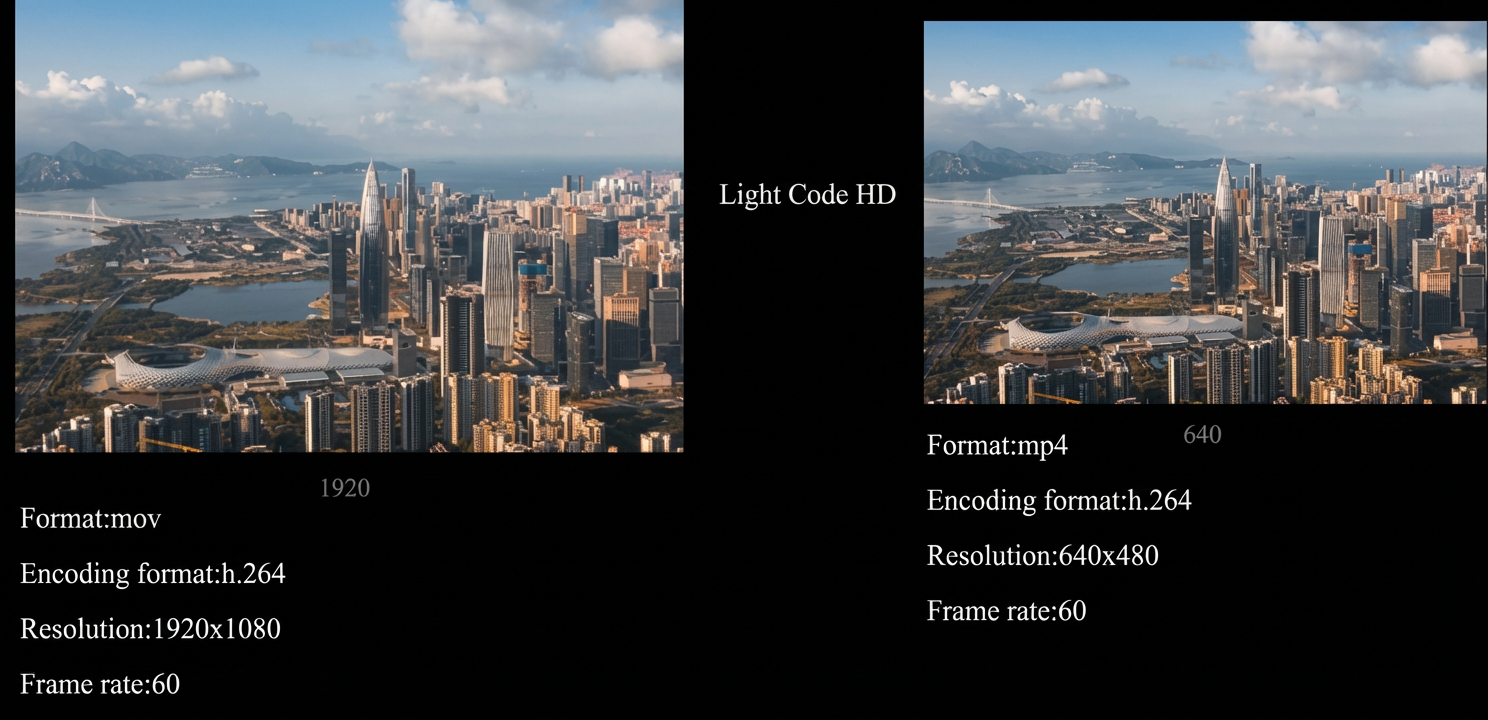
Transcoding details
Video format: mov → mp4
Video settings: Codec is H.264, CRF is 25, VideoSlim enabled
Audio settings: AAC codec, 96 kbps bitrate, stereo, 44.1 kHz sample rate
Output path: oss://test-bucket/video-demo/seaside-skyscrapers.mp4
Completion notification: Send an MNS message to the MNS topic “test-mns-topic”
For an SDK example, see OpenAPI Explorer. The example parameters are pre-filled. Modify them as needed before testing.
Request parameters
{
  "ProjectName": "test-project",
  "Notification": {
    "MNS": {
      "TopicName": "test-mns-topic"
    }
  },
  "Sources": [
    {
      "URI": "oss://test-bucket/video-demo/seaside-skyscrapers.mov"
    }
  ],
  "Targets": [
    {
      "Audio": {
        "TranscodeAudio": {
          "Bitrate": 96000,
          "Channel": 2,
          "Codec": "aac",
          "SampleRate": 44100
        }
      },
      "Container": "mp4",
      "URI": "oss://test-bucket/video-demo/seaside-skyscrapers.mp4",
      "Video": {
        "TranscodeVideo": {
          "VideoSlim":1,
          "Codec": "h264",
          "Resolution":"640x480",
          "FrameRateOption":"adaptive",
          "CRF":"25",
          "FrameRate": "60",
          "PixelFormat": "yuv420p"
        }
      }
    }
  ]
}
H.265 VBR configuration with Lightweight HD
Encode video using H.265. If the source video has a lower frame rate, use the source value.
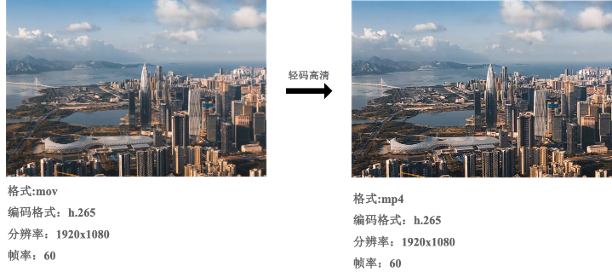
Transcoding details
Video format: mov → mp4
Video settings: H.265 codec, Bitrate 3000 kbps, resolution 1920×1080, frame rate 60
Audio settings: AAC codec, 128 kbps bitrate, stereo, 44.1 kHz sample rate
Output path: oss://test-bucket/video-demo/seaside-skyscrapers.mp4
Completion notification: Send an MNS message to the MNS topic “test-mns-topic”
For an SDK example, see OpenAPI Explorer. The example parameters are pre-filled. Modify them as needed before testing.
Request parameters
{
  "ProjectName": "test-project",
  "Notification": {
    "MNS": {
      "TopicName": "test-mns-topic"
    }
  },
  "Sources": [
    {
      "URI": "oss://test-bucket/video-demo/seaside-skyscrapers.mov"
    }
  ],
  "Targets": [
    {
      "Audio": {
        "TranscodeAudio": {
          "Bitrate": 96000,
          "Channel": 2,
          "Codec": "aac",
          "SampleRate": 44100
        }
      },
      "Container": "mp4",
      "URI": "oss://test-bucket/video-demo/seaside-skyscrapers.mp4",
      "Video": {
        "TranscodeVideo": {
          "VideoSlim":1,
          "Bitrate":"3000000",
          "Codec": "h265",
          "FrameRateOption":"adaptive",
          "FrameRate":"60",
          "PixelFormat": "yuv420p"
        }
      }
    }
  ]
}
H.265 CRF configuration with Lightweight HD
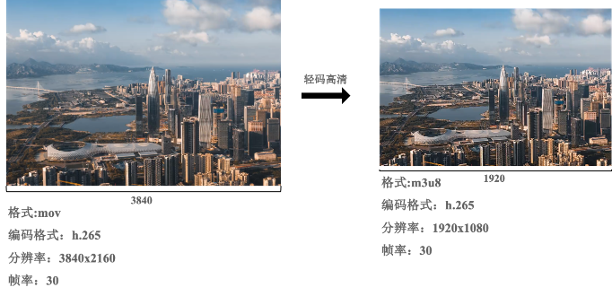
Transcode the video to H.265 at 1920×1080 resolution and 30 fps. Use HLS segmentation. If the source video has lower resolution, use the source value.
Transcoding details
Video format: mov → m3u8
Segmentation: HLS format, segment length 10 seconds
Video settings: H.265 codec, CRF 25, resolution 1920×1080, frame rate 30
Audio settings: AAC codec, 128 kbps bitrate, stereo, 44.1 kHz sample rate
Output paths:
oss://test-bucket/video-demo/seaside-skyscrapers.m3u8,oss://test-bucket/video-demo/seaside-skyscrapers-%d.tsCompletion notification: Send an MNS message to the MNS topic “test-mns-topic”
For an SDK example, see OpenAPI Explorer. The example parameters are pre-filled. Modify them as needed before testing.
Request parameters
{
  "ProjectName": "test-project",
  "Notification": {
    "MNS": {
      "TopicName": "test-mns-topic"
    }
  },
  "Sources": [
    {
      "URI": "oss://test-bucket/video-demo/seaside-skyscrapers.mov"
    }
  ],
  "Targets": [
    {
      "Audio": {
        "TranscodeAudio": {
          "Bitrate": 128000,
          "Channel": 2,
          "Codec": "aac",
          "SampleRate": 44100
        }
      },
      "Container": "ts",
      "Segment": {
        "Duration": 10,
        "Format": "hls"
      },
      "URI": "oss://test-bucket/video-demo/seaside-skyscrapers.{autoext}",
      "Video": {
        "TranscodeVideo": {
          "AdaptiveResolutionDirection": true,
          "Codec": "h265",
          "VideoSlim":1,
          "CRF": 25,
          "FrameRate": 30,
          "PixelFormat": "yuv420p",
          "Resolution": "1920x1080",
          "ResolutionOption": "adaptive",
          "ScaleType": "fit"
        }
      }
    }
  ]
}