Intelligent workflow configuration best practices
Intelligent workflows enable modular, customizable media processing pipelines. This topic provides configuration examples for live stream translation and RTC caption recognition.
Scenario 1: Live stream translation
An intelligent workflow performs speech recognition on a live stream, generates real-time translations, and sends the intermediate and final results for each sentence to your HTTP server through a callback.
Overall topology configuration
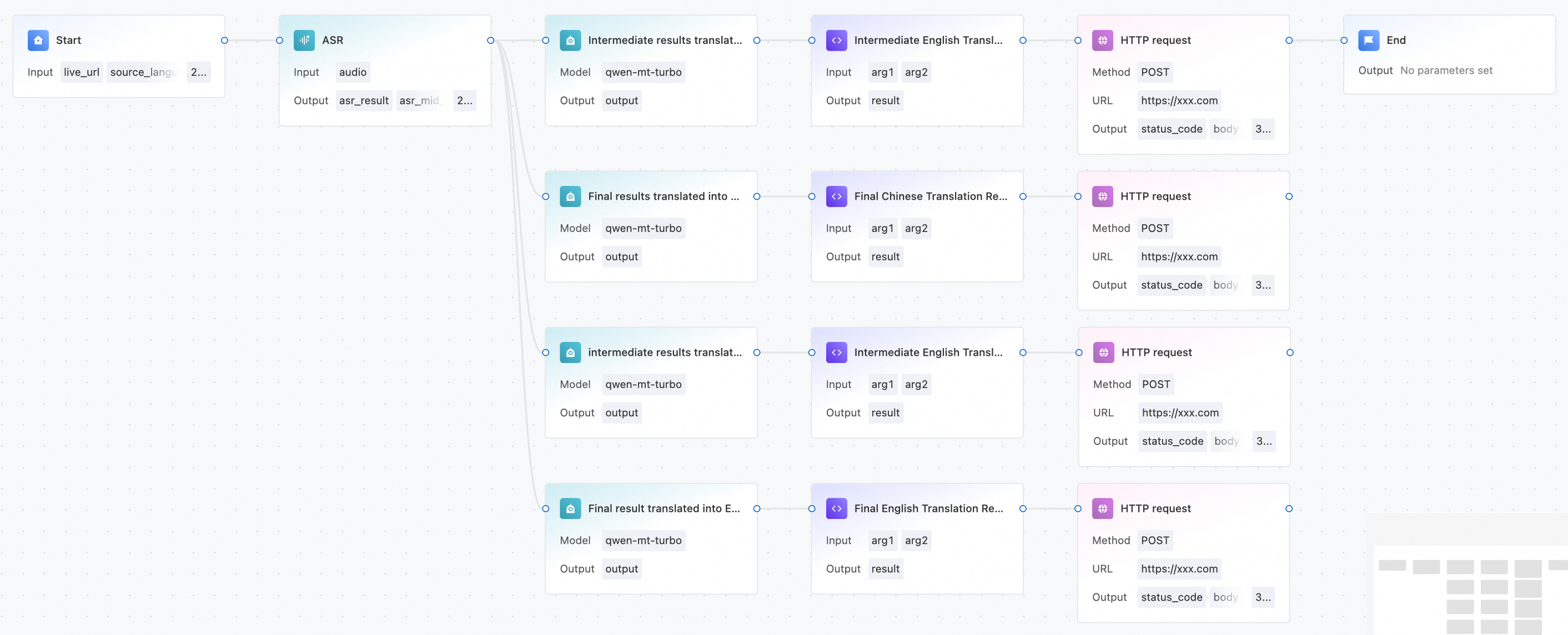
The topology includes six nodes: Start, Automatic Speech Recognition (ASR), Large Language Model (LLM), Code Execution, HTTP Request, and End.
The node configurations are as follows:
Start node
When you start the workflow, pass the following input parameters to the Start node:
{
  "live_url": {
      "Url": "rtmp://test.com/test_app/test_stream?auth_key=test",
      "MaxIdleTime": 20
  },
  "source_language_id": "es"
}
Parameter | Required | Description |
live_url | Yes | Pass as an Object with the following fields:
|
source_language_id | Yes | The source language. Select a value from the following list. |
Mandarin Chinese: zh
English: en
Spanish: es
Japanese: ja
Korean: ko
French: fr
Thai: th
Russian: ru
German: de
Guangxi dialect: guangxi
Portuguese: pt
Cantonese: yue
Traditional Cantonese: yue_hant
Minnan: minnan
Polish: pl
Italian: it
Ukrainian: uk
Dutch: nl
Arabic: ar
Indonesian: id
Turkish: tr
Vietnamese: vi
ASR node
The ASR node configuration panel contains the following settings:
Model configuration: Select System preset (other options include Third-party plugin and Custom integration)
Silence timeout: Default value is 400 ms
Custom hotwords: Upload a TXT file (up to 500 words, each word up to 10 characters, file size up to 100 KB, UTF-8 encoding without BOM)
Set the input variable to the live_url parameter of the Start node, and set the input language to the source_language_id parameter of the Start node. Leave the other parameters as default or configure them as needed.
LLM node
This example configures the qwen-mt-turbo model using the Custom Model Integration (OpenAI-compliant) method. Set Target protocol address to https://dashscope.aliyuncs.com/compatible-mode/v1. For more information about how to obtain an API key, see Obtain an API Key. In the model parameters (JSON), configure the source_lang and target_lang fields within the translation_options object. The user prompt can directly reference the intermediate or final results from the ASR node.
Code execution node
The node is named Intermediate English Translation Result Assembly. Configure two input variables: arg1 (Object type, referencing the ASR recognition result) and arg2 (String type, referencing the translation result). The Python 3 code executes arg1['TransText'] = arg2 and return {"result": arg1}. The output variable result is of Object type.
To merge the ASR and LLM translation results for the callback, use a Python script in the Code Execution node. Set the LLM output to the TransText field of the ASR result, then return a JSONObject as the callback data.
HTTP request node
Configure the following settings:
Request method: POST.
API configuration: The public address of your callback server.
URL parameters: result_type=mid_en. You can customize the callback type.
Request body type: json.
Request body data: Reference the JSON output from the callback data.
Scenario 2: RTC caption recognition
An intelligent workflow performs ASR on a specified audio stream in a Real-Time Communication (RTC) channel. The recognition results are sent to the client through a DataChannel callback to display captions.
Overall topology configuration

The topology includes four nodes: Start, ASR, RTC Ingest, and End.
The node configurations are as follows:
Start node
Variable descriptions:
rtc: When you start the workflow, pass the RTC parameters. These include AppId, ChannelId, and UserId. You also need to select the output audio stream.
source_language_id: The source language for recognition.
push_app_id: The RTC AppId for the DataChannel callback.
push_channel_id: The RTC ChannelId for the DataChannel callback.
push_uid: The RTC UserId for the DataChannel callback.
Variable example:
{
  "rtc": {
    "AppId": "xxx",
    "ChannelId": "rtcaitest1",
    "UserId": "userA"
  },
  "source_language_id": "zh",
  "push_app_id": "app_id",
  "push_channel_id": "channel_id",
  "push_uid": "user_id"
}
ASR node
In the ASR node configuration panel, Model configuration supports three modes: System preset, Third-party plugin, and Custom integration. Silence timeout defaults to 400 ms. Custom hotwords support uploading TXT files with up to 500 words, each word up to 10 characters, file size up to 100 KB, UTF-8 encoding without BOM.
Set the input variable to the audio from rtc parameter output audio stream of the Start node, and set the input language to the source_language_id parameter of the Start node. Leave the other parameters at their default values or customize them as needed.
RTC ingest node
The audio input variable type is Stream. Reference the audio stream variable value.
The text input variable must reference the output text from the ASR node. The App ID, channel ID, and user ID correspond to the push_app_id, push_channel_id, and push_uid fields of the Start node and represent the role information for DataChannel stream ingest.
Identify troubleshooting with no results or tasks that stop automatically
RTC subtitle recognition needs to complete the following steps in turn, any interruption will lead to no recognition results. If the client does not receive subtitles, or the task automatically becomes stopped, troubleshoot in the following order:
Publish audio by the target user: Confirm that the user corresponding to the start node rtc.UserId has joined the rtc.ChannelId and is publishing an audio stream (no mute stream push or stop stream push). The client can collect the microphone sound, which does not mean that the audio has been released to the channel.
Task Startup: Confirm that the StartAIWorkflow returned the TaskId. Call the GetAIWorkflowTask query, the task status should be running.
Subscribe to audio: Confirm that the AppId, ChannelId, and UserId in the rtc are the same as the values used when the client enters the conference, including the case. If the UserId does not match, the workflow does not subscribe to the target audio.
Speech recognition: Call the GetAIWorkflowTask to check whether the ASR node in the NodeResults has output. The silence time of the ASR node (400 ms by default) is only used for speech sentences and is not a stop condition for the task.
Result: When using the RTC stream pushing node, make sure that the push_app_id, push_channel_id, and push_uid are correct and the client has received the DataChannel message. When you use HTTP to request a node callback, confirm that the callback address can be accessed from the public network.
NoteIf the task is stopped but the NodeResults and Outputs returned by the GetAIWorkflowTask cannot explain the reason for the stop, make sure that the business side does not call the StopAIWorkflowTask for the TaskId.