Integrate Real-time Conversational AI for embodied AI scenarios
This topic describes how to integrate the Alibaba Cloud ApsaraVideo Real-time Communication (ARTC) service into embodied AI devices, such as robots, that run on Linux.
Prerequisites
Create a Real-Time Communication agent. For more information, see Real-Time Communication Quick Start.
Alibaba Cloud provides a Python version of the Linux demo for your reference.
Core concepts and limitations
Before you begin coding, note the following key concepts and limitations of Linux platform integration:
ARTC SDK: The Linux platform does not currently have a standalone Real-time Conversational AI software development kit (SDK). Instead, all features are implemented through the general-purpose Linux ARTC SDK.
Custom audio and video I/O: The Linux SDK supports only custom audio input and playback modes. You are responsible for capturing audio data from the microphone and pushing it to the SDK. You must also retrieve audio data from the SDK and play it through the speaker. The SDK does not directly operate sound card devices. This design provides maximum flexibility for embedded systems.
Platform architecture:
x86 architecture: The official Linux ARTC SDK is provided for the x86 architecture.
ARM architecture: If your device uses the ARM architecture, first use the x86 version to verify the process in your developer environment. After verification, contact Alibaba Cloud sales and provide your ARM platform toolchain to obtain a custom ARM version of the SDK.
Integration steps
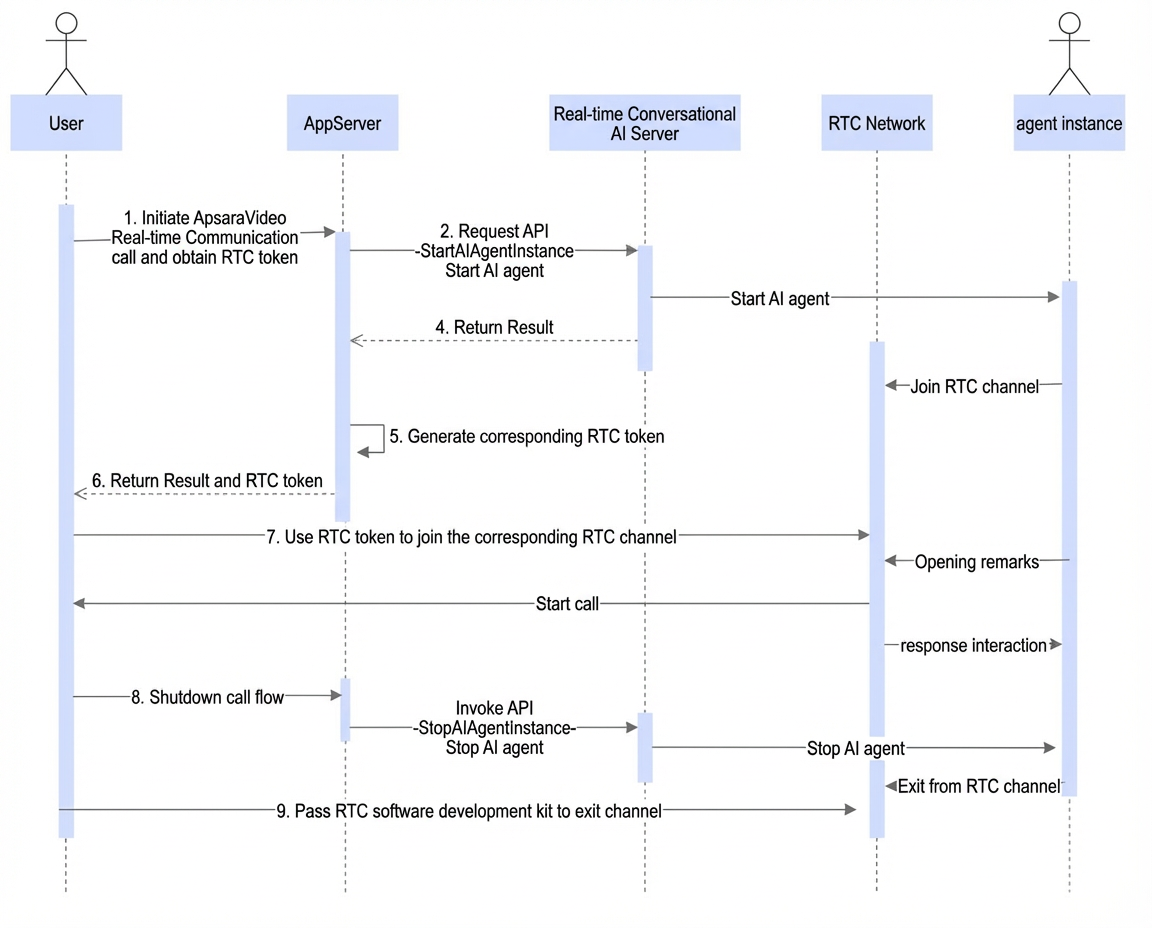
The following figure shows the complete interaction flow between the embodied AI client and the AI agent through the ARTC service. For the Linux SDK integration steps, see Implement Real-Time Communication on Linux.
1. Engine initialization and parameter settings
Correctly initializing the RTC engine and configuring key parameters is the first step to achieving low-latency AI interaction.
# Initialize the engine
eventHandler = EngineEventListener()
h5mode = False # Set to True to enable H5 compatibility mode for interoperability with web clients
currentPath = os.getcwd()
coreServicePath = os.path.abspath(os.path.join(currentPath, "Release", "lib", "AliRtcCoreService"))
# Set low-latency configurations for Real-time Conversational AI
extra_jobj = {"user_specified_disable_audio_ranking": "true",
                            "user_specified_client_biz":1,
"neteq_maximum_delay":50,                            "user_specified_use_external_audio_record":"TRUE"}
extra = json.dumps(extra_jobj)
self.rtc_engine = AliRTCEngine.CreateAliRTCEngine(eventHandler, 42000, 45000, "/tmp", coreServicePath, h5mode, extra)

# Create a token locally. If you have an app server, you can get the token from it.
authInfo = AuthInfo()
authInfo.appid = '{appid}'
appkey = '{appkey}'
authInfo.userid = 'test'
authInfo.username = authInfo.userid
authInfo.channel = chid
expire = datetime.datetime.now() + datetime.timedelta(days=1)
authInfo.timestamp = int(time.mktime(expire.timetuple()))
authInfo.token = self.rtc_engine.GenerateToken(authInfo, appkey)

# Enable audio dump for debugging audio issues. Change the value of user_specified_audio_dump_path to an existing path in your local environment.
params = {
                "audio": {
                    "user_specified_audio_dump_on_call": "TRUE",
                    "user_specified_audio_dump_path": "/home/rtc/aliyun-audio/"
                }
            }
self.rtc_engine.SetParameter(json.dumps(params))

# Enable the Data Channel to send and receive data
self.rtc_engine.SetParameter('{"data":{"enablePubDataChannel":true,"enableSubDataChannel":true}}')

# Enable audio stream ingest
self.rtc_engine.PublishLocalAudioStream(True)
# Enable video stream ingest
self.rtc_engine.PublishLocalVideoStream(True)
self.rtc_engine.EnableLocalVideo(False)
# Enable custom audio input. Set the sample rate and number of channels for the audio input from your service.
self.rtc_engine.SetExternalAudioSource(True, sampleRate=16000, channelsPerFrame=1)
# Set the role for real-time interaction
self.rtc_engine.SetClientRole(AliEngineClientRole.AliEngineClientRoleInteractive)

# Join Channel
joinConfig = JoinChannelConfig()
joinConfig.channelProfile = ChannelProfile.ChannelProfileInteractiveLive
joinConfig.subscribeAudioFormat = AudioFormat.AudioFormatPcmBeforMixing
joinConfig.isAudioOnly = False
joinConfig.publishAvsyncMode = PublishAvsyncMode.PublishAvsyncNoDelay
joinConfig.subscribeMode = SubscribeMode.SubscribeAutomatically
joinConfig.publishMode = PublishMode.PublishAutomatically
# In a Real-time Conversational AI scenario, the embodied AI client must join the channel as a human.
self.rtc_engine.JoinChannelWithProperty(authInfo.token, AliEngineUserParam(
    channelId=authInfo.channel,
    userId = authInfo.userid,
    userName = authInfo.username,
    capabilityProfile = AliCapabilityProfile.AliCapabilityProfileAiHuman
), joinConfig)
2. Set up acoustic echo cancellation (AEC)
Enable acoustic echo cancellation (AEC): To prevent echo from the robot's speaker being recaptured by the microphone, enable the AEC feature after you successfully join the channel.
Execute this operation in the OnJoinChannelResult callback function:
def OnJoinChannelResult(self, result:int, channel:str, userId:str) -> None:
  self.rtc_engine.SetParameter('{"audio":{"user_specified_external_audio_aec":"TRUE"}}')
3. Custom input and playback
The Linux SDK supports only custom audio input and playback. It does not support direct SDK control of the sound card for audio capture or playback. For more information, see Custom audio capture.
Send user audio data: Your application needs to capture PCM audio data from a microphone or another source. Then, you can push the data to the SDK for encoding and sending using the following interface.
self.rtc_engine.PushExternalAudioFrameRawData(audioSamples, sampleLength, timestamp)Receive AI audio data: The voice generated by the AI agent (PCM data) is returned through the
OnSubscribeAudioFramecallback function. In this function, you can retrieve the audio data and play it through a speaker or perform other processing.
def OnSubscribeAudioFrame(self, uid: str, frame: AliRTCEngine.AudioFrame) -> None:
  pass
Feature practices
Basics: How to pass through instruction data from the LLM during a conversation with an embodied AI robot?
When a user gives an instruction, such as "wave to me", the large language model (LLM) must generate an instruction and send it to the robot for execution. The following three implementation methods are recommended:
LLM Function Calling:
ASR detects the user's voice, converts it to text, and sends it to the LLM.
The LLM understands the intent and calls a predefined Function Call (custom plug-in).
This plug-in directly triggers the corresponding interface on your business server-side, which then remotely controls the robot to perform the action.
Filtered playback + Client-side instruction parsing:
ASR -> LLM. The LLM generates a reply that includes spoken text, such as "Okay, watch me perform", and a machine instruction, such as
{"action": "wave_hand"}.Use the filtered playback feature of Real-time Conversational AI to filter out the instruction content during playback. For more information, see Filter playback content.
The robot client receives the message, parses the instruction, and calls a local API to perform the action.
Server-side callback + Data Channel :
ASR -> LLM. The LLM performs internal intent recognition. When an intent is recognized, it triggers a server-side callback.
The business backend determines that an instruction needs to be executed. It then calls the SendAIAgentDataChannelMessage - Send a Data Channel message to an agent call API to send the instruction through the RTC service.
The robot client receives and executes the message through the Data Channel. For more information, see Send custom messages to a client.
Advanced: Receive real-time captions and custom messages
Real-time captions, agent status, and the custom instructions mentioned earlier are all transmitted through the Data Channel during the AI interaction. The client must listen for the OnDataChannelMsg callback to receive this information. For more information, see Real-time captions.
def OnDataChannelMsg(self, uid: str, msg: AliRTCEngine.AliEngineDataChannelMsg) -> None:
    dataChannelMsg = msg.data.decode('utf-8')
    try:
        print(dataChannelMsg)
        msg = json.loads(dataChannelMsg)
        if msg["data"] and msg["data"]["text"]:
            # Extract the real-time caption text
            print(msg["data"]["text"])
    except Exception as e:
        pass