Normalization
This topic describes the normalization component.
Features
This component normalizes input data and supports the min-max and Z-score methods.
Calculation logic
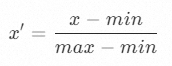
Min-max normalization: Performs a linear transformation to map data to the [0, 1] range. The formula is:
Z-score normalization: Transforms data to follow a standard normal distribution. The formula is:
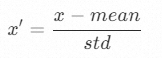
In the formulas, x is the raw data, min is the minimum value, max is the maximum value, mean is the average value, std is the standard deviation, and x' is the normalized value.
Parameters
IN port - Input parameters
Parameter | Description | Required | Data Type | Data Source Type |
IN | The variable to normalize. | Yes | Integer or floating-point number Note An exception is thrown if non-numeric data exists. | Any |
PARAM port - Input parameters
Parameter name | Description | Required | Default Value | Valid Values |
Normalization upper limit | The maximum value of the normalized variable. | Required only when the normalization method is min-max. | 1 | None |
Normalization lower limit | The minimum value of the normalized variable. | Required only when the normalization method is min-max. | -1 | None |
Normalization mean | The average value of the normalized variable. | Required only when the normalization method is Z-score. | 0 | None |
Normalization standard deviation | The standard deviation of the normalized variable. | Required only when the normalization method is Z-score. | 1 | None |
OUT port - Output parameters
Parameter name | Description | Data Type |
OUT | The normalized output, which corresponds to the input parameter of the IN port. | Floating-point number |
Other parameters
Parameter | Description | Required | Default Value | Valid Values |
Normalization method | You can select the normalization method. | Yes | min-max |
|
Output quality codes
The output quality code is processed as follows:
If the input quality code is missing or is not a numeric value, the output quality code is -1.
If the input quality code is a bad value, the output quality code is 0.
If the input quality code is a good value, the output quality code is the same as the input quality code.
① A quality code is considered good if its value is -1 or is greater than or equal to 192.
② A quality code is considered bad if its value is in the range of [0, 192).