Overview
IoT Edge provides facial recognition database service APIs for V series edge integrated devices. These APIs allow you to create, view, delete, and update users, user groups, and device groups. You can also manage the relationships between them.
Facial data synchronization mechanism
IoT Edge synchronizes facial data as follows:
A user can join one or more user groups.
An edge integrated device can join one or more device groups.
You can bind or unbind the facial data synchronization relationship between user groups and device groups.
ImportantBinding or unbinding the facial data synchronization relationship between user groups and device groups triggers a large amount of data synchronization to the devices. Do not change this relationship frequently.
The following figure shows the facial data synchronization mechanism in a factory facial recognition scenario.
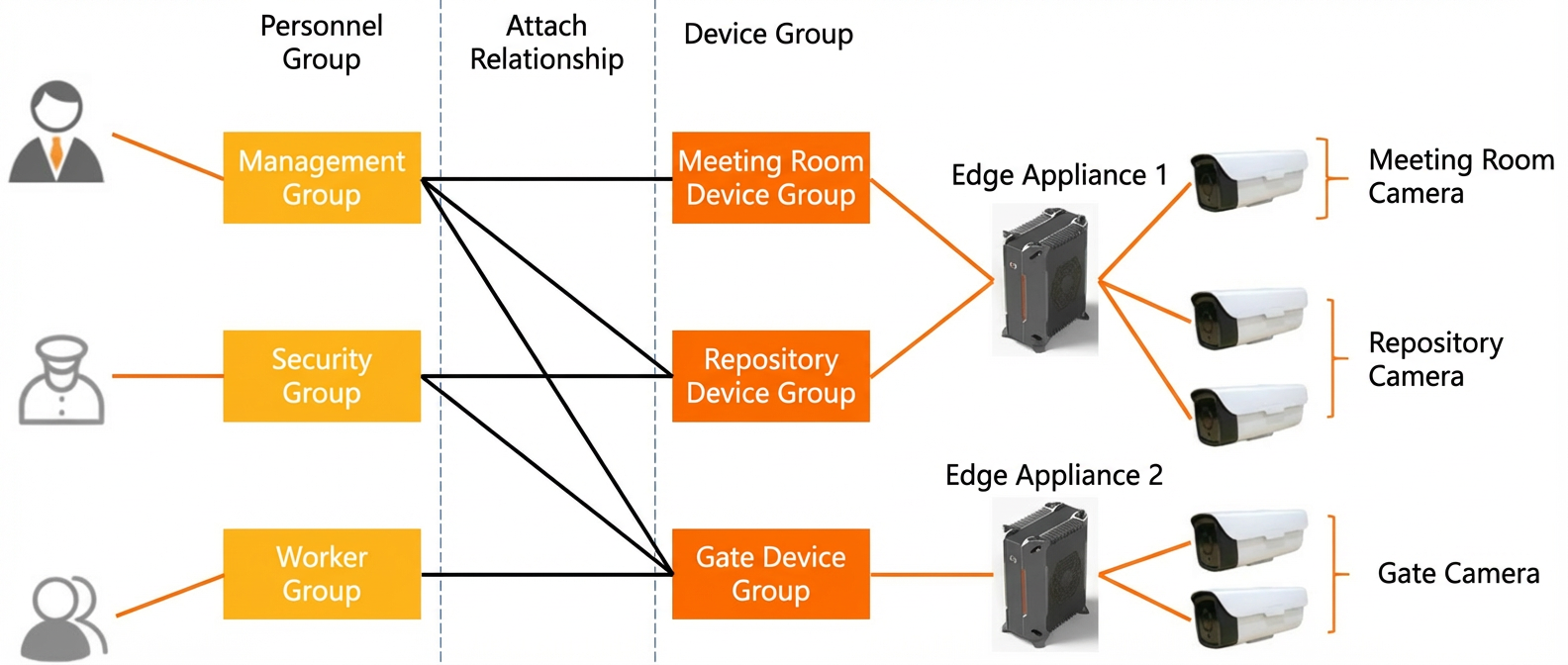
In the figure:
The facial data of each user in the Management Group is synchronized to every edge integrated device in the Conference Room Device Group, Warehouse Device Group, and Main Gate Device Group (Edge Integrated Device 1, Edge Integrated Device 2).
The facial data of each user in the Security Group is synchronized to every edge integrated device in the Warehouse Device Group and Main Gate Device Group (Edge Integrated Device 1, Edge Integrated Device 2).
The facial data of each user in the Worker Group is synchronized to every edge integrated device in the Main Gate Device Group (Edge Integrated Device 2).
API call sequence
Add a user
For the following steps:
Perform steps 1 to 3 only once for each facial recognition project, such as a factory, school, or office building.
Repeat steps 4 and 5 each time you add a user.
Call the API in step 6 as needed.
Create a user group and a device group:
User group: AddFaceUserGroup
Device group: AddFaceDeviceGroup
Bind the user group to the device group for facial data synchronization: AddFaceUserGroupAndDeviceGroupRelation.
Add a device to the device group: AddFaceDeviceToDeviceGroup.
Add a user: AddFaceUser.
Add the user to the user group: AddFaceUserToUserGroup.
(Optional) Add a facial image for the user: AddFaceUserPicture.
Delete face users
To delete a single user:
Call RemoveFaceUserFromUserGroup to remove the user from the user group.
Call DeleteFaceUser to delete the user from the facial recognition database.
You can delete multiple face users in two scenarios:
Call QueryFaceAllUserIdsByGroupId to retrieve the IDs of all users in the user group. Then, call DeleteFaceUser in a loop to delete the users.
Call DeleteFaceUserGroup to delete the user group. This deletes all users in the group.
To delete a specific facial image of a user, call DeleteFaceUserPicture.
To delete all facial data from a specific edge integrated device, call the APIs in the following order:
Call QueryFaceDeviceGroupsByDevice to query all device groups associated with the edge integrated device.
Call RemoveFaceDeviceFromDeviceGroup in a loop to remove the edge integrated device from each device group.
Handle facial data synchronization errors
If the facial recognition database on the cloud is inconsistent with the one on the device, call ClearFaceDeviceDB. This clears the entire database on the edge integrated device and triggers a full resynchronization of facial data.
Resynchronizing facial data can take a long time depending on network conditions and other environmental factors. Do not call ClearFaceDeviceDB frequently.