Message routing configuration examples
You can configure an edge instance with one or more message routing paths. This section provides examples of how to configure the eight message routing paths supported by IoT Edge and how to view messages.
For more information, see Configure message routing.
Message routing path: From device to IoT Hub
When you create an edge instance, a default route from the device to IoT Hub is automatically created. This route sends all device messages, including properties and events, to the cloud (IoT Hub). If the default route in the edge instance is removed, you can manually add a message route from a device to IoT Hub to send properties, events, or all messages from that device to the cloud.
The example in the following figure shows a route that sends the properties and events from the Light and Light02 devices to the cloud. If device data cannot be sent to the cloud because of a network disconnection, IoT Edge stores the data locally. After the network connection is restored, IoT Edge retransmits the local data to the cloud.
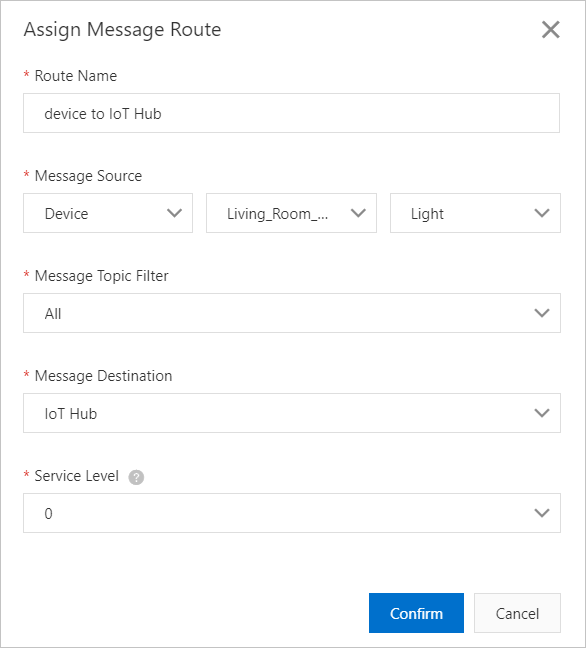
View messages: After the device data is filtered by the message topic and sent to the cloud, you can view the reported data on the Simple Log Service page for the sub-device's product in the IoT Platform console.
Message routing path: From device to edge application
You can send device properties or all messages, including properties and events, to an edge application.
The example in the following figure shows a route that sends the properties from the Light device to a specified edge application named lightSensorDataFilter.
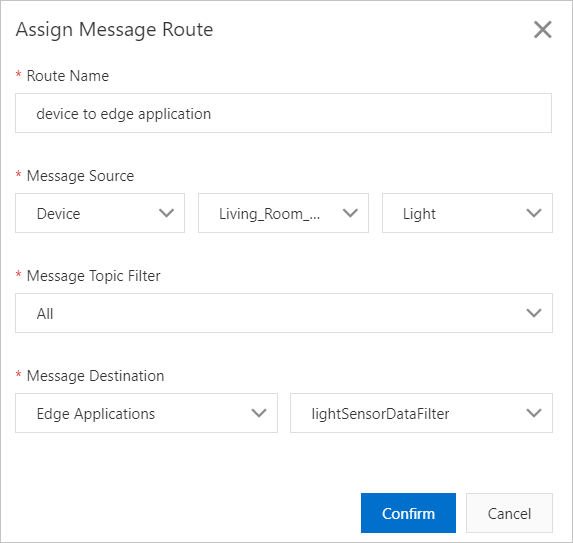
View messages: Messages routed to edge applications are not sent to the cloud. Therefore, you can view them only in the on-premises gateway logs. You can use the tail command to view the on-premises gateway logs. The command format is: tail -f /linkedge/run/logger/fc-base/{module name}/log.INFO. Replace the {module name} variable with the name of your module. Example: tail -f /linkedge/run/logger/fc-base/function-compute/log.INFO, where function-compute is the module name of the edge application.
Message routing path: From device to stream data analytics
You can send device properties or all messages, including properties and events, to a stream data analytics task.
The following figure shows an example where property and event information from all devices is sent to a stream data analytics task named High-temperature alarm.
View messages: You can view data that is routed to a stream data analytics task only in the on-premises logs. You can use the tail command to view the on-premises logs. The command format is: tail -f /linkdge/run/log_slf4j/blink/flink--localsession-{max_index}-{container_id}.log. The {max_index} variable is the current maximum log serial number. To find the serial number, run the ls command in the /linkdge/run/log_slf4j/blink directory. The {container_id} variable is the current container ID.
Message routing path: From edge application to IoT Hub
You can send data from an edge application to the cloud.
/productkey/devicename/user/# topic and sends them to the cloud. If a network failure occurs, IoT Edge stores the messages that the lightSensorDataFilter edge application cannot send. After the network connection is restored, IoT Edge retransmits the local data to the cloud.
/productkey/devicename/user/# is a custom topic used to send messages to IoT Platform. For more information, see
Communicate using custom topics.
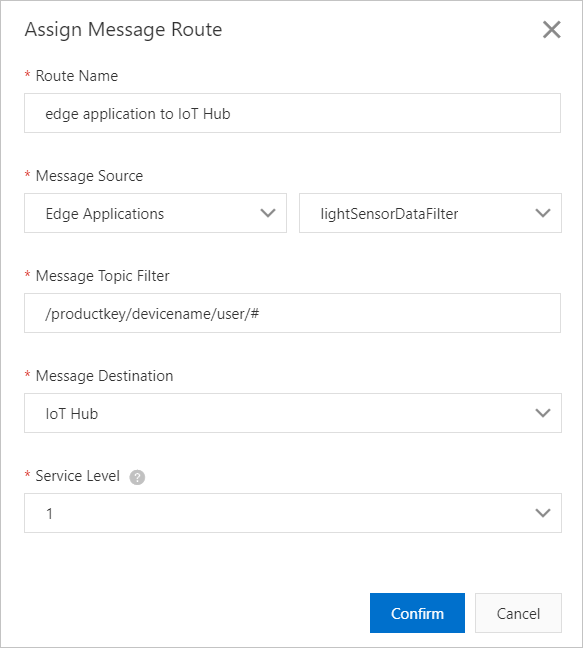
View messages: After data from the edge application is reported to the cloud, you can view the data on the Simple Log Service page for the product associated with the instance's gateway device in the IoT Platform console.
Message routing path: From edge application A to edge application B
You can send data from one edge application to another.
The example in the following figure shows a route where edge application A filters for messages with a subject that matches /xxxx and sends them to edge application B.
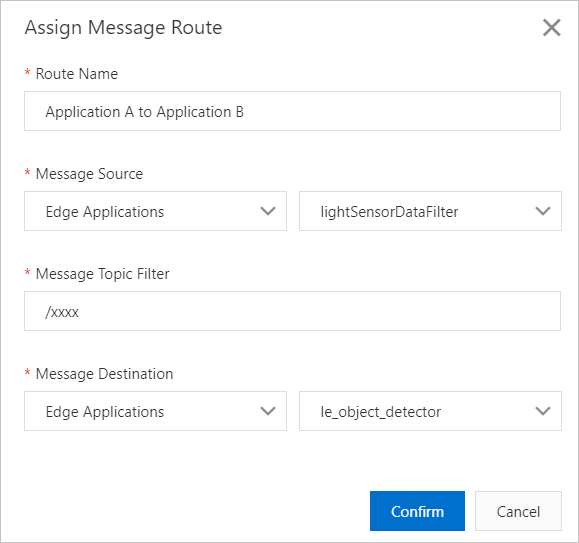
View messages: You can view data that is routed to an edge application only in the on-premises logs of the gateway device. For more information, see the instructions for viewing messages in the Message routing path: From device to edge application section.
Message routing path: From IoT Hub to edge application
You can send messages from the cloud to an edge application.
/a1*******/gateway_01/user/get topic and sends them to the edge application.
/$Your_ProductKey/$Your_DeviceName/user prefix to send messages to the edge.
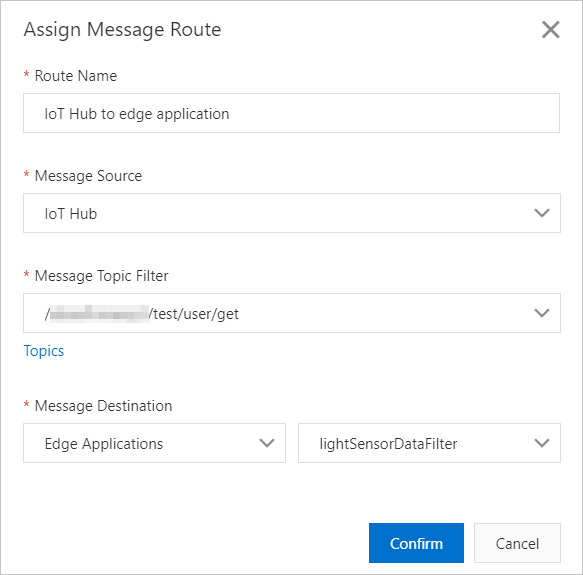
View messages: You can view data that is routed to an edge application only in the on-premises logs of the gateway device. For more information, see the instructions for viewing messages in the Message routing path: From device to edge application section.
Message routing path: From stream data analytics to edge application
You can send data from a stream data analytics task to an edge application.
/xxxx topic and sends them to the lightSensorDataFilter edge application.
/xxxx is a custom topic. For more information about how to configure custom topics, see
Use custom topics for communication.
View messages: You can view data that is routed to an edge application only in the on-premises logs of the gateway device. For more information, see the instructions for viewing messages in the Message routing path: From device to edge application section.
Message routing path: From stream data analytics to IoT Hub
You can send data from a stream data analytics task to the cloud.
/xxxx topic and sends them to the cloud. If a network failure occurs, IoT Edge stores the messages that the
High-temperature alarm stream data analytics task cannot send. After the network connection is restored, IoT Edge retransmits the local data to the cloud.
/xxxx is a custom topic for sending messages to the cloud (IoT Hub). For more information about how to configure custom topics, see
Use custom topics for communication.
View messages: In the IoT Platform console, go to the Simple Log Service page for the product associated with the instance's gateway device to view the stream analytics data that has been reported to the cloud.