What are edge applications
IoT Edge lets you manage the versions and configurations of your edge applications. IoT Edge supports two types of edge applications: Function Compute applications and container image applications.
Function Compute applications
A Function Compute application is an edge application based on Alibaba Cloud Function Compute. You can develop code in the cloud and run it on the edge. Function Compute applications inherit the event-driven programming model of Alibaba Cloud Function Compute. This serverless computing framework lets you focus on your business logic without managing underlying tasks, such as program startup, message routing, log queries, or process keep-alive.
The code for Function Compute applications can originate from two sources: functions developed using Alibaba Cloud Function Compute and functions developed locally. Locally developed functions must comply with the requirements in the Function Development Guide.
The Standard Edition (LE Standard) of IoT Edge does not currently support Function Compute in Python.
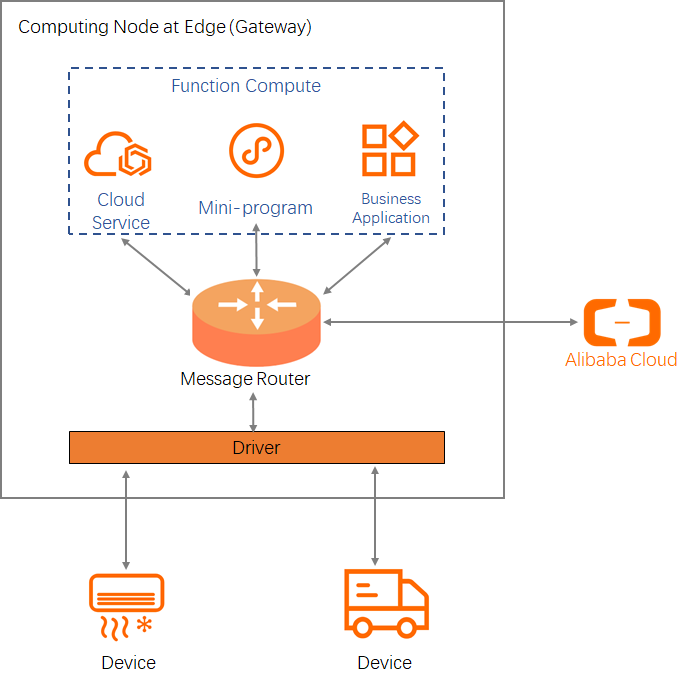
Function Compute provides many features and benefits that improve the management of edge devices.
- Advantages of Function Compute applications:
- Flexible programming model: Edge Function Compute inherits the on-demand mode from Alibaba Cloud Function Compute and also provides a long-running mode. After you deploy your code, you can configure it to run continuously. This mode supports the development of device drivers and traditional server-side programs.
- High real-time performance: Functions run on the edge gateway. This allows data collection and analysis to occur closer to the data source, which results in faster response times.
- Offline operation: Device data can be processed on the on-premises network without a connection to the cloud. This allows devices to operate normally during network disconnections.
- Components of a Function Compute application:
- Cloud-based code hosting: You can manage your code in the cloud. You can add, delete, modify, or query code at any time. You can also use hot deployment to run the code on the gateway.
- Edge-side program management: This component manages functions that are deployed to the gateway. It provides features such as program execution, service keep-alive, log queries, performance monitoring, resource monitoring, and scheduled triggers.
- Development APIs: Edge Function Compute provides APIs for device driver and application development. These APIs help reduce development costs.
- Event sources for Function Compute applications: When a triggering event occurs, IoT Edge calls the handler function in your code to process the event. For functions in on-demand mode, the function is loaded and run only when the first triggering event occurs. The following event sources can trigger a Function Compute application:
- Scheduled trigger: In the IoT Platform console, you can set a function to run on a schedule. The function is then triggered at a configured interval, such as once per minute.
- Message trigger: Messages are routed to Function Compute from various sources, such as devices, other Function Compute applications, or stream analytics. These messages then trigger the function.
- Function caller: The edge gateway provides an API to call local Function Compute functions. The function is triggered by a direct call from an external program or another function.
Container image applications
A container image application is an edge application based on container technology. You can pull an image directly from an image repository to use as an edge application.
The image for a container image application can be sourced from an Alibaba Cloud Container Registry repository or a public image repository.
The lifecycle of a container image application is managed by IoT Edge. You can access IoT Edge services through the edge-side OpenAPI. For more information about the OpenAPI, see Edge-side HTTP API.
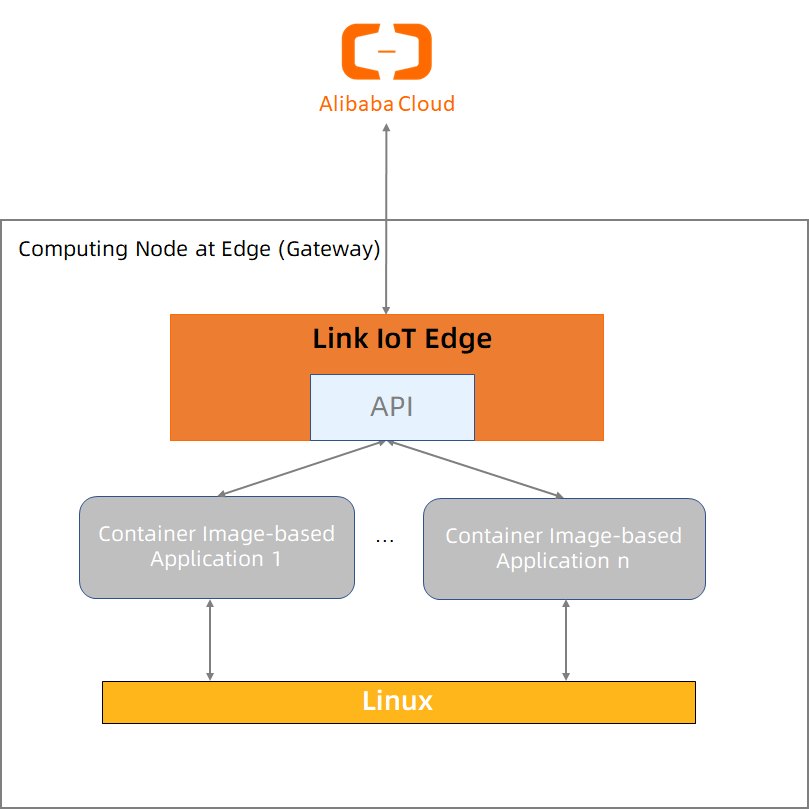
For more information about container image applications, see the official Docker documentation.