Table Store
Use the Table Store node to insert, query, delete, and update data in a Table Store table.
Prerequisites
You must first activate the Alibaba Cloud Table Store service and create an instance and a table. For more information, see Usage overview.
The primary key of a Table Store table supports only integer, string, and binary data types. Ensure that your input data matches these data types.
Node configuration
The figure below shows the Table Store node configuration.
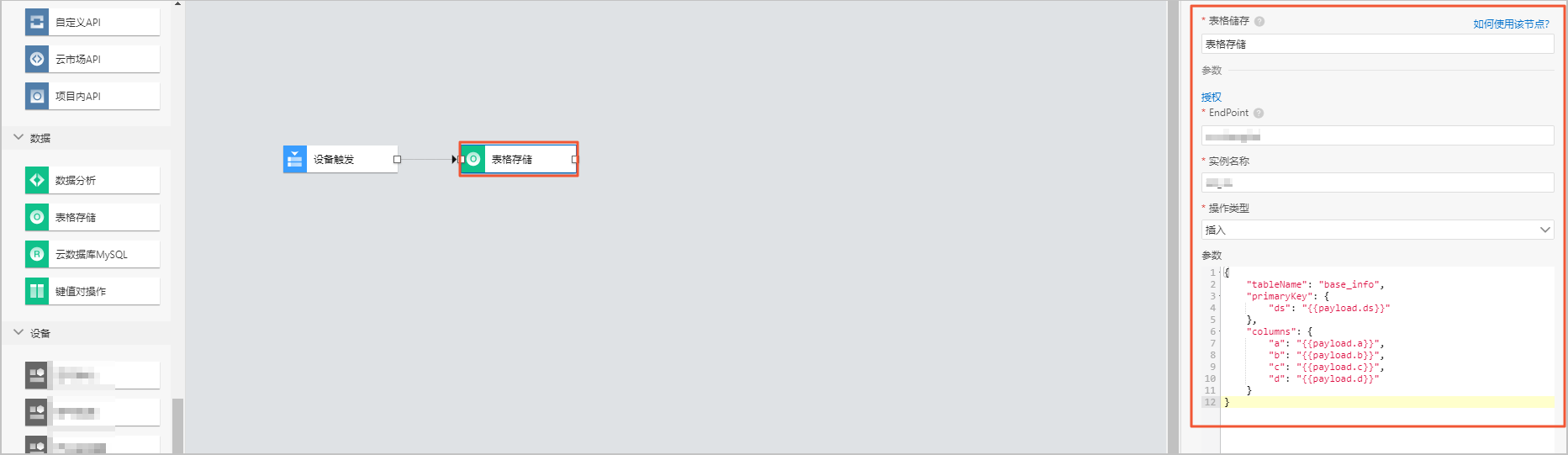
| Parameter | Description |
| Node name | The name of the node. It must be 30 characters or less and can contain Chinese characters, letters, digits, and underscores (_). |
| Authorization | Click Authorize to open the Resource Access Management (RAM) console and grant IoT Platform permission to access your Table Store resources. |
| Endpoint | The region ID of your Table Store instance, such as cn-hangzhou. For more information about region IDs, see Regions and zones. |
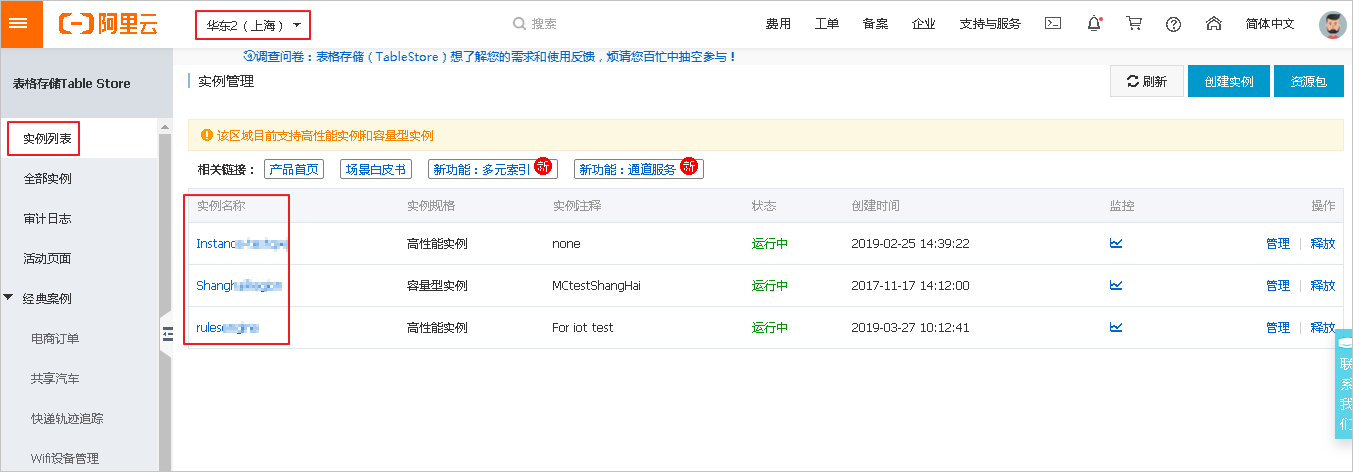
| Instance name | The instance name, which is available on the Instance List page in the Table Store console. For more information about how to use Table Store, see Usage overview. |
| Operation type | Select an operation type:
|
| Parameters | The required parameters vary by operation type. For details, see the Parameters section. |
Parameters
You can use variables in parameters. IoT Studio provides the following built-in global variables:
- The
payloadobject contains the output data from the previous node. Access a specific value using the formatpayload.key.For example,
payload.productKeyaccesses the value from an output like{productKey: 'value'}. - The
queryobject contains data from the initial input node of the flow, such as parameters from an HTTP request or data from a device trigger. Access a specific value using the formatquery.parameterName.For example,
query.deviceNameaccesses the value of the deviceName input parameter from an API request node. - The
nodeobject contains the output data from any specific node in the flow, referenced by its ID (node.node_ID). Access a specific value using the formatnode.node_ID.key.For example,
node.node_39***0.pageNumaccesses the value of pageNum from the output of the node with the IDnode_39***0.
The following sections provide the parameter structure and examples for each operation type.
- Insert
{
  "tableName": "", // The name of the table
  "primaryKey": { // The primary key of the table
  },
  "columns": { // The data to insert
  }
}
Example: Inserts a new row with a specified primary key and values for fields a, b, c, and d.
{ "tableName": "base_info", "primaryKey": { "ds": "{{payload.ds}}" }, "columns": { "a": "{{payload.a}}", "b": "{{payload.b}}", "c": "{{payload.c}}", "d": "{{payload.d}}" } } - Query
{
  "tableName": "",  // The name of the table
  "primaryKey": { // The primary key of the table
  }
  "condition": { // The query condition. Only equality checks are supported.
  },
  "columns": [] // The columns to query
}
Example: Queries for data that matches the specified values for fields a and b.
{ "tableName": "base_info", "primaryKey": {"ds": "{{node.node_4043aa20.ds}}"}, "condition": { "a": "{{payload.a}}", "b": "{{payload.b}}" }, "columns": ["ds", "a", "b", "c", "d"] } - Delete
{
  "tableName": "",  // The name of the table
  "primaryKey": { // The primary key, which specifies the row to delete
  }
}
Example: Deletes the row where the primary key ds has the value specified in{{query.ds}}.{ "tableName": "base_info", "primaryKey": { "ds": "{{query.ds}}" } } - Update
{
  "tableName": "", // The name of the table
  "primaryKey": { // The primary key, which specifies the row to update
  },
  "columns": {  // The data to update
  }
}
Example: Updates the values of fields a, b, and d in the row where the primary key ds has the value specified in
{{query.ds}}.{ "tableName": "base_info", "primaryKey": { "ds": "{{query.ds}}" }, "columns": { "a": "gasdlghasldfjksjh", "b": "gaksjdflkjhs", "d": "d" } }
Node output
The node outputs the Table Store operation result.