TSL model development
A Thing Specification Language (TSL) model is a data model that defines a product for the Alibaba Cloud IoT Platform. This topic describes how to use the TSL model feature to report device properties and events, set properties, and invoke services.
Prerequisites
You have obtained device credentials.
You have added a TSL model.
You have downloaded C LinkSDK Extended.
Procedure
The following sequence diagram shows the basic procedure for using a TSL model. The device application ./demos/data_model_basic_demo.c is used as an example. For more information about the APIs, see aiot_dm_api.h.
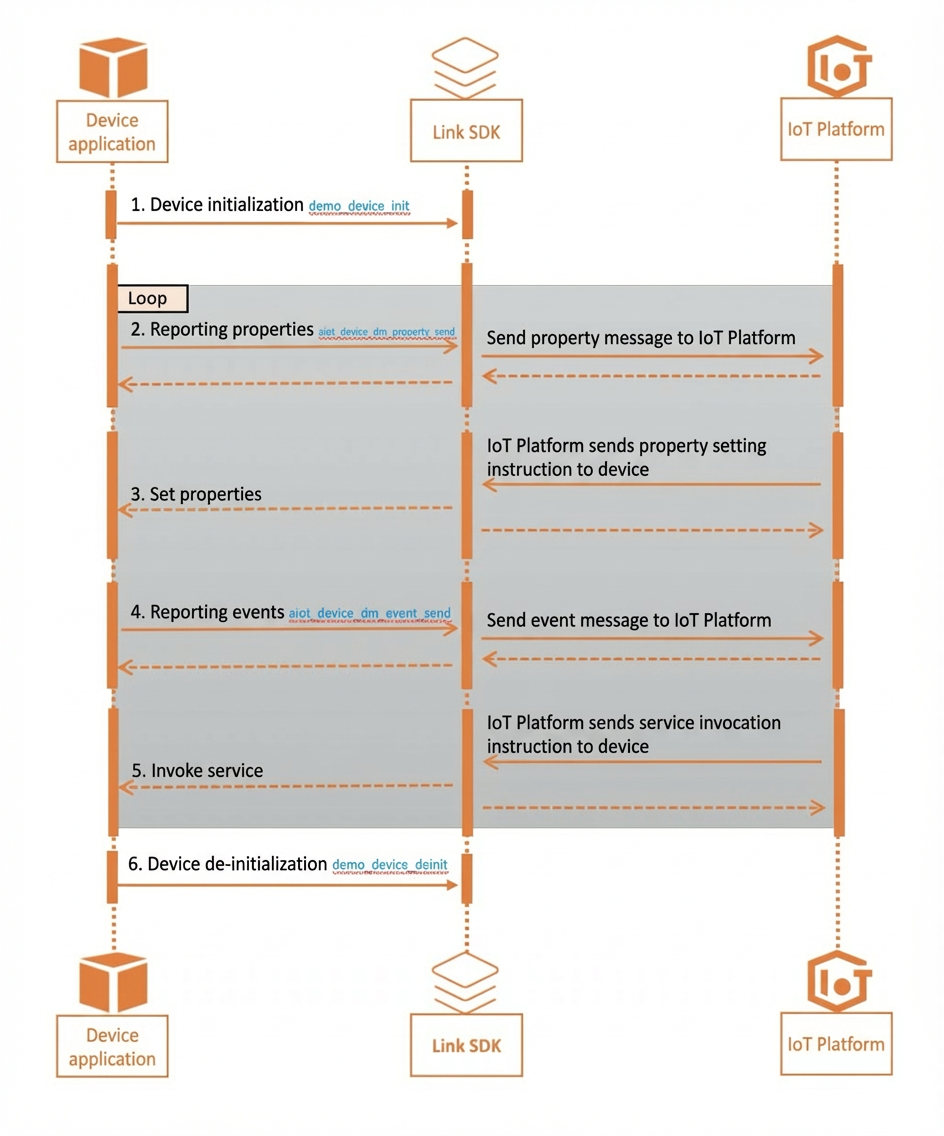
Step 1: Initialize the device
Create a device handle and establish a device connection.
static void* demo_device_init(char *product_key, char *device_name, char *device_secret, char *host, uint16_t port)
{
    int32_t res = STATE_SUCCESS;
    /* Create a device. */
    void *device = aiot_device_create(product_key, device_name);
    if (device == NULL) {
        printf("device create failed\n");
        return NULL;
    }
    /* Set the device secret. */
    aiot_device_set_device_secret(device, device_secret);

    /* Initialize the connection configuration parameters. */
    aiot_linkconfig_t* config = aiot_linkconfig_init(protocol);
    /* Set the host and port of the server. */
    aiot_linkconfig_host(config, host, port);

    /* Set the device connection parameters. */
    aiot_device_set_linkconfig(device, config);

    /* Establish a device connection. */
    res = aiot_device_connect(device);
    if (res < STATE_SUCCESS) {
        /* If the connection attempt fails, destroy the MQTT instance and revoke the resources. */
        aiot_linkconfig_deinit(&config);
        aiot_device_delete(&device);
        printf("aiot_device_connect failed: -0x%04X\n\r\n", -res);
        return NULL;
    }

    /* If the connection is established, return the device object. */
    aiot_linkconfig_deinit(&config);
    return device;
}
Step 2: Report properties
Property reporting is typically used to report the device status. The following example shows how to report that the light is off.
 /* Example of reporting a property. */
    char *property_params = "{\"LightSwitch\": 0}";
    aiot_device_dm_property_post(device_client, property_params, 1);
Step 3: Set properties
When a device receives a message to set a property, it executes the corresponding callback function. The message type is AIOT_DMRECV_PROPERTY_SET. For demonstration purposes, the following example only prints the property setting.
/* Cloud -> Device: Example of processing a property setting message. The example only prints the message. */
static void demo_dm_msg_property_set_callback(void *device, const aiot_dm_msg_t *dm_msg, void *userdata)
{
    printf("demo_dm_msg_property_set_callback params = %.*s\r\n",
        dm_msg->data.property_set.params_len,
        dm_msg->data.property_set.params);

    /* TODO: Demonstrate a sync reply. */
    char *reply_data = "{}";
    aiot_device_dm_propertyset_reply(device, dm_msg->context, 200, reply_data);

    /* TODO: Demonstrate an asynchronous reply [not replying in the callback function]. You need to back up the message context for the reply. */
    /*
    void *context = aiot_dm_msg_context_clone(dm_msg->context);
    aiot_device_dm_propertyset_reply(device, dm_msg->context, 200, reply_data);
    aiot_dm_msg_context_free(context);
    */
}
Step 4: Report events
Events typically contain information, alerts, and faults that require processing by external systems. The following example simulates a fault report with an error code of -1.
 char *event_id = "Error";
    char *event_params = "{\"ErrorCode\": -1}";
    aiot_device_dm_event_post(device_client, event_id, event_params, 1);
Step 5: Invoke services
Services provide instructions or methods for a device that can be invoked externally. For example, turning on a light can be implemented as a service invocation. The following example demonstrates a service invocation where the callback simply prints the information.
/* Cloud -> Device: Example of processing a service invocation message. The example only prints the message. */
static void demo_dm_msg_service_invoke_callback(void *device, const aiot_dm_msg_t *dm_msg, void *userdata)
{
    printf("demo_dm_msg_service_invoke_callback service_id %s, params = %.*s\r\n",
        dm_msg->data.service_invoke.service_id,
        dm_msg->data.service_invoke.params_len,
        dm_msg->data.service_invoke.params);

    /* TODO: Demonstrate a sync reply. */
    char *reply_data = "{}";
    aiot_device_dm_service_reply(device, dm_msg->context, dm_msg->data.service_invoke.service_id, 200, reply_data);

    /* TODO: Demonstrate an asynchronous reply [not replying in the callback function]. You need to back up the message context for the reply. */
    /*
    void *context = aiot_dm_msg_context_clone(dm_msg->context);
    aiot_device_dm_propertyset_reply(device, dm_msg->context, 200, reply_data);
    aiot_dm_msg_context_free(context);
    */
}
Step 6: Deinitialize the device
 /* Disconnect the device and revoke its resources. */
    demo_device_deinit(device_client);