Connect an MCU + WAN module to IoT Platform
This topic describes how to connect a device that uses a microcontroller unit (MCU) and a wide area network (WAN) communication module to IoT Platform.
A device connects to the Internet using a wide area network (WAN) module if its microcontroller unit (MCU) does not support the TCP/IP protocol stack. The architecture is shown in the following figure:
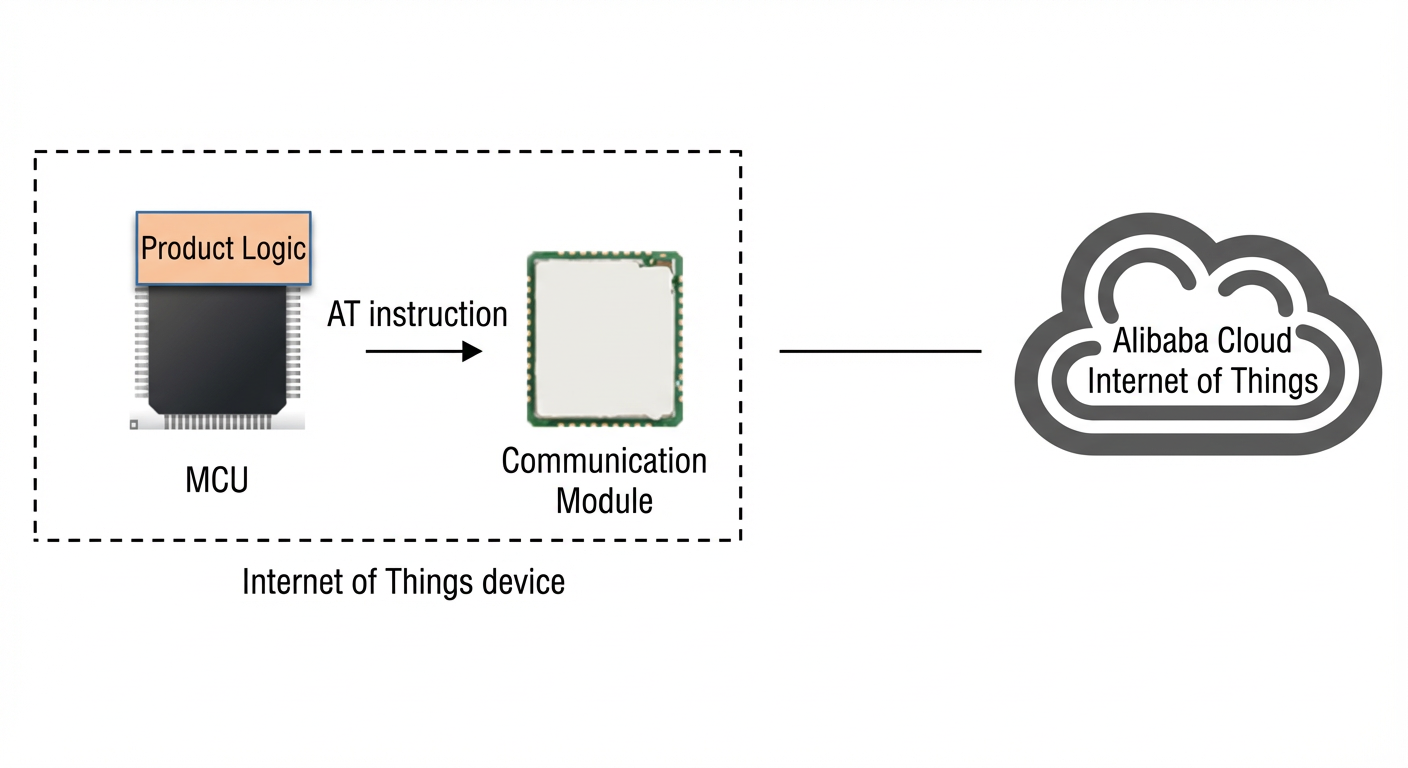
MCU + module that supports connections to Alibaba Cloud IoT Platform
If your module already supports connections to Alibaba Cloud IoT Platform, contact the module manufacturer to obtain the AT commands to connect your device to Alibaba Cloud IoT Platform.
MCU + module that supports MQTT
In this scenario, the module supports Message Queuing Telemetry Transport (MQTT) but does not provide AT commands to connect to Alibaba Cloud IoT Platform. You must generate an MQTT Username, Password, and ClientID on the MCU that comply with Alibaba Cloud IoT Platform standards. You can use these credentials to establish an MQTT connection between the device and IoT Platform.
For more information about how to connect to Alibaba Cloud IoT Platform over MQTT, see MQTT-TCP connection. To prevent connection failures due to protocol errors, C code samples are available. You can use these samples to automatically generate the required MQTT parameters by providing the ProductKey, DeviceName, DeviceSecret, and server site information.
After the device obtains the Username, Password, ClientID, and Alibaba Cloud IoT Platform server site information for the MQTT connection, you can call the MQTT AT commands provided by the module to connect to Alibaba Cloud IoT Platform.
If the connection fails, see Troubleshoot errors to identify the cause.
After the connection is established, see Use custom topics for communication to learn how to send messages to and receive messages from IoT Platform.
MCU + module that supports TCP
This is the most difficult scenario. MCUs have limited Random Access Memory (RAM) and flash storage. Porting an MQTT client to an MCU consumes significant storage space. You must also understand the details of the MQTT client to ensure it works correctly with the module. This process can be time-consuming.
Alibaba Cloud IoT Platform provides a TCP-based connection solution. This solution is in a trial phase. To apply, send a message to contact us using the following template.
Subject: Request for TCP connection solution for devices connecting to Link SDK products
Content:
Company name
Contact person and title
Phone number
Module model
Product description
Product scale and development plan
MCU + module that supports HTTPS
If your device only needs to report data and does not require remote control, you can connect it to Alibaba Cloud IoT Platform over Hypertext Transfer Protocol Secure (HTTPS) if the module supports HTTPS. For more information about the HTTPS connection specifications for IoT Platform, see Connect over HTTP. You can call the module's HTTPS AT commands to connect to IoT Platform.
Dynamic device registration
It can be difficult to burn a unique ProductKey, DeviceName, and DeviceSecret onto each device on a production line. If each device has a unique identifier, such as an Integrated Circuit Card Identifier (ICCID), MAC address, or serial number, you can use dynamic registration. This method implements the one-device-one-secret feature and eliminates the need to burn a unique key onto each device during production.
In this solution, you pre-install a ProductKey and ProductSecret in the device firmware. These two parameters are the same for all devices of a specific product. You can use the device's unique identifier as the DeviceName in Alibaba Cloud IoT Platform. After the device is powered on, it dynamically registers with the cloud to obtain its DeviceSecret. After the device obtains the ProductKey, DeviceName, and DeviceSecret, it can connect to Alibaba Cloud IoT Platform over MQTT by following the process described earlier.
To prevent attackers from using a leaked ProductKey and ProductSecret to create fake devices, you can upload the unique device identifiers to IoT Platform in advance to create a whitelist. For more information about how to enable dynamic registration for a product, see One-device-one-secret. For more information about how to upload unique device identifiers in batches, see Create multiple devices at a time. For the Upload Method parameter, select Batch Upload.
If the module provides HTTPS AT commands, see the "Use one-device-one-secret dynamic registration for directly connected devices" section in Device identity registration to implement dynamic registration. If the module provides MQTTS AT commands, see Implement dynamic registration over an MQTT channel.
Note:
After a device obtains a DeviceSecret through dynamic registration, you should save the DeviceSecret on the device. After the device restarts, it can use the ProductKey, DeviceName, and DeviceSecret to connect directly to IoT Platform. Dynamic registration is not required for every connection.
If a device has already connected to IoT Platform using its ProductKey, DeviceName, and DeviceSecret, subsequent attempts at dynamic registration will fail.