Make-based compilation instructions
This topic provides a detailed overview of the Make system and explains how to tailor the software development kit (SDK).
Make commands
Command | Description |
| Purges all intermediate files generated during the build process. This restores the current directory to its original cloned state. |
| Starts compilation using the default or selected platform configuration file. |
| Displays the current compilation configuration. For example, it can show the cross-compilation toolchain and compilation CFLAGS. |
| Opens a multi-platform selection menu. Press a number key to select a platform. Compilation then starts based on the corresponding hardware platform configuration. |
| Displays the currently selected platform configuration file. |
| Edits and generates the feature configuration file |
| Prints the help text. |
Tailoring the SDK
For versions V3.0.1 and later, you can use the make menuconfig command or the config.bat script to graphically configure the SDK on Linux or Windows hosts, respectively.
Graphical configuration tool
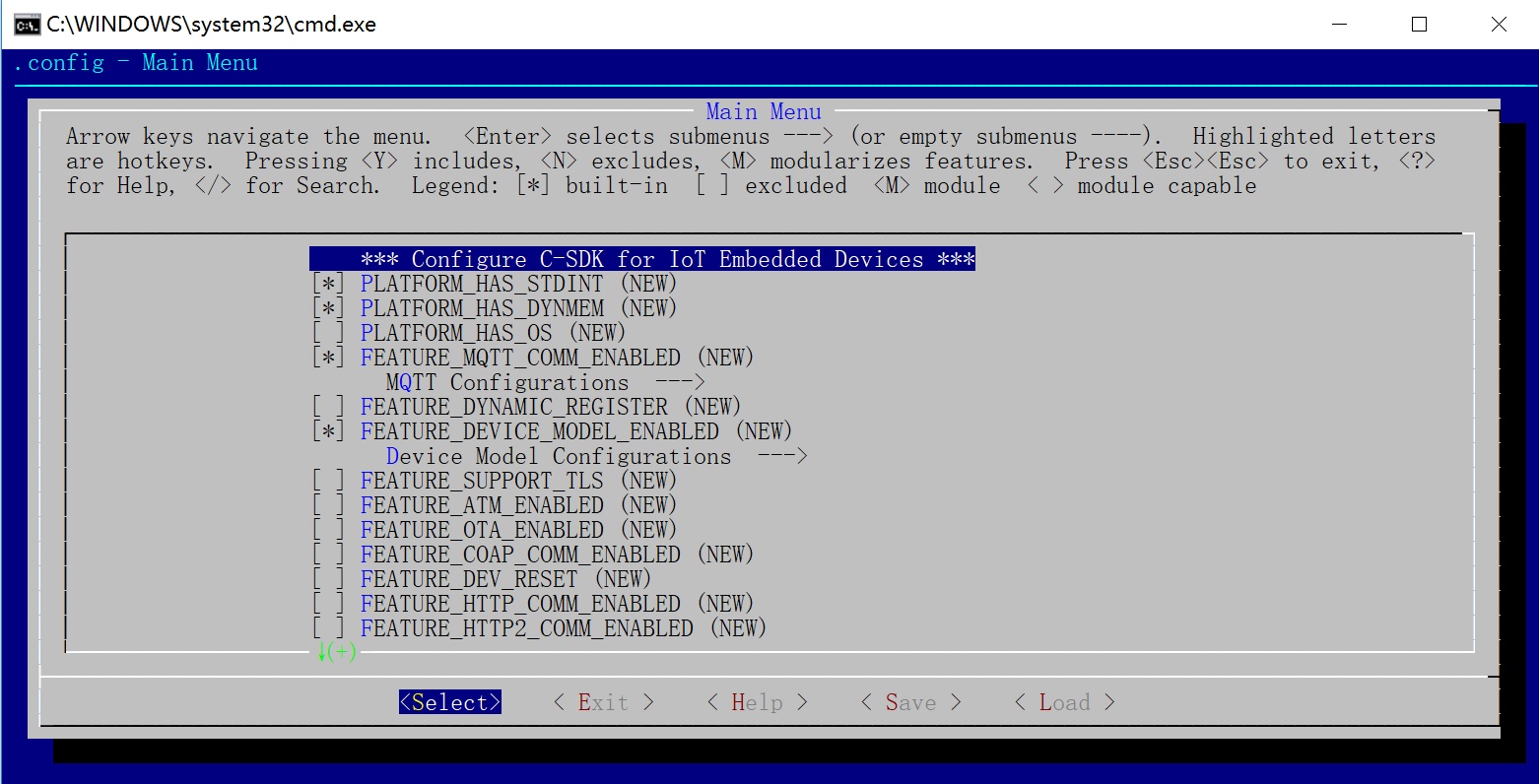
In the graphical interface, press the space bar to enable or disable a feature. Use the up and down arrow keys to select different features.
Use the arrow keys to move the highlight bar to an option. Then, press the H key to display a detailed description of the option.
Do not manually edit the
make.settingsfile to change configurations. All configurations must be made through the graphical interface.
The following table describes the configuration options.
Configuration item | Description |
| Enables or disables the MQTT cloud connection feature. This feature allows embedded devices that use the C-Link SDK to connect and interact with Alibaba Cloud servers using the |
| Enables or disables the CoAP cloud connection feature. This feature allows embedded devices that use the C-Link SDK to connect and interact with Alibaba Cloud servers using the |
| Enables or disables the HTTP or HTTPS cloud connection feature. This feature allows embedded devices that use the C-Link SDK to connect and interact with Alibaba Cloud servers using the |
| Enables or disables the one-type-one-secret or dynamic registration feature. Dynamic registration means you do not need to flash different device certificates (ProductKey, DeviceName, and DeviceSecret) for different devices of the same product type. Instead, flash the same |
| Enables or disables the legacy API style for the Pro Edition. When you program with Pro Edition Thing Specification Language models, the C-Link SDK provides both the legacy |
| Enables or disables the device binding feature, which is available in versions V2.3.0 and later. This feature is for users who connect to the Feiyan platform using the C-Link SDK. Enable it to allow devices to be controlled by the Feiyan public app and to attach devices to user accounts. |
| In versions earlier than V2.3.0, this switch was named Enables or disables the Pro Edition gateway feature. When you program with Pro Edition Thing Specification Language models, the C-Link SDK provides not only the |
| Enables or disables the HTTP2 cloud connection feature. This feature allows embedded devices that use the C-Link SDK to connect and interact with Alibaba Cloud servers using the |
| Enables or disables the MQTT direct connection feature. This feature allows devices to connect to Alibaba Cloud servers using the |
| Enables or disables the firmware upgrade feature. This feature allows a device to download firmware files that you upload in the IoT Platform console from Alibaba Cloud servers. |
| In versions earlier than V2.3.0, this switch was named Enables or disables the Pro Edition Thing Specification Language model feature. This feature allows a device to communicate with the server-side using the Alink protocol, which is based on services, properties, and events. |
| Enables or disables the use of TLS at the TLS layer. If disabled, the device connects to the cloud using a TCP connection without TLS encryption. |
| In versions earlier than V2.3.0, this switch was named Enables or disables the Wi-Fi provisioning feature. Wi-Fi provisioning is a proprietary Alibaba Cloud communication protocol for sending the SSID and password of a Wi-Fi network from a mobile app to a device. |
| Enables or disables local control. This feature is used only when the device is connected to the Alibaba Cloud Link Living platform and requires the device to connect to the network through Wi-Fi or Ethernet. When this switch is enabled, a mobile app can control the device over the local area network (LAN). |
| Enables or disables the Thing Specification Language model shadow. When enabled, the cloud can set the properties of a device when it is offline. After the device comes online, it retrieves the saved values from the cloud and applies them. |
| Enables or disables subscription topic persistence. When a device comes online again, if it finds that a topic is already subscribed, it does not send a subscription message to IoT Platform. This reduces the number of messages exchanged between the device and the platform. |
Output description
After a successful compilation using Make, a table similar to the following one is displayed. This table shows the ROM and static RAM usage for each module.
| RATE  | MODULE NAME          | ROM     | RAM     | BSS    | DATA   |
|-------|----------------------|---------|---------|--------|--------|
| 45.3% | src/dev_model        | 28563   | 216     | 188    | 28     |
| 28.1% | src/mqtt             | 17737   | 28      | 28     | 0      |
| 25.7% | src/infra            | 16195   | 544     | 60     | 484    |
| 1.65% | src/dev_sign         | 1045    | 48      | 0      | 48     |
|-------|----------------------|---------|---------|--------|--------|
|  100% | - IN TOTAL -         | 63540   | 836     | 276    | 560    |
The required output artifacts are located in the output/release directory.
output/release/lib
Artifact filename | Description |
| A reference implementation of the HAL interface layer. It provides |
| The main library of the SDK. It provides |
| A tailored version of |
output/release/include
Artifact filename | Description |
| Appears when you select the MQTT cloud connection feature during configuration. It lists the user APIs provided by this feature. |
| Appears when you select the Thing Specification Language model management feature during configuration. It lists the user APIs provided by this feature. |
The APIs for a selected feature use the naming convention <feature_name>_api.h.
output/release/bin
If you compile on a host environment, such as Ubuntu or Windows, without cross-compilation, you can generate demo programs that run directly on the host.
Artifact filename | Description |
| A sample program for the Thing Specification Language model management feature. It demonstrates the use of |
| A sample program for the MQTT cloud connection feature. It demonstrates the use of |
Configuration system components
User input
The build configuration system for the device-side C-Link SDK uses the following input files for user configuration. You can edit these files to configure the build system.
Feature configuration file: The
make.settingstext file in the root directory.Platform configuration file: The
config.xxx.yyyseries of files in thetools/boarddirectory, also known asconfigfiles.
The build system uses the config.xxx.yyy file for compilation. Because feature configuration and tailoring are more common, these settings are extracted into the make.settings file.
The config.xxx.yyy file is used to specify the toolchain programs and compile or link options for the target embedded hardware platform, which facilitates cross-platform porting. In this file, you can add custom CFLAGS using the CONFIG_ENV_CFLAGS += ... syntax and specify link options using CONFIG_ENV_LDFLAGS += ... . In contrast, the make.settings file is used to tailor or configure the functional modules of the C-Link SDK for a specific target hardware platform.
Build units
Within the project's root directory, any subdirectory that contains an iot.mk file is treated as a build unit by the build system.
Each build unit can be compiled separately. For example, if the path of a build unit relative to the root directory is bar or foo/bar1, you can use the make bar or make foo/bar1 command to compile it.
tools/board/config.xxx.yyy
A text file with a name in the format config.<VENDOR>.<MODEL> is treated by the build system as a hardware platform configuration file. Each file corresponds to a specific embedded software and hardware platform.
The
<VENDOR>part specifies the operating system (OS) provider for the embedded platform, such asmxchip,ubuntu, orwin7. As a result, the build system searches for precompiled binary library files and header files in the$(IMPORT_DIR)/<VENDOR>directory.The
<MODEL>part indicates the specific hardware model of the embedded platform, such asmtk7687orqcom4004. You can also include other information, such asmingw32orx86-64, because the build system does not interpret this part.
Debugging methods
In the
make ...command line, set theTOP_Qvariable to an empty value to print the execution logic of the project's top layer. This logic includes the hardware platform selection and the generation of the main SDK library.make .... TOP_Q=In the
make ...command line, set theQvariable to an empty value to print the internal build process of a module. This process includes the generation of object files and the composition of header file search paths.make .... Q=You can use
make foo/barto buildfoo/barseparately. You must runmake reconfigfirst.You can navigate to the
.O/foo/barpath to view the complete temporary compilation directory,makefile, and all source code. Runningmakein this directory has the same effect as runningmake foo/barfrom the root directory.
Cross-compilation
The following variables are used in the tools/board/config.xxx.yyy platform configuration file.
Variable | Description |
| Specifies global For example, |
| Specifies global For example, |
| Specifies the common prefix for the cross-compilation toolchain. For example, setting |
| Used when the cross-compilation toolchain does not have a common prefix or the prefix does not match the For example, for |
| Used when the cross-compilation toolchain does not have a common prefix or the prefix does not match the For example, for |
| Used when the cross-compilation toolchain does not have a common prefix or the prefix does not match the For example, if |
| Specifies the format of the binary library generated by the SDK. For example, |
Folders and files
Variable | Description |
| A switch that specifies whether the |