Device authentication
Device authentication is performed using two methods: unique-certificate-per-device and unique-certificate-per-product. This topic describes the scenarios for each method.
Authentication methods
Unique-certificate-per-device: Burn the ProductKey, DeviceName, and DeviceSecret onto each device. Then, adapt the corresponding Hardware Abstraction Layer (HAL) and call the function provided by the SDK to connect to IoT Platform. This method requires you to modify your production line tools to burn a unique DeviceName and DeviceSecret onto each device.
One-Type-One-Secret: In this method, a fixed ProductKey and ProductSecret are flashed onto each device. Each device must also have a unique identifier that is uploaded to the Alibaba Cloud IoT Platform in advance. Then, you can call a function provided by the SDK to connect the device to the cloud.
Get Link SDK
To download different versions of Link SDK, see Get SDK.
Unique-certificate-per-device programming
Set the device authentication information based on your Link SDK version.- For Link SDK v3.0.1, implement the following HAL functions:
- HAL_GetProductKey
- HAL_GetDeviceName
- HAL_GetDeviceSecret
- For Link SDK v3.1.0 and v3.2.0, set the authentication information using `IOT_Ioctl`:
- IOT_Ioctl(IOTX_IOCTL_SET_PRODUCT_KEY, g_product_key)
- IOT_Ioctl(IOTX_IOCTL_SET_DEVICE_NAME, g_device_name)
- IOT_Ioctl(IOTX_IOCTL_SET_DEVICE_SECRET, g_device_secret)
src\mqtt\examples\mqtt_example.c. The code is as follows:int main(int argc, char *argv[])
{
void *pclient = NULL;
int res = 0;
int loop_cnt = 0;
iotx_mqtt_param_t mqtt_params;
memset(&mqtt_params, 0x0, sizeof(mqtt_params));
mqtt_params.handle_event.h_fp = example_event_handle;
pclient = IOT_MQTT_Construct(&mqtt_params);
if (NULL == pclient) {
EXAMPLE_TRACE("MQTT construct failed");
return -1;
}
...
} Unique-certificate-per-product programming
The following diagram shows the flow of the unique-certificate-per-product authentication method.
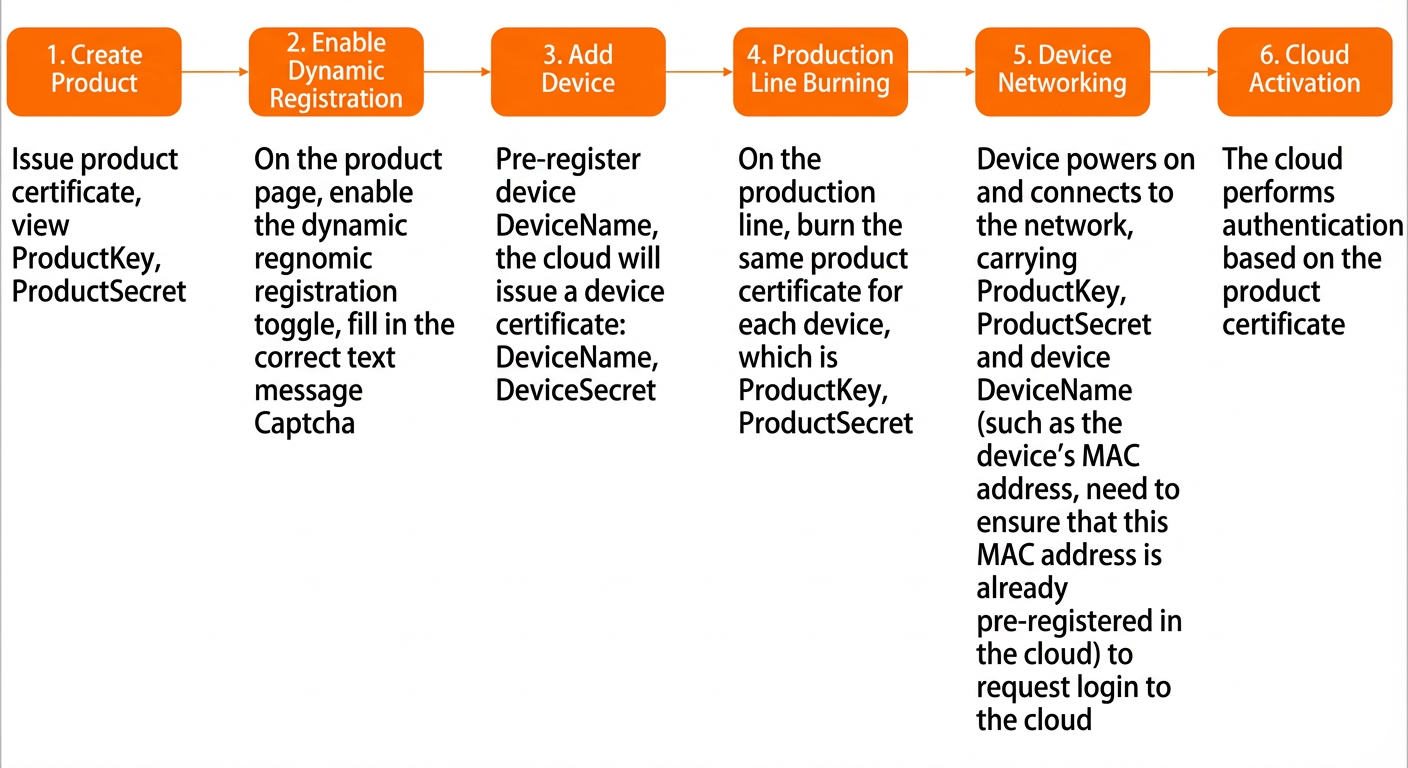
- The device uses the ProductKey, ProductSecret, and DeviceName to retrieve the corresponding DeviceSecret from IoT Platform.
- The dynamic registration service of IoT Platform checks whether the DeviceName exists in the device list for the specified ProductKey. If the DeviceName is found, the service returns the DeviceSecret.
- After the device obtains the DeviceSecret, it calculates the MQTT connection parameters and signature in the same way as the unique-certificate-per-device method.
- The device uses the calculated MQTT connection parameters to connect to IoT Platform.
- Save the obtained DeviceSecret to the device's storage medium for future use. Losing the DeviceSecret can have critical consequences, such as the device being unable to go online. IoT Platform does not accept repeated dynamic registration requests for activated devices.
- To use the unique-certificate-per-product feature, you must pre-register each device. In the IoT Platform console, upload the DeviceName for each device and enable the dynamic registration feature for the corresponding product.
The following API operations are involved in the implementation flow:
- Steps 1 and 2 correspond to the
IOT_Dynamic_Register()function. - Step 3 corresponds to the
IOT_Sign_MQTT()function. - Step 4 corresponds to the
IOT_MQTT_Construct()function.
- If a device calls
IOT_Dynamic_Register()again after obtaining a DeviceSecret, the call fails. Therefore, after obtaining the DeviceSecret, save it to the device's local storage medium. - Before your program calls
IOT_Dynamic_Register(), it must first callHAL_GetDeviceSecret()to check whether a DeviceSecret has already been obtained. If a DeviceSecret exists, do not callIOT_Dynamic_Register()again. - For more information about the parameters, see Feature API operations.
Example
Take Link SDK v3.0.1 as an example. For a sample program for the unique-certificate-per-product feature, see the src/dynamic_register/examples/dynreg_example.c file.
The following sections explain the code segment by segment:
- To use the unique-certificate-per-product feature, include its header file
dynreg_api.h:#include <stdio.h> #include <string.h> #include "infra_types.h" #include "infra_defs.h" #include "dynreg_api.h" - Prepare the input parameter
regionand the input/output structmeta:iotx_http_region_types_t region = IOTX_HTTP_REGION_SHANGHAI; HAL_Printf("dynreg example\n"); memset(&meta,0,sizeof(iotx_dev_meta_info_t)); HAL_GetProductKey(meta.product_key); HAL_GetProductSecret(meta.product_secret); HAL_GetDeviceName(meta.device_name);Note- The input parameter
region = IOTX_CLOUD_REGION_SHANGHAIindicates that the China (Shanghai) region is used as the connection site for this demo. Replace this value with your site as needed. For more information, see Regions and zones. - The input parameter
metarepresents the ProductKey, ProductSecret, and DeviceName obtained locally.
- The input parameter
- Call the
IOT_Dynamic_Register()API operation to obtain the DeviceSecret. This is the only user-facing API operation for the unique-certificate-per-product feature. If the call is successful, themetaparameter is populated with the DeviceSecret obtained from IoT Platform.res = IOT_Dynamic_Register(region, &meta); if (res < 0) { HAL_Printf("IOT_Dynamic_Register failed\n"); return -1; } HAL_Printf("\nDevice Secret: %s\n\n", meta.device_secret);
Feature API operations
- Prototype:
int32_t IOT_Dynamic_Register(iotx_http_region_types_t region, iotx_dev_meta_info_t *meta); - Description: Requests a DeviceSecret from IoT Platform using the specified region, ProductKey, ProductSecret, and DeviceName.
- Parameters:
Parameter Data type Direction Description region iotx_http_region_types_t Input The region where the device will operate, such as China (Shanghai), Asia Pacific NE 1 (Tokyo), US West 1 (Silicon Valley), or Asia Pacific SE 1 (Singapore). For a complete list, see Regions and zones. meta iotx_dev_meta_info_t * Input/Output Input: The device's ProductKey, ProductSecret, and DeviceName. Output: The DeviceSecret obtained from IoT Platform. - Return value:
Return value Description =0 The request was successful. <0 The request failed.
- Prototype:
void *IOT_MQTT_Construct(iotx_mqtt_param_t *pInitParams); - Description: Initializes MQTT connection parameters and establishes an MQTT connection.
- Parameters:
Parameter Data type Direction Description pInitParams iotx_mqtt_param_t * Input MQTT connection parameters. - Return value:
Return value Description A non-null object The request was successful. NULL (a null object) The request failed.
- Prototype:
int32_t IOT_Sign_MQTT(iotx_mqtt_region_types_t region, iotx_dev_meta_info_t *meta, iotx_sign_mqtt_t *signout) - Description: Calculates the MQTT signature.
- Parameters:
Parameter Data type Direction Description region iotx_http_region_types_t Input The region where the device is located. meta iotx_dev_meta_info_t * Input The information required for signing. It stores the device's identity strings, including the ProductKey and DeviceName. signout iotx_sign_mqtt_t * Output The signing result, which includes the username, password, clientid, and hostname. - Return value:
Return value Description =0 The request was successful. <0 The request failed.