Report logs
IoT Platform allows devices to report their local logs. You can query these logs on the Simple Log Service page in the IoT Platform console to analyze faults. This topic describes how to configure the C Link SDK to enable a device to report local logs to IoT Platform.
Prerequisites
You have completed the Download C Link SDK Extended task.
Enable the Report Device Local Logs switch on the Device Details page in the IoT Platform console.
Workflow
The following sequence diagram shows the log reporting workflow. This example uses the device application demos/logpost_basic_demo.c.
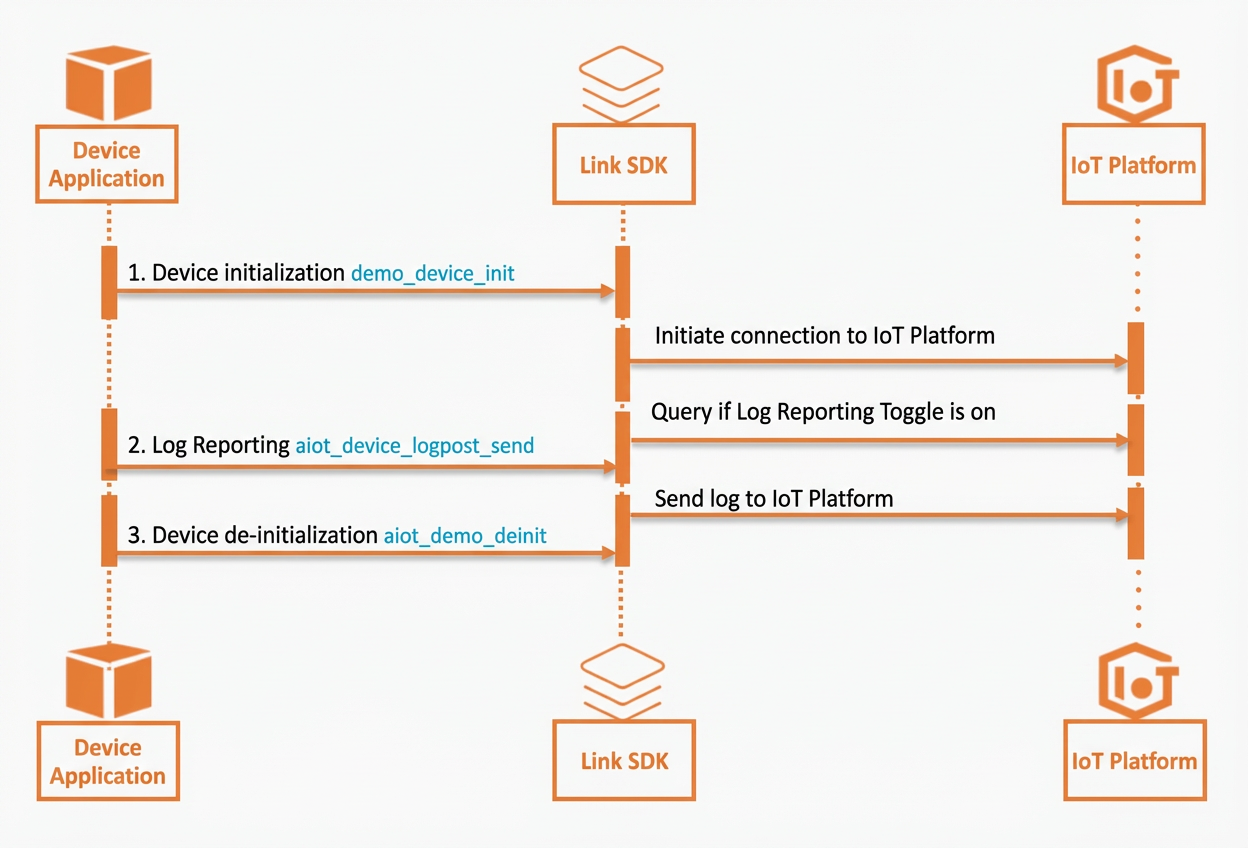
Step 1: Initialize the device
Create a device handle and establish a connection for the device.
static void* demo_device_init(char *product_key, char *device_name, char *device_secret, char *host, uint16_t port)
{
    int32_t res = STATE_SUCCESS;
    /* Create a device. */
    void *device = aiot_device_create(product_key, device_name);
	....
    ....

    res = aiot_device_connect(device);

	....
    ....
    return device;
}
Configure the log module.
Set the callback function for the log module.
/* Set the callback function for the log module. */
aiot_device_logpost_set_callback(device, demo_logpost_msg_callback, NULL);
Parameter description
Parameter
Description
deviceThe device handle.
demo_logpost_msg_callbackThe message callback function for the log module.
NULLThe context of the callback function.
(Optional) Specify whether a reply is required for log reporting.
/* Specify whether a reply is required for log reporting. 0: No reply is required. This is the default value. 1: A reply is required. */
aiot_device_logpost_set_post_reply(device, 1);
Parameter description
Parameter
Description
deviceThe device handle.
11: A reply is required.
0 (default): No reply is required.
After you configure the log module, the C Link SDK automatically queries IoT Platform to check if the log switch is enabled. The status of the switch is then sent to the user through the callback function.
static void demo_logpost_msg_callback(void *device, const aiot_logpost_event_t *event, void *userdata)
{
    if(event->type == AIOT_LOGPOSTEVT_CONFIG_DATA) {
        if(event->data.config_data.on_off == 1) {
            printf("device logpost config on\r\n");
        } else {
            printf("device logpost config off\r\n");
        }
    }
    ....
}
Step 2: Report logs
Send a log reporting request.
/* Report logs to the cloud. */
static void demo_send_log(void *device, char *log)
{
    int32_t res = 0;
    aiot_log_t log_msg;

    memset(&log_msg, 0, sizeof(aiot_log_t));
    log_msg.timestamp = 0;                          /* The timestamp in milliseconds. If you set this parameter to 0, the SDK uses the current timestamp. */
    log_msg.loglevel = AIOT_LOGPOST_LEVEL_DEBUG;    /* The log level. */
    log_msg.module_name = "APP";                    /* The module to which the log belongs. */
    log_msg.code = 200;                             /* The status code. */
    log_msg.msg_id = 0;                             /* The identifier of the message sent from the cloud. If no message is sent, set this parameter to 0. */
    log_msg.content = log;                          /* The log content. */

    res = aiot_device_logpost_send(device, &log_msg);
    if (res < 0) {
        printf("aiot_device_logpost_send failed: -0x%04X\r\n", -res);
    }
}
Parameter description
Parameter
Description
deviceThe device handle.
log_msgThe log information to report.
Cloud response
If you specified in Step 1 that a reply is required for log reporting, the cloud sends a reply after it receives and stores the log.
If the value of
codeis 200, the log is reported successfully.static void demo_logpost_msg_callback(void *device, const aiot_logpost_event_t *event, void *userdata) { .... if(event->type == AIOT_LOGPOSTEVT_POST_REPLY) { printf("device logpost post reply id %d, code %d\r\n", event->data.post_reply.msg_id, event->data.post_reply.code); } }Parameter description
Parameter
Description
deviceThe device handle.
eventThe specific content of the message event.
userdataThe context of the callback.
Step 3: Deinitialize the device
 /* Disconnect the device and release its resources. */
 demo_device_deinit(device);