Overview
You can use the C LinkSDK Extended from IoT Platform to simplify development, quickly connect devices to IoT Platform, and collect large amounts of device data in the cloud. This topic describes the architecture and features of the C LinkSDK Extended.
SDK architecture
C LinkSDK Extended is an open source software development kit (SDK) written in C99. It currently supports only Linux devices.
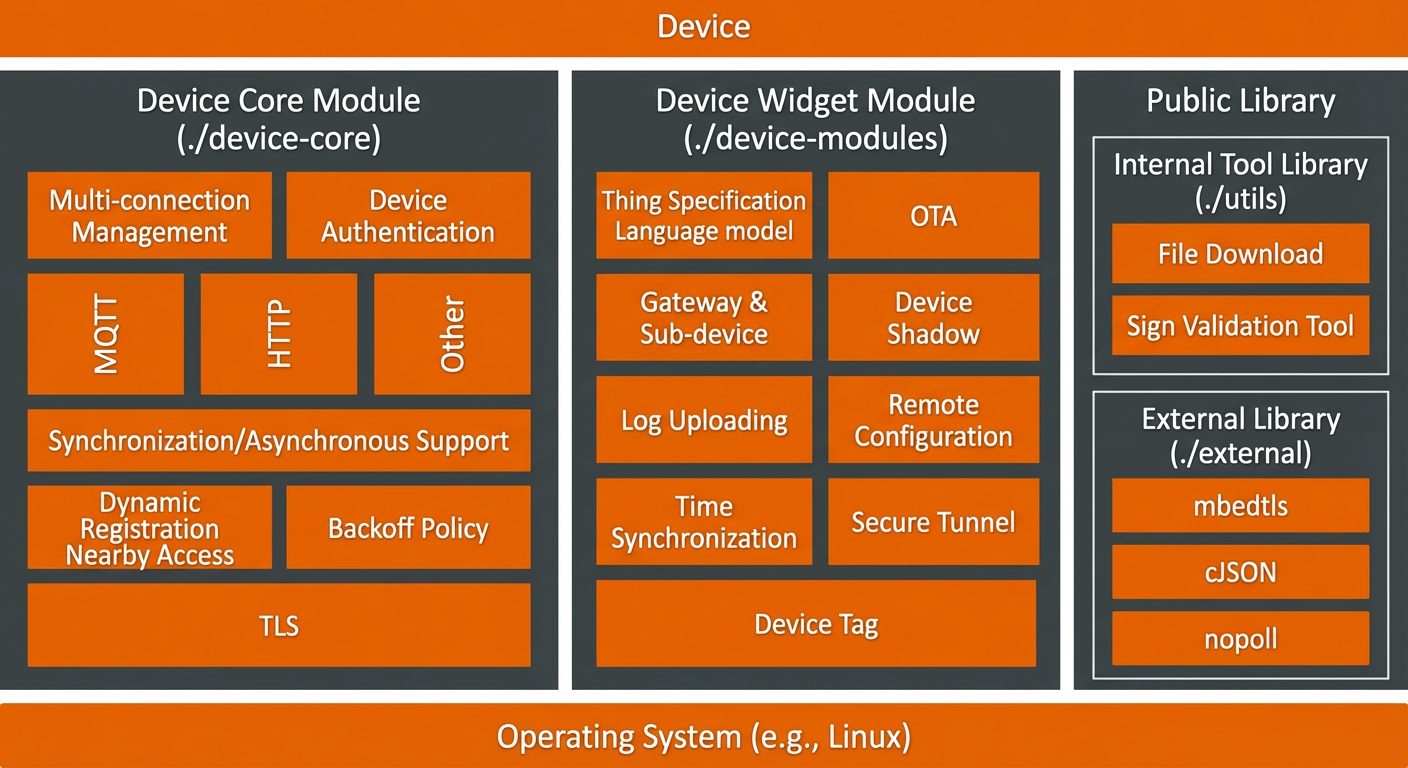
Source code directory structure
/device-core
The core module for devices. This is a required component. Its features include the following:
Feature | Description |
Device authentication |
|
Device connection | Establishes a Message Queuing Telemetry Transport (MQTT) connection between a device and IoT Platform for communication. Establishes an HTTPS connection between a device and IoT Platform to report data. |
Device message sending and receiving | Devices can report data to IoT Platform over MQTT or HTTPS. If a device requires remote management, especially receiving messages actively sent from the cloud, it must connect to IoT Platform using MQTT. |
Device distribution | Guides a device to connect to the nearest server. |
Dynamic device registration | Obtains a shared key from the cloud to flash unified firmware to devices in batches. |
/device-modules
Optional device components. You can delete unused modules within this component before compilation to reduce resource overhead.
Feature | Description |
Thing Specification Language model | Manages devices based on a TSL model. This removes the need to handle the data interaction format between devices and IoT Platform, which reduces development costs and helps you quickly develop device services. |
Device tag | Assigns a custom ID to a device for flexible management. |
Gateway and sub-device | Connects a device gateway to IoT Platform. This allows devices without an IP address to connect to IoT Platform indirectly. |
Device log | Reports device logs to the cloud for storage, query, and analysis. |
Time sync | A device obtains the standard time from IoT Platform. |
Device upgrade | A device upgrades its firmware through IoT Platform. |
Device shadow | Caches the device status. When a device is online, it can directly receive instructions from the cloud. After a device comes back online, it can actively pull instructions from the cloud. |
Secure tunnel | Establishes a WebSocket channel between an access client and a device. This lets you remotely connect to devices on an enterprise intranet that are connected to IoT Platform. |
Remote Configuration | Remotely updates configuration information, such as system parameters and network parameters, without restarting the device or interrupting its operation. |
Data compression | Supports the transmission of compressed data between a device and IoT Platform. This saves device traffic and improves transmission efficiency. |
Multiple connections for a single device | Supports the extension of Queries Per Second (QPS) for device messages. |
/external
External open source libraries that the SDK depends on, such as cJSON, MbedTLS, and noPoll.
/utils
Internal utility library implemented by the SDK. It includes a file download tool and a signature verification tool.
portfiles
Interface implementations for cross-platform porting of the SDK. Currently, only Linux is supported.
Demo introduction
Demo | Feature |
device_basic_demo | Demonstrates basic device connection, sending and receiving messages, and using custom messages. |
device_bootstrap_demo | Demonstrates how to use the nearby access feature for devices. |
device_dynamic_register_demo | Demonstrates how to use the nearby access feature for devices. |
ota_basic_demo | Demonstrates how to use the device Over-the-Air (OTA) upgrade feature. |
dm_basic_demo | Demonstrates how a device uses the TSL model feature. |
logpost_basic_demo | Demonstrates how a device reports local logs. |
tunnel_basic_demo | Demonstrates how to use the remote logon feature for devices. |
shadow_basic_demo | Demonstrates how to use the device shadow feature. |
gateway_****_demo | Demonstrates how to use features related to gateways and sub-devices. |
For more information about the environment requirements to integrate the C Link SDK, see Environment requirements and configurations.
Design principles
API functions and data structures are listed in the
xxx/aiot_xxx_api.hheader file. They are named in theaiot_xxx_yyyformat.Usage examples for component features are provided in files such as
xxx/demos/xxx_{basic,posix}_demo.c.The API function prototypes for components are as follows:
aiot_device_***: APIs for the core device module.aiot_device_xxx_***: APIs for device components.
The API returns a status code, which is a non-positive integer of type
int32_t. A value of0indicates success and other values indicate the runtime status.Use the
retval = aiot_xxx_yyy()format to retrieve the return value.Each return value corresponds to a unique internal execution branch. For more information, see
aiot_state_api.horaiot_xxx_api.h.The return value ranges for all components do not overlap. They are distributed within the range of 0x0000 to
0xFFFF.