Unique-certificate-per-product
With unique-certificate-per-product authentication, all devices for a product can be flashed with the same identifiers. All devices share the same product certificate, which contains the ProductKey and ProductSecret. When a device sends an activation request, IoT Platform verifies its identity and then sends the required connection information to the device.
Background information
Unique-certificate-per-product authentication supports two modes: with and without pre-registration.
Dynamic registration without pre-registration: You do not need to create devices on IoT Platform in advance. This method dynamically creates a device and returns authentication information to it.
Dynamic registration with pre-registration: You must create devices on IoT Platform in advance. This method dynamically retrieves the DeviceSecret.
Prerequisites
Procedure
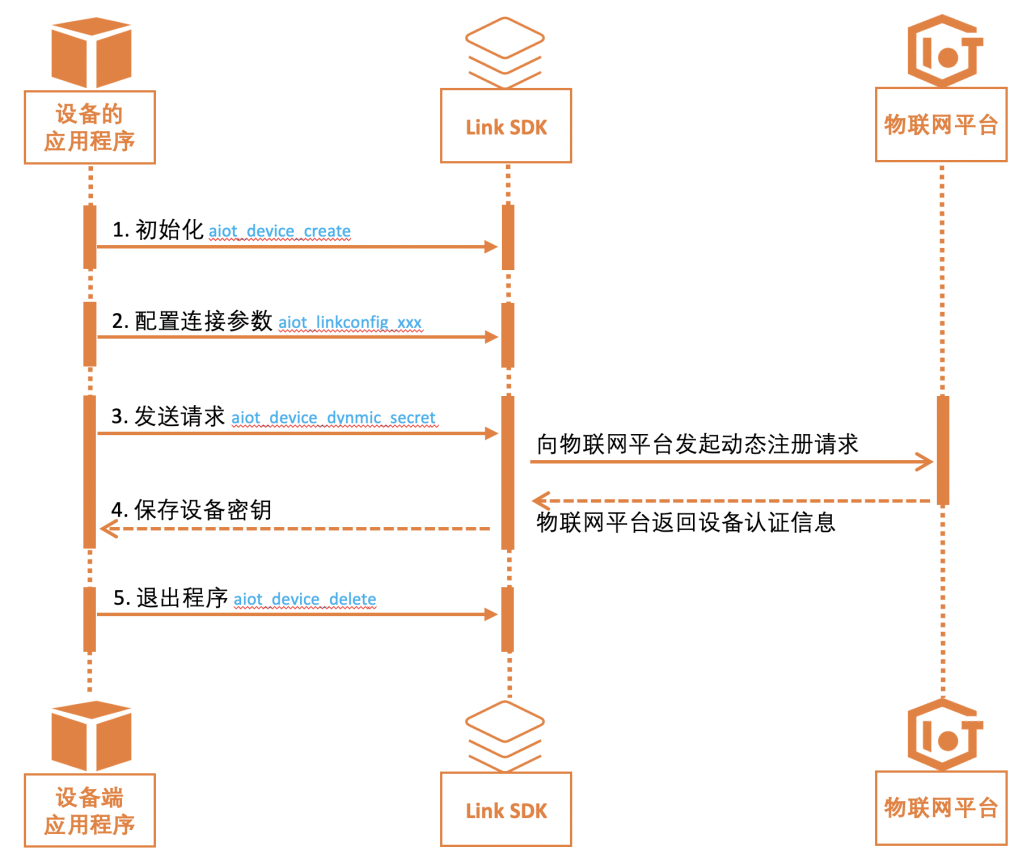
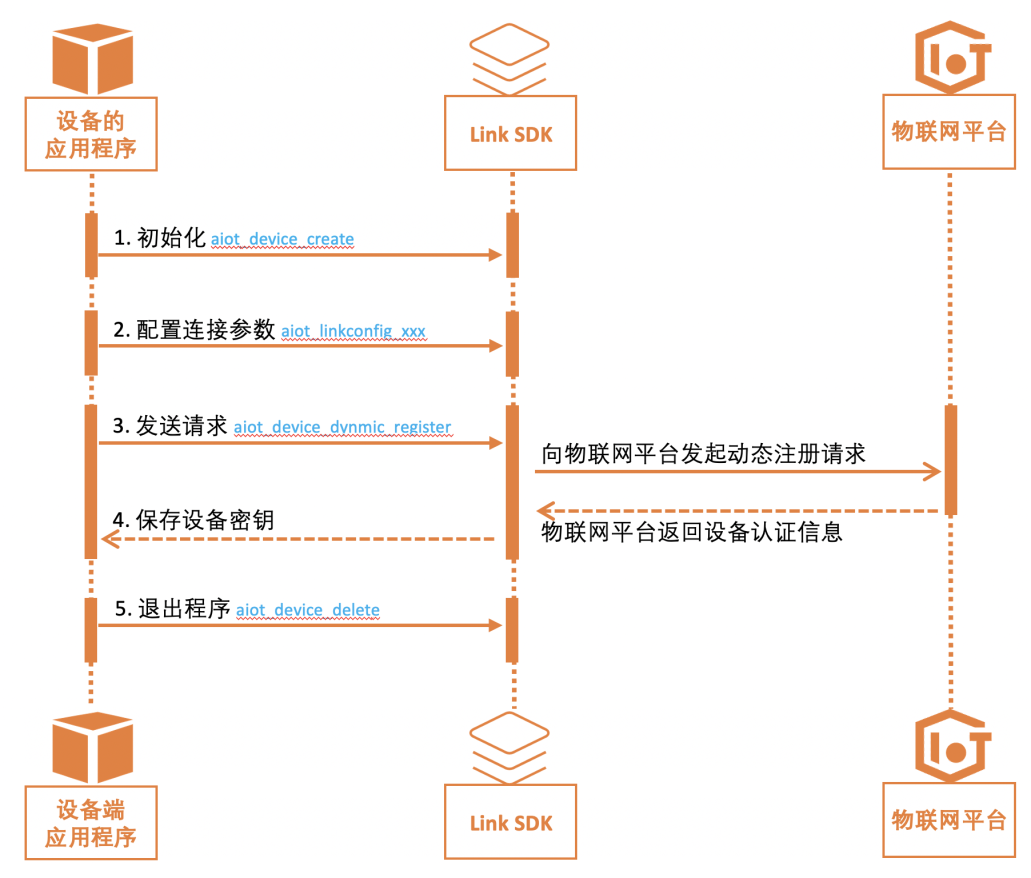
The following flowcharts illustrate the procedure for unique-certificate-per-product authentication. The demos/device_dynamic_register_demo.c device application is used as an example.
Flowchart for per-model pre-registration
Flowchart for dynamic registration without pre-registration
Step 1: Device initialization
Add the header file.
#include "aiot_device_api.h"Create a device handle.
void *device_client = aiot_device_create(product_key, device_name);
if (device_client == NULL) {
    printf("device_client failed\n");
    return -1;
}
Step 2: Set connection parameters
config = aiot_linkconfig_init(protocol);
if(config == NULL){
    aiot_device_delete(&device_client);
    printf("aiot_linkconfig_init failed\n");
    return -1;
}
aiot_linkconfig_host(config, host, port);
/* The dynamic registration feature requires the product_secret. If the device belongs to an enterprise instance, the INSTANCE_ID is also required. */
aiot_linkconfig_dynamic_register(config, product_secret, INSTANCE_ID);
Step 3: Send a dynamic registration request
Method for pre-registering secrets by model
/* After you obtain the key through dynamic registration, use the key to connect. */
char device_secret_result[128];
res = aiot_device_dynamic_secret(device_client, config, device_secret_result, 128);
if(res != STATE_SUCCESS) {
    ...
}
/* TODO: This example only prints the result. Save the device secret. */
printf("dynamic register success, device_secret %s\r\n", device_secret_result);
Dynamic registration without pre-registration
aiot_dynamic_register_info_t info;
res = aiot_device_dynamic_register(device_client, config, &info);
if(res != STATE_SUCCESS) {
    aiot_device_delete(&device_client);
    aiot_linkconfig_deinit(&config);
    printf("aiot_device_dynamic_register failed\n");
    return -1;
}

/* TODO: This example only prints the result. Save the connection information. */
printf("dynamic register success, username %s, password %s, clientid %s\r\n", info.username, info.password, info.client_id);
Step 4: Save the device secret and connection information
This example only prints the result of the dynamic registration. In your application, you must save this result to the file system.
Step 5: Exit the program
/* Release resources */
aiot_linkconfig_deinit(&config);
aiot_device_delete(&device_client);