Receive device messages using a server-side subscription
Configure an AMQP server-side subscription so your server can connect as an AMQP client and receive data from a sample street lamp device.
Background information
The following figure shows the workflow for receiving device messages through an AMQP server-side subscription. For more information, see Configure an AMQP server-side subscription and Connect an AMQP client.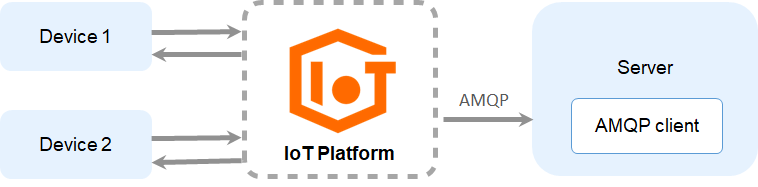
Procedure
-
Log on to the IoT Platform console.
-
On the Overview tab, click Public Instance.
-
Configure a consumer group so your server can receive forwarded messages.
-
In the left-side navigation pane, choose , and click the Consumer Groups tab.
-
Click Create Consumer Group.
-
In the Create Consumer Group dialog box, enter StreetLampConsumerGroup as the consumer group name and click Confirm.
-
-
Configure a server-side subscription for the street lamp product to subscribe to various message types.
-
In the left-side navigation pane, choose .
-
On the Server-Side Subscription page, on the Subscriptions tab, click Create Subscription.
-
In the Create Subscription dialog box, set the parameters and click Confirm.
Parameter
Description
Product
Select StreetLamp.
Subscription type
Select AMQP.
Consumer group
Select the StreetLampConsumerGroup that you created in the previous step.
Message type
Select Device Upstream Notification.
-
-
Connect an AMQP client to IoT Platform.
This example uses Java. We recommend the Apache Qpid JMS client for AMQP connections. For more information about the Qpid JMS client, see Qpid JMS 0.57.0.
Development environment:
-
Operating system: 64-bit Windows 10
-
JDK version: JDK 8
-
Integrated development environment (IDE): IntelliJ IDEA Community Edition
-
Download the demo package and decompress the package.
-
Open IntelliJ IDEA, import the amqp-demo sample project from the demo package, and then use Maven to build the project.
-
In the AmqpClient.java file of the src/main/java/com.aliyun.iotx.demo directory, modify the parameters required to connect the JMS client to IoT Platform.
Parameter
Example
Description
accessKey
LTAI****************
Log on to the IoT Platform console, hover over your profile picture, and click AccessKey Management to obtain your AccessKey ID and AccessKey Secret.
NoteTo use a RAM user, you must grant it the AliyunIOTFullAccess permission. Otherwise, the connection fails. For more information about granting permissions to a RAM user, see Authorize a RAM user to access IoT Platform.
accessSecret
yourAccessKeySecret
consumerGroupId
VWhGZ2QnP7kxWpeSSjt******
The consumer group ID of the StreetLampConsumerGroup created in Step 3. In the IoT Platform console,go to the public instance page, choose , and click the Consumer Groupstab to find the consumer group ID.
iotInstanceId
-
Example for a new public instance: iot-w3***
-
Example for an old public instance: ""
The instance ID.
-
New public instance: On the Overview tab, find the ID of your public instance.
-
Old public instance: This type of instance does not have an instance ID. Set this parameter to an empty string.
For more information about instances, see Instance overview.
clientId
12345
The client ID. You must define this ID. The ID can be up to 64 characters in length. We recommend that you use a unique identifier, such as the UUID, MAC address, or IP address of the server where your AMQP client is located.
After the AMQP client is connected and starts, log on to the IoT Platform console. On the Consumer Groups tab of the page for the instance, click View next to the consumer group. The Consumer Group Details page displays this parameter. This helps you identify different clients.
connectionCount
4
The number of connections for the AMQP client. The maximum value is 128. This parameter is used to scale out real-time message pushes.
On the Consumer Group Details page, connected clients are displayed in the
${clientId}+"-"+numberformat. The minimum value for number is 0.host
-
Example for a new public instance: iot-***.amqp.iothub.aliyuncs.com
-
Example for an old public instance: 198426864******.iot-amqp.cn-shanghai.aliyuncs.com
The AMQP endpoint.
-
For Java, .NET, Python 2.7, Node.js, and Go clients: the port number is 5671.
-
For Python 3 and PHP clients: the port number is 61614.
For more information, see View and configure instance endpoints.
-
-
Run the sample code. Log output similar to the following indicates that the AMQP client is connected to IoT Platform and receiving messages.
NoteThe demo code includes the
Thread.sleep(60 * 1000);code snippet, which terminates the program one minute after it starts. In your application, set the run time based on your business requirements.[main] INFO com.aliyun.iotx.demo.AmqpClient - amqp demo is started successfully, and will exit after 60s [AmqpProvider :(2):[amqps://xxx.aliyuncs.com:5671]] DEBUG org.apache.qpid.jms.provider.amqp.AmqpConsumer - Dispatching received message: JmsInboundMessageDispatch { sequence... [JmsSession [ID:d0cd8ff1-5c3xxx ry dispatcher] DEBUG org.apache.qpid.jms.provider.failover.FailoverProvider - Executing Failover Task: message acknowledge -> JmsInboundMessag... [AmqpProvider :(2):[amqps://xxx.aliyuncs.com:5671]] DEBUG org.apache.qpid.jms.provider.amqp.AmqpConsumer - Delivered Ack of message: JmsInboundMessageDispatch { sequence = [JmsSession [ID:d0cd8ff1-5c3xxx ry dispatcher] DEBUG org.apache.qpid.jms.provider.failover.FailoverProvider - Executing Failover Task: message acknowledge -> JmsInboundMessag... [AmqpProvider :(2):[amqps://xxx.aliyuncs.com:5671]] DEBUG org.apache.qpid.jms.provider.amqp.AmqpConsumer - Accepted Ack of message: JmsInboundMessageDispatch { sequence = 1 [pool-1-thread-1] INFO com.aliyun.iotx.demo.AmqpClient - receive message, topic = /a1xxx/device1/thing/event/property/post, messageId = 13800447898700645, content = {"deviceType":"CustomCategory","iotId":"nTT9rxxx","requestId":"1617863381153","checkFailedData":{},"productKey":"a10xxx","gmtCreate":1617863218430,"deviceName":"device1","items":{"LightSwitch":1}}}}}
-