FAQ about connecting devices using a generic protocol
This topic describes how to troubleshoot issues that occur when you connect devices using a generic protocol.
Background information
If your devices are connected to your own cloud servers for remote management and data collection, it may not be practical to modify the device firmware to connect to Alibaba Cloud IoT Platform. In this case, you can use the IoT as Bridge SDK to use the features of IoT Platform and add your devices to an IoT Platform-based solution.
For more information about the IoT as Bridge SDK, see What is the cloud-to-cloud integration (formerly IoT as Bridge) SDK. For instructions, see Basic usage.
How do I connect to IoT Platform?
BridgeBootstrap class object to connect to IoT Platform.- Successful connection:
When you create a
BridgeBootstrapobject, the SDK automatically connects to the platform. The connection is successful if no exception is thrown. - Failed connection:
The connection fails if a
BootExceptionis thrown. You can listen for this exception to detect a connection failure. If an exception occurs, destroy theBridgeBootstrapobject. Then, create a newBridgeBootstrapobject every 10 seconds to try to reconnect to IoT Platform.
How do I manually disconnect from IoT Platform?
While the application is running, you can call Http2MessageClientFactory.getClient().disconnect() to manually disconnect.
Do I need to monitor for unexpected disconnections from IoT Platform?
You do not need to monitor for unexpected disconnections if your enterprise server is connected to IoT Platform using the SDK. If a disconnection occurs due to issues such as a network failure, the SDK automatically tries to reconnect.
How do I generate device certificates in a batch?
You can call the BatchRegisterDevice API using the SDK that is provided by IoT Platform to generate device certificates in a batch. For more information, see Download cloud SDKs and BatchRegisterDevice.
How do I get sub-device certificates?
In the IoT as Bridge SDK demo, device information is stored in
DeviceIdentity. ThegetDeviceIdentity()method of theDeviceConfigManagerclass retrieves the device certificate based on the specified device ID.In a production environment, re-implement
DeviceConfigManager. In theinit()method ofConfigFactory, pass your implementation ofDeviceConfigManager. Then, use thegetDeviceIdentity()method to retrieve device certificates from your database.
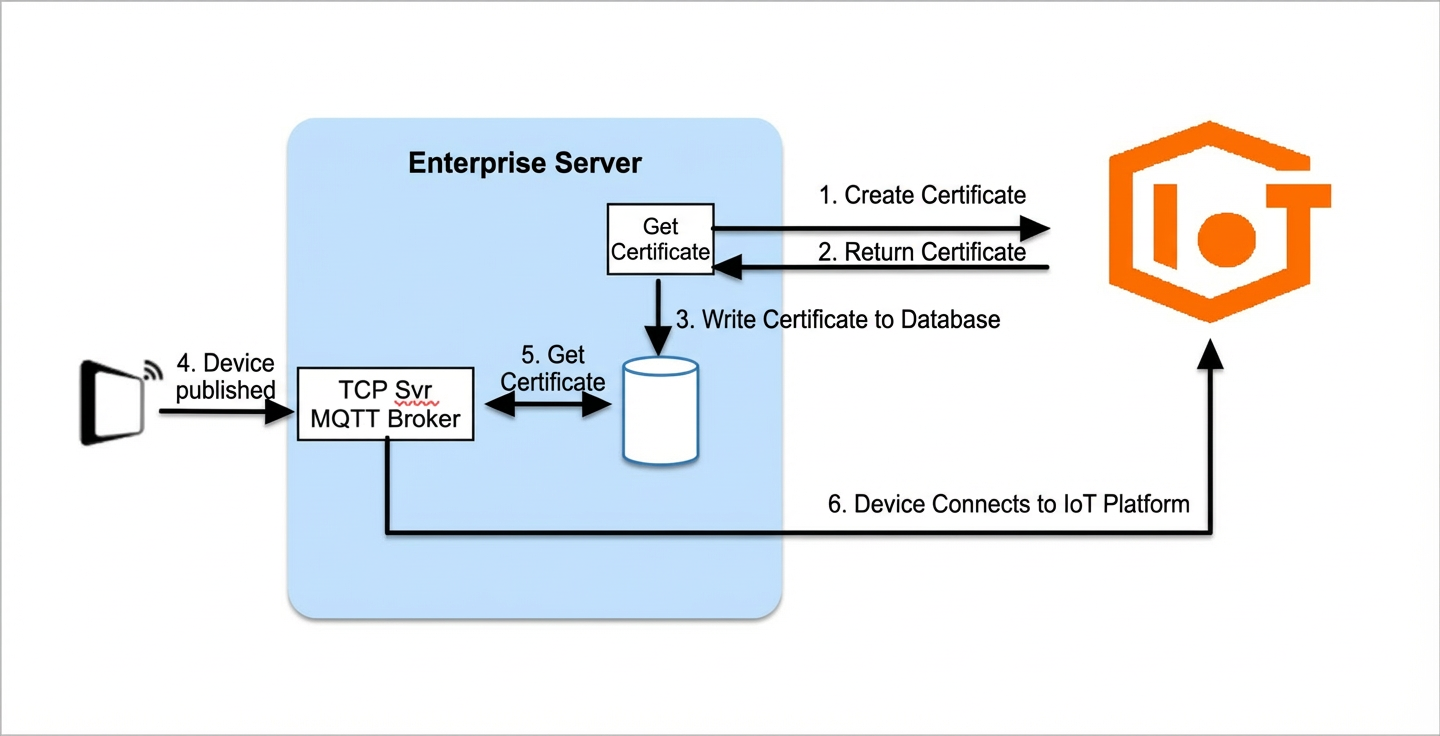
How do I associate sub-device certificates with devices?
Follow these steps:
- Generate sub-device certificates in a batch and write them to a database.
- When a sub-device goes online, check if a certificate is already associated with it.
- If a certificate is associated, use that certificate to connect to IoT Platform.
- If no certificate is associated, retrieve an unused certificate from the database and associate it with the device. Then, use the new certificate to connect the sub-device to IoT Platform.
In the IoT as Bridge SDK demo, device certificates are stored in a configuration file. For more information, see Basic usage. This method is not recommended for production environments that have many devices.
How do I bring a device online?
When a device connects to your server, you must call the IoT as Bridge SDK API doOnline() to notify the IoT Platform that the device is online.
How do I take a device offline?
When your server detects that a device has disconnected, you can call the doOffline() API of the IoT as Bridge SDK. This notifies IoT Platform that the device is offline.