FAQ about IoT Platform instances
This topic answers frequently asked questions about using IoT Platform instances.
For more information about IoT Platform instances, see Instance overview.
Category |
Question |
Instance management |
|
Instance environment |
|
Instance resources |
|
Instance migration |
|
Device connection for instances |
|
API calls for instances |
How do I find an instance?
Problem description
After you activate IoT Platform or purchase an IoT Platform Enterprise instance, you cannot find the public instance or the purchased Enterprise instance in the IoT Platform console.
Possible causes
The region that you selected in the IoT Platform console is not the region where your instance is located. The following table lists the supported regions for public and Enterprise instances.
Instance
Supported regions
Public instance
China (Shanghai), Germany (Frankfurt), US (Silicon Valley), US (Virginia), Singapore, Japan (Tokyo)
Enterprise instance
China (Shanghai), China (Beijing), China (Shenzhen), Germany (Frankfurt), US (Silicon Valley), US (Virginia), Singapore, Japan (Tokyo)
You did not refresh the IoT Platform console page after you purchased the instance.
You are on the Production Environment or Staging Environment tab, but the destination instance is in a different environment.
Solution
To find an instance in a region where the Enterprise Instance service is available, follow these steps:
Log on to the IoT Platform console.
In the upper-left corner of the page, select the region where the destination instance is located.
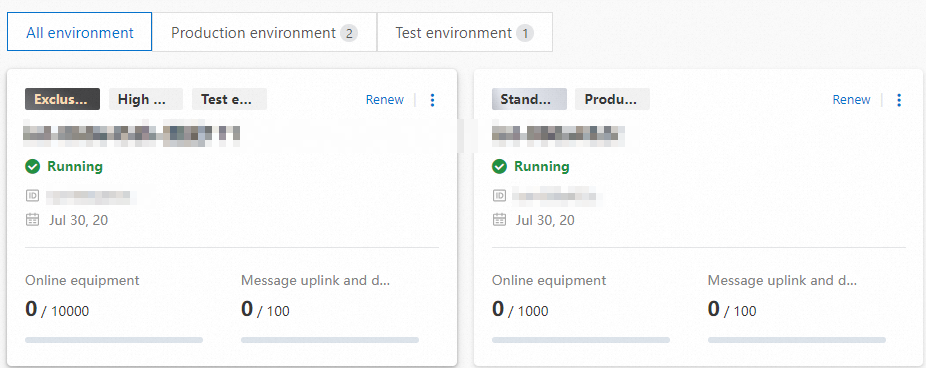
On the Instance Overview tab, click the All Environments tab to find the destination instance.
A newly purchased Enterprise instance appears at the top of the instance list.
How do I get an instance ID?
Problem description
You need the instance ID for Enterprise instances and new public instances when you develop a device SDK, IoT Platform cloud SDK, or AMQP SDK.
Solution
In the upper-left corner of the IoT Platform console, select the region where the destination instance is located.
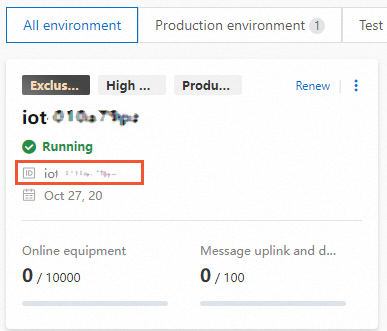
On the Instance Overview tab, find your instance in the list and view its ID.
ImportantThe legacy Public Instance area does not display a specific ID:
When you use the IoT Platform cloud SDK to call an API, you do not need to specify the instance ID (IotInstanceId). You can delete the code related to
IotInstanceIdin your request.When you connect devices and AMQP clients, you must specify an empty value, such as
iotInstanceId = "".
What is the purpose of setting an instance environment, and does setting a production or staging environment affect the instance ID?
IoT Platform uses instances to manage and maintain devices. You can set an environment for an instance to identify which environment its devices belong to. This helps you distinguish and manage devices that connect to IoT Platform in different environments.
Changing the instance environment does not affect the instance ID. After you activate a new public instance or purchase an Enterprise instance, the corresponding instance ID is fixed.
Does IoT Platform support instance scale-out?
New public instance: Scale-out is not supported. If the defined specifications do not meet your business needs, you can upgrade the public instance to an Enterprise instance. For more information, see Upgrade a public instance to an Enterprise instance.
Enterprise instance: If the purchased specifications do not meet your business needs, you can upgrade the instance. For more information, see Upgrade an Enterprise instance.
Legacy public instance: Scale-out is not supported. If the resource specifications are insufficient, you must migrate new or existing devices to an IoT Platform Enterprise instance.
For information about the business impact and system modifications required for migration, see Read before you start.
Is there a time limit for new public instances of IoT Platform?
None.
How do I upgrade a legacy public instance to a new public instance?
IoT Platform does not support upgrading a legacy public instance to a new public instance.
To use a new public instance, you can register a new Alibaba Cloud account and activate the IoT Platform service. For more information, see Activate a new public instance.
What do I do if my new public instance is frozen?
On the Instance Overview tab in the IoT Platform console, click the instance card to continue using the public instance.
How do I shut down a new public instance of Alibaba Cloud IoT Platform?
You cannot directly shut down a new public instance. If devices connected to the new public instance are offline for a long time, IoT Platform automatically freezes the instance.
You can also upgrade the new public instance to an Enterprise instance. After the upgrade, you cannot revert it to a public instance.
What is the difference in device connection domain names between legacy public instances and Enterprise instances?
The domain name format is different. For information about how to view the connection domain name, see View and configure instance endpoints.
For different instances under the same Alibaba Cloud account, are the AccessKey ID and AccessKey secret for calling the cloud SDK the same?
The AccessKey ID and AccessKey secret form an account-level AccessKey pair. An AccessKey pair is specific to an Alibaba Cloud account or a RAM user. All instances under the same Alibaba Cloud account or RAM user use the same AccessKey ID and AccessKey secret to call the cloud SDK.
For more information about AccessKey pairs, see Create an AccessKey pair. For information about credential solutions for calling the cloud SDK, see Securely use credentials.
What should I note when migrating a legacy public instance to an Enterprise instance?
For information about the requirements and preparations for instance migration, see Read before you start.
Does migrating a legacy public instance to an Enterprise instance consume the resources of the Enterprise instance?
Yes, you can.
If the number of devices under an instance exceeds the maximum concurrent connections, are new devices blocked from connecting, or are existing online devices disconnected?
New devices cannot go online.
After a grayscale migration of a legacy public instance is complete, the migration details page shows no device information
For more information about IoT Platform instance migration, see Instance migration overview.
Problem
After an instance migration task completes a grayscale migration, the device list on the Migration Details page is empty.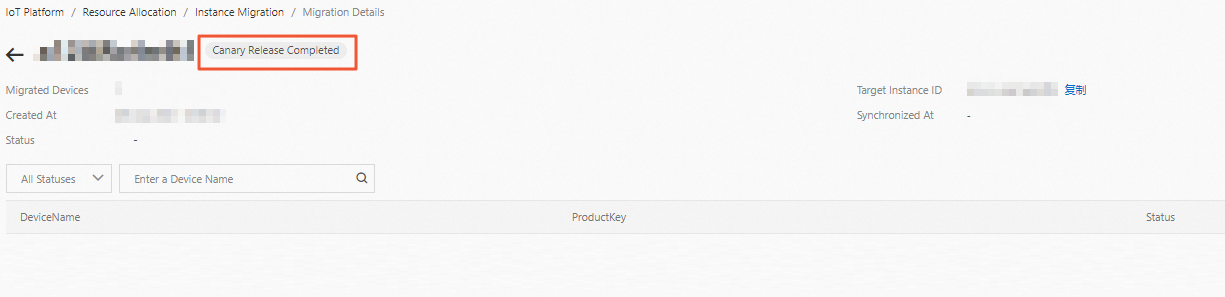
Possible cause
The grayscale migration process involves copying product data, copying rules engine data, and then migrating some device data. If a problem occurs in a step before device migration, the devices are not migrated, and the Migration Details page shows no device information. This does not affect your business.
Solution
You can perform the grayscale migration again. For more information, see Step 2: Grayscale migration.
Can a legacy public instance of IoT Platform under one account be migrated to an Enterprise instance under another account?
No, it cannot. For a legacy public instance migration, both the public instance and the destination Enterprise instance must be under the same account and in the same region.
Can an IoT Platform Enterprise instance be migrated? If so, how?
Enterprise instances do not support migration. Currently, only legacy public instances in the China (Shanghai) region support instance migration. For more information, see Migrate a legacy public instance.
You can use device distribution to move devices across regions, instances, and accounts. For more information, see Device distribution.
Can a Standard Enterprise instance be upgraded to a Premium one?
No, it cannot. After you purchase an Enterprise instance, the instance type is fixed and cannot be changed. If the resource specifications of your instance are insufficient, you can upgrade the instance specifications. For more information, see Upgrade/Downgrade guide.
To use the Premium instance service, you can purchase a new instance directly. For more information, see Purchase an Enterprise instance.
If I let an existing Enterprise instance expire and purchase a new one, can I keep the same instance ID?
No, you cannot. When you purchase a new instance, IoT Platform automatically generates a new instance ID that is different from any other instance ID under your account.
If you find that your instance specifications are too high for your current business needs at the time of renewal, you can first downgrade and then renew. For more information, see Upgrade/Downgrade and renewal.
How do I use a device API to query the device's connection information?
You cannot use a cloud API to query the device connection information.
In the IoT Platform console, on the Instance Details page of the corresponding instance, click View Development Configuration in the upper-right corner to copy the device connection information.
API call returns the error "Error: Instance not found."
For legacy public instances, you do not need to specify an instance ID.
For new public instances and Enterprise instances, you must specify an instance ID. The error may be caused by the following:
The specified value is invalid. The value may contain extra spaces or unsupported characters.
The specified region is incorrect.
For more information about IoT Platform instances, see Instance overview.
When migrating an IoT Platform public instance to an Enterprise instance, can OTA update packages be migrated as well?
No, they cannot. The migration of Over-the-Air (OTA) update tasks and packages is not supported.
You must first confirm whether the product to be migrated has any device OTA update tasks. If it does, you must either complete the OTA update before you migrate the instance, or stop the OTA update task and perform the update after the instance migration is complete. Otherwise, the OTA update may fail during the instance migration, and running OTA update tasks will continue to incur charges.
How can I tell if a public instance is new or legacy, and can it be directly upgraded to an Enterprise instance?
New public instances have an instance ID, while legacy public instances do not. If the resource specifications of a public instance do not meet your business needs:
Legacy public instances must be migrated to an Enterprise instance. For more information, see Migrate a legacy public instance.
New public instances can be directly upgraded to an Enterprise instance. For more information, see Upgrade a new public instance to an Enterprise instance.
Can authorized products and devices in a legacy public instance be migrated to an Enterprise instance?
No, they cannot. The instance migration feature does not support the migration of authorized products or devices. For more information, see Read before you start instance migration.
What does "grayscale migration" mean in the context of instance migration?
Grayscale migration is a partial migration. It involves migrating a small number of devices for testing before you perform a full migration. You must complete a grayscale migration before you can perform a full migration.
For more information, see Instance migration procedure.
My IoT Platform instance is only running about 300 devices. I want to downgrade the configuration. Where can I do that?
IoT Platform supports downgrading the resource specifications of an Enterprise instance. When you downgrade, you receive a refund for the disabled or downgraded features.
Refund calculation method: (Daily price of the instance before downgrade - Daily price of the instance after downgrade) × Remaining days until expiration.
On the Instance Overview tab in the IoT Platform console, you can click the edit
 icon in the upper-right corner of the instance card.
You can then click Downgrade to go to the downgrade page.
You can reduce the instance configuration specifications and complete the purchase as instructed on the page.
The specific refund amount is subject to the amount displayed on the downgrade page.
Will the connection domain name change after upgrading an IoT Platform Enterprise instance?
No, it will not.
Can legacy public instances be migrated to all types of Enterprise instances?
Currently, you can only migrate data such as products and devices from a legacy public instance to a Standard Enterprise instance.
Does legacy public instance migration support cross-region or cross-account migration to an Enterprise instance?
No, it does not. You can only migrate data, such as products and devices, from a legacy public instance to an Enterprise instance that is under the same account and in the same region.
You can use device distribution to move devices across regions, instances, and accounts. The destination region, destination instance, and destination account can only view and use the devices, not edit or manage them. For more information, see Device distribution.
Do I need to update the connection domain name after migrating a legacy public instance?
If you use the Link SDK provided by IoT Platform to develop your devices, the device automatically connects to the Enterprise instance. You do not need to modify the device connection domain name. For more information about the Link SDK, see Device connection.
If you do not use the device SDK provided by IoT Platform, you must modify the device connection domain name and develop your own device reconnection logic.
After a legacy public instance is successfully migrated, do I need to pass the Enterprise instance ID when the server-side calls a cloud API?
Yes. You need to implement logic in your application server that uses the cloud SDK to read the instance ID.
When migrating a legacy public instance to an Enterprise instance, do I first need to create products, devices, and configure message forwarding in the Enterprise instance?
No, you do not. After you purchase a destination Enterprise instance with sufficient resource specifications, you can directly migrate the products, devices, and message forwarding configurations from the legacy public instance. You do not need to create them in the destination Enterprise instance.
For more information, see Data migration from a legacy public instance.
Will migrating a legacy public instance affect connected devices?
During instance migration, an online device will be forced offline. If the device has a reconnection mechanism, it will automatically reconnect successfully after the instance migration.
The device SDK provided by IoT Platform includes a built-in reconnection mechanism. For more information, see Migration guide for legacy public instances.
How do I upgrade a new public instance of IoT Platform to an Enterprise instance?
For more information, see Upgrade a new public instance to an Enterprise instance.
After a new public instance is upgraded to an Enterprise instance, it is removed. This action is irreversible. Proceed with caution.
To keep the new public instance, you can purchase an Enterprise instance. This adds a new Enterprise instance while allowing you to continue using the new public instance. For more information, see Purchase an Enterprise instance.