Gateways and sub-devices
IoT Platform supports direct connections for devices. Devices can also be attached to a gateway as sub-devices and connect to the platform through the gateway.
Scenarios
This is useful in scenarios where sub-devices cannot connect directly or require topology management, such as when they connect through Wi-Fi, Bluetooth, or ZigBee gateways.
Benefits
IoT Platform helps you manage sub-devices and the topology between sub-devices and gateways. It also lets you perform monitoring and Operations and Maintenance (O&M) on sub-devices. Your business system can send messages to and receive messages from sub-devices directly, regardless of their physical connections or locations.
Gateways and devices
When you create a product, you must select a node type. IoT Platform supports three node types:
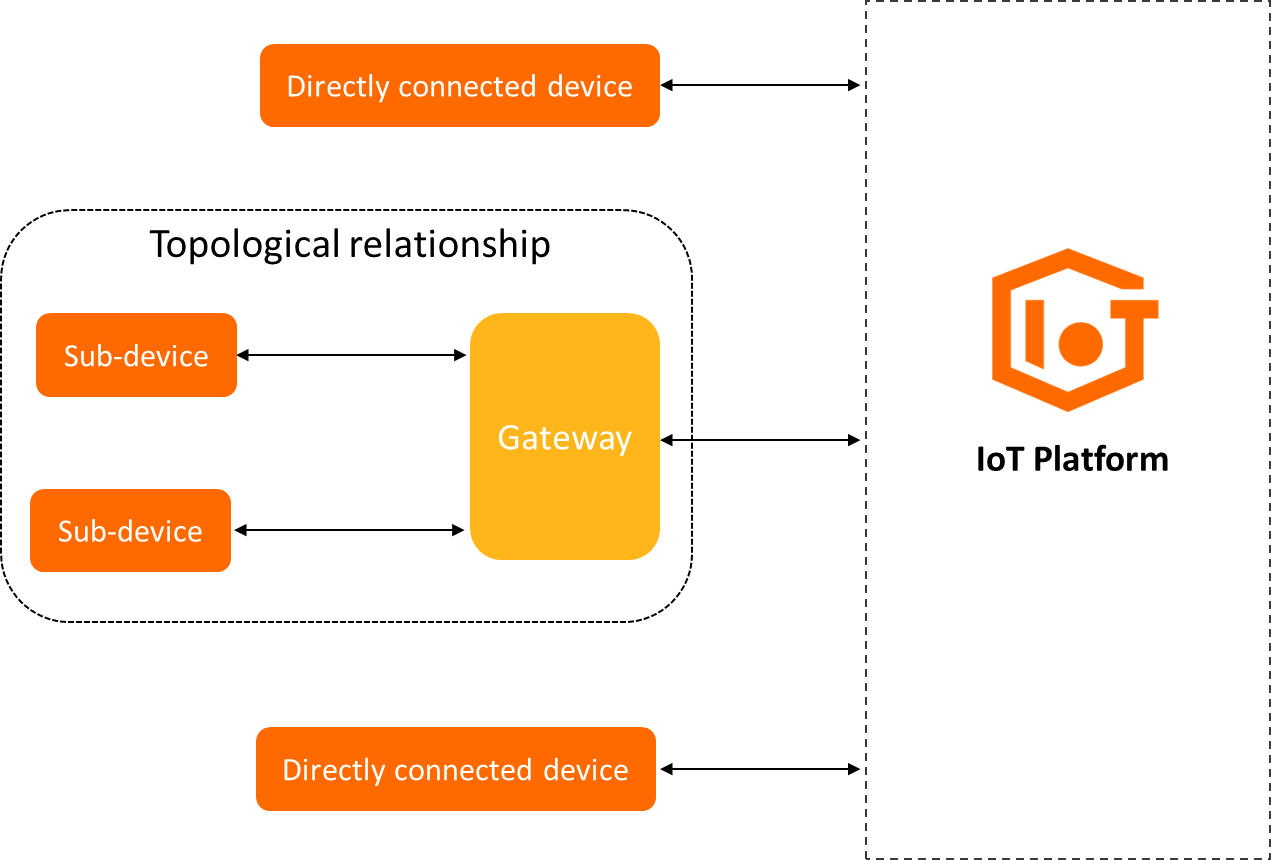
Directly connected device: A device that has an IP address and connects directly to IoT Platform. It cannot have sub-devices attached to it, but it can be attached to a gateway as a sub-device.
Gateway sub-device: A device that does not connect directly to IoT Platform. Instead, it connects to IoT Platform through an attached gateway.
Gateway device: A directly connected device that can have sub-devices attached. For simplicity, this document refers to this device type as a gateway. A gateway includes a sub-device management module to maintain the sub-device topology and sync the topology with the cloud.
The topology of a gateway and its sub-devices is shown in the following figure.
Connection methods
After a gateway connects to IoT Platform, it syncs the topology to the cloud. The gateway then acts as a proxy for its sub-devices, handling communication with IoT Platform for tasks such as device authentication, message uploads, and receiving instructions.
A gateway connects to IoT Platform in the same way as a standard device. For more information, see Connect a device using the Link SDK.
Sub-devices can connect to IoT Platform in two ways:
Unique-certificate-per-device authentication: The gateway obtains the device certificate of the sub-device and reports the certificate information (ProductKey, DeviceName, and DeviceSecret) to IoT Platform.
Dynamic registration and authentication: In the IoT Platform console, enable dynamic registration for the sub-device. The gateway obtains the sub-device's ProductKey and DeviceName and acts as a proxy to dynamically register the sub-device. IoT Platform verifies the identity of the sub-device. After the verification is successful, IoT Platform dynamically issues a DeviceSecret. The sub-device then uses its device certificate (ProductKey, DeviceName, and DeviceSecret) to connect to IoT Platform.