IoT Platform logs
The IoT Platform console provides logs that record communication among IoT Platform, devices, and your applications. You can use these logs to understand device status and communication details by examining the message content, service type, action, and status code. The logs help you identify the cause of failed operations, monitor devices, and troubleshoot issues. This topic describes how to view IoT Platform logs and provides information about error codes and troubleshooting.
Log service types
The following figure shows the log service types for mobile-originated messages.
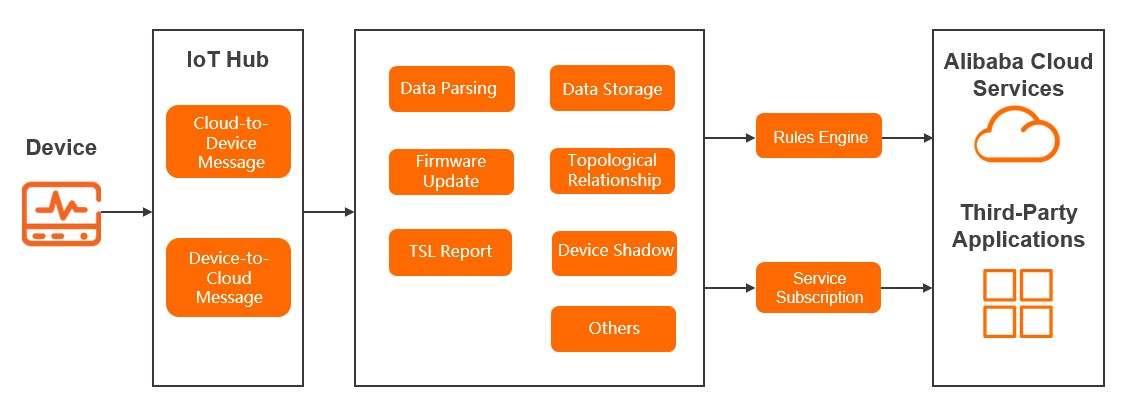
When IoT Platform receives data from a device, it generates a log for the message. This log includes the message topic.
Logs are generated for each data processing module.
If a message is sent to a consumer through data forwarding or server-side subscription (AMQP or MNS), IoT Platform generates logs for the rules engine (data forwarding) and server-side subscription modules.
The following figure shows the log service types for mobile-terminated messages.
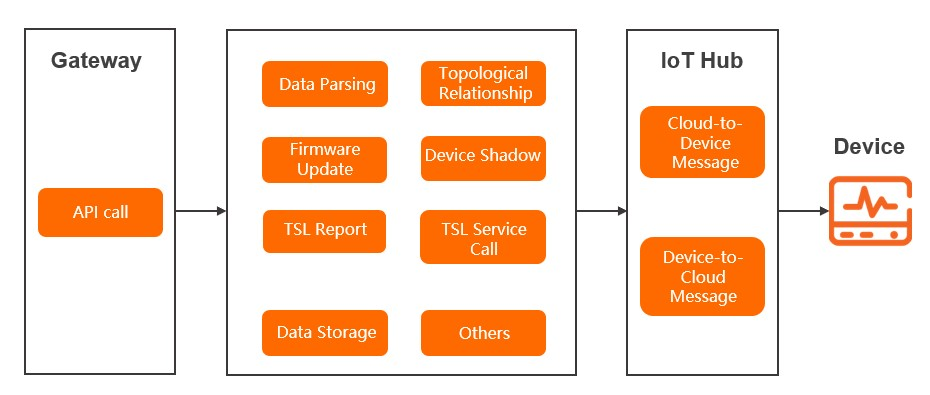
When a user invokes an API operation to generate a message, IoT Platform generates a log for the API call. This log includes the API operation name.
Logs are generated for each data processing module.
If a message is sent to a device, IoT Platform generates a log for the cloud-to-device message. This log includes the message topic.
Query IoT Platform logs
Log on to the IoT Platform console.
On the Overview page, find the instance that you want to manage and click the instance ID or instance name.
In the navigation pane on the left, go to and click the IoT Platform Logs tab.
Select a product, enter search criteria, and then click the search icon.
The following table describes the supported search criteria.
ImportantIf your search criteria, such as a device name or content keyword, contain any of the following special characters:
, '";=()[]{}?@&<>/:\n\t\r, the input is split into multiple words. This causes the log query to fail and the error message Log query: abnormal query parameters is displayed.Search condition
Description
DeviceName
Enter a device name to search for logs related to that device.
TraceId
Enter a trace ID to search for logs across linked modules.
Content keyword
Enter a keyword from the log content to search for logs.
MessageID
The unique identifier that IoT Platform generates for a message.
You can search for logs by MessageID only for mobile originated and mobile terminated message analysis.
Status
Query logs by result status. You can select one of the following options:
All Statuses
Success: The status code is 200.
Failed: Corresponds to other failure status codes.
Service type
Select the service type of the logs that you want to query.
Time range
Select the time range for the logs that you want to query.
Log fields
The following table describes the fields in a log entry.
Parameter | Meaning | Notes |
Time | The time when the log was generated. | None. |
TraceId | The trace ID. You can use it to search for logs across linked modules. | None. |
MessageID | The message ID. | None. |
DeviceName | The device name. | None. |
Service type | By default, logs of all service types are displayed. You can query logs of a specific service type. When logs are forwarded to Simple Log Service, the corresponding English field names for each service type are as follows:
| A primary identifier for the service module. |
Action | The action name, API operation name, service method, or message topic. For more information about API operation names, see API list. For more information about service methods or message topics, see Alink protocol. The following list describes related actions:
| A secondary identifier for the service. |
Content | The log content may include the following parameters:
| For TSL model data parsing logs from products that use the pass-through or custom data format, the log content also displays the raw data sent by the device as a hexadecimal string. |
Status | The result code. A value of 200 indicates success. Other values indicate failure. For error codes from API calls, see Error codes. For other error codes, see the following sections. | None. |
Device behavior error codes
Device behavior logs mainly include logs for devices going online and offline.
Error code | Meaning | Cause | Troubleshooting |
200 | The device came online successfully and was then manually taken offline. |
| On the device's Device Details page in the console, check the Last Online Time and Current Status to confirm its status. |
1910 | MQTT heartbeat timeout. The device went offline unexpectedly. | A device periodically sends heartbeat packets to IoT Platform to confirm that it is active. The sending interval is defined by the device and must be less than the keepalive interval configured in the cloud. If IoT Platform does not receive a heartbeat packet from the device within the keepalive interval, IoT Platform terminates the connection, and the device must reconnect. For more information about how to set the keepalive interval on the device, see Keepalive parameter description. | Check whether the MQTT heartbeat keepalive interval exceeds the configured value. |
1911 | The device went offline because the TCP connection between the device and the cloud was disconnected. |
| Change the network environment or check the firewall or gateway settings. For example, you can try disabling the firewall to verify the connection. Note If TCP disconnections occur frequently, use TCPDUMP to capture packets during an unexpected disconnection and then submit a ticket for troubleshooting. |
1913 | The sub-device is offline. | The gateway device is offline, which caused the sub-device to go offline. | Use Simple Log Service to query the reason why the gateway device is offline. |
1923 | Device messages are throttled. |
| Reduce the frequency of device requests or communication. |
401 | The device has no permission. | When a topology relationship was being added, the signature information of the sub-device failed identity verification. | Use an algorithm tool to verify the generated signature and the reported signature according to the signing method in the Alink protocol. For more information about the Alink protocol, see Device identity registration. |
427 | Unexpected device offline. | The device was forced offline because its device certificate was used by another device. IoT Platform identifies a device only by its device certificate information (ProductKey, DeviceName, and DeviceSecret).
|
|
520 | Sub-device session error. |
| In the console, under Device List, search for the device to view its status. |
521 | The device was deleted. | The device was deleted from the cloud. | In the console, under Device List, search for the device to confirm that it has been deleted. |
522 | The device is disabled. | The device was disabled in the cloud. | In the console, verify that the device status is Disabled. |
6100 | The device does not exist. | The device has not been created or has been deleted. | In the console, under Device List, search for the device to verify that it exists. |
6204 | The device is disabled. | After a device is disabled, you cannot perform operations on it, such as adding a topology relationship, setting properties, or calling services. | In the console, check that the device status is Disabled. |
6287 | Signature error. | The signature of the directly connected device or sub-device is incorrect. | Use an algorithm tool to verify the generated signature and the reported signature according to the signing method in the Alink protocol. For more information about the Alink protocol, see Device identity registration. |
6288 | Dynamic registration is disabled for the device. | Dynamic registration is not enabled for the product to which the sub-device belongs. | In the console, on the Product Details page for the product associated with the device, enable the Dynamic Registration switch. |
6296 | The Alibaba Cloud account and instance information do not match. | The current instance does not belong to the current Alibaba Cloud account. | In the console, check if the current instance belongs to the current Alibaba Cloud account. |
6401 | The topology relationship does not exist. | When checking the topology relationship, the topology relationship does not exist. | In the console, on the page, you can search for the device and view its information. |
6402 | The gateway device and the sub-device are the same device. | When you add a topology relationship, you cannot add a gateway device as a sub-device of itself. | Check the information of the sub-device for which the topology is being added to see if it is the same as the gateway device information. |
6619 | The sub-device is attached to another gateway device. | If a sub-device is already attached to another gateway device, it cannot be registered under the current gateway device. | On the Device Details page for the sub-device in the console, check if the sub-device is attached to a gateway device. |
2043 | Device authentication failed due to an invalid token. | The token used for device authentication failed verification. | Check if the token is incorrect or has expired. You can refresh or recreate the token. |
Message-related error codes
Message-related logs include logs generated by the following service types:
Device-to-cloud message
Cloud-to-device message
Data forwarding messages generated by the rules engine (including server-side subscription and data forwarding)
Error code | Meaning | Cause | Troubleshooting |
1004 | The data format of the message sent from the device to the cloud is incorrect. | During a device OTA update, the data format reported in any of the following scenarios is incorrect:
| For more information, see Data format of OTA update messages. Check the data format for the corresponding scenario and report the data in the correct format. |
1901 | Message sending failed due to network limitations, such as TCP write buffer congestion. | The channel for receiving messages on the device is blocked. This may be caused by a slow network or insufficient message processing capacity on the device, which prevents the server from sending the message. | Check the network condition and the message consumption capacity of the device. |
1902 | An exception occurred when writing the message to the network. | Sending failed due to a network exception. | Check the network condition. |
1903 | Incorrect topic format. | The message topic format is incorrect. | Check the topic format. |
1904 | The cloud received an invalid revert-RPC (RRPC) response. | The RRPC response received by the cloud does not correspond to an RRPC request. The original request may have timed out. | Check if the RRPC response sent by the device has timed out. |
1905 | The cloud timed out while waiting for the device to respond to the RRPC request. | The RRPC request sent by the cloud did not receive an RRPC response from the device within the timeout period. | Check if the RRPC request received by the device has been responded to promptly. |
1941 | Authorization request failed. | Token authentication failed. | Check and retrieve the token, then initiate the request again. |
1942 | Message communication is throttled. | The number of requests for the topic exceeds the limit. | Reduce the message sending frequency of a single device, or contact customer service. |
1950 | A network connection exception occurred when writing the message. | Failed to send the message due to a network error. | Check the network condition. |
1951 | Unknown response type. | The device sent a message of an unknown type to the cloud. | Check the type of message sent by the device. If you are using an Alibaba Cloud device SDK, contact customer service or submit a ticket. |
6733 | Network positioning failed. | Positioning could not be completed based on the specified network information. | Replace with other network information and try positioning again. |
6736 | IP positioning failed. | Could not get the positioning result based on the specified IP address. | Replace with other IP information and try positioning again. |
6831 | The topic or method does not comply with the Alink protocol definition. | The topic sent by the device or the method in the result from parsing the mobile-originated script does not comply with the Alink protocol definition. | Check if the reported topic is a topic defined in the Alink protocol. Check if the reported data uses a method defined in the Alink protocol. |
9200 | The device is not activated. | The device is not activated on IoT Platform. After a new device is registered, it must successfully connect to IoT Platform and send data to be activated. | In the console, check the device status. |
9201 |
|
|
|
9203 | The service subscription endpoint is offline. | When a message is forwarded to a server-side subscription, the AMQP or MNS client for the server-side subscription is not online. | Confirm that your AMQP or MNS client for server-side subscription is online. |
9236 | Topic authentication failed. | The operation permission for the topic used for publishing or subscribing to messages is inconsistent. | In the console, in the Topic Category List for the product that the device belongs to, check whether the topic's Operation Permission is correct.
|
9307 | SQL statement parsing failed. | The SQL statement may not conform to the syntax, or the runtime parameters do not conform to the usage of the functions. | Check the correctness of the SQL statement and the functions within it. |
9324 | Throttling. | Too many forwarding requests from the device or tenant. Note For more information about throttling, see Data forwarding limits. | Reduce the message sending frequency, or consult customer service. |
9325 | The data forwarding service is unavailable. | The destination cloud product for data forwarding is unavailable. | Check if there is a problem with the destination cloud product. For example, overdue payments for the cloud product, deletion of the cloud product instance, or deletion of the permission that allows IoT Platform to access the destination cloud product can cause the cloud product to be unavailable in IoT Platform. |
9326 | The resource specifications of the Enterprise Edition instance are exceeded. | The resource specifications of the current instance, such as Mobile Originated/Terminated Message TPS or Message Forwarding TPS, no longer meet your business requirements. | On the Instance Details page in the console, you can view the real-time usage of each resource. For more information, see View available resources of an instance. After you confirm the resource with insufficient specifications, you can upgrade the instance's resource specifications. For more information, see Upgrade an instance. |
9321 | Invalid parameter. | The passed request parameters are invalid, including parameters for other cloud products. | Check the corresponding parameter settings as prompted. |
9320 | Invalid payload. | The format of the message body sent by the device is invalid. | Check if the format of the message body is standard. |
9331 | Internal error in the destination cloud product for message forwarding. | An internal error occurred in the destination cloud product for data forwarding. | Look up the error code in the content on the official website of the corresponding cloud product, or contact customer service. |
9332 | Abnormal cloud product configuration. | When setting up message forwarding, the configuration was incorrect, causing an error when connecting to the destination cloud product service. | Check the data forwarding rule to see if the configuration of the destination product is correct and if the resource exists. Look up the cause and solution for the error code in the content on the official website of the corresponding cloud product. |
9362 | An exception occurred during script execution. | An exception occurred when the rules engine executed the script. Possible causes are as follows:
You can determine the specific cause based on the log content. | Based on the log content description, check if the script syntax and function invocation are correct. For more information about how to use scripts and functions, see Script syntax and Function list. |
9333 | Cloud product authorization error. | The permission that allows IoT Platform to access the destination cloud product may be incorrect. | Check your Alibaba Cloud RAM authorization policy. |
9389 | A message could not be sent from the sub-device because the gateway device is not online. | The gateway device to which the sub-device belongs is not online. | In the console, on the Device List page, search for the target gateway device and check its status. Confirm that the gateway device is online, or restart the gateway device to bring the sub-device online. |
9399 | Unknown internal server error. | Internal error in IoT Platform. | Contact customer service or submit a ticket. |
9600 | The number of connections for a single consumer group exceeds the limit. | Too many connections. For more information, see Server-side subscription limits. | Purge excess connections. |
9601 | The heartbeat value does not meet the requirements. | The heartbeat value does not meet the requirements. For more information, see Server-side subscription limits. | Set a heartbeat value that meets the requirements. |
9602 | The cloud disconnected the connection. | Load balancing adjustments or cloud-side publishing can trigger this issue. The accepter must implement reconnection logic. This issue generally has no impact on your services. | Submit a ticket for troubleshooting. |
9650 | Message ACK timed out. A response was not received from the accepter. | The accepter timed out when replying with an ACK. | Troubleshoot the message processing logic of the accepter. |
9651 | The accepter replied with an ACK release message. | The accepter replied with an ACK release message. | |
9652 | The accepter replied with a NACK. | The accepter replied with a NACK. |
TSL model-related error codes
TSL model-related logs include logs generated by the following service types:
TSL model data reporting
TSL model service invocation
For TSL model-related logs of products that use the pass-through or custom data format, the log content also displays the raw data sent by the device as a hexadecimal string.
The following table lists the error codes for failed service calls and property settings.
When a service is called, IoT Platform validates whether the input parameters of the service comply with the service definition in the device's TSL model.
Error code | Meaning | Cause | Troubleshooting | |
Common error codes | 100000 | Parameter error. | The instance ID was not retrieved when the configuration information of the product was queried for the public or Enterprise Edition instance. | Confirm whether you have entered the IoT Platform instance. If you have, submit a ticket for troubleshooting. |
9201 | The consumer is offline. | The consumer group for server-side subscription is not online. | In the console, on the page, check the Consumer Group Status. Then, in the Consumption Log, check the reasons for server-side connections and disconnections. | |
9200 | The device is not activated. | The device is not activated on IoT Platform. After a new device is registered, it needs to report data. | In the console, check the device's online status. | |
9237 | The payment for the IoT Platform service is overdue. | The current Alibaba Cloud account has an overdue payment. | In the console, click Billing in the upper-right corner to view your balance in the User Center. Ensure that your account balance is sufficient. Otherwise, devices on IoT Platform become unavailable. | |
9389 | A message could not be sent from the sub-device because the gateway device is not online. | The gateway device to which the sub-device belongs is not online. | In the console, under Device List, search for the target gateway device to check its status. Confirm that the gateway device is online, or restart the gateway device to bring the sub-device online. | |
6208 | The device is disabled. | When a device is disabled, property setting and service invocation are prohibited. | In the console, check the device status. If the device is disabled, enable it and retry the operation. | |
6300 | The method does not exist during TSL validation. | During TSL validation, the Alink (standard) format data sent by the device or the custom (pass-through) format data converted by the script does not contain the `method` parameter that is required by the Alink protocol. | Check the logs of device property reporting to view the reported data. Alternatively, check the on-premises device logs to view the reported data. | |
6206 | An error occurred while querying the service definition. | When a service is called, its definition information is queried. This error occurs if the service does not exist. | In the console, on the product details page, check the feature definition of the product to which the device belongs and verify whether the passed-in service exists. If it exists, check whether the input parameters contain non-printable characters. | |
6200 | The script does not exist. | For products that use the pass-through (custom) format, when a downstream service is invoked, the product script is called to convert the data. This error occurs if the script does not exist. | In the console, on the product details page, check whether the product script exists. If it exists, save the script again and retry the operation. | |
6201 | The data is empty after script conversion. | The script executed successfully, but the returned data is empty. For example, rawDataToProtocol returns null, or protocolToRawData returns null or an empty array. | Check the script content to confirm under what conditions the returned data is empty. | |
6207 | Data format error. | This error occurs during synchronous downstream invocation or when the device reports data. During synchronous downstream invocation, possible causes include the following:
| See API operation documentation and the TSL model to check the required data format for the service. Also see Alink protocol documentation to check the corresponding data format. | |
6330 | The data format does not comply with the Long type specification. | The TSL model defines a parameter or property of the Long type, but the corresponding data in the message does not comply with the Long type format. |
| |
6335 | The device sends a response with non-empty parameters when a property of its Thing Specification Language model is set. | The TSL model defines the response data for the property setting method as empty. Therefore, after IoT Platform sends a property setting command to the device, the data field in the response must be empty. |
| |
6336 | The value of the time parameter in the TSL model is invalid. | When the device reports TSL model property or event data, the included time timestamp does not meet the requirements. Important When reporting TSL model property and event data, the device supports only data within the next 24 hours. | Check whether the time field in the TSL model property and event data reported by the device meets the requirements. | |
5490 | The TSL model feature module does not exist. | The custom feature module in the TSL model does not exist. |
| |
5092 | The property does not exist in the TSL model. | The property in the upstream or downstream information is not defined in the TSL model. Important If the property belongs to a custom TSL model module, the property in upstream and downstream communication must be prefixed with the custom module identifier in the format |
| |
5094 | The service does not exist in the TSL model. | The service is not defined in the TSL model, or the input parameters of the service do not match the definition. Important If the service belongs to a custom TSL model module, it must be prefixed with the custom module identifier in the format |
| |
5096 | The event does not exist in the TSL model. | The event is not defined in the TSL model, or the input parameters of the event do not match the definition. Important If the event belongs to a custom TSL model module, it must be prefixed with the custom module identifier in the format |
| |
System exception error codes | 5159 | An error occurred while obtaining property information from the TSL model. | System exception. | Submit a ticket for troubleshooting. |
5160 | An error occurred while obtaining event information from the TSL model. | |||
5161 | An error occurred while obtaining service information from the TSL model. | |||
6661 | An exception occurred while querying tenant information. | |||
6205 | An exception occurred during downstream service invocation. | |||
26015 | Script parsing processing exception. | |||
The following table lists the error codes for failed property and event reporting.
When properties or events are reported, the TSL model validates whether the properties comply with the property definitions in the TSL model and whether the input parameters of the events comply with the event definitions in the TSL model.
Error code | Meaning | Cause | Troubleshooting | |
Common error codes | 6106 | Too many property data items were reported. | A device cannot report more than 200 valid properties at a time. | Check the logs of device property reporting to verify the number of reported properties. Alternatively, check the on-premises device logs to view the reported data. |
6300 | The method does not exist during TSL validation. | During TSL validation, the Alink (standard) format data sent by the device or the custom (pass-through) format data converted by the script does not contain the `method` parameter that is required by the Alink protocol. | Check the logs of device property reporting to view the reported data. Alternatively, check the on-premises device logs to view the reported data. | |
6320 | Property information does not exist during TSL validation. | When querying the device's TSL model, the property information of the device was not found. | In the console, on the product details page, check the feature definition of the product to which the device belongs and verify whether the property definition exists. If it does not exist, define the corresponding property. | |
6367 | When TSL model data (properties or events) is reported, the included time timestamp does not meet the requirements. | When reporting TSL model data (properties or events), the device supports only data from the past 30 days. | Check whether the time field in the TSL model data (properties or events) reported by the device meets the requirements. | |
6450 | The `method` parameter is missing from the Alink protocol data. | The Alink standard format data sent by the device or the custom/pass-through format data parsed by the script into Alink standard format data does not contain a method. | Check the logs of device property reporting to verify whether the reported data contains a method parameter. Alternatively, check the on-premises device logs. | |
6207 | Data format error. | This error occurs during synchronous downstream invocation or when the device reports data. When the device reports data, the possible cause is that the Alink data format reported by the device or the data format returned after script parsing is not in JSON format. | See Alink protocol documentation to check the corresponding data format and report data in the required format. | |
System exception error codes | 6452 | Throttling. | The request volume is too high, triggering throttling. | Submit a ticket for troubleshooting. |
6760 | The tenant's storage space exceeds the quota. | System exception. | Submit a ticket for troubleshooting. | |
The following table lists the error codes for failed replies to service calls and property settings.
Error code | Meaning | Cause | Troubleshooting | |
Common error codes | 460 | Parameter error. | The request parameters are incorrect. | Submit a ticket for troubleshooting. |
500 | Internal system exception. | An unknown system exception occurred. | Submit a ticket for troubleshooting. | |
400 | An error occurred during the service request. | An unknown error occurred when calling the service. | Submit a ticket for troubleshooting. | |
429 | Requests are too frequent. | Requests are too frequent, triggering system throttling. | Submit a ticket for troubleshooting. | |
System exception error codes | 6452 | Throttling. | The request volume is too high, triggering throttling. | Submit a ticket for troubleshooting. |
The following table lists common TSL error codes.
When services are called, properties are reported, or events are reported, the device's TSL model validates whether the input parameters of the service comply with the service definition, whether the properties comply with the property definitions, and whether the input parameters of the events comply with the event definitions.
Error code | Meaning | Cause | Troubleshooting | |
Common error codes | 6321 | The identifier for the property does not exist in the TSL model. | System exception. | Submit a ticket for troubleshooting. |
6317 | An error exists in the TSL model. | System exception. | Submit a ticket for troubleshooting. | |
6332 | The input parameters do not comply with the TSL specification. | The input parameters must comply with the defined TSL specification. | In the console, on the product details page, check the feature definition of the product to which the device belongs. Verify the input parameters. | |
6302 | A required parameter is missing. | During TSL validation of service input parameters, the required parameters for the service were not passed. | In the console, on the product details page, check the feature definition of the product to which the device belongs. For service query invocation or property setting, check the input parameters of the corresponding service and verify the passed parameters. | |
6306 | The input parameters do not comply with the TSL integer data type specification. | During TSL validation:
| In the console, on the product details page, check the feature definition of the product to which the device belongs and the input parameters of the corresponding service. Verify the parameter types. | |
6307 | The input parameters do not comply with the TSL 32-bit floating-point data type specification. | During TSL validation:
| In the console, on the product details page, check the feature definition of the product to which the device belongs and the input parameters of the corresponding service. Verify the parameter types and value ranges. | |
6322 | The input parameters do not comply with the TSL 64-bit floating-point data type specification. | During TSL validation:
| In the console, on the product details page, check the feature definition of the product to which the device belongs and the input parameters of the corresponding service. Verify the parameter types and value ranges. | |
6308 | The input parameters do not comply with the TSL Boolean data type specification. | During TSL validation:
| In the console, on the product details page, check the feature definition of the product to which the device belongs and the input parameters of the corresponding service. Verify the parameter types. | |
6309 | The input parameters do not comply with the TSL enumeration data type specification. | During TSL validation, the parameter type does not match the type defined in the TSL model. | In the console, on the product details page, check the feature definition of the product to which the device belongs and the input parameters of the corresponding service. Verify the parameter types. | |
6310 | The input parameters do not comply with the TSL character data type specification. | During TSL validation:
| In the console, on the product details page, check the feature definition of the product to which the device belongs and the input parameters of the corresponding service. Verify the parameter types. | |
6311 | The input parameters do not comply with the TSL date data type specification. | During TSL validation:
| In the console, on the product details page, check the feature definition of the product to which the device belongs and the input parameters of the corresponding service. Verify the parameter types. | |
6312 | The input parameters do not comply with the TSL struct data type specification. | During TSL validation:
| In the console, on the product details page, check the feature definition of the product to which the device belongs and the input parameters of the corresponding service. Verify the parameter types. | |
6304 | The validated parameter does not exist in the TSL struct. | During TSL validation, the passed parameter does not exist in the struct. | In the console, on the product details page, check the feature definition of the product to which the device belongs and the input parameters of the corresponding service. Verify the parameter types. | |
6324 | During parameter validation, the array-type parameter does not comply with the specification. | During TSL validation:
|
| |
6328 | During parameter validation, the passed parameter is not of the array type. | During TSL validation, an error occurs if the passed parameter is not of the array type. | In the console, on the product details page, check the feature definition of the product to which the device belongs and the input parameters of the corresponding service. Query the parameters of the array type and verify that the corresponding passed parameters are of the array type. | |
6325 | During parameter validation, the element type of the passed array-type parameter is currently unsupported. | During TSL parameter validation, the element types in arrays currently support only integers, 32-bit floating-point numbers, 64-bit floating-point numbers, strings, and structs. | Check whether the element type of the passed array is one of the currently supported types. | |
System exception error codes | 6318 | System exception during TSL parsing. | System exception. | Submit a ticket for troubleshooting. |
6329 | An error occurred during TSL array specification parsing during parameter validation. | |||
6323 | Parameter specification format error in the TSL model. | |||
6316 | An error occurred during TSL parameter parsing. | |||
6314 | Unsupported data type in the TSL model. | |||
6301 | An error occurred during TSL parameter format validation. | |||
Data parsing error codes | 26010 | Requests are too frequent and throttled. | Requests are too frequent. | Submit a ticket for troubleshooting. |
26001 | Script content is empty. | When executing the script, the script content could not be obtained. | In the console, check whether the product script exists. If it exists, verify that it is properly saved as a formal script, not a draft. | |
26002 | An exception occurred during script execution. | The script started to execute, but an issue, such as a syntax error, occurred. | In the console, execute the script with the same parameters to view the specific error message and modify the script accordingly. Important The IoT Platform console provides only a basic runtime environment for scripts and does not perform detailed validation. We recommend that you thoroughly validate the script locally before you save it. | |
26003 | Script execution timed out. | The script logic is too complex, and the execution time exceeded the 3-second limit. | In the console, check the script content and review the logic for issues such as infinite loops. We recommend that you execute the script locally to ensure that it runs as expected before you save it. | |
26006 | Required methods are missing from the script. | The script executed normally, but the script content is incorrect. The script must include the protocolToRawData and rawDataToProtocol methods. An error occurs if these methods are missing during execution. | In the console, check the script content to verify that the protocolToRawData and rawDataToProtocol methods exist. | |
26007 | The format of the result that is returned by the script is incorrect. | The script executed normally, but the returned result does not comply with the format requirements. The script must include the protocolToRawData and rawDataToProtocol methods. protocolToRawData must return a byte[] array, and rawDataToProtocol must return a JSON object. If the script returns a result that does not comply with these formats, this error occurs. For example, after a device reports data, the result returned to the device is also parsed by the script. If the returned result is not processed, it may return an unsupported type. | In the console, view the script and obtain its content. Execute the script locally with the input parameters and check whether the returned result format complies with the requirements. | |
Subscription and unsubscription topic error codes
Error code | Meaning | Cause | Troubleshooting |
9200 | The device is not activated. | The device is not activated on IoT Platform. After a new device is registered, it must successfully connect to IoT Platform and send data to be activated. | In the console, check the device status. |
500 | Internal system exception. | An unknown system exception occurred. | Submit a ticket for troubleshooting. |
403 | Request denied. | Overdue payment or topic authentication failure. | Submit a ticket for troubleshooting. |
Topology relationship error codes
Error code | Meaning | Cause | Troubleshooting |
5005 | Failed to query product information. | The product does not exist. | In the console, on the page, query the product information and confirm whether the ProductKey exists. |
Remote Configuration error codes
Error code | Meaning | Cause | Troubleshooting |
6710 | The remote configuration file has no content. You need to edit and save the content in the console and then retrieve it again. | The remote configuration content in the console has not been saved. | Refresh the page in the console. You must save the edited content under Configuration Template. |
6713 | The Remote Configuration switch is not turned on. | On the page in the console, the Remote Configuration switch is not turned on. | In the console, on the page, check the status of the Remote Configuration switch. |
Device job error codes
Error code | Meaning | Cause | Troubleshooting |
71035 | The specified task ID is not a custom task ID, or the jobs in the task are already in a final state. | The device job communication protocol topics: | In the console, on the page, go to the Job Details page to check the job type and job status. |
71019 | The device job does not exist. | The jobs associated with the device job do not exist. | In the console, on the page, go to the Job Details page and click the Job Overview tab to check whether the jobs exist. |
Secure tunnel and remote logon error codes
Error code | Meaning | Cause | Troubleshooting |
78114 | Authentication failed when the access point or device connected to the secure tunnel. | The token used for secure tunnel connection authentication failed verification. | Check the token used for secure tunnel connection authentication and confirm that it is the token added for the secure tunnel. For more information, see Create a secure tunnel. |
78115 | Session creation failed in the secure tunnel. | Possible causes:
| Determine the cause based on the log error message and troubleshoot accordingly:
|
78116 | Remote logon to the device failed. | The username or password entered for remote logon is incorrect. | Check and confirm that the entered username and password are correct. |
Device file upload error codes
Error code | Meaning | Cause | Troubleshooting |
78123 | A file with the same name that the device requested to upload already exists. | Possible causes:
| Confirm the device-side configuration:
For more information, see Upload files. |
78129 | The number of files uploaded by the device to the IoT Platform storage space exceeds the limit. A device can store up to 1,000 files in the IoT Platform storage space. | The number of files uploaded by the device to the IoT Platform storage space has exceeded 1,000. | Confirm whether the number of files uploaded by the device to the IoT Platform storage space exceeds the limit. |
Time series data storage error codes
Error code | Meaning | Cause | Troubleshooting |
6363 | The time series data storage space is insufficient. | The time series data storage space specification of the instance is insufficient. | View the available resources for time series data storage space under the instance. For more information, see View available resources of an instance. |
6364 | Insufficient read IOPS for time series data storage. | The time series data storage IOPS specification of the instance is insufficient. | View the available resources for time series data storage IOPS under the instance. For more information, see View available resources of an instance. |
6365 | Insufficient write IOPS for time series data storage. | The time series data storage IOPS specification of the instance is insufficient. | |
6366 | The time range of the queried time series data exceeds the storage retention period. | The data to be queried has expired and been purged. | View the storage retention period of time series data for the instance. For more information, see Manage time series storage configurations. |
6367 | When time series data is reported, the included time timestamp does not meet the requirements. For more information about time series data, see Overview of time series data storage. | When reporting time series data, the device supports only data from the past 30 days. | Check whether the time field in the time series data reported by the device meets the requirements. |
Cloud API error codes
For error codes related to cloud API operations, see Error codes.