Dynamic device registration over MQTT
A directly connected device can use unique-certificate-per-product authentication to dynamically register over MQTT. The device first establishes a TLS connection to obtain a device certificate, then reconnects using the certificate for communication.
Prerequisites
Unique-certificate-per-product authentication supports two methods: without pre-registration and with pre-registration. Compare region limits, instance limits, and operation flows in Unique-certificate-per-product authentication.
Complete the following steps in Unique-certificate-per-product authentication before you start:
-
Create a product.
-
Enable dynamic registration.
-
(With pre-registration only) Add a device.
-
Flash device information on the production line.
Dynamic registration flow
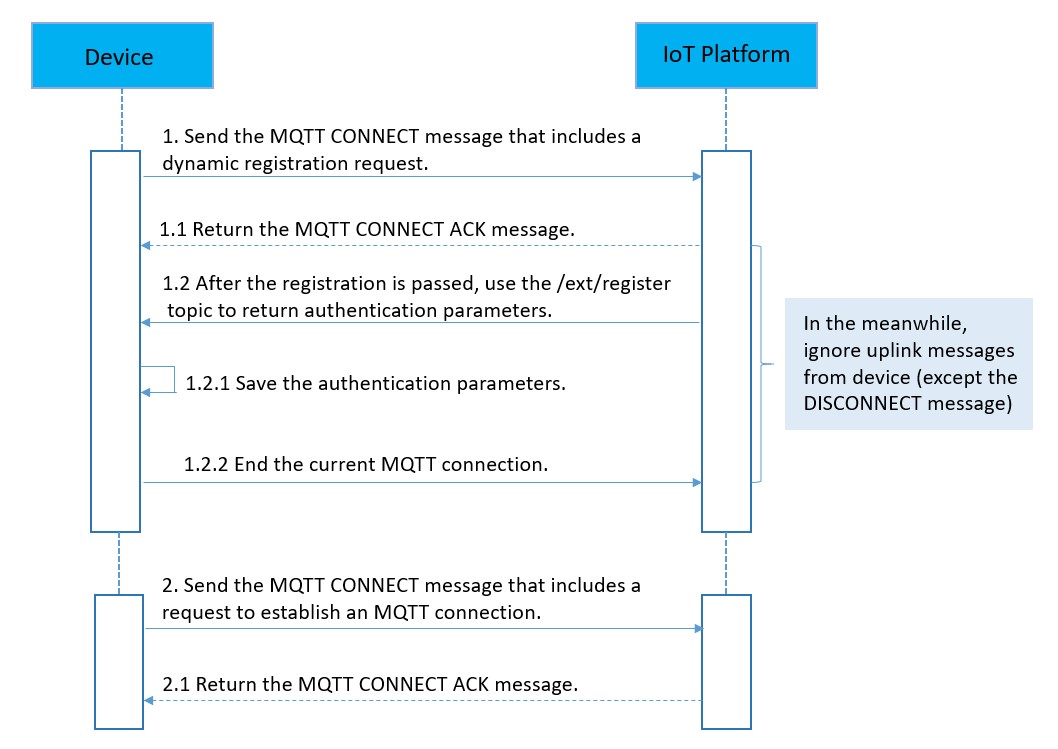
-
The device sends a CONNECT message that contains dynamic registration parameters to request a connection.
NoteDynamic registration requires TLS. Direct TCP connections are not supported. IoT Platform does not verify the MQTT keepalive interval during dynamic registration, so you do not need to set it.
-
MQTT connection domain name: MQTT endpoints for public and Enterprise instances are listed in View and configure instance endpoints.
NoteFor unique-certificate-per-product authentication without pre-registration, ${YourRegionId} is
cn-shanghai. -
Dynamic registration parameters in the CONNECT message:
-
When a device belongs to a new public instance or an Enterprise instance, the dynamic registration parameters are as follows:
mqttClientId:clientId+"|securemode=-2,authType=xxxx,random=xxxx,signmethod=xxxx,instanceId=xxxx|" mqttUserName: deviceName+"&"+productKey mqttPassword:sign_hmac(productSecret,content) -
When a device belongs to a legacy public instance, the dynamic registration parameters are as follows:
mqttClientId:clientId+"|securemode=2,authType=xxxx,random=xxxx,signmethod=xxxx|"
mqttUserName: deviceName+"&"+productKey
mqttPassword:sign_hmac(productSecret,content)
NoteFor more information, see Instance overview.
Parameter description:
-
mqttClientId
Parameters in the value:
Parameter
Description
clientId
The client ID. Custom value, up to 64 characters. Use the MAC address or serial number (SN) for easy identification.
securemode
The security mode.
-
For unique-certificate-per-product authentication with pre-registration, the value is fixed at 2.
-
For unique-certificate-per-product authentication without pre-registration, the value is fixed at -2.
authType
The authentication method. Each method returns different parameters:
-
register: For unique-certificate-per-product authentication with pre-registration, this method returns the DeviceSecret.
-
regnwl: For unique-certificate-per-product authentication without pre-registration, this method returns the DeviceToken and ClientID.
random
A custom random number.
signMethod
The signature algorithm. Supported values: hmacmd5, hmacsha1, and hmacsha256.
instanceId
The instance ID. Find it on the Instance Overview page of the IoT Platform console.
-
-
mqttUserName
Structure:
deviceName+"&"+productKeyExample:
device1&al123456789 -
mqttPassword
Calculation method:
sign_hmac(productSecret,content)Concatenate deviceName, productKey, and random in alphabetical order without delimiters to form the content string. Sign it using the algorithm specified by signMethod in mqttClientId, with the ProductSecret as the key.
Example:
hmac_sha1(h1nQFYPZS0mW****, deviceNamedevice1productKeyal123456789random123)
-
-
-
IoT Platform returns a CONNECT ACK message.
-
A return value of 0 indicates that the device is successfully registered.
-
Other values indicate that the dynamic registration failed. You can identify the cause of the failure based on the returned error code.
IoT Platform returns one of the following status codes:
Result code
Message
Description
0
CONNECTION_ACCEPTED
The dynamic registration is successful.
2
IDENTIFIER_REJECTED
Invalid parameters. Possible causes:
-
A required parameter is missing or in an invalid format.
-
A direct TCP connection was used. Dynamic registration requires TLS.
3
SERVER_UNAVAILABLE
A server error occurred. Try again later.
4
BAD_USERNAME_OR_PASSWORD
Authentication failed.
Verify the mqttUserName and mqttPassword values.
-
-
IoT Platform pushes authentication parameters to a topic based on the authType in the CONNECT message.
NoteThe device does not need to subscribe to this topic.
-
With pre-registration (authType=register), the topic is
/ext/register. The message contains the DeviceSecret.Payload format:
{ "productKey" : "***", "deviceName" : "***", "deviceSecret" : "***" } -
Without pre-registration (authType=regnwl), the topic is
/ext/regnwl. The message contains the ClientID and DeviceToken.Payload format:
{
  "productKey" : "***",
  "deviceName" : "***",
  "clientId" : "***",
  "deviceToken" : "***"
}
-
-
The device receives and saves the DeviceSecret, or the ClientID and DeviceToken. Then, it disconnects the current MQTT connection.
Disconnect by sending a DISCONNECT message or closing the TCP connection.
If the device does not disconnect, IoT Platform closes the connection after 15 seconds.
If you use the Eclipse Paho MQTT client, set
MqttConnectOptions.setAutomaticReconnect(false). Otherwise, the client automatically re-initiates dynamic registration after the connection closes. -
The device reconnects using the DeviceSecret (with pre-registration) or the DeviceToken and ClientID as mqttClientId (without pre-registration). MQTT-TLS connection.
Example
Directly connected device example: Dynamic registration using unique-certificate-per-product authentication (MQTT channel).