OTA updates
The IoT as Bridge SDK 2.1.3 and later support over-the-air (OTA) updates. You can use the SDK to update device firmware over the air.
Background information
The following figure shows the OTA update process.
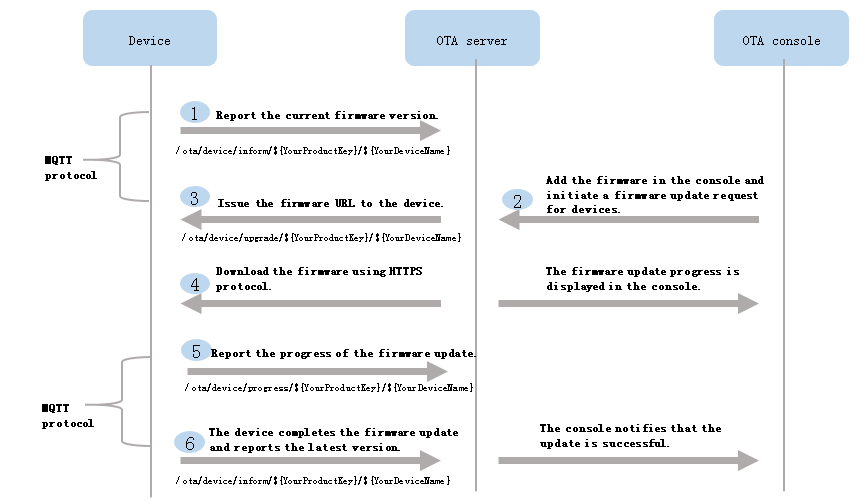
For more information about how to push update packages from IoT Platform to devices, see OTA update overview.
For more information about the update process, topics, and data formats for firmware updates, see Perform OTA updates.
Call operations for OTA updates
The IoT as Bridge SDK encapsulates OTA update operations. To perform OTA updates, call the following three operations in the SDK:
- Submit device firmware versions
After a device comes online or completes an update, it must report the current firmware version to the following topic:
/ota/device/inform/${YourProductKey}/${YourDeviceName}.To report a firmware version, call the TslUplinkHandler.reportFirmwareVersion operation. Syntax:
/**
 * The device submits the firmware version to IoT Platform.
 * @param requestId: the ID of the request
 * @param originalIdentity: the original identifier of the device
 * @param version: the firmware version to be submitted
 * @ return: The value true is returned if the firmware version is submitted.
*/
boolean reportOtaVersion(String requestId, String originalIdentity, String version)
Example
TslUplinkHandler tslUplinkHandler = new TslUplinkHandler(); tslUplinkHandler.doOnline(session, originalIdentity); tslUplinkHandler.reportOtaVersion("12345", originalIdentity, "1.0.1"); - Receive update notifications from IoT Platform
After you add update packages to IoT Platform and initiate OTA updates, IoT Platform pushes update notifications to devices. Devices must subscribe to the following topic to receive update notifications:
/ota/device/upgrade/${YourProductKey}/${YourDeviceName}.To receive OTA update notifications from IoT Platform, call the BridgeBootStrap.setOtaUpgradeHandler() operation and configure a callback. Syntax:
/**
 * Configure a callback to receive the OTA update notifications that are pushed from IoT Platform.
 * @ param otaUpgradeHandler: the callback that is set.
*/
public void setOtaUpgradeHandler(OtaUpgradeHandler otaUpgradeHandler) {
    this.callback.setOtaUpgradeHandler(otaUpgradeHandler);
}

public interface OtaUpgradeHandler {

    /**
     * Push OTA update notifications from IoT Platform.
     * @param requestId: the ID of the request
     * @param firmwareInfo: the information about OTA updates
     * @param session: the current session
     * @return
     */
    boolean onUpgrade(String requestId, OtaFirmwareInfo firmwareInfo, Session session);
}

public class OtaFirmwareInfo {

    /**
     * The size of the update package.
     */
    private long size;

    /**
     * Valid signature methods: MD5 and SHA256.
     */
    private String signMethod;

    /**
     * The signature of the update package.
     */
    private String sign;

    /**
     * The version of the update package.
     */
    private String version;

    /**
     * The download URL of the update package.
     */
    private String url;
}
Example
bridgeBootstrap.setOtaUpgradeHandler(new OtaUpgradeHandler() { @Override public boolean onUpgrade(String requestId, OtaFirmwareInfo firmwareInfo, Session session) { log.info("ota onUpgrade, requestId:{}, firmware:{}, identity:{}", requestId, firmwareInfo, session.getOriginalIdentity()); // Implement the OTA update. return true; } }); - Report the update progress
After a firmware update starts, the device must report the update progress to the following topic:
/ota/device/progress/${YourProductKey}/${YourDeviceName}.To report the update progress, call the TslUplinkHandler.reportOtaProgress operation. Syntax:
/**
 * Submit the OTA update progress.
 * @param requestId: the ID of the request
 * @param originalIdentity: the original identifier of the device
 * @param step: the current progress
 * @param desc: the description
 * @return
*/
boolean reportOtaProgress(String requestId, String originalIdentity, String step, String desc)
Example
tslUplinkHandler.reportOtaProgress("7979", session.getOriginalIdentity(), "100", "ota success");