Perform OTA updates
IoT Platform supports the over-the-air (OTA) feature. You can use the OTA feature to update devices. This topic describes how to use the OTA feature to update devices when Message Queuing Telemetry Transport (MQTT) is used to connect the devices to IoT Platform. This topic also describes the topics and data formats that are used during data forwarding in OTA updates.
Process
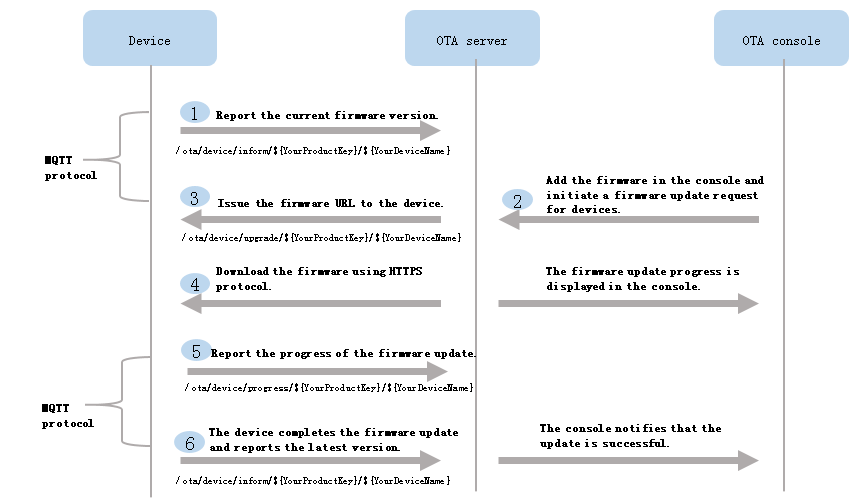
The following figure shows the process of performing an OTA update over MQTT.
Notes
- To perform a differential update, the device must submit the version number of an OTA module. To perform a full update, the device does not need to submit the version number of an OTA module. If the version number is not submitted, you cannot specify a source version when you configure a batch update. For more information, see Create a batch upgrade task.
A device needs to submit the version number only once during the startup before the first update. After the update is installed on the device, the device must immediately submit the current version number.
- When you start to update multiple devices in the IoT Platform console, each device is in the Pending Update state.
When IoT Platform receives the update progress that is submitted by a device, the status of the device changes to Updating.
Note After a device receives an update notification from IoT Platform, the device can download the update package and perform an update immediately or during off-peak business hours. - IoT Platform checks whether an OTA update is successful based on the version number that is submitted by the device.
- An offline device cannot receive an update notification from IoT Platform.
After the device goes online, IoT Platform checks whether the device needs to be updated. If an update is required, IoT Platform sends an update notification to the device. Otherwise, no notification is sent.
Message formats
For the device-side development process and code samples, see the OTA development sections in the Link SDK documentation for each language.
The following steps describe the process of performing an OTA update.
- Optional: The device connects to the OTA service and reports its version number.
The device publishes its current OTA module version to the following MQTT topic:
/ota/device/inform/${productKey}/${deviceName}. The message format is as follows:{ "id": "123", "params": { "version": "1.0.1", "module": "MCU" } }Table 1. Parameter descriptions Parameter Type Description id String The message ID. A string-type number. The value must be unique for the device. The value can range from 0 to 4294967295. version String The version of the OTA module. module String The name of the OTA module. Note- The module parameter is optional when you report the version number of the default module.
- The version number of the default module represents the firmware version number of the entire device.
- In the IoT Platform console, add an update package, check the update package, and then start a batch update.
For more information, see Overview.
- After you trigger an update from the console, the device receives a message from the OTA service containing the update package URL.
The device subscribes to the following topic:
/ota/device/upgrade/${productKey}/${deviceName}. When IoT Platform initiates an OTA update request for the device, the device receives a message on this topic that contains the URL of the update package.The message format is as follows:
- For an OTA upgrade package that contains a single file:
- If the download protocol for the upgrade package is HTTPS:
{ "id": "123", "code": 200, "data": { "size": 93796291, "sign": "f8d85b250d4d787a9f483d89a974***", "version": "10.0.1.9.20171112.1432", "isDiff": 1, "url": "https://the_firmware_url", "signMethod": "MD5", "md5": "f8d85b250d4d787a9f48***", "module": "MCU", "extData":{ "key1":"value1", "key2":"value2", "_package_udi":"{\"ota_notice\":\"Upgrade the underlying camera driver to fix the blurry video issue.\"}" } } } - If the download protocol for the upgrade package is MQTT:
{
    "id": "123",
    "code": 200,
    "data":{
        "size":432945,
        "digestsign":"A4WOP***SYHJ6DDDJD9***",
        "version":"2.0.0",
        "isDiff":1,
        "signMethod":"MD5",
        "dProtocol":"mqtt",
        "streamId":1397345,
        "streamFileId":1,
        "md5":"93230c3bde***",
        "sign":"93230c3bde42***",
        "module":"MCU",
        "extData":{
            "key1":"value1",
            "key2":"value2"
        }
    }
}
- If the download protocol for the upgrade package is HTTPS:
- OTA upgrade packages that contain multiple files support only the HTTP download protocol. The data format is as follows:
{
    "id": "123",
    "code": 200,
    "data": {
        "version": "2.0.0",
        "isDiff": 1,
        "signMethod": "MD5",
        "files":[
            {
                "fileSize":432944,
                "fileName":"file1-name",
                "fileUrl":"https://iotx***.aliyuncs.com/nop***.tar.gz?Expires=1502955804&OSSAccessKeyId=***&Signature=XfgJu7***U%3D&security-token=CAISu***",
                "fileMd5":"93230c3bde425a9d7984a594ac55ea1e",
                "fileSign":"93230c3bde425a9d7984a594ac55****"
            },
            {
                "fileSize":432945,
                "fileName":"file2-name",
                "fileUrl":"https://iotx-***.aliyuncs.com/no***.tar.gz?Expires=1502955804&OSSAccessKeyId=***&Signature=XfgJu7P***KU%3D&security-token=CAISuQJ***",
                "fileMd5":"93230c3bde425a9d7984a594ac56ea1f",
                "fileSign":"93230c3bde425a9d7984a594ac56****"
           }
        ],
        "module": "MCU",
        "extData":{
            "key1":"value1",
            "key2":"value2",
            "_package_udi":"{\"ota_notice\":\"Upgrade the underlying camera driver to fix the blurry video issue.\"}"
        }
    }
}
Table 2. Parameter descriptions Parameter Type Description id Long The message ID. The ID must be unique for the device. message String The result information. code String The status code. version String The version of the device upgrade package. size Long The size of the upgrade package file in bytes. This parameter is included only when the OTA upgrade package contains a single file.
url String The storage address of the upgrade package in Object Storage Service (OSS). This parameter is included only when the OTA upgrade package contains a single file and the download protocol is HTTPS.
dProtocol String The download protocol for the upgrade package. This parameter is included only when the download protocol is MQTT.
streamId Long The unique identifier for downloading the OTA upgrade package over MQTT. This parameter is included only when the download protocol is MQTT.
streamFileId Integer The unique identifier for a single upgrade package file. This parameter is included only when the download protocol is MQTT.
isDiff Long This parameter is included only when the package type is delta update. A value of 1 indicates that the package contains only the differences between the new version and the previous version. The device must perform a delta revert.
digestsign String The signature of the OTA upgrade package file after a secure upgrade. This parameter is included only if the secure upgrade feature is enabled for the OTA upgrade package. To enable the secure upgrade feature for an OTA upgrade package, see Secure upgrade. sign String The signature of the OTA upgrade package file. This parameter is included only when the OTA upgrade package contains a single file.
signMethod String The signature method. Valid values: SHA256MD5
md5 String If the signature method is MD5, a value is assigned to both the sign and md5 parameters. This parameter is included only when the OTA upgrade package contains a single file.
module String The name of the module to which the upgrade package belongs. Note If the module name is default, IoT Platform does not send the module parameter.extData Object A list of tags for the upgrade batch and custom information pushed to the device. The _package_udi field indicates custom information.
The format for a single tag is
"key":"value".files Array A list of information for multiple upgrade package files. This parameter is included when the OTA upgrade package contains multiple files. The information for each file is as follows:
- fileSize: The size of the upgrade package file.
- fileName: The name of the upgrade package file.
- fileUrl, fileMd5, and fileSign have the same meanings as url, md5, and sign.
- For an OTA upgrade package that contains a single file:
- Optional: After the SDK receives the update package URL, the device has 24 hours to download the package before the URL expires. If the URL expires, the device can request the update information again by publishing a message to the following topic:
The request topic is
/sys/${productKey}/${deviceName}/thing/ota/firmware/get, and the message format is as follows.{ "id": "123", "version": "1.0", "params": { "module": "MCU" }, "method": "thing.ota.firmware.get" }Table 4. Parameter descriptions Parameter Type Description id String The message ID. A string-type number. The value must be unique for the device. The value can range from 0 to 4294967295. version String The protocol version. The value is fixed at 1.0. params Object The request parameters. module String The name of the module to which the upgrade package belongs. Note If this parameter is not specified, the device requests the upgrade package information for the default module.method String The request method. The value is thing.ota.firmware.get. After receiving the request, IoT Platform sends the update package information to the device on the following reply topic:
/sys/${productKey}/${deviceName}/thing/ota/firmware/get_reply.- If an update package is available, the service responds with the package details in the following format:
- For an OTA upgrade package that contains a single file:
- If the download protocol for the upgrade package is HTTPS:
{ "id": "123", "code": 200, "data": { "size": 93796291, "sign": "f8d85b250d4d787a9f483d89a974***", "version": "10.0.1.9.20171112.1432", "isDiff": 1, "url": "https://the_firmware_url", "signMethod": "MD5", "md5": "f8d85b250d4d787a9f48***", "module": "MCU", "extData":{ "key1":"value1", "key2":"value2", "_package_udi":"{\"ota_notice\":\"Upgrade the underlying camera driver to fix the blurry video issue.\"}" } } } - If the download protocol for the upgrade package is MQTT:
{
    "id": "123",
    "code": 200,
    "data":{
        "size":432945,
        "digestsign":"A4WOP***SYHJ6DDDJD9***",
        "version":"2.0.0",
        "isDiff":1,
        "signMethod":"MD5",
        "dProtocol":"mqtt",
        "streamId":1397345,
        "streamFileId":1,
        "md5":"93230c3bde***",
        "sign":"93230c3bde42***",
        "module":"MCU",
        "extData":{
            "key1":"value1",
            "key2":"value2"
        }
    }
}
- If the download protocol for the upgrade package is HTTPS:
- OTA upgrade packages that contain multiple files support only the HTTP download protocol. The data format is as follows:
{
    "id": "123",
    "code": 200,
    "data": {
        "version": "2.0.0",
        "isDiff": 1,
        "signMethod": "MD5",
        "files":[
            {
                "fileSize":432944,
                "fileName":"file1-name",
                "fileUrl":"https://iotx***.aliyuncs.com/nop***.tar.gz?Expires=1502955804&OSSAccessKeyId=***&Signature=XfgJu7***U%3D&security-token=CAISu***",
                "fileMd5":"93230c3bde425a9d7984a594ac55ea1e",
                "fileSign":"93230c3bde425a9d7984a594ac55****"
            },
            {
                "fileSize":432945,
                "fileName":"file2-name",
                "fileUrl":"https://iotx-***.aliyuncs.com/no***.tar.gz?Expires=1502955804&OSSAccessKeyId=***&Signature=XfgJu7P***KU%3D&security-token=CAISuQJ***",
                "fileMd5":"93230c3bde425a9d7984a594ac56ea1f",
                "fileSign":"93230c3bde425a9d7984a594ac56****"
           }
        ],
        "module": "MCU",
        "extData":{
            "key1":"value1",
            "key2":"value2",
            "_package_udi":"{\"ota_notice\":\"Upgrade the underlying camera driver to fix the blurry video issue.\"}"
        }
    }
}
Table 4. Parameters Parameter Type Description id String The message ID, which matches the ID from the device's request. The returned Message ID is the ID from the device request, which corresponds to the id parameter in the data sent to the
/sys/${productKey}/${deviceName}/thing/ota/firmware/gettopic.code Integer The status code. A value of 200 indicates success. data String The update package information. For parameter descriptions, see the parameter descriptions for the pushed OTA update package. - For an OTA upgrade package that contains a single file:
- If no upgrade package is available, the following data is returned:
{
    "id": "123",
    "code": 200,
    "data": {
    }
}
- If an update package is available, the service responds with the package details in the following format:
- After the SDK receives the update package URL, call the appropriate SDK API to download the package.For example, to download an update package over HTTPS, the C SDK provides the aiot_download_send_request API. For more information, see Device OTA. Note The download must be completed within 24 hours of receiving the URL; otherwise, the URL expires.
To view logs generated during the download process, see:
- During the update, the device reports its progress by publishing messages to the following topic:
/ota/device/progress/${productKey}/${deviceName}.Note Set the progress reporting frequency on the device to a maximum of once every 3 seconds. If the device reports progress too frequently, you may not be able to view all progress reports on the Batch Details page for the OTA upgrade package in the IoT Platform console.The message format is as follows:
{
    "id": "123",
    "params": {
        "step": "-1",
        "desc": "OTA upgrade failed. Could not request the upgrade package information.",
        "module": "MCU"
    }
}
Table 3. Parameter descriptions Parameter Type Description id String The message ID. A string-type number. The value must be unique for the device. The value can range from 0 to 4294967295. step String The OTA upgrade progress.
Valid values:- An integer from 1 to 100: The upgrade progress percentage.
-1: The upgrade failed.-2: The download failed.-3: The verification failed.-4: The flashing failed.
Configure the progress values and their descriptions on the device based on the actual upgrade scenario. For information about how to configure them on the device, see OTA upgrades for Link SDK on devices.
desc String A description of the current step. The description can be up to 128 characters long. If an error occurs, this field can contain the error message. module String The name of the module to which the upgrade package belongs. For more information about modules, see Add an upgrade package. Note The module parameter is optional when you report the OTA upgrade progress of the default module. - After the OTA update of a device is completed, the device sends the current firmware version to the following topic:
/ota/device/inform/${productKey}/${deviceName}. If the submitted version is the same as the version that is sent by the OTA service to the topic, the OTA update is successful. Otherwise, the OTA update fails.Note IoT Platform checks whether an OTA update is successful based on the submitted firmware version. For example, a device submits an update progress of 100%. However, if the current firmware version is not submitted within a specified timeout period, IoT Platform considers that the update fails.We recommend that you immediately restart the device after the OTA update is completed. After the device goes online, submit the current version number. The interval between a request to connect the device to IoT Platform and a request to submit the current version number cannot exceed 2 seconds.
Common errors
- Signature error. This error occurs if the device uses an incomplete or manually modified URL for the update package.
<Error> <Code>SignatureDoesNotMatch</Code> <Message> The request signature we calculated does not match the signature you provided. Check your key and signing method. </Message> <RequestId>5995470683464D75xxx</RequestId> <HostId>iotx-ota-pre.xxx.aliyuncs.com</HostId> <OSSAccessKeyId>STS.Em9Qvxxx ZBvCXUR3</OSSAccessKeyId> <SignatureProvided>XfgJu7P6DWWejstKJgXJEH0qAKU=</SignatureProvided> <StringToSign> GET 1502955805 /iotx-ota-pre/nopoll_0.4.4.tar.gz?security- token=CAISuQJ1q6Ft5B2yf5jIPk6MGsyN1Jx5jo6MvnfBg1IPTvlvt5D5OTz2IHtIf3NpAusdsv03nWxT7v4flqFyTINVAEvYZJOPKGrGR0DzDbDasumZsJbo4f/MQBqBaEaXPS2MvVfJ+zLrf0ceusbFbpjzJ6xaCAGxypQ12iN+/r6/5gdc9FcQSkLO8BZrFsKxBl+tdUROFbIPKpKWSKuGfLC1dysQoQ1 </StringToSign> <StringToSignBytes> 47 45 54 0A 0A 0A 31 35 30 32 39 35 35 38 30 35 0A 2F 69 6F 74 78 2D 6F 74 61 2D 70 72 65 2F 6E 6F 70 6F 6C 6C 5F 30 2E 34 2E 34 2E 74 61 72 2E 67 7A 3F 73 65 63 75 72 69 74 79 2D 74 6F 6B 65 6E 3D 43 41 49 53 75 51 4A 31 71 36 46 74 35 42 32 79 66 53 6A 49 70 4B 36 4D 47 73 79 4E 31 4A 78 35 6A 6F 36 4D 76 6E 66 42 67 31 49 50 54 76 6C 76 74 35 44 35 4F 54 7A 32 49 48 74 49 66 33 4E 70 41 75 73 64 73 76 30 33 6E 57 78 54 37 76 34 66 6C 71 46 79 54 49 4E 56 41 45 76 59 5A 4A 4F 50 4B 47 72 47 52 30 44 7A 44 62 44 61 73 75 6D 5A 73 4A 62 6F 34 66 2F 4D 51 42 71 42 61 45 61 58 50 53 32 4D 76 56 66 4A 2B 7A 4C 72 66 30 63 65 75 73 62 46 62 70 6A 7A 4A 36 78 61 43 41 47 78 79 70 51 31 32 69 </StringToSignBytes> </Error> - Access denied. This error occurs because the URL has expired. URLs are valid for 24 hours.
<Error>
    <Code>AccessDenied</Code>
    <Message>Request has expired.</Message>
    <RequestId>5995498D7444FA88Axxx</RequestId>
    <HostId>iotx-ota-pre.xxx.com</HostId>
    <Expires>2017-08-17T07:43:24.000Z</Expires>
    <ServerTime>2017-08-17T07:45:17.000Z</ServerTime>
</Error>