Data exploration functions
Data exploration functions find trends, maximums, and central values in sample data. They also test whether the data follows a normal, uniform, or exponential distribution.
Function | Description |
Tests whether data follows a uniform or exponential distribution. | |
Tests whether data follows a normal distribution. | |
Retrieves trend and period information from time series data. | |
Finds local maximums in sequence data. |
Functions to test for uniform or exponential distribution
These functions are available only in the China (Shanghai) region.
The distribution test functions support a maximum of 5 million rows of data.
These distribution test functions are for offline scheduling.
These functions use the Kolmogorov-Smirnov method to test whether data follows a uniform or exponential distribution. For more information about hypothesis testing, see scipy.stats.ks_2samp. Hypothesis testing involves making an assumption and then performing a test. First, you assume the null hypothesis is true. Then, you use sample data to test whether the null hypothesis holds.
Define the null and alternative hypotheses. The null hypothesis is that the sample data follows a uniform (or exponential) distribution. The alternative hypothesis is that the sample data does not follow a uniform (or exponential) distribution.
Determine the significance level. The significance level is the probability of rejecting the null hypothesis when it is true. In practice, a significance level of 0.05 is common.
Calculate the p-value using the Kolmogorov-Smirnov method. The p-value is the probability of observing the sample data, or more extreme data, if the null hypothesis is true.
If the p-value is less than the 0.05 significance level, you can reject the null hypothesis because it is highly unlikely that the data fits the distribution. This means the data does not follow a uniform (or exponential) distribution. If the p-value is 0.05 or greater, you accept the null hypothesis, which means the data follows a uniform (or exponential) distribution.
Function format
SELECT DISTRIBUTION_TEST(method,test_col) as result FROM table;Input parameters
method: Required.
"expon": Exponential distribution."uniform": Uniform distribution.
test_col: Required. The column of data whose distribution you want to test. The data type must be double.
Output parameter
result: The data type is double. A significance level of 0.05 is common in practice. If the p-value is less than 0.05, you reject the null hypothesis. This means the sample data does not follow a uniform (or exponential) distribution. If the p-value is 0.05 or greater, you accept the null hypothesis. This means the sample data follows a uniform (or exponential) distribution. The function returns the p-value. To obtain the statistic value, submit a ticket.
Function to test for normal distribution
This function is available only in the China (Shanghai) region.
The normal distribution test function supports a maximum of 5 million rows of data.
This normal distribution test function is for offline scheduling.
This function uses the Shapiro-Wilk, D'Agostino's K-squared, or Kolmogorov-Smirnov method to test whether data follows a normal distribution. For more information about hypothesis testing, see scipy.stats.ks_2samp. Hypothesis testing involves making an assumption and then performing a test. First, you assume the null hypothesis is true. Then, you use sample data to test whether the null hypothesis holds.
Define the null and alternative hypotheses. The null hypothesis is that the sample data follows a normal distribution. The alternative hypothesis is that the sample data does not follow a normal distribution.
Determine the significance level. The significance level is the probability of rejecting the null hypothesis when it is true. In practice, a significance level of 0.05 is common.
Calculate the p-value. The p-value is the probability of observing the sample data, or more extreme data, if the null hypothesis is true. Data that is farther from the mean of the expected distribution is considered more extreme.
If the p-value is less than the 0.05 significance level, you can reject the null hypothesis because it is highly unlikely that the data fits the distribution. This means the data does not follow a normal distribution. If the p-value is 0.05 or greater, you accept the null hypothesis, which means the data follows a normal distribution.
Function format
SELECT NORMALTEST(model,test_col) as result FROM table;Input parameters
method: Required. The data type is string.
"SW": Shapiro-Wilk test. For this test, the recommended sample size is between 7 and 2,000."DA": D'Agostino's K-squared test."KS": Kolmogorov-Smirnov test.
test_col: Required. The column of data whose distribution you want to test. The data type must be double.
Output parameter
result: The data type is double. A significance level of 0.05 is common in practice. If the p-value is less than 0.05, you reject the null hypothesis. This means the sample data does not follow a normal distribution. If the p-value is 0.05 or greater, you accept the null hypothesis. This means the sample data follows a normal distribution. The function returns the p-value. To obtain the statistic value, submit a ticket.
Time series decomposition function
This function is available only in the China (Shanghai) region.
The time series decomposition function supports a maximum of 500,000 rows and 30 columns of data.
This time series decomposition function is for offline scheduling.
This function retrieves trend and period information from time series data. When you use this operator to process data read from a custom storage table in DataService Studio, you must re-sort the data. We recommend that you sort by the ts field.
Function format
SELECT X11_DECOMPOSE(config,decompose_col,other_col)
as(trend,seasonal,residual,decompose_col, other_col)
FROM table;
Input parameters
config: Required. The data type is JSON.
"mode": Enter"additive"for an additive model. Enter"multiplicative"for a multiplicative model."period": The recurrence period of the sequence.
decompose_col: Required. The column to be decomposed. The data type must be double.other_col: Optional. Any data type. Other input columns that can be output along with the decomposition results.
Output parameters
trend: The data type is double. The overall trend that changes over time.seasonal: The data type is double. The recurring changes within a specific period.residual: The data type is double. The changes not caused by trend or seasonality, but by various other factors.decompose_col: The data type is double. The input column for time series decomposition.other_col: The data type is string. The other input columns.
Example 1: Additive model
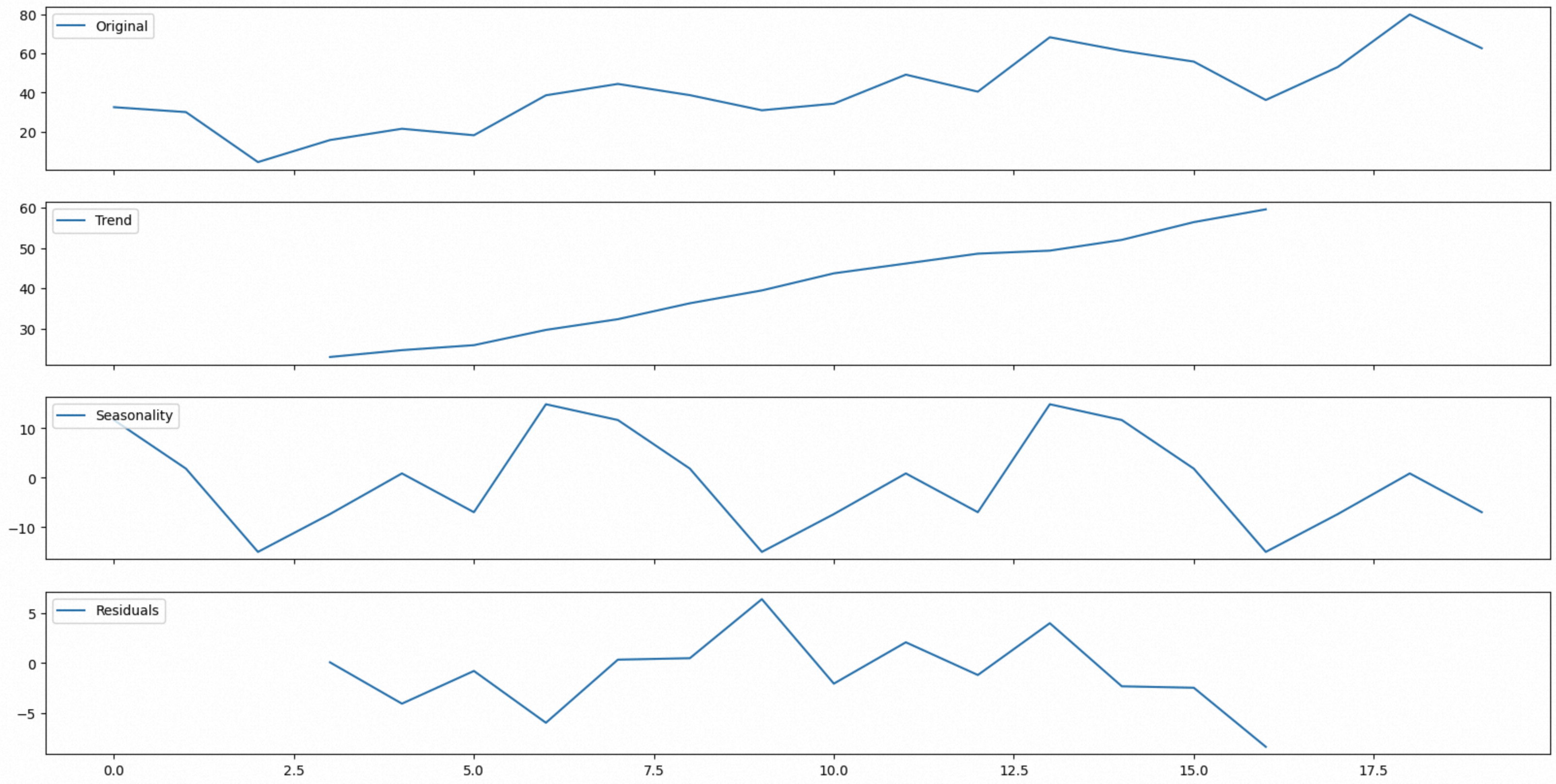
SELECT X11_DECOMPOSE('{"model":"additive","period":"3"}',
value,idx)
as(trend,seasonal,residual,num,idx)
FROM Values (32.50284661,0),(30.00239172,1),(4.47326732,2),(15.73310388,3),(21.49780825,4),(18.17761162,5),
(38.57413106,6),(44.3770641,7),(38.64285117,8),(30.92699097,9),(34.31304265,10),(49.11533554,11),(40.43372196,12)
,(68.21267232,13),(61.34765278,14),(55.76735624,15),(36.17021295,16),(53.00386398,17),(79.85061438,18),(62.59943415,19) t(value,idx);
The model is configured as an additive model with a recurrence period of 3. The function outputs a numerical sequence. The following graph was plotted using Python:
Example 2: Additive model
Download the electricity consumption data for the device cluster. The devices in the cluster operate at a stable power. The overall electricity consumption increases as the number of devices in the cluster grows. An additional device was added to the cluster to collect and analyze information from other devices. You need to extract the information for this specific device.
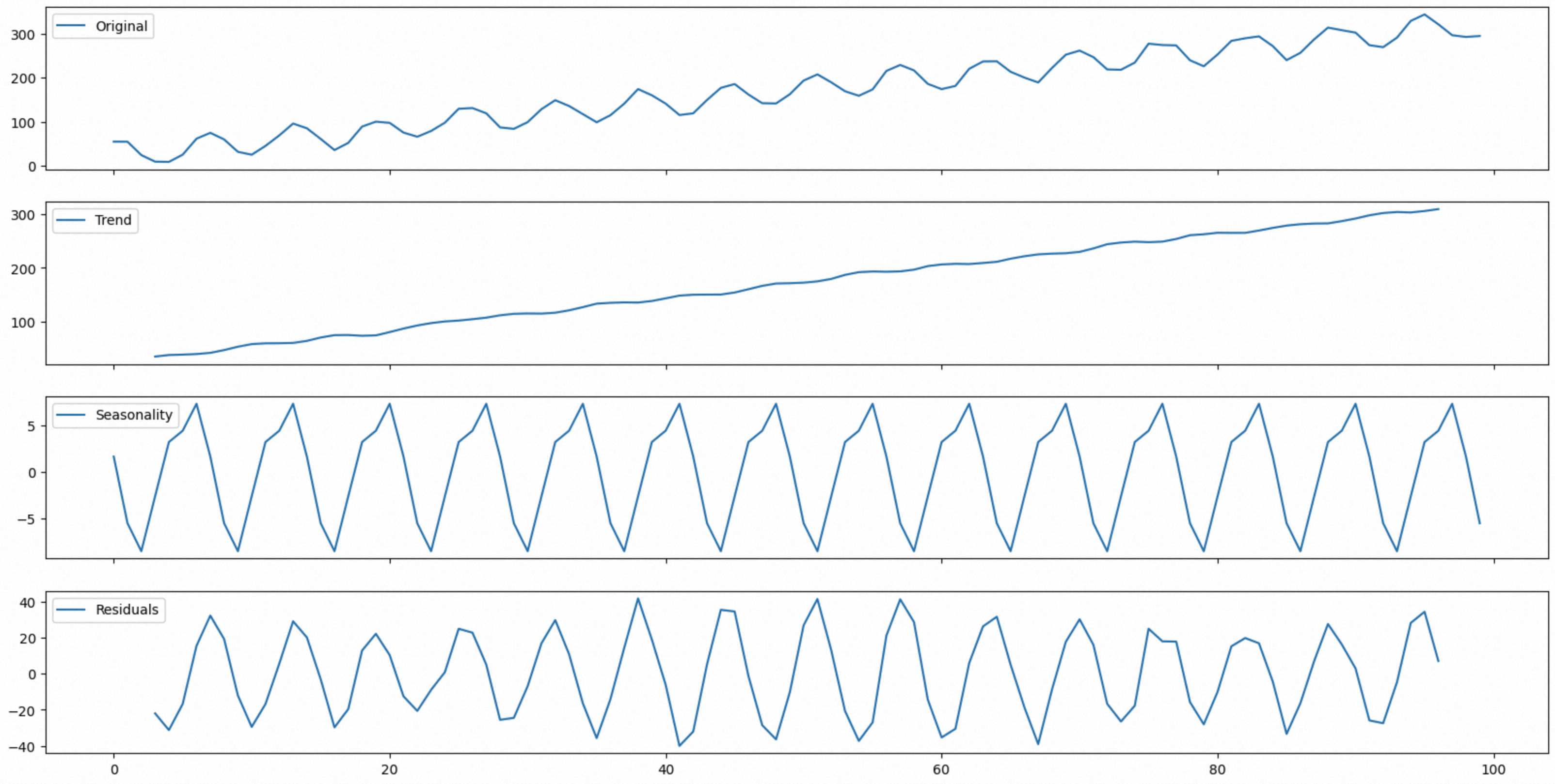
The power consumption of the monitoring device and the increased power consumption from the growing number of cluster devices have an additive relationship. Therefore, you can use an additive model to decompose the electricity consumption data. The cluster's electricity consumption continuously increases as the number of devices grows. The power consumption of the monitoring device, which is shown in the seasonal curve, varies with different tasks. The residual term indicates the impact of random factors in the device's operating environment, such as temperature and humidity, on power consumption.
This example reads data from a custom storage table. You must re-sort the data after reading it.
SELECT X11_DECOMPOSE('{"model":"additive","period":"7"}',
num,idx)
as(trend,seasonal,residual,num,idx)
FROM (SELECT num,idx from decompose_add_100 ORDER by idx);
The function outputs a numerical sequence. The following graph was plotted using Python:
Example 3: Multiplicative model
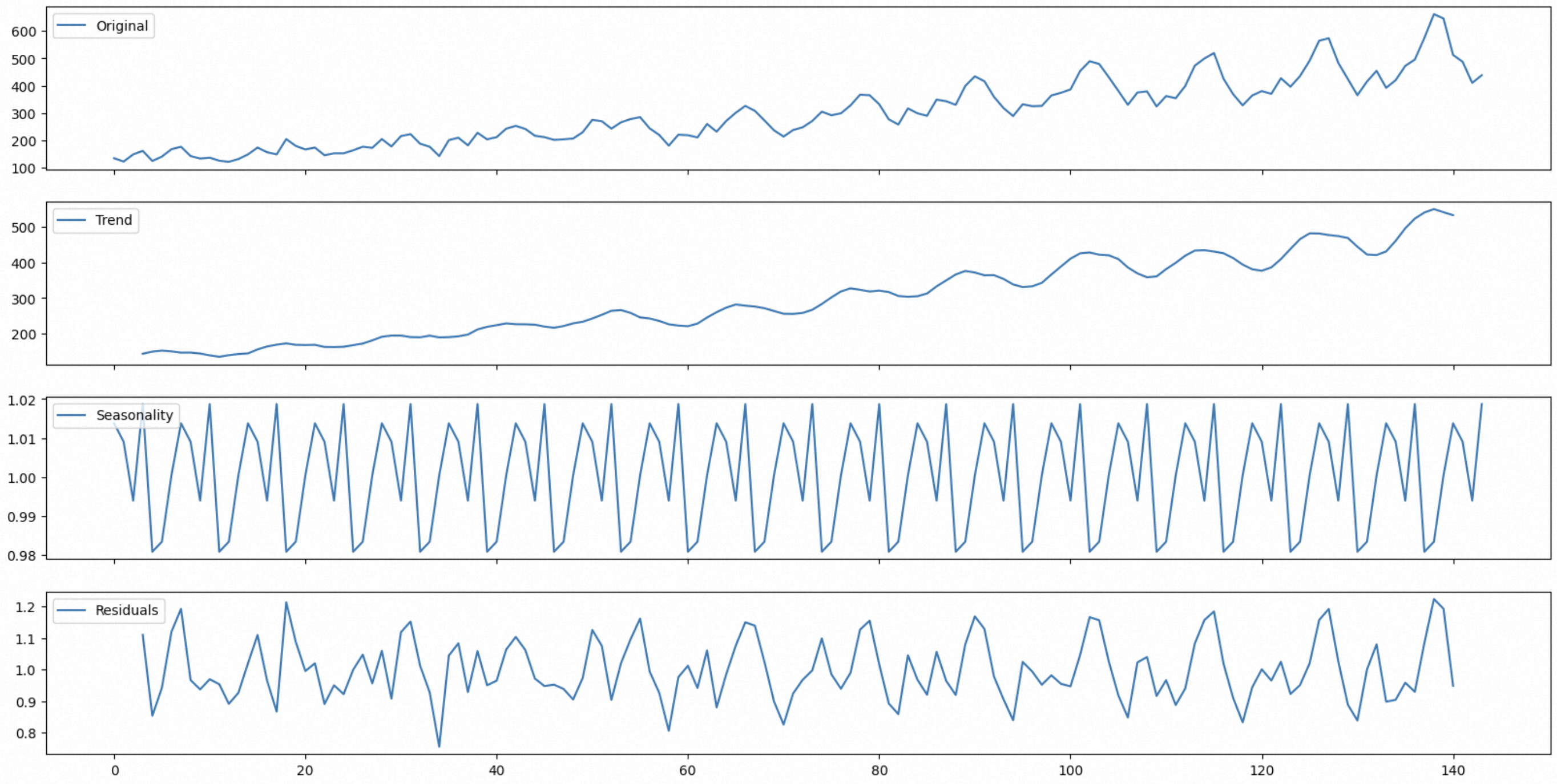
Download the electricity consumption data for the device cluster. The periodic changes in device power consumption and the increased consumption from the growing number of devices have a multiplicative relationship. Therefore, you can use a multiplicative model to decompose the electricity consumption data. The cluster's electricity consumption continuously increases as the number of devices grows. Because the tasks performed each day are different, the device's power consumption also changes periodically with task scheduling. The residual term indicates the impact of random factors in the device's operating environment, such as temperature and humidity, on power consumption.
This example reads data from a custom storage table. You must re-sort the data after reading it.
SELECT X11_DECOMPOSE('{"model":"multiplicative","period":"7"}',
num,idx)
as(trend,seasonal,residual,num,idx)
FROM (SELECT num,idx from decompose_multi_144 ORDER by idx);
The function outputs a numerical sequence. The following graph was plotted using Python:
Peak detection function
This function is available only in the China (Shanghai) region.
The peak detection function supports a maximum of 500,000 rows and 30 columns of data.
This peak detection function is for offline scheduling.
Finds local maximums in sequence data.
Function format
SELECT FIND_PEAKS(config, sortColIdx, valueColIdx,
		sortCol, valueCol, OtherCol)
    as (sortCol,valueCol, OtherCol) FROM table;
Input parameters
config: Optional. A JSON string."height": The minimum height of a peak. Cannot be 0."threshold": The minimum vertical distance to neighboring samples."distance": The minimum distance between adjacent peaks.
sortColIdx: Required. The data type is bigint. The ordinal number of the numeric column used for sorting.valueColIdx: Required. The data type is bigint. The ordinal number of the numeric column to be sorted.sortCol: Required. The column used for sorting. The data type must be double.valueCol: Required. The column to be sorted. The data type must be double.OtherCol: Optional. Specifies other columns of any data type to sort.
Output parameters
sortCol: The data type is double. The `sortCol` value corresponding to the peak.valueCol: The data type is double. The `valueCol` value corresponding to the peak.OtherCol: The data type is string. The `OtherCol` value corresponding to the peak.
Example: Device power detection
Detect peaks in device power.
Download the processed device power information. You can use the
FIND_PEAKSfunction to retrieve the peaks from the input device power data. This helps you understand the operating status of the device. You can import the data into a custom storage table in DataService Studio and then use the data in Analysis and Insights.Assume that the first column in the input data is
idxand the second column isnum. You can useidxto sortnum.Set the parameters for the
FIND_PEAKSfunction as follows: SetsortColIdxto 1,valueColIdxto 2,sortColtoidx, andvalueColtonum.SELECT FIND_PEAKS('{"height":null,"threshold":null,"distance":null}', 1, 2, idx, num ) as (idx,num) FROM findpeaks_1000;This example does not include extra columns. If needed, you can enter another column name, such as
other_col, afternum.SELECT FIND_PEAKS('{"height":null,"threshold":null,"distance":null}', 1, 2, idx, num, other_col) as (idx,num,other_col) FROM findpeaks_1000;The
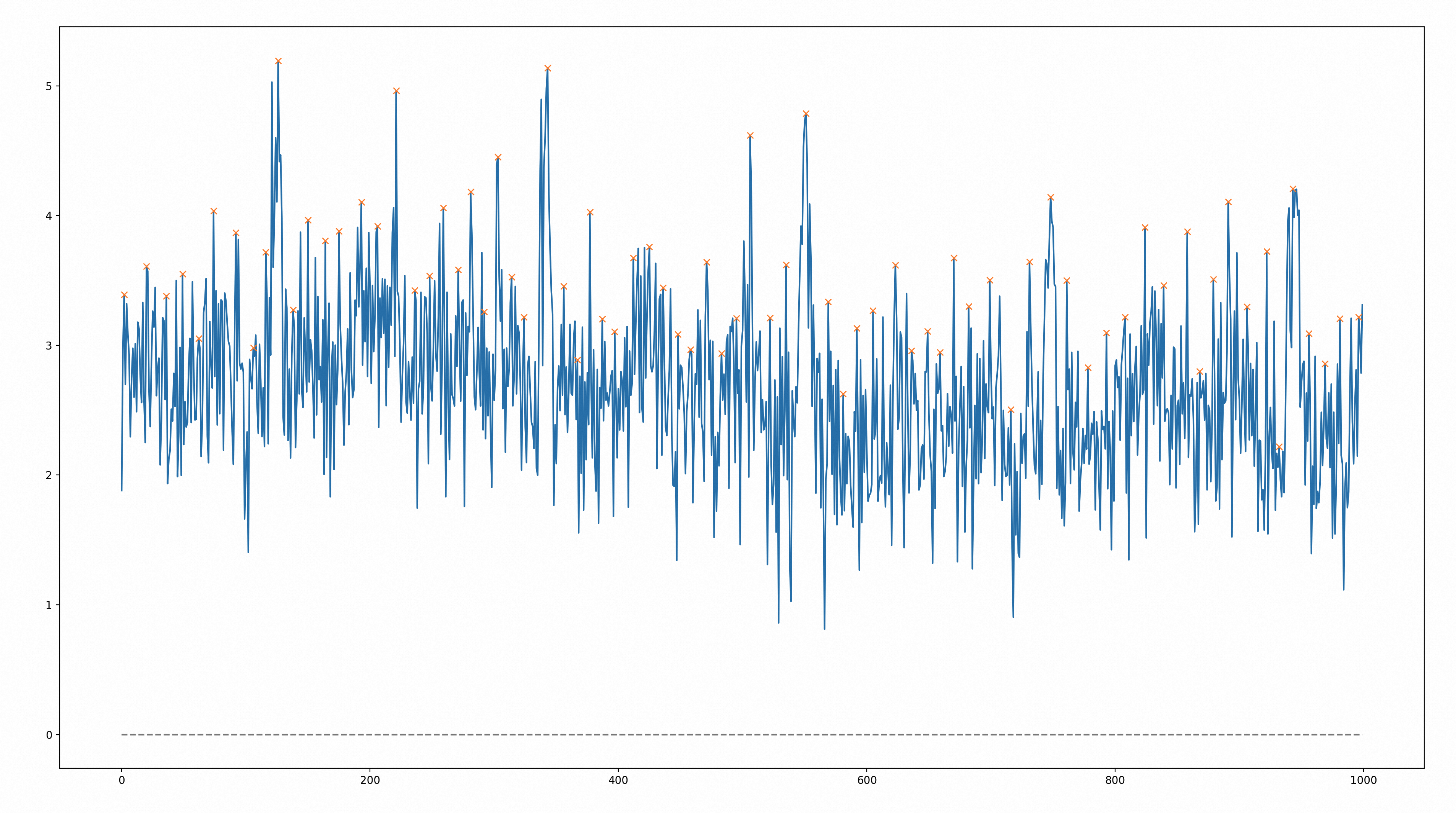
FIND_PEAKSfunction sorts the input data and outputs the coordinates of each peak. The following graph was plotted using Python based on the output data. The graph marks all the peaks.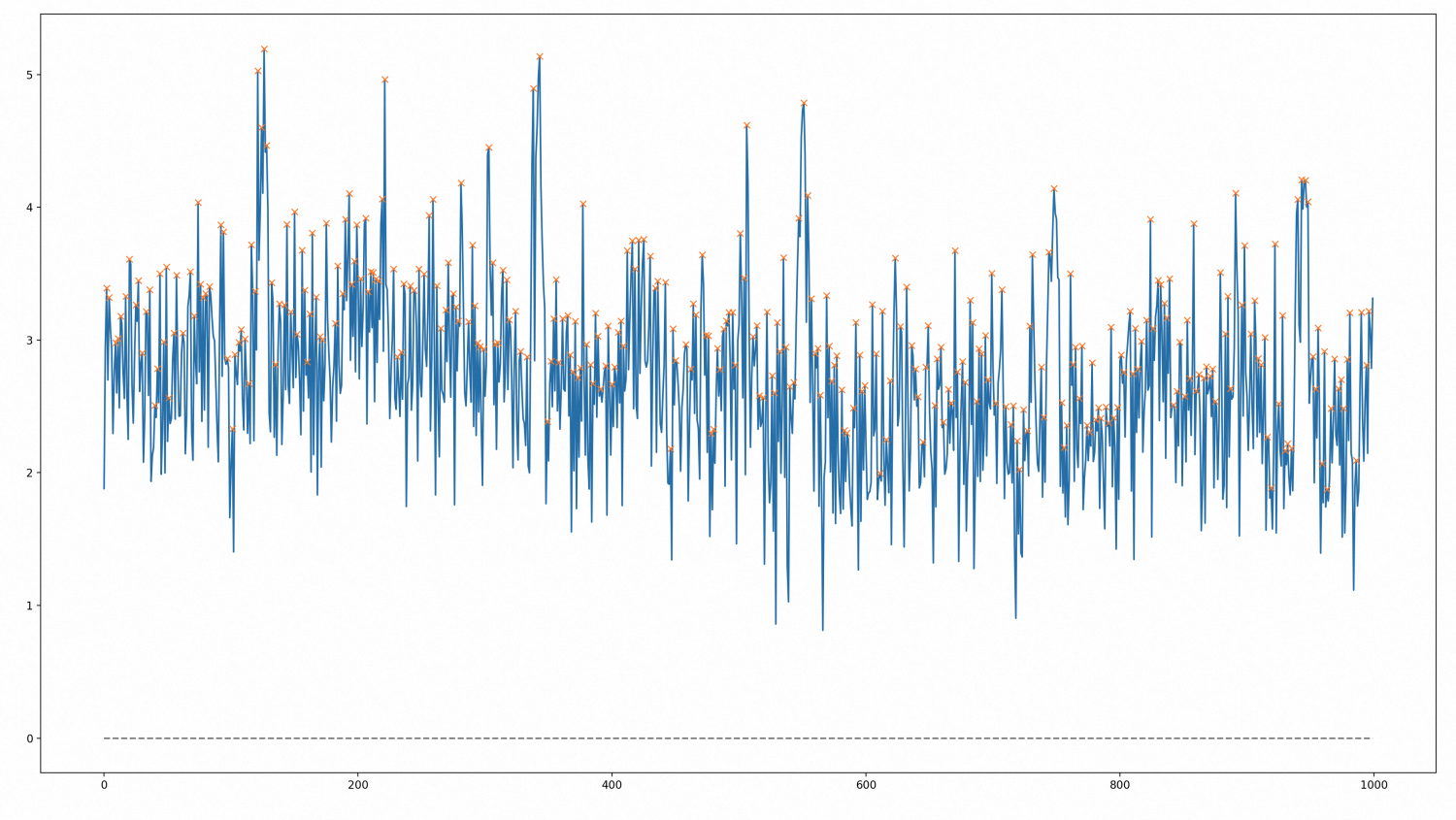
Set the height parameter.
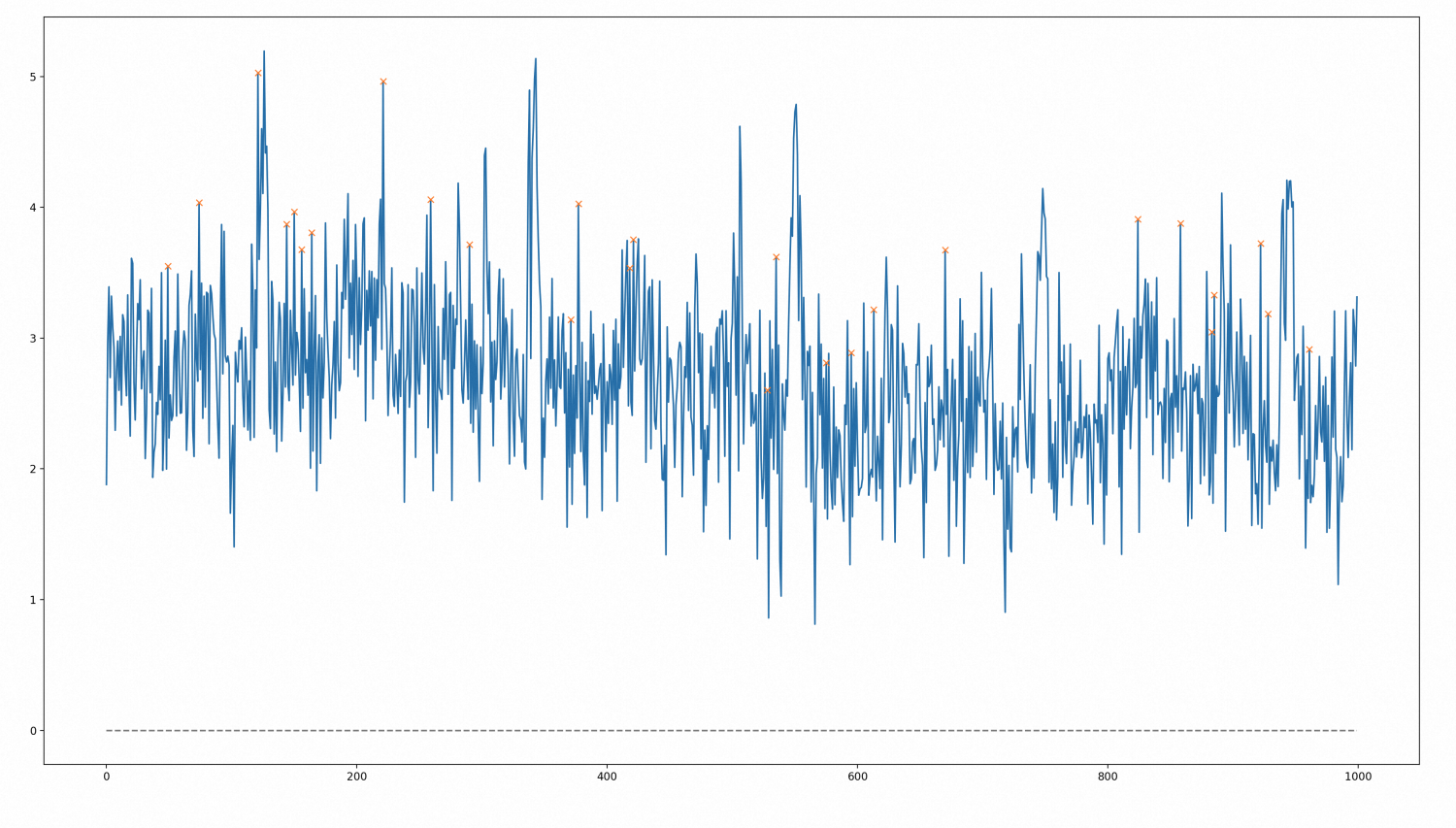
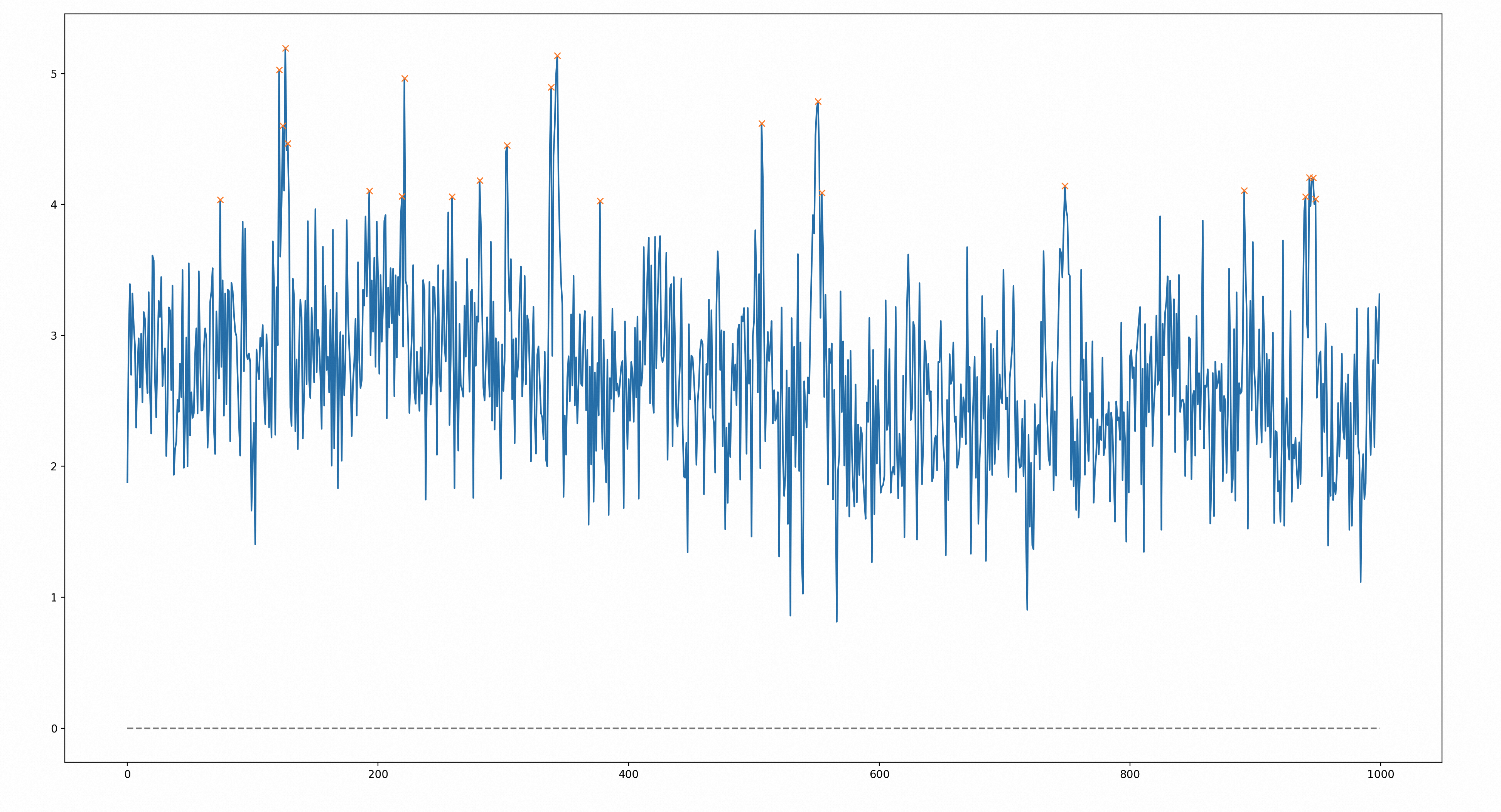
The peaks found previously are too general. To detect peaks that exceed an expected range, you can set the height parameter. In this example, height is set to 4. This returns 24 peak points where the power metric exceeds 4. Reviewing the times when these peaks occurred can provide useful information for production decisions.
SELECT FIND_PEAKS('{"height":4}',
    1,
    2,
    idx,
    num)
    as (idx,num) FROM findpeaks_1000;
The following graph was plotted using Python. It marks all peaks that are greater than 4.
Set the threshold parameter.
In some cases, data with sharp changes is more important. You can set the threshold parameter to limit the vertical distance between a peak and its neighboring sample points. This filters the data for sharp changes. In this example, threshold is set to 1. This returns 27 peak points that have a vertical distance greater than 1 from their neighboring sample points.
SELECT FIND_PEAKS('{"threshold":1}',
    1,
    2,
    idx,
    num )
    as (idx,num) FROM findpeaks_1000;
The following graph was plotted using Python. It marks the 27 peak points that have a vertical distance greater than 1 from their neighboring sample points.

Set the distance parameter.
Information from adjacent peaks can be redundant. You can set the distance parameter to specify the minimum horizontal distance between two sample points. This filters the data and removes redundant information. In this example, the horizontal distance is set to 10. Starting from the first peak in the input data, any peaks within a horizontal distance of 10 are ignored. This makes the resulting peaks more sparse. Analyzing the device data at the times these sparse peaks occur is more valuable.
SELECT FIND_PEAKS('{"distance":10}',
    1,
    2,
    idx,
    num )
    as (idx,num) FROM findpeaks_1000;
The following graph was plotted using Python. It marks all peak points that have an adjacent distance greater than 10.