Best practices for application access to cloud resources in ACK
This solution demonstrates how applications in ACK can access backend resources without an AccessKey pair. It provides best practices to guide you in using the AccessKey-free method in ACK.
Overview
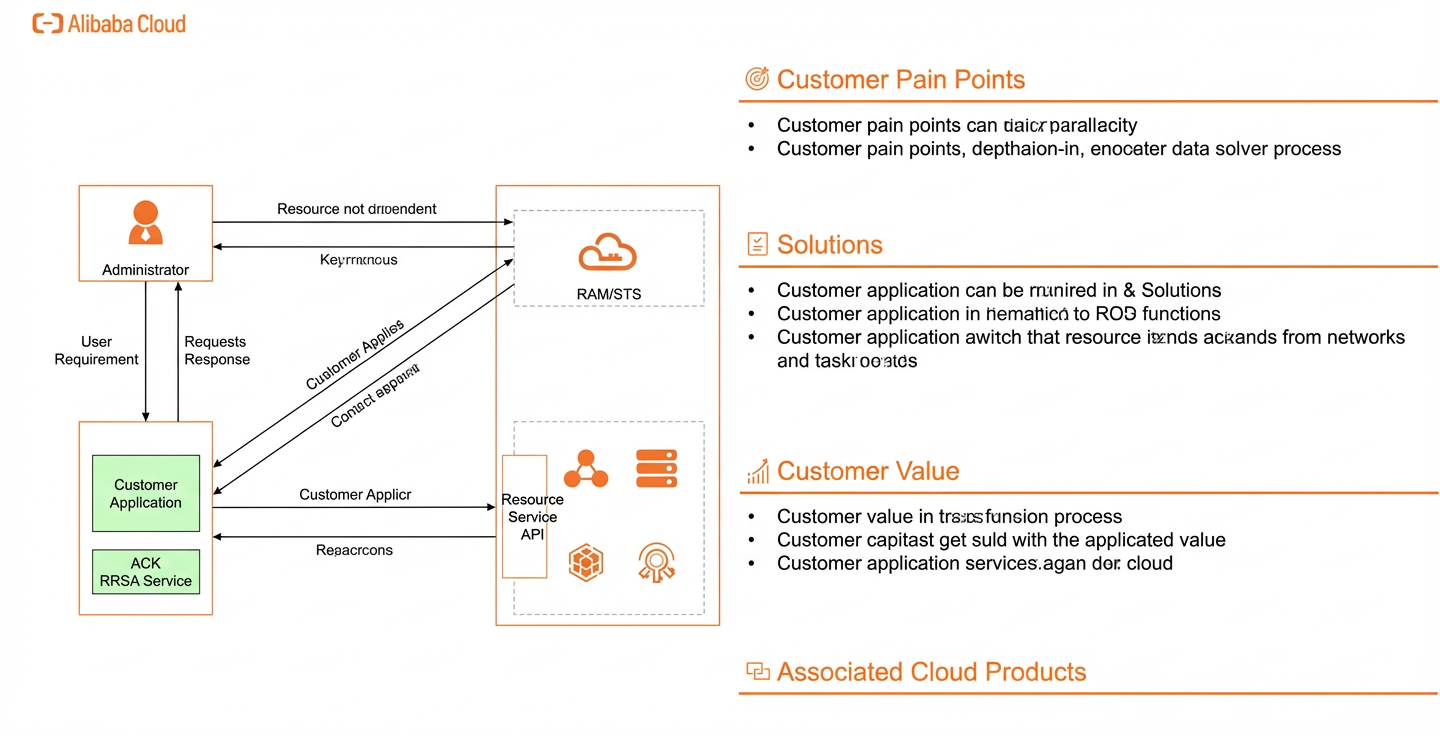
Traditionally, an application accesses authorized cloud resources using an account AccessKey pair or by assuming a Resource Access Management (RAM) role. The role is bound to a specific node and accessed through the ECS meta server. This process obtains a Security Token Service (STS) token, which is used as a credential to access the OpenAPI of the corresponding resource service.
Using a fixed AccessKey pair to directly access Alibaba Cloud APIs often requires writing the AccessKey pair into a Secret, which creates a security risk. A temporary AccessKey pair is the recommended solution on the cloud. If you use the ECS meta server's instance role solution and can ensure that all applications running on the node belong to the same trusted tenant, sharing the same role's STS token is acceptable from a security standpoint. However, in a multi-tenant scenario, the role bound to the node must be authorized to meet the cloud resource needs of applications from all tenants. An application from one tenant can then easily obtain access permissions to the cloud resources of all tenants on the node by calling the role token interface of the meta server. This can lead to unauthorized cross-tenant access.
This document introduces an AccessKey-free solution for Alibaba Cloud Container Service for Kubernetes (ACK) scenarios. This solution isolates application access permissions to cloud resources on the data plane for multi-tenant clusters.
Advantages of the solution
High compatibility with Kubernetes
You do not need to bind any RAM roles to the cluster nodes or run extra agents on them.
Least privilege for multi-tenancy
You can run multiple business applications on the same ACK cluster. The solution supports authorization by namespace and application. Permission management can be fine-grained to prevent over-authorization.
Standardized application usage
This solution provides standardized documentation and code to help you quickly switch to an AccessKey-free implementation.
Customer scenario
Preventing AccessKey pair leakage in container scenarios
Scenario description
The best way to avoid using permanent AccessKey pairs is to not use them. This scenario describes how to prevent applications from leaking AccessKey pairs in container environments.
Target customers
- Enterprise customers who use containers
- A single Kubernetes cluster can run multiple tenant workloads.
- Customers with high requirements for AccessKey pair administration
Customer use case
Customer background
Company X, a well-known express delivery company, processes tens of millions of orders and packages daily. The company places a high value on cloud identity security.
Customer pain points (or requirements)
The customer runs all services in a single cluster, isolated by namespaces. Different business applications run in different namespaces. Some applications need to operate on cloud resources, such as writing logs or submitting images to OSS. Initially, each application had its AccessKey pair hard-coded. This practice led to an AccessKey pair leak when a developer left the company and took the code. The customer wants a set of best practices for AccessKey pair management in ACK.
Implementation plan
- Assign a separate RAM role to each application to implement the principle of least privilege.
- Modify the pod deployment YAML file to add an OpenID Connect (OIDC) token volume.
- Modify the applications to use temporary AccessKey pairs instead of hard-coded ones.
Customer benefits
- Eliminates hard-coded AccessKey pairs in applications, which prevents developers from leaking them.
- If a temporary token is leaked, you can handle the situation quickly without changing code and redeploying.
Solution architecture
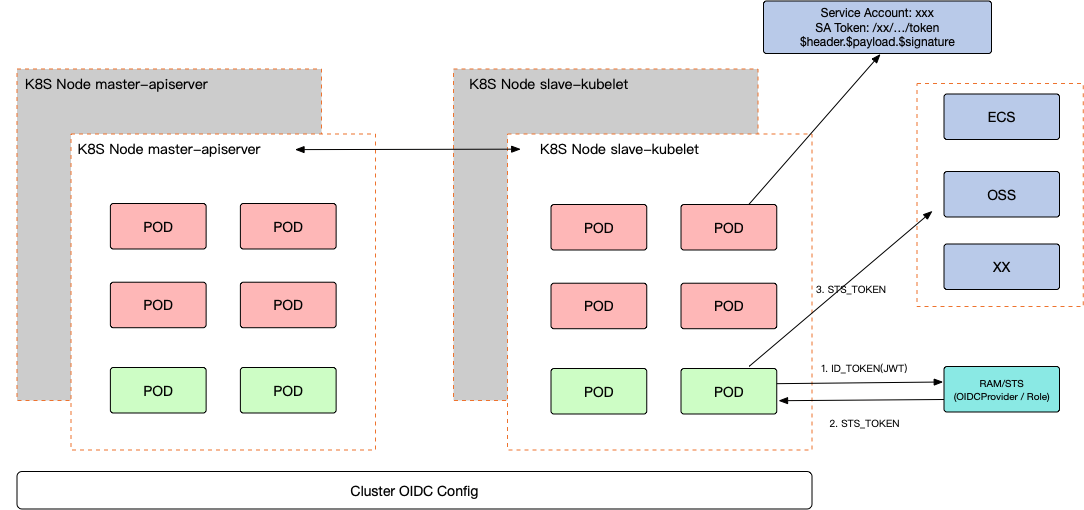
The solution involves two main products: a Kubernetes cluster and RAM. The following section describes the static configuration.
Static configuration
Because the configuration involves Container Service for Kubernetes and RAM, you must perform configurations for both:
- In the RAM console, you can configure a new identity provider (IdP). Add an OIDC-based IdP definition, including the OIDC issuer URL and audience (`aud`). You can also configure a role that an identity from this IdP can assume. In the role's trust policy, you can add conditions for the OIDC identity information, such as the audience and subject (`sub`). Then, you can define the resources and actions that this role can access.
- In the Kubernetes cluster, you can configure OIDC properties, such as its own OIDC identity and the public-private key pair used to issue ID tokens. You can define a corresponding Service Account for the target pod and configure the name of the role that the pod needs to assume. After the pod starts, it can obtain a dynamically replaced ID token from the corresponding volume directory. Using this token and the role ARN defined in RAM, the pod can obtain an STS token from the RAM/STS service to access other Alibaba Cloud services.
The final implementation is a Service Account definition in Kubernetes that contains a RoleName and an OIDC ID token. The RoleName maps to a role name in RAM. The trust policy of this role is matched using the `aud` and `sub` claims in the ID token. ACK now supports one-click configuration for the OIDC part, so you do not need to configure it manually.
Architecture summary
You can configure OIDC properties on the Kubernetes cluster. This allows the cluster to generate standard ID tokens for specific Service Accounts and inject these tokens into pods that use those Service Accounts. At the same time, you can configure the OIDC provider on the cluster as a standard IdP in RAM. RAM trusts the ID tokens issued by this IdP as identity representatives. You can then bind these identities as trusted entities to different roles. Finally, applications in the pods can use these ID tokens to assume predefined roles and obtain STS tokens to access other Alibaba Cloud services.
Solution extension
In addition to optimizing the keys, you also need to consider how to better use existing permanent keys to improve security. This includes solutions such as key rotation and key management. For more information, see other solutions for identity and permission management in the landing zone.
Product Pricing and Terms
Product pricing
| Product name |
Description |
Pricing |
| RAM |
Resource Access Management (RAM) is an Alibaba Cloud service for managing user identities and resource access permissions. Using RAM, you can create and manage RAM users (such as employees, systems, or applications) and control their permissions to operate on resources. |
Free. For more information, see Pricing. |
| STS |
Security Token Service (STS) is an Alibaba Cloud service for managing temporary access permissions. |
Free. For more information, see Pricing. |
| Container Service for Kubernetes |
Container Service for Kubernetes (ACK) is one of the first service platforms in the world to pass the Kubernetes conformance certification. It provides high-performance container application management services and supports enterprise-level lifecycle management for Kubernetes containerized applications. ACK lets you run Kubernetes containerized applications in the cloud easily and efficiently. |
Paid. For more information, see Pricing. |
Glossary
| Name |
Description |
| OIDC |
OIDC is an industry-recognized protocol for user identity authentication. A common scenario is using Alipay to authorize logon to a third-party application. OIDC uses an authorization protocol (usually OAuth 2.0) for identity authentication. You can think of OIDC as being implemented through OAuth 2.0. |
| OAuth 2.0 |
To understand the OAuth 2.0 authorization protocol, consider a common example: A person (A) goes to an office building (B) to visit a department (C). The front desk stops A, checks if A has an appointment, registers A, and then gives A a pass. A can then proceed. The process of checking the appointment and issuing the pass is the authorization process. In this analogy, A is the business system (or third-party application), and department C is the resource that the third-party software wants to access. Therefore, an authorization protocol ensures that a third party can access resources only after obtaining authorization. |
| AccessKey |
When you call Alibaba Cloud APIs, you must use an AccessKey pair for identity verification. An AccessKey pair consists of an AccessKey ID and an AccessKey secret, which must be used together. |
Security
Fine-grained role authorization
You can create a custom policy to specify the exact permissions for a RAM role. For application access scenarios, the logic of a business application is predictable. You know which cloud resources the program will access and what operations it will perform. We recommend granting fine-grained permissions at the application level. For example, if a business application needs to upload and download images from `xxxbucket`, the fine-grained policy looks like this:
{
  "Version": "1",
  "Statement": [
    {
      "Effect": "Allow",
      "Action": ["oss:GetObject", "oss:PutObject"],
      "Resource": "acs:oss:cn-hangzhou:1234567890:xxxbucket/*"
    }
  ]
}
Also, different environments of the same application should not access the same resources. We recommend that each environment of an application corresponds to a specific role. This practice prevents over-authorization and avoids interference between different business environments.
For Kubernetes scenarios, we do not recommend mixing staging and production environments in the same cluster under the same account. We recommend running staging services in a cluster under a staging environment account. Production clusters should run in a cluster under a production environment account.
For more fine-grained authorization, you can also restrict the source IP address of the caller.
STS token permission scope
By default, the permissions of an STS token are the same as the permissions of the role to be assumed.
If you do not set the Policy parameter when you call the AssumeRole API, the returned STS token has all the permissions of the specified role.
Notes
Is there a limit on STS service calls?
The AssumeRole API has a call limit of 6,000 times per minute and 100 times per second. This limit is shared by an Alibaba Cloud account and all RAM users and RAM roles under it. If the number of requests exceeds the limit, throttling is triggered, which can affect business operations. You need to accurately assess the call frequency of your applications. To increase the capacity, you can submit a ticket to request a quota increase. Each STS token has an expiration time. We recommend caching the token on the client within its validity period. This practice avoids regenerating the STS token for every Alibaba Cloud API call, which can cause throttling and affect your services.
Handling a leaked STS token
If an STS token obtained by assuming a RAM role is leaked, you can follow these steps to revoke all issued STS tokens.
- Use your Alibaba Cloud account to log on to the RAM console.
- Remove all access policies from the RAM role. For more information, see Remove permissions from a RAM role.
- Delete the RAM role. For more information, see Delete a RAM role. After you delete the RAM role, all unexpired STS tokens obtained by assuming that role become invalid immediately.
If you still need to use the role, you can recreate a role with the same name, grant it the same access policies, and use the new role to continue your tasks.
ACK cluster version requirements
The RAM Roles for Service Accounts (RRSA) feature is supported only on clusters of version 1.22 and later. This includes ACK Standard Edition, ACK Pro Edition, ASK Standard Edition, and ASK Pro Edition.
Implementation steps
Preparations
- Make sure you have an ACK cluster.
- Make sure you have created the necessary Kubernetes resources in the ACK cluster, including a namespace and a service account.
Implementation time
After the preparations are complete, this solution takes about 45 minutes to implement.
Data planning
The following procedure uses the data plan shown below:
| Resource Object |
Resource Subtype |
Value |
| ACK |
namespace |
default |
| serviceaccount |
app |
|
| RAM |
role |
ACK-APP-STS-Role |
Procedure
Enable the RRSA feature
In this step, you can configure the RRSA feature for Container Service for Kubernetes. If the parameters are already configured, you can skip this step.
- Log on to the Container Service for Kubernetes console.
- In the navigation pane on the left, click Clusters.
- On the Clusters page, click the name of the target cluster, or click Details in the Actions column of the target cluster.
- On the cluster details page, click the Basic Information tab, and then click Enable RRSA to the right of RRSA OIDC Provider URL.
- In the Enable RRSA dialog box that appears, click OK. When the cluster status changes from Updating to Running, the RRSA feature is enabled. The OIDC provider URL appears to the right of RRSA OIDC Provider URL.
Use the RRSA feature
After you enable the RRSA feature for the cluster, you can follow these steps to grant applications in the cluster the ability to obtain temporary credentials to access the cloud resource OpenAPI through RRSA.
- Create a RAM role
Create a RAM role for the Service Account that the application uses. The application will later obtain temporary credentials to assume this RAM role. When you create the role, set the identity provider type to OIDC. For the identity provider, select the one generated for the corresponding cluster ID. The format is usually `ack-rrsa-$clusterID`. In the conditions, the format for oidc:sub is system:serviceaccount:<namespace>:<service_account>. For more information, see Create a RAM role for a trusted Alibaba Cloud account.
The trust policy of the created RAM role looks like this:
{
  "Statement": [
    {
      "Action": "sts:AssumeRole",
      "Condition": {
        "StringEquals": {
          "oidc:aud": "sts.aliyuncs.com",
          /*Replace <oidc_issuer_url> with the OIDC provider URL of the current cluster. You can obtain this URL from the Basic Information tab of the cluster details page.*/
          "oidc:iss": "<oidc_issuer_url>",
          /*Replace <namespace> with the namespace where the application resides. In this example, the value is default.*/
          /*Replace <service_account> with the service account used by the application. In this example, the value is app.*/
          "oidc:sub": "system:serviceaccount:<namespace>:<service_account>"

        }
      },
      "Effect": "Allow",
      "Principal": {
        "Federated": [
          /*Replace <account_uid> with the UID of your Alibaba Cloud account. Replace <cluster_id> with the ID of your ACK cluster.*/
          "acs:ram::<account_uid>:oidc-provider/ack-rrsa-<cluster_id>"
        ]
      }
    }
  ],
  "Version": "1"
}- Grant permissions to the RAM role. You can specify which cloud resources this RAM role can access by granting permissions to it. For more information, see Grant permissions to a RAM role.
Note that this is the role that the application actually assumes. You must grant it the necessary permissions to operate on cloud resources.
- Deploy the application
When you deploy the application, modify the application's template to automatically generate an OIDC token. For more information, see Deploy a service account token volume projection.
Sample template:
apiVersion: v1
kind: Pod
metadata:
  name: test-rrsa
spec:
  containers:
  - image: alpine:3.14
    command:
    - sh
    - -c
    - 'sleep inf'
    name: test
    volumeMounts:
    - mountPath: /var/run/secrets/tokens
      name: oidc-token
  serviceAccountName: build-robot
  volumes:
  - name: oidc-token     # This is a new configuration item.
    projected:
      sources:
      - serviceAccountToken:
          path: oidc-token
          expirationSeconds: 7200    # The expiration time of the OIDC token in seconds.
          audience: "sts.aliyuncs.com"
Note:
- audience field must be sts.aliyuncs.com.
- The expirationSeconds value must be less than 43200 (12 hours). If you set a larger value, the actual OIDC token has an expiration time of 12 hours.
Your application can then use the OIDC token mounted in the container (the content of the `/var/run/secrets/tokens/oidc-token` file in the example above) to call the STS AssumeRoleWithOIDC API. This call obtains a temporary STS credential to assume the RAM role created earlier. You can then use the temporary credential to access the cloud resource OpenAPI.
Application authentication using RRSA OIDC tokens
The official Alibaba Cloud software development kits (SDKs) for Go, Java, and Node.js/TypeScript already support this authentication method. Developers do not need to manually call the AssumeRoleWithOIDC API because the SDKs can directly obtain the STS token to complete Alibaba Cloud API calls.
For code examples, see the next chapter.
Troubleshooting
Why do errors occur when I use STS?
If a RAM user calls the AssumeRole API using an API, a command-line interface (CLI), or an SDK to obtain an STS token and receives the following error message:
Error message: You are not authorized to do this action. You should be authorized by RAM.The possible causes and solutions are as follows:
- The RAM user does not have an access policy that allows assuming roles through STS: Add the system policy (AliyunSTSAssumeRoleAccess) or a custom policy to the RAM user. For more information, see Can I specify which RAM role a RAM user can assume?.
- The trust policy of the RAM role does not include the RAM user you are using, which means the RAM role does not allow the RAM user to assume it: Add a trust policy to the RAM role that allows the RAM user to assume it. For more information, see Modify the trust policy of a RAM role.