Obtain and use temporary credentials using RRSA for Container Service
This topic describes how an application deployed on Container Service for Kubernetes (ACK) can obtain and use a temporary credential, also known as a Security Token Service (STS) token. This method prevents you from hard-coding an AccessKey pair in your application and reduces the risk of credential leakage.
Overview
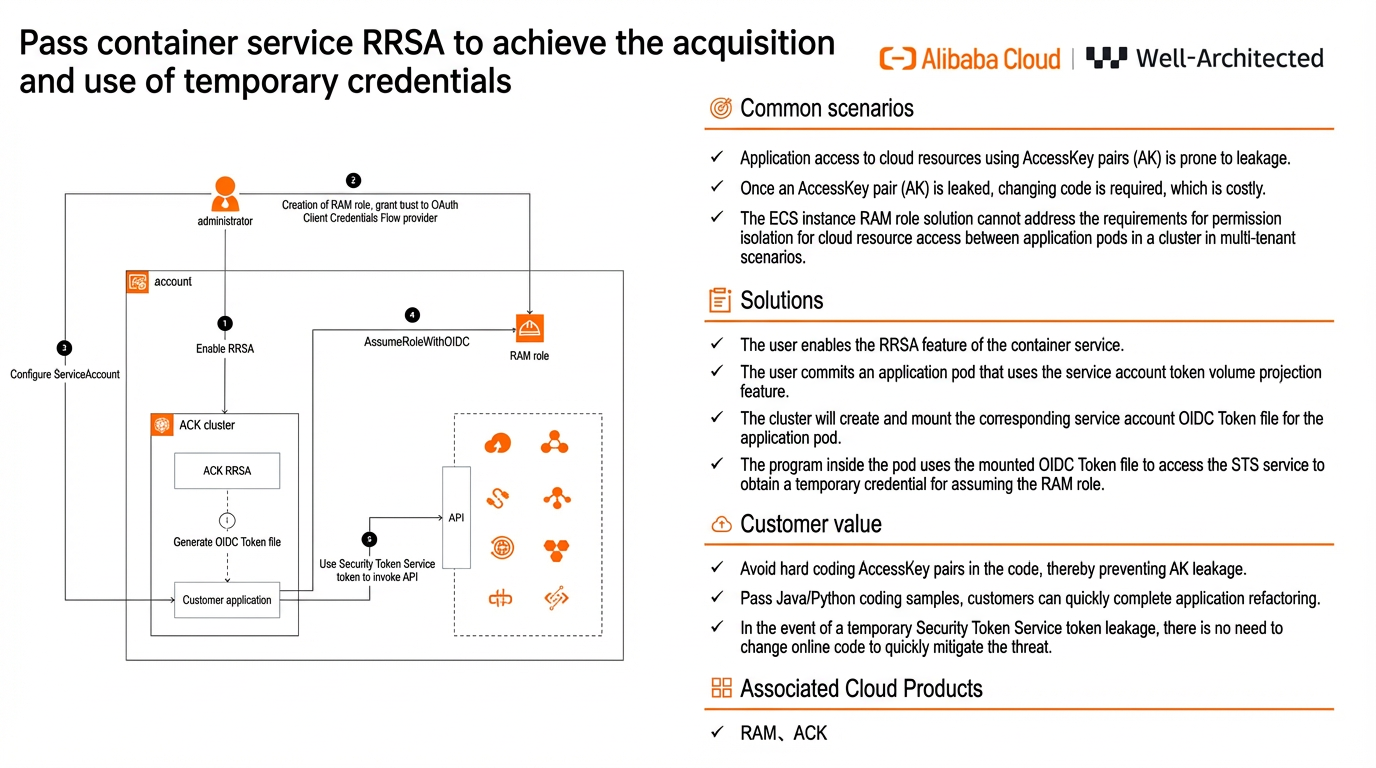
The RAM Roles for Service Accounts (RRSA) feature lets you use RAM roles for applications at the pod level to achieve permission isolation. When a user submits an application pod that uses the service account token volume projection feature, the cluster creates and mounts a corresponding service account OpenID Connect (OIDC) token file for the pod. Applications in each pod can use the mounted OIDC token file to assume an independent RAM role. They can then use the obtained temporary credential to access cloud resources. This approach avoids hard-coding an AccessKey pair in your code, which eliminates the risk of leakage and helps you implement the principle of least privilege for application RAM permissions.
This topic describes how to create a RAM role, grant permissions to a service account, and how applications in a cluster can obtain and use temporary credentials.
Benefits
This solution significantly improves the security, flexibility, and convenience of your cloud applications. It also reduces maintenance costs and operational complexity.
Improved security
RRSA lets you bind a RAM role to an ACK cluster service account or pod and use an STS token to access cloud resources. This avoids hard-coding an AccessKey pair in your code and eliminates the risk of leakage. Using temporary credentials (STS tokens) effectively addresses the security risks associated with permanent credentials (AccessKey pairs).
Fine-grained permission management
You can bind RAM roles with specific authorization policies to different ACK cluster service accounts. This ensures that each account can only access the resources it needs, which implements the principle of least privilege.
Enhanced flexibility
Applications deployed in an ACK cluster can use an official Alibaba Cloud software development kit (SDK) to set the RAM role authentication method and obtain a temporary STS token. This method does not require pre-configured, fixed access credentials. Instead, it lets you dynamically obtain and use temporary credentials as needed. You do not need to manage credentials directly on the ACK cluster. To adjust permissions, you can simply modify the authorization policy of the RAM role. This makes it easy to maintain the access permissions of the ACK cluster.
Reduced maintenance costs
When you use temporary STS tokens, you do not need to frequently update the AccessKey pairs in your code. This reduces maintenance costs and operational complexity. This solution provides Java and Python code samples to help you quickly adapt your applications, which reduces development and deployment complexity.
Customer scenarios
AK-free architecture for applications deployed in ACK clusters
Scenario description
Applications that you deploy in ACK clusters need to access other cloud resources. The traditional method is to hard-code a RAM user's AccessKey pair in the cluster. If the AccessKey pair is written in a configuration file, it can be easily leaked and is difficult to maintain. RRSA for Container Service solves the security risks of permanent credentials by associating ACK cluster service accounts with RAM roles and using STS tokens to access cloud resources.
Target customers
- High security requirements: You need to ensure that your AccessKey pairs are not exposed to prevent security vulnerabilities.
- Dynamic access permission management: You need to dynamically manage and temporarily grant permissions for applications in the cluster to access other resources. This avoids the risks associated with long-term credentials.
- Simplified O&M: You want to simplify credential management during O&M and reduce the complexity of manual maintenance.
Solution architecture
This solution uses RRSA for Container Service to obtain and use temporary credentials. The architecture and process improve system security and flexibility by dynamically managing and temporarily granting access permissions, which avoids the risks of long-term AccessKey pair exposure. Administrators need to configure roles and permissions only once. Then, applications in the cluster can dynamically obtain and use temporary credentials at runtime, which simplifies O&M.
The administrator enables the RRSA feature for the ACK cluster (Step 1 in the diagram). The administrator creates a role that trusts the OIDC IdP and grants the role the required permissions to access cloud resources (Step 2 in the diagram). The administrator then uses an annotation to associate the RAM role with a service account and binds the service account to the corresponding pod (Step 3 in the diagram). The RRSA feature automatically generates and periodically refreshes an OIDC token file (Step i in the diagram). Your application can then use the OIDC token to call the AssumeRoleWithOIDC API and assume the bound RAM role to obtain an STS token from RAM or STS (Step 4 in the diagram). Finally, the application uses the obtained STS token to call the APIs of the target cloud services (Step 5 in the diagram). The service API processes the request and returns the result. The client application receives the result and completes the business logic.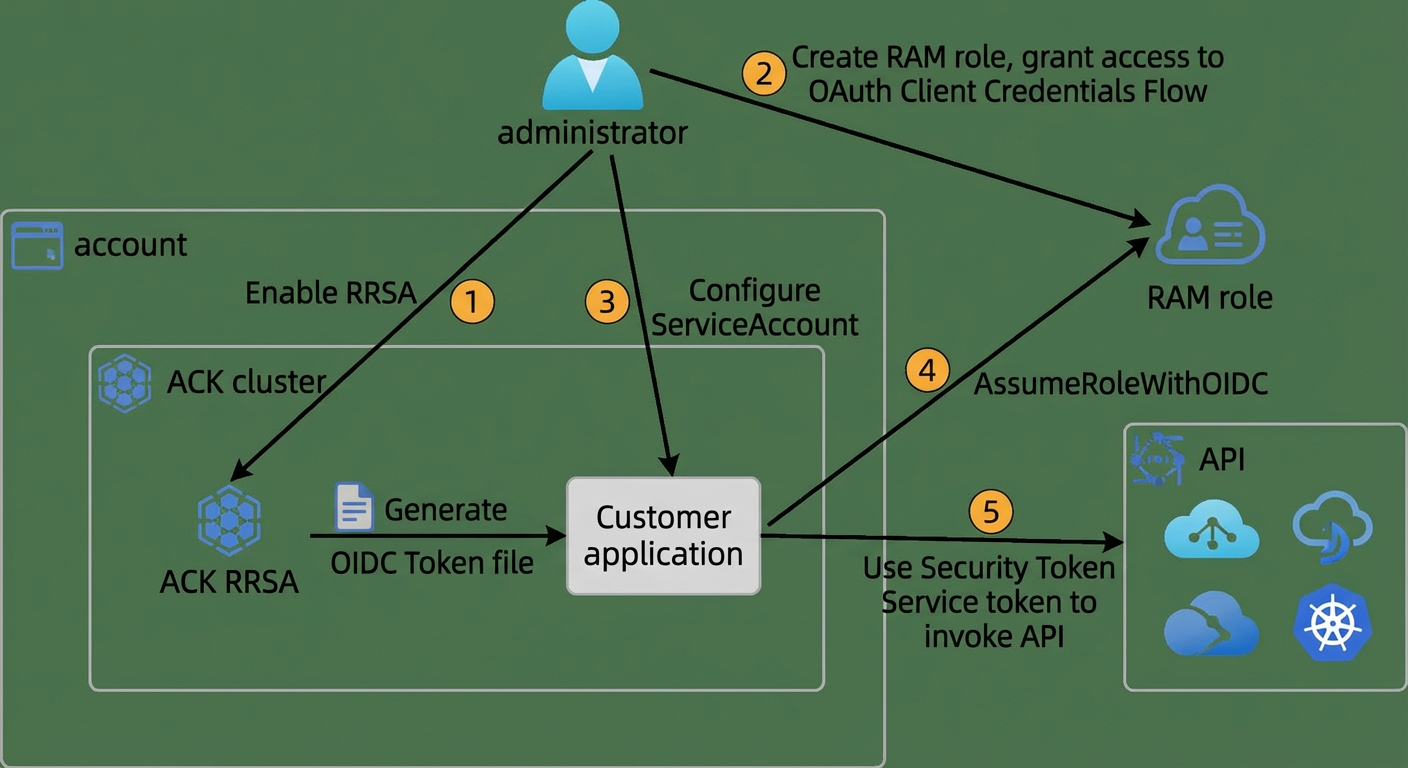
Product Pricing and Terminology
Product pricing
| Product Name |
Description |
Pricing |
| RAM |
Resource Access Management (RAM) is an Alibaba Cloud service that lets you manage user identities and resource access permissions. With RAM, you can create and manage RAM users, such as employees, systems, or applications, and control their permissions to operate on resources. |
Free. For more information, see Pricing. |
| Container Service for Kubernetes (ACK) |
Container Service for Kubernetes (ACK) is one of the first service platforms in the world to pass the Kubernetes Conformance Test. It provides high-performance container application management services and supports lifecycle management for enterprise-level Kubernetes containerized applications. This lets you run Kubernetes containerized applications on the cloud with ease and efficiency. This topic describes ACK and its different cluster types. |
Billed. For more information, see Product Billing. |
| Resource Directory |
Resource Directory is an Alibaba Cloud service that provides multi-level account and resource relationship management for enterprise customers. |
Free. For more information, see Product Billing. |
| Cloud Config |
Cloud Config is a resource auditing service that provides features such as resource configuration history tracking and configuration compliance auditing. It helps you easily achieve autonomous infrastructure supervision and ensure continuous compliance for your resources. |
Free. For more information, see Product Billing. |
| ActionTrail |
ActionTrail is an Alibaba Cloud service that provides query and delivery services for resource operation records of your Alibaba Cloud account. It can be used for scenarios such as security analytics, resource change tracking, and compliance auditing. |
Free. For more information, see Product Billing. |
Glossary
| Name |
Description |
| Management account |
When an enterprise has multiple Alibaba Cloud accounts, this refers to the administrator account that has permission to manage the resources of other accounts. It is used to manage multiple accounts, uniformly configure identity and permissions for multiple accounts, view bills for each Alibaba Cloud account, and uniformly configure and apply audit rules to member accounts. |
| RAM administrator |
A RAM administrator has permission to manage RAM resources under an account. A RAM administrator can be an Alibaba Cloud account (root account) or a RAM user under the root account with the AliyunRAMFullAccess permission. We strongly recommend that you use a RAM user as the RAM administrator. |
| AccessKey pair |
An AccessKey pair is a permanent access credential that Alibaba Cloud provides to users. It consists of an AccessKey ID and an AccessKey secret. Requests carry the AccessKey ID and a signature generated by encrypting the request content with the AccessKey secret for identity verification and request legality checks. |
| RAM role |
A RAM role is a virtual user that can be granted a set of access policies. Unlike a RAM user, a RAM role does not have permanent identity credentials, such as a logon password or AccessKey pair. It must be assumed by a trusted entity. After successful assumption, the trusted entity obtains the RAM role's temporary identity credential, an STS token, which can be used to access authorized resources as the RAM role. |
| RAM Roles for Service Accounts (RRSA) |
RRSA lets you achieve pod-level OpenAPI permission isolation within a cluster. This enables fine-grained isolation of cloud resource access permissions and reduces security risks. |
Security
ACK service role
When you activate ACK, you must grant a system service role to the service account. Only after this role is correctly granted can ACK properly call related services, such as ECS, OSS, NAS, and SLB, to create clusters and save logs. For more information about the service roles included in ACK, see the documentation.
Notes
Cluster Version Limitations
The RRSA feature is only supported on clusters of version 1.22 and later. This includes ACK Basic clusters, ACK Pro clusters, ACK Serverless Basic clusters, and ACK Serverless Pro clusters.
When to enable RRSA
Enabling RRSA causes a brief restart of the API server. If your business depends on the API server, enable RRSA during off-peak hours.
RAM role limits for service accounts
- A service account can be associated with only one RAM role.
- A RAM role can be reused by multiple service accounts. For more information, see Create and authorize a RAM role.
Alibaba Cloud services that support STS
To view the Alibaba Cloud services that support STS, see Alibaba Cloud services that work with STS.
Implementation steps
Preparations
- To audit the enablement of the ACK cluster RRSA feature,ensure that you have activated Cloud Config. For more information, see Activate Cloud Config.
Implementation duration
After you complete the preparations, this solution takes about 60 minutes to implement.
Procedure
Continuous compliance auditing (Optional)
You can use Cloud Config to continuously audit the enablement of the ACK cluster RRSA feature. This lets you promptly identify ACK clusters where the RRSA feature is not enabled and enable it for them. This achieves fine-grained isolation of cloud resource access permissions and reduces security risks.
Create an account group (Optional)
If you are in a multi-account environment and want to centrally manage compliance for multiple member accounts, you can use your management account to add all or some of the member accounts from your resource directory to the same account group. The account group will serve as a management unit for cross-account compliance management. If you are in a single-account environment, you can skip this step.
- Log on to the management account and go to the Resource Management console. In the navigation pane on the left, choose Resource Directory > Trusted Services. Select Cloud Config and click Manage.
- In the Delegated Administrator Account section, click Add to delegate the log archive account as the administrator for Cloud Config.
- Log on to the log archive account and go to the Cloud Config console. In the navigation pane on the left, choose Account Group. Click Create Account Group to centrally manage compliance for the member accounts in your resource directory.
- When you create the account group, you can select Global for the account group type. The members of a global account group are automatically synchronized with your resource directory. The global account group automatically detects new members in the resource directory and adds them to the group. This ensures that the scope of compliance management is always consistent with the resource directory. Note that you can create only one global account group. In this example, we create a global account group named ResourceDirectory.
Create a rule
- Go to the Cloud Config console. If you are using the account group from the previous step for multi-account compliance management, switch to the account group that requires compliance management in the navigation pane on the left.
- In the navigation pane on the left, choose Compliance Audit > Rules, and then click Create Rule. Select the rule named ack-rrsa-enabled. Click Next.
- In the Set Basic Properties step, you can set the risk level, trigger mechanism, and trigger frequency for the rule.
- Click Next. You can further set the scope of the rule, such as making it effective only for resources within certain resource groups or with certain tags. This allows for more fine-grained management of the compliance control scope.
- After the rule is created, you can see a list of all non-compliant resources under the current account group on the rule details page. These are the ACK clusters where the RRSA feature is not enabled. By default, this rule runs a check every 24 hours. You can configure the trigger frequency when you create or modify the rule.
- Finally, you can deliver the non-compliant resource data to other Alibaba Cloud services, such as Simple Log Service or Object Storage Service. This makes it easier to archive, process, and audit the data. For more information about data delivery, see Deliver configuration data.
Enable the RRSA feature
- Log on to the ACK console.
- In the navigation pane on the left, click Clusters.
- On the Clusters page, click the name of the target cluster or click Details in the Actions column of the target cluster.
- On the cluster details page, click the Basic Information tab. In the Cluster Information section, click Enable RRSA next to RRSA OIDC.
- In the Enable RRSA dialog box that appears, click OK.
In the Basic Information section, when the cluster status changes from Updating to Running, it indicates that the RRSA feature has been enabled for the cluster. The URL and ARN of the OIDC IdP are displayed next to RRSA OIDC.
Note: Enabling RRSA causes a brief restart of the API server. If your business depends on the API server, enable RRSA during off-peak hours.
After you enable the RRSA feature for a cluster, ACK performs the following operations in the background.
- An OIDC Issuer service is automatically created for the cluster. This service is managed by ACK and does not require your maintenance. For more information, see OIDC Issuer.
- The configuration of the service account token volume projection feature for the current cluster is modified. The service-account-issuerparameter value of the cluster is merged with the OIDC Issuer configuration created in this step. For more information, see Deploy service account token volume projection.
- An OIDC IdP that uses this OIDC Issuer is created under your account. The name is ack-rrsa-<cluster_id>, where <cluster_id> is your cluster ID. For more information, see Manage an OIDC IdP.
Install the ack-pod-identity-webhook component
- On the Clusters page, click the name of the target cluster. In the navigation pane on the left, choose Operations > Components.
- On the Components page, click the Security tab, find the ack-pod-identity-webhook component, and click Install in the lower-right corner of the component.
- In the dialog box that appears, confirm the component information and click OK.
The ack-pod-identity-webhook component automatically injects the following configurations into the pod:
| Category |
Configuration item |
Description |
| Environment variable |
ALIBABA_CLOUD_ROLE_ARN |
The ARN of the RAM role to assume. |
| ALIBABA_CLOUD_OIDC_PROVIDER_ARN |
The ARN of the OIDC IdP. |
|
| ALIBABA_CLOUD_OIDC_TOKEN_FILE |
The file path that contains the OIDC token. |
|
| VolumeMount |
rrsa-oidc-token |
The configuration for mounting the OIDC token. |
| Volume |
rrsa-oidc-token |
The configuration for mounting the OIDC token. |
If you want to use the RRSA feature without installing the ack-pod-identity-webhook component, you can manually modify the application template to mount the required OIDC token file and configure the relevant environment variables. For more information, see Manually modify the application template to use the RRSA feature (Optional).
Create and authorize a RAM role
Create a RAM role and grant it the permissions to operate on the cloud resources that your application needs.
- Log on to the RAM console with your Alibaba Cloud account.
- In the navigation pane on the left, choose Identities > Roles. On the Roles page, click Create Role.
- In the Create Role panel, select Identity Provider as the trusted entity type, and then click Next.
- On the Configure Role page, configure the role information as described below, and then click Finish.
| Configuration item |
Description |
| Role Name |
<your_role_name>. |
| Note |
Optional. Enter notes about the role. |
| Identity Provider Type |
OIDC. |
| Select Identity Provider |
ack-rrsa-<cluster_id>. <cluster_id> is your cluster ID. |
| Limitations |
Based on the sample application information, enter To configure multiple service accounts:
|
- Grant permissions to the created role. Specify the cloud resources that this RAM role can access, such as the AliyunCSReadOnlyAccess system policy required by the sample application. For more information, see Grant permissions to a RAM role.
Note that this is the role that the application will actually assume. You must grant it the corresponding permissions to operate on cloud resources.
If you want to use an existing RAM role instead of creating a new one, you can add the relevant permissions to the existing RAM role. For more information, see Use and authorize an existing RAM role (Optional).
Obtain and use temporary credentials in an application
When you use an Alibaba Cloud SDK to call an OpenAPI for resource operations, you must correctly configure the credential information. We strongly recommend that you use Alibaba Cloud Credentials to easily obtain and manage your access credentials:
- When you obtain a temporary credential based on an OIDC RAM role, Credentials automatically obtains the OIDC RAM role bound to the service accountand calls AssumeRoleWithOIDC to obtain a temporary access credential.
- Credentials automatically manages the lifecycle of the temporary credential. You do not need to worry about renewing expired temporary credentials. Credentials automatically ensures that the credentials are periodically updated.
- With the default credential chain of Credentials, you can use the same set of code and control the credential acquisition method in different environments through configurations outside the program.
Alibaba Cloud SDK V2.0 (Recommended)
Currently, Alibaba Cloud SDK V2.0 has built-in support for OpenAPI authentication using RRSA OIDC tokens. All cloud product SDKs generated based on SDK V2.0 that support STS token authentication will support RRSA OIDC token authentication by default.
If you use Alibaba Cloud SDK V2.0, you can easily integrate Alibaba Cloud Credentials.
Take Java as an example. Install Credentials using Maven:
<!-- We recommend that you use the latest version of Credentials. -->
<!-- For a list of all released versions, see https://github.com/aliyun/credentials-java/blob/master/ChangeLog.txt -->
<dependency>
  <groupId>com.aliyun</groupId>
  <artifactId>credentials-java</artifactId>
  <version>LATEST</version>
</dependency>
Credentials supports multiple ways to initialize the credential client. You can choose the appropriate method as needed. The following describes how to explicitly configure an OIDC RAM role and use the default credential chain. For more information, see Initialize the credential client.
Note: To use Credentials, you must have Java version 1.8 or later.
Explicitly configure an OIDC RAM role (Recommended)
We recommend that you use this method to explicitly configure the settings in your code. This avoids unexpected results caused by environment variables, configuration files, and other factors in the runtime environment. You can set the value of the Credentials Config by determining the environment type. This lets you use one set of code to support multiple scenarios, such as ECS instance roles, ACK RRSA, and environment variables. The configuration type for ACK is oidc_role_arn. Credentials automatically obtains the OIDC RAM role, calls AssumeRoleWithOIDC to exchange for an STS token, and completes the credential client initialization.
The following is a Java code sample. For the complete code, see the code sample.
import com.aliyun.credentials.Client;
import com.aliyun.credentials.models.Config;
// import com.alibaba.fastjson2.JSON;
// import com.aliyun.sts20150401.models.GetCallerIdentityResponse;

/**
 * Initialize with Credentials and use OIDCRoleArn.
 */
public class CredentialsOIDCRoleArnSample {
    public static void main(String[] args) throws Exception {
        // Initialize the credential client.
        Config credentialConfig = new Config();
        credentialConfig.setType("oidc_role_arn");
        credentialConfig.setRoleArn(System.getenv("ALIBABA_CLOUD_ROLE_ARN"));
        credentialConfig.setOidcProviderArn(System.getenv("ALIBABA_CLOUD_OIDC_PROVIDER_ARN"));
        credentialConfig.setOidcTokenFilePath(System.getenv("ALIBABA_CLOUD_OIDC_TOKEN_FILE"));
        // The role session name. You do not need to set this parameter if the ALIBABA_CLOUD_ROLE_SESSION_NAME environment variable is configured.
        credentialConfig.setRoleSessionName("<RoleSessionName>");
        // Set a more restrictive access policy. This is not required. Sample value: {"Statement": [{"Action": ["*"],"Effect": "Allow","Resource": ["*"]}],"Version":"1"}
        credentialConfig.setPolicy("<Policy>");
        // Not required, the external ID of the RAM role.
        // This parameter is provided by an external party and is used to prevent the confused deputy problem.
        credentialConfig.setExternalId("<ExternalId>");
        // Set the session expiration time.
        credentialConfig.setRoleSessionExpiration(3600);
        Client credentialsClient = new Client(credentialConfig);

        // Call an API. This example uses GetCallerIdentity to get the current caller's identity information.
        // com.aliyun.teaopenapi.models.Config config = new com.aliyun.teaopenapi.models.Config();
        // config.setCredential(credentialsClient);
        // config.setEndpoint("sts.cn-hangzhou.aliyuncs.com");
        // com.aliyun.sts20150401.Client stsClient = new com.aliyun.sts20150401.Client(config);
        // GetCallerIdentityResponse getCallerIdentityResponse = stsClient.getCallerIdentity();
        // System.out.println(JSON.toJSONString(getCallerIdentityResponse));
    }
}
For code samples in other languages, see the documentation.
Default credential chain
When you initialize the credential client without passing any parameters, Credentials uses the default credential chain to initialize the client. With the default credential chain, you can use the same set of code and control the credential acquisition method in different environments through configurations outside the program. Unless you clearly know the priority of credential information query in the default credential chain and the credential information configuration method in each of your program's running environments, we do not recommend that you use the default credential chain. We recommend that you explicitly configure the OIDC RAM role to avoid unexpected results caused by environment variables, configuration files, and other factors in the runtime environment. For the complete code, see the code sample.
import com.aliyun.credentials.Client;
// import com.alibaba.fastjson2.JSON;
// import com.aliyun.sts20150401.models.GetCallerIdentityResponse;

public class DemoTest {
    public static void main(String[] args) throws Exception{
        // Do not specify parameters.
        Client credentialClient = new Client();

        // Call an API. This example uses GetCallerIdentity to get the current caller's identity information.
        // com.aliyun.teaopenapi.models.Config config = new com.aliyun.teaopenapi.models.Config()
        //     .setCredential(credentialsClient)
        //     .setEndpoint("sts.cn-hangzhou.aliyuncs.com");
        // com.aliyun.sts20150401.Client stsClient = new com.aliyun.sts20150401.Client(config);

        // GetCallerIdentityResponse getCallerIdentityResponse = stsClient.getCallerIdentity();
        // System.out.println(JSON.toJSONString(getCallerIdentityResponse));
    }
}
When you use the default credential chain to initialize the client, the Java SDK, for example, tries to find the relevant credential information in the following order of priority (from high to low):
- System properties
- Environment variables
- OIDC RAM role
- Configuration file
- ECS instance RAM role
For more information, see Java SDK default credential chain.
For the ECS instance RAM role, Credentials retrieves the ALIBABA_CLOUD_ECS_METADATA (ECS instance RAM role name) from the environment variables. If it exists, the program will retrieve the STS token of the ECS instance RAM role from the ECS Metadata Service as the default credential information. We strongly recommend that you configure the ALIBABA_CLOUD_ECS_IMDSV2_ENABLE=true environment variable to enable obtaining the STS token in strengthened mode.
Note:
- When you use the default credential chain, Credentials will search for the relevant credential information in order of priority. Avoid improper maintenance of environment variables, which may lead to obtaining unexpected credentials.
To migrate from using a long-term fixed AccessKey pair, you only need to modify a small amount of code. As shown in the figure below, the left column shows how to initialize the Alibaba Cloud SDK with a fixed AccessKey pair, and the right column shows how to initialize the Alibaba Cloud SDK with Credentials.

Alibaba Cloud SDK V1.0 (Not recommended)
Alibaba Cloud SDK V1.0 is an older version with good stability. Many long-time users are accustomed to developing with the original SDK. This section provides a concise guide for these users. For new users, we strongly recommend that you use the new SDK directly. We also recommend that long-time users migrate to the new SDK as soon as possible.
To initialize the SDK client, you can use Credentials. Take Java as an example. Install Credentials using Maven:
<!-- We recommend that you use the latest version of Credentials. -->
<!-- For a list of all released versions, see https://github.com/aliyun/credentials-java/blob/master/ChangeLog.txt -->
<dependency>
  <groupId>com.aliyun</groupId>
  <artifactId>credentials-java</artifactId>
  <version>LATEST</version>
</dependency>

<dependency>
  <groupId>com.aliyun</groupId>
  <artifactId>tea</artifactId>
  <version>LATEST</version>
</dependency>
The following code shows how to first initialize the credential client, and then use the credential information of the credential client to initialize the SDK V1.0 client. For more ways to initialize the credential client, see Manage access credentials. For the complete code, see the code sample.
import com.aliyun.credentials.Client;
import com.aliyun.credentials.models.CredentialModel;
import com.aliyuncs.DefaultAcsClient;
import com.aliyuncs.IAcsClient;
import com.aliyuncs.auth.BasicSessionCredentials;
import com.aliyuncs.profile.DefaultProfile;
// import com.alibaba.fastjson2.JSON;
// import com.aliyuncs.sts.model.v20150401.GetCallerIdentityRequest;
// import com.aliyuncs.sts.model.v20150401.GetCallerIdentityResponse;

public class Main {

    public static void main(String[] args) {
        DefaultProfile profile = DefaultProfile.getProfile("cn-hangzhou");
        // Initialize the credential client.
        Client credentialClient = new Client();
        // Initialize the SDK 1.0 client with the credential client.
        IAcsClient client = createAcsClientByCredentials(profile, credentialClient);

        // Call an API. This example uses GetCallerIdentity to get the current caller's identity information.
        // GetCallerIdentityRequest getCallerIdentityRequest = new GetCallerIdentityRequest();
        // GetCallerIdentityResponse getCallerIdentityResponse = client.getAcsResponse(getCallerIdentityRequest);
        // System.out.println(JSON.toJSONString(getCallerIdentityResponse));
    }

    public static IAcsClient createAcsClientByCredentials(DefaultProfile profile, Client credentialClient) {
        return new DefaultAcsClient(profile, () -> {
            // To ensure thread safety, get the AK, SK, and security token from the CredentialModel.
            CredentialModel credentialModel = credentialClient.getCredential();
            String ak = credentialModel.getAccessKeyId();
            String sk = credentialModel.getAccessKeySecret();
            String token = credentialModel.getSecurityToken();
            return new BasicSessionCredentials(ak, sk, token);
        });
    }
}
It is worth noting that when you initialize the SDK V1.0 client with the credential client, to ensure thread safety, you must first retrieve the CredentialModel, and then retrieve the credential information from the CredentialModel. You cannot directly retrieve the credential information from the credential client credentialClient, because Credentials automatically retrieves and updates the credentials, which causes the CredentialModel object to change. If you retrieve the information directly from the credential client, the AccessKey ID, AccessKey secret, and security token may not belong to the same set of credentials, which will cause an error.
OSS SDK
You can also use the Alibaba Cloud OSS SDK to obtain and use temporary credentials. After integrating the OSS SDK, you need to initialize the OSS client.
You need to integrate Alibaba Cloud Credentials. The currently supported SDKs are:
| OSS SDK language |
Recommended version |
| Java |
>= 3.11.3 |
| Python |
>= 2.14.0 |
| PHP |
>= 2.6.0 |
| Go |
>= 3.0.2 |
Take Java as an example. Install Credentials and the OSS SDK using Maven:
<!-- We recommend that you use the latest version of Credentials. -->
<!-- For a list of all released versions, see https://github.com/aliyun/credentials-java/blob/master/ChangeLog.txt -->
<dependency>
  <groupId>com.aliyun</groupId>
  <artifactId>credentials-java</artifactId>
  <version>LATEST</version>
</dependency>

<dependency>
  <groupId>com.aliyun.oss</groupId>
  <artifactId>aliyun-sdk-oss</artifactId>
  <version>3.17.4</version>
</dependency>
The following code shows how to first initialize the credential client, and then use the credential information of the credential client to initialize the OSS client. For the two ways to initialize the credential client, see the Alibaba Cloud SDK V2.0 section. For more ways, see Initialize the credential client.
import com.aliyun.credentials.Client;
import com.aliyun.credentials.models.CredentialModel;
import com.aliyun.oss.ClientBuilderConfiguration;
import com.aliyun.oss.ClientConfiguration;
import com.aliyun.oss.OSSClient;
import com.aliyun.oss.common.auth.Credentials;
import com.aliyun.oss.common.auth.CredentialsProvider;
import com.aliyun.oss.common.auth.DefaultCredentials;
import com.aliyun.oss.common.comm.SignVersion;

public class Main {
    public static void main(String[] args) {
        // Initialize the credential client.
        Client credentialClient = new Client();

         // The endpoint of the region where the bucket is located. Take China (Hangzhou) as an example.
        String endpoint = "https://oss-cn-hangzhou.aliyuncs.com";
        // The region information corresponding to the endpoint, such as cn-hangzhou.
        String region = "cn-hangzhou";
        // We recommend that you use the more secure V4 signature algorithm. In this case, you need to add the region information corresponding to the endpoint during initialization and declare SignVersion.V4.
        // OSS Java SDK 3.17.4 and later versions support V4 signatures.
        ClientBuilderConfiguration configuration = new ClientBuilderConfiguration();
        configuration.setSignatureVersion(SignVersion.V4);

        // Initialize the OSS client with the credential client.
        OSS ossClient = OSSClientBuilder.create()
            .endpoint(endpoint)
            .credentialsProvider(new CredentialsProvider() {
                @Override
                public void setCredentials(Credentials credentials) {
                }

                @Override
                public Credentials getCredentials() {
                    // To ensure thread safety, get the AK, SK, and security token from the CredentialModel.
                    CredentialModel credentialModel = credentialClient.getCredential();
                    String ak = credentialModel.getAccessKeyId();
                    String sk = credentialModel.getAccessKeySecret();
                    String token = credentialModel.getSecurityToken();
                    return new DefaultCredentials(ak, sk, token);
                }
            })
            .clientConfiguration(configuration)
            .region(region)
            .build();

        // Call the OSS API.
        // ossClient.listBuckets();

        // Shut down the OSSClient.
        ossClient.shutdown();
    }
}
It is worth noting that when you initialize the OSS client with the credential client, to ensure thread safety, you must first retrieve the CredentialModel, and then retrieve the credential information from the CredentialModel. You cannot directly retrieve the credential information from the credential client credentialClient, because Credentials automatically retrieves and updates the credentials, which causes the CredentialModel object to change. If you retrieve the information directly from the credential client, the AccessKey ID, AccessKey secret, and security token may not belong to the same set of credentials, which will cause an error.
SLS SDK
You can also use the Alibaba Cloud SLS SDK to obtain and use temporary credentials. After integrating the SLS SDK, you need to initialize the SLS client.
You need to integrate Alibaba Cloud Credentials. The currently supported SDKs are:
| SLS SDK language |
Recommended version |
| Java |
>= 0.6.88 |
| Python |
>= 0.9.3 |
| PHP |
>= 0.6.4 |
| Go |
>= 0.1.55 |
Take Java as an example. Install Credentials and the SLS SDK using Maven:
<!-- We recommend that you use the latest version of Credentials. -->
<!-- For a list of all released versions, see https://github.com/aliyun/credentials-java/blob/master/ChangeLog.txt -->
<dependency>
  <groupId>com.aliyun</groupId>
  <artifactId>credentials-java</artifactId>
  <version>LATEST</version>
</dependency>

<dependency>
  <groupId>com.aliyun.openservices</groupId>
  <artifactId>aliyun-log</artifactId>
  <version>0.6.107</version>
</dependency>
The following code shows how to first initialize the credential client, and then use the credential information of the credential client to initialize the SLS client. For the two ways to initialize the credential client, see the Alibaba Cloud SDK V2.0 section. For more ways, see Initialize the credential client.
import com.aliyun.credentials.models.CredentialModel;
import com.aliyun.openservices.log.Client;
import com.aliyun.openservices.log.common.auth.DefaultCredentials;

public class Main {
    public static void main(String[] args) {

        // The endpoint of Simple Log Service. Take Hangzhou as an example.
        String endpoint = "cn-hangzhou.log.aliyuncs.com";

        // Initialize the credential client.
        com.aliyun.credentials.Client credentialClient = new com.aliyun.credentials.Client();

        // Initialize the SLS client with the credential client.
        Client slsClient = createSlsClientByCredentials(endpoint, credentialClient);

        // Call the SLS API.
        // slsClient.ListProject();

        // Shut down the SLS client.
        slsClient.shutdown();
    }

    public static Client createSlsClientByCredentials(String endpoint, com.aliyun.credentials.Client credentialClient) {
        return new Client(endpoint, () -> {
            // To ensure thread safety, get the AK, SK, and security token from the CredentialModel.
            CredentialModel credentialModel = credentialClient.getCredential();
            String ak = credentialModel.getAccessKeyId();
            String sk = credentialModel.getAccessKeySecret();
            String token = credentialModel.getSecurityToken();
            return new DefaultCredentials(ak, sk, token);
        });
    }
}
It is worth noting that when you initialize the SLS client with the credential client, to ensure thread safety, you must first retrieve the CredentialModel, and then retrieve the credential information from the CredentialModel. You cannot directly retrieve the credential information from the credential client credentialClient, because Credentials automatically retrieves and updates the credentials, which causes the CredentialModel object to change. If you retrieve the information directly from the credential client, the AccessKey ID, AccessKey secret, and security token may not belong to the same set of credentials, which will cause an error.
Code examples
Code description
This solution provides code samples for using Credentials to obtain temporary credentials with the Alibaba Cloud SDK, OSS SDK, and SLS SDK. The samples are available in Java and Python to help you quickly adapt your applications.
Code address
For the code address, see the code repository.
Deploy the application
- In the following YAML sample, add the label
pod-identity.alibabacloud.com/injection: 'on'to the namespace and add the annotationpod-identity.alibabacloud.com/role-name: demo-role-for-rrsato the service account. This enables the automatic configuration injection feature of the ack-pod-identity-webhook component.
---
apiVersion: v1
kind: Namespace
metadata:
  name: rrsa-demo
  labels:
    pod-identity.alibabacloud.com/injection: 'on'

---
apiVersion: v1
kind: ServiceAccount
metadata:
  name: demo-sa
  namespace: rrsa-demo
  annotations:
    pod-identity.alibabacloud.com/role-name: demo-role-for-rrsa
    pod-identity.alibabacloud.com/service-account-token-expiration: '3600' # Set the TTL for the OIDC token mounted to pods that use this service account.

---
apiVersion: v1
kind: Pod
metadata:
  name: demo
  namespace: rrsa-demo
  annotations:
    pod-identity.alibabacloud.com/service-account-token-expiration: '3600' # Set the TTL for the OIDC token mounted to this pod.
spec:
  serviceAccountName: demo-sa
  containers:
    - image: <your_image>
      imagePullPolicy: "Always"
      name: demo
  restartPolicy: OnFailure
You can add the annotation pod-identity.alibabacloud.com/service-account-token-expiration to the service account to specify the TTL of the OIDC token mounted to pods that use this service account. The value must be in the range of [600, 43200] seconds. The default value is 3600. If an invalid value is configured, 3600 will be used.
You can also add the annotation pod-identity.alibabacloud.com/service-account-token-expiration to the pod. If this configuration item exists on both the service account and the pod, the configuration on the service account will be ignored.
For more information about the configuration of the ack-pod-identity-webhook component, see ack-pod-identity-webhook.
Manually modify the application template to use the RRSA feature (Optional)
You can manually modify the application template to mount the required OIDC token file and configure the relevant environment variables. This lets you use the RRSA feature without installing the ack-pod-identity-webhook component.
The following is a sample application template.
apiVersion: v1
kind: Pod
metadata:
  name: demo
  namespace: rrsa-demo
spec:
  containers:
    env:
    - name: ALIBABA_CLOUD_ROLE_ARN
      value: <role_arn>
    - name: ALIBABA_CLOUD_OIDC_PROVIDER_ARN
      value: <oid_provider_arn>
    - name: ALIBABA_CLOUD_OIDC_TOKEN_FILE
      value: /var/run/secrets/ack.alibabacloud.com/rrsa-tokens/token
    image: <your_image>
    imagePullPolicy: Always
    name: demo
    volumeMounts:
    - mountPath: /var/run/secrets/ack.alibabacloud.com/rrsa-tokens
      name: rrsa-oidc-token
      readOnly: true
  restartPolicy: OnFailure
  serviceAccount: demo-sa
  serviceAccountName: demo-sa
  volumes:
  - name: rrsa-oidc-token
    projected:
      defaultMode: 420
      sources:
      - serviceAccountToken:
          audience: sts.aliyuncs.com
          expirationSeconds: 3600
path: tokenImportant: Replace the following fields in the sample application template.
- <oid_provider_arn>: Replace with the OIDC provider ARN of the current cluster. You can obtain this ARN from the ACK console > Cluster Information > Basic Information.
- <role_arn>: Replace with the RAM role ARN used by the current application. You can obtain this ARN from the RAM console > Roles > Role Details page.
- audience: The value must be
sts.aliyuncs.com. - expirationSeconds: The unit is seconds. The value must be in the range of
[600, 43200], which is 10 minutes to 12 hours. If the set value is greater than 43200 (12 hours), the actual expiration time of the OIDC token will still be 12 hours.
After you deploy the modified application template, the application can use the OIDC token mounted in the container (the content of the file pointed to by the ALIBABA_CLOUD_OIDC_TOKEN_FILE environment variable), the role's ARN (the value of the ALIBABA_CLOUD_ROLE_ARN environment variable), and the OIDC IdP's ARN (the value of the ALIBABA_CLOUD_OIDC_PROVIDER_ARN environment variable) to call the STS <a href="https://help.aliyun.com/zh/ram/api-assumerolewithoidc#doc-api-Sts-AssumeRoleWithOIDC" rel="noopener noreferrer" target="_blank">AssumeRoleWithOIDC</a> API. This obtains a temporary credential to assume the specified RAM role, which can then be used to access cloud resource OpenAPI. For sample application code, see Reference code for using RRSA OIDC tokens with official Alibaba Cloud SDKs.
Use and authorize an existing RAM role (Optional)
If your application needs to use an existing RAM role instead of creating a new one, you can modify the RAM role's trust policy. Add a new trust policy statement that allows applications using the specified service account to obtain temporary credentials by assuming this RAM role. For more information, see Modify the trust policy of a RAM role.
The following is a sample of the Statement entry to add to the RAM role's trust policy.
{
  "Action": "sts:AssumeRole",
  "Condition": {
    "StringEquals": {
      "oidc:aud": "sts.aliyuncs.com",
      "oidc:iss": "<oidc_issuer_url>",
      "oidc:sub": "system:serviceaccount:<namespace>:<service_account>"
    }
  },
  "Effect": "Allow",
  "Principal": {
    "Federated": [
      "<oidc_provider_arn>"
    ]
  }
}
Important: Replace the following fields in the sample Statement entry.
- <oidc_issuer_url>: Replace with the OIDC provider URL of the current cluster. You can obtain this URL from the ACK console > Cluster Information > Basic Information.
- <oidc_provider_arn>: Replace with the OIDC provider ARN of the current cluster. You can obtain this ARN from the ACK console > Cluster Information > Basic Information.
- <namespace>: Replace with the namespace where the application is located.
- <service_account>: Replace with the service account used by the application.
Audit OIDC RAM role operations (Optional)
To audit the operations of an OIDC RAM role, such as what operations were performed with the role's identity, you can use your log audit account to go to the ActionTrail console. In Events > Event Query, find the operation events for that role. Click an event to view its details. You can distinguish which role session the operation came from by the requestParameters.stsTokenPrincipalName in the event record. This field has a fixed format: ${role_name}/${role_session}.
Note: The role session can be specified by the environment variable ALIBABA_CLOUD_ROLE_SESSION_NAME or set in the credentials config in the code.
If your account has audit log delivery enabled, you can run the following SQL query in Events > Advanced Query to quickly find all operations performed with a specific role identity in a specific role session:
event.requestParameters.stsTokenPrincipalName:${role_name}/${role_session}Troubleshooting
Why do I get an error when using an official Alibaba Cloud SDK with an RRSA OIDC token?
For solutions to errors that occur when using an official Alibaba Cloud SDK with an RRSA OIDC token, see the documentation.