Export data to a local CSV file
You can export tables from the LindormTable engine to local files in formats such as CSV, ORC, Parquet, and TXT. This topic describes how to use DataWorks and Object Storage Service (OSS) to export data from LindormTable to an OSS bucket and then download it as a CSV file to your local computer. It covers billing information, limitations, and the step-by-step procedure.
Prerequisites
-
You have created a DataWorks workspace. For more information, see Create a workspace.
-
You have created an exclusive resource group for Data Integration in DataWorks. For more information, see Create and use an exclusive resource group for Data Integration.
-
You have created an OSS bucket. For more information, see Create a bucket.
Billing
The solution described in this topic uses DataWorks and OSS. In addition to Lindorm, the following items may incur charges:
Limitations
You can only perform a full export of a single table. Exporting an entire database or performing an incremental export is not supported.
Step 1: Export data to OSS
1. Add a Lindorm data source
Log on to the DataWorks console. In the target region, click in the left-side navigation pane. Select a workspace from the drop-down list and click Go to Management Center.
In the navigation pane on the left, click Data Source to go to the Data Source List page.
-
In the upper-right corner of the page, click Add Data Source and select Lindorm as the data source type. Follow the on-screen instructions to configure the data source.
2. Add an OSS data source
Log on to the DataWorks console. In the target region, click in the left-side navigation pane. Select a workspace from the drop-down list and click Go to Management Center.
In the navigation pane on the left, click Data Source to go to the Data Source List page.
-
In the upper-right corner of the page, click Add Data Source and select OSS as the data source type. Follow the on-screen instructions to configure the data source.
3. Configure a batch synchronization job
-
Go to the DataStudio page.
Log on to the DataWorks console. In the target region, click in the left-side navigation pane. Select a workspace from the drop-down list and click Go to Data Development.
-
Hover over the
 icon and click Create Workflow.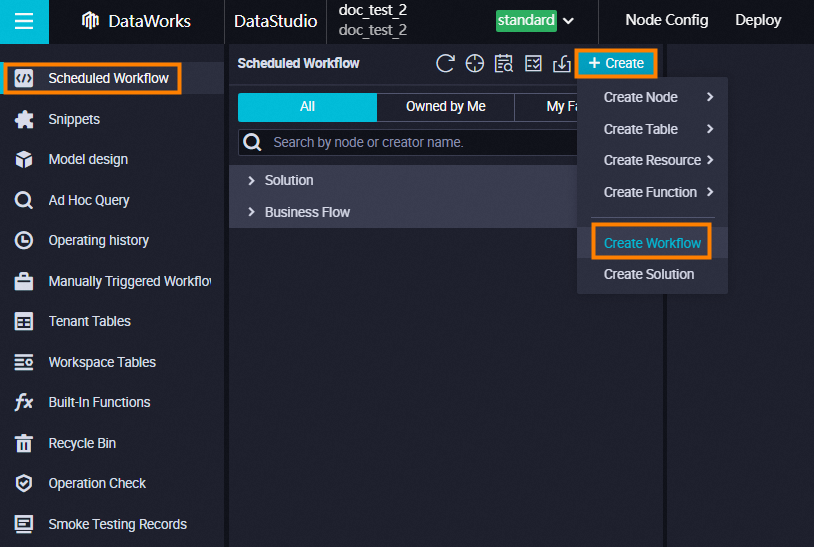
-
In the Create Workflow dialog box, enter a Workflow Name and Description.
-
Click Create.
-
Configure the network and resource settings, test the connectivity, and then click Next step.
-
Set Data Source to Lindorm and select the Lindorm Data Source Name that you added in Step 1.
-
Set Destination to OSS and select the OSS Data Source Name that you added in Step 2.
-
For My Resource Group, select an exclusive resource group. This resource group is used to run the synchronization job. If you do not have an exclusive resource group, see Create and use an exclusive resource group for Data Integration.
-
-
Configure the data source.
-
Select the table type and table.
Set the table type to TableService for tables created with SQL. For tables created with the HBase API or tables that contain dynamic columns, set the table type to WideColumn.
If you cannot find your table, try switching the table type.
-
Select the read method.
If the table contains dynamic columns, select a narrow table. Otherwise, select a wide table.
-
-
Configure the data destination.
-
Set the file type to csv. You can also select other file types. For more information, see OSS data source.
-
Set the file name (including the path), column delimiter, and other parameters.
-
-
(Optional) Configure column headers. Follow this step if you want the exported CSV file to include column headers.
-
In the toolbar, click the conversion script icon.
-
In the OSS Writer script, add a
headerconfiguration.The following code provides a complete sample script for exporting a CSV file with column headers.
Export SQL table
{
    "type": "job",
    "version": "2.0",
    "steps": [
        {
            "stepType": "lindorm",
            "parameter": {
                "selects": [],
                "mode": "FixedColumn",
                "datasource": "lindorm",
                "columns": [
                    "id",
                    "name",
                    "address"
                ],
                "envType": 1,
                "tableMode": "tableService",
                "encoding": "UTF-8",
                "caching": 128,
                "table": "tb"
            },
            "name": "Reader",
            "category": "reader"
        },
        {
            "stepType": "oss",
            "parameter": {
                "fieldDelimiterOrigin": ",",
                "nullFormat": "null",
                "dateFormat": "yyyy-MM-dd HH:mm:ss",
                "datasource": "oss_lindorm",
                "header": [
                    "id",
                    "name",
                    "address"
                ],
                "envType": 1,
                "writeSingleObject": true,
                "writeMode": "truncate",
                "encoding": "UTF-8",
                "fieldDelimiter": ",",
                "fileFormat": "csv",
                "object": "lindorm_sql"
            },
            "name": "Writer",
            "category": "writer"
        },
        {
            "name": "Processor",
            "stepType": null,
            "category": "processor",
            "copies": 1,
            "parameter": {
                "nodes": [],
                "edges": [],
                "groups": [],
                "version": "2.0"
            }
        }
    ],
    "setting": {
        "executeMode": null,
        "errorLimit": {
            "record": "0"
        },
        "speed": {
            "concurrent": 2,
            "throttle": false
        }
    },
    "order": {
        "hops": [
            {
                "from": "Reader",
                "to": "Writer"
            }
        ]
    }
}
Export HBase table
{
    "type": "job",
    "version": "2.0",
    "steps": [
        {
            "stepType": "lindorm",
            "parameter": {
                "selects": [],
                "mode": "FixedColumn",
                "datasource": "lindorm",
                "columns": [
                    "STRING|rowkey",
                    "STRING|cf:a",
                    "STRING|cf:b",
                    "STRING|cf:c"
                ],
                "envType": 1,
                "tableMode": "wideColumn",
                "encoding": "UTF-8",
                "caching": 128,
                "table": "test"
            },
            "name": "Reader",
            "category": "reader"
        },
        {
            "stepType": "oss",
            "parameter": {
                "fieldDelimiterOrigin": ",",
                "nullFormat": "null",
                "dateFormat": "yyyy-MM-dd HH:mm:ss",
                "datasource": "oss_lindorm",
                "envType": 1,
                "writeSingleObject": true,
                "header": [
                    "rowkey",
                    "cf:a",
                    "cf:b",
                    "cf:c"
                ],
                "writeMode": "truncate",
                "encoding": "UTF-8",
                "fieldDelimiter": ",",
                "fileFormat": "csv",
                "object": "from_lindorm_hbase"
            },
            "name": "Writer",
            "category": "writer"
        },
        {
            "copies": 1,
            "parameter": {
                "nodes": [],
                "edges": [],
                "groups": [],
                "version": "2.0"
            },
            "name": "Processor",
            "category": "processor"
        }
    ],
    "setting": {
        "errorLimit": {
            "record": "0"
        },
        "locale": "en-US",
        "speed": {
            "throttle": false,
            "concurrent": 2
        }
    },
    "order": {
        "hops": [
            {
                "from": "Reader",
                "to": "Writer"
            }
        ]
    }
}
For more information about the OSS data source script, see Appendix: Script demo and parameter description.
-
-
(Optional) Configure channel and scheduling properties. To further control data synchronization properties, such as job concurrency and synchronization rate, see Configure a synchronization job in wizard mode.
-
In the toolbar, click the Save icon and then the Run icon. Clicking the Run icon starts the data export to OSS.
Step 2: Download data from OSS
-
Log on to the OSS console.
-
Click Bucket List, and then click the name of the destination bucket.
-
Find the file by using the data destination file name that you set when you configured the batch synchronization job. Click Download in the Actions column to download the file to your local computer.