Custom Message Sending and Receiving
Send and receive custom real-time messages through the Data Channel in the ARTC SDK.
Sample Code
Android client custom message sending and receiving: Android/ARTCExample/BasicUsage/src/main/java/com/aliyun/artc/api/basicusage/DataChannelMessage/DataChannelMessageActivity.java.
iOS client custom message sending and receiving: iOS/ARTCExample/BasicUsage/DataChannelMessage/DataChannelMessageVC.swift.
Harmony client custom message sending and receiving: Harmony/ARTCExample/entry/src/main/ets/pages/basicusage/DataChannelMessagePage.ets.
Prerequisites
-
You have a valid Alibaba Cloud account and an ARTC application. For instructions, see Create Application. You can retrieve your App ID and App Key from the Application Management Console.
-
The ARTC SDK is integrated into your project with basic real-time audio and video features implemented. For SDK integration, see SDK Download and Integration. For implementing audio and video calls, see Implementing Audio and Video Calls.
The ARTC DataChannel feature requires the streamer to push audio or video streams. Use it only after establishing a call and starting to push audio or video. If your scenario does not require actual audio or video streaming, push a silent audio stream to meet this dependency and enable the DataChannel.
Feature Implementation
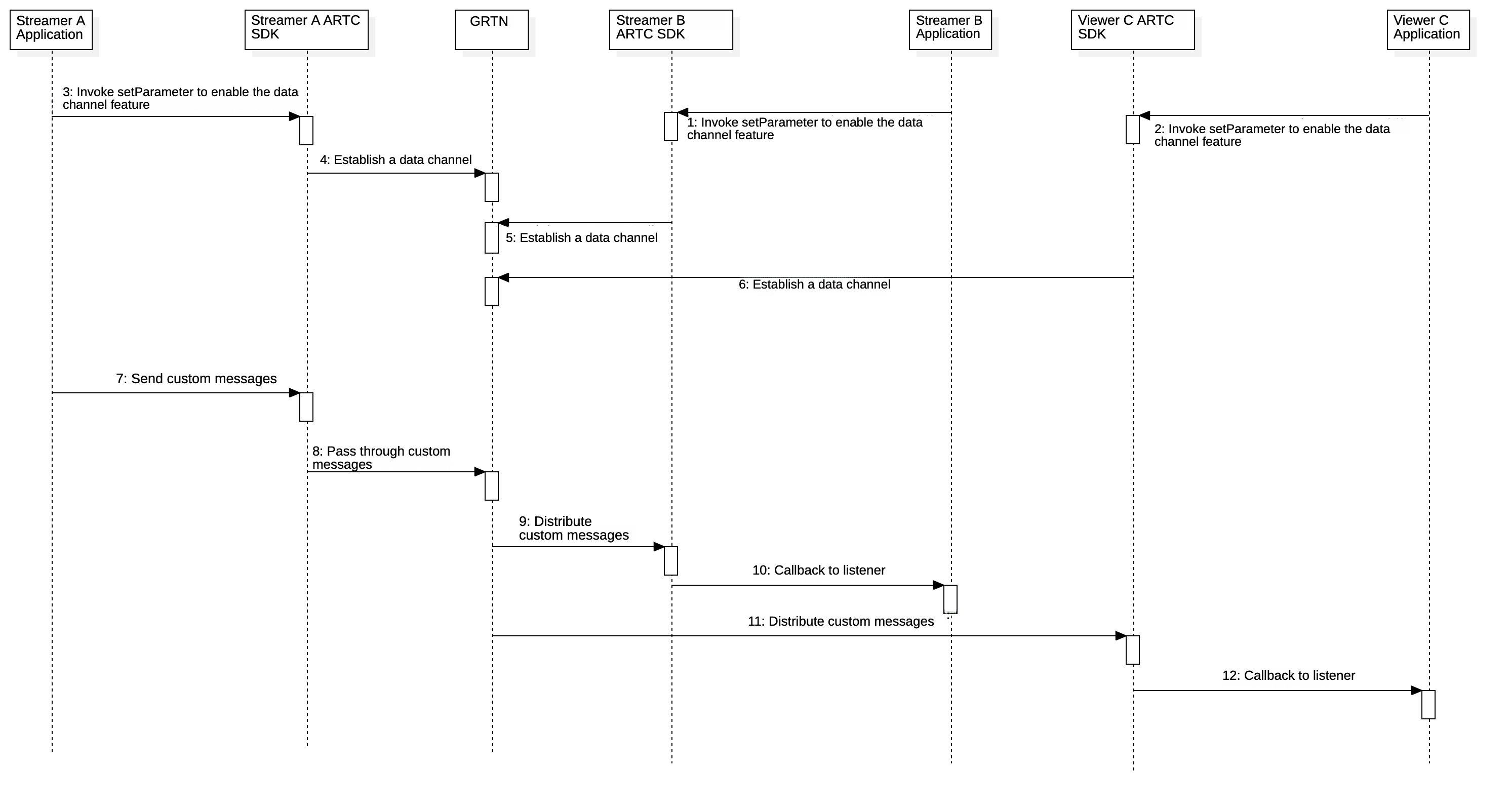
Streamers can send and receive messages. Viewers can only receive messages.
Enable Custom Message Channel
The custom message channel is disabled by default in ARTC. Call the setParameter interface to enable it. You can call this interface before or after joining a channel.
Android
param = "{\"data\":{\"enablePubDataChannel\":true" + ",\"enableSubDataChannel\":true}}";
mAliRtcEngine.setParameter(param);
iOS
NSString* parameter = [NSString stringWithFormat:@"{\"data\":{\"enablePubDataChannel\":true,\"enableSubDataChannel\":true}}"];
[self.engine setParameter:parameter];
Harmony
const param = '{"data":{"enablePubDataChannel":true,"enableSubDataChannel":true}}';
this.rtcEngine.setParameter(param);
Web
// The Web client must call this before joinChannel
mAliRtcEngine.setParameter(
  JSON.stringify({
    data: {
      enablePubDataChannel: true,
      enableSubDataChannel: true,
    },
  }),
);
Mac
NSString* parameter = [NSString stringWithFormat:@"{\"data\":{\"enablePubDataChannel\":true,\"enableSubDataChannel\":true}}"];
[self.engine setParameter:parameter];
Windows
char * param = "{\"data\":{\"enablePubDataChannel\":true,\"enableSubDataChannel\":true}}";
mAliRtcEngine->SetParameter(param);
Linux
For Java sample code, see Java Quick Integration > Send and Receive Messages.
For more information, see C++ Quick Integration > Message Communication.
For Python sample code, see Python Quick Integration > Message Communication.
Send Custom Messages
After establishing a DataChannel, call the sendDataChannelMsg interface to send messages.
-
Streamers can send and receive messages. Viewers can only receive messages.
-
Call
setParameterto enable the custom message channel before sending messages. -
Data sending has the following limits:
-
Bitrate limit: 30 KB/s.
-
The data channel can send up to 60 data packets per second, with each packet limited to 1 KB.
-
Android
AliRtcEngine.AliRtcDataChannelMsg msg = new AliRtcEngine.AliRtcDataChannelMsg();
msg.type = AliRtcEngine.AliRtcDataMsgType.AliEngineDataMsgCustom;
/* All types of data are supported, including text and images. */
msg.data =  xxxx;
mAliRtcEngine.sendDataChannelMsg(msg);
iOS
AliRtcDataChannelMsg* msg = [[AliRtcDataChannelMsg alloc] init];
msg.type = AliRtcDataMsgCustom;
/* All types of data are supported, including text and images. */
msg.data = xxxxx;
[self.engine sendDataChannelMessage:msg];
Harmony
const msg = new AliRtcDataChannelMsg();
msg.type = AliRtcDataMsgType.AliRtcDataChannelCustom;

const seiData = this.stringToArrayBuffer(this.SendText);
msg.data = seiData;

// Send message
const res = this.rtcEngine.sendDataChannelMsg(msg);
Web
const data = new TextEncoder().encode('xxxx');
// Data can be any type (such as text or images), in ArrayBuffer format.
mAliRtcEngine.sendDataChannelMessage(
  new AliRtcDataChannelMsg(data),
);
Mac
AliRtcDataChannelMsg* msg = [[AliRtcDataChannelMsg alloc] init];
msg.type = AliRtcDataMsgCustom;
/* All types of data are supported, including text and images. */
msg.data = xxxxx;
[self.engine sendDataChannelMessage:msg];
Windows
AliEngineDataChannelMsg msg;
msg.type = AliEngineDataChannelCustom;
/* All types of data are supported, including text and images. */
msg.data =  data;
msg.dataLen = dataLength;
mAliRtcEngine->SendDataChannelMessage(msg);
Linux
For Java sample code, see Java Quick Integration > Sending and receiving messages.
For more information, see C++ Quick Integration > Message Communication.
For more information, see Python Quick Integration > Message Communication.
Receive Custom Messages
Listen for the onDataChannelMessage callback to receive custom messages.
Android
// When AliRtcEngineNotify is triggered
public void onDataChannelMessage(String uid, AliRtcEngine.AliRtcDataChannelMsg msg) {
    /* TODO: Write the logic for processing custom messages. */
}
iOS
- (void)onDataChannelMessage:(NSString *_Nonnull)uid controlMsg:(AliRtcDataChannelMsg*_Nonnull)controlMsg {
	/* TODO: Write the logic for processing custom messages. */
}
Harmony
// Data channel message reception callback
listener.onDataChannelMessage((uid: string, msg: AliRtcDataChannelMsg) => {
  console.info(`Received data channel message: uid=${uid}, type=${msg.type}`);
  /* TODO: Write the logic for processing custom messages. */
});
Web
mAliRtcEngine.on('dataChannelMsg', (uid, message) => {
  // Write the logic for processing custom messages.
  console.log('dataChannelMsg', uid, message);
});
Mac
- (void)onDataChannelMessage:(NSString *)uid controlMsg:(AliRtcDataChannelMsg *)controlMsg {
    /* TODO: Write the logic for processing custom messages. */
}
Windows
public:
virtual void OnDataChannelMessage(const char* uid, const AliEngineDataChannelMsg& msg) override {
    /* TODO: Write the logic for processing custom messages. */
}
Linux
For Java sample code, see Java quick integration > sending and receiving messages.
For more information, see C++ Quick Integration > Message Communication.
For Python sample code, see Python Quick Integration > Message Communication.