Generate live stream URLs
To start a live stream, you need an ingest URL for the broadcaster to send the stream and a streaming URL for viewers to play it back. This document explains how to generate signed ingest and streaming URLs for ApsaraVideo Live to ensure secure and reliable stream delivery.
Prerequisites
Before you generate ingest and streaming URLs, you must add an ingest domain and a streaming domain and associate them. For more information, see Add domains.
An ingest domain supports up to 300 concurrent streams in China (Beijing), China (Shanghai), and China (Shenzhen), and 50 in other regions. For more information, see Limits.
URL structure
A live streaming URL consists of a protocol, an ingest/streaming domain, AppName, StreamName, and an Token.

The following table describes the components of a live streaming URL.
|
Parameter |
Description |
Example |
|
Protocol |
The protocol used for the live stream. |
|
|
Ingest/Streaming domain |
The domain you have added. Use an ingest domain to generate an ingest URL, and a streaming domain to generate a streaming URL. |
|
|
AppName |
A custom name for your application, used to distinguish between different services or scenarios. |
|
|
StreamName |
A custom name for the stream, which serves as its unique identifier. |
|
|
Access token |
An encrypted string generated using an MD5 algorithm and the authentication key configured for your domain. It secures your live stream. For information about how the string is generated, see URL signing. |
|
Generate URLs
You can generate ingest and streaming URLs using one of the following methods:
-
Generate in the console: Recommended for initial trials and testing. This method automatically generates a URL with an encrypted {Token}.
-
Generate using code: Recommended for production environments. This method lets you automate URL generation on your server for flexible management and distribution.
Generate in the console
-
Go to the URL generator page.
-
Configure the settings and click Generate URLs to obtain the ingest and streaming URLs.
These settings include: Streaming domain (required; click Add domains if you have none), Associated ingest domain (auto-filled from the selected streaming domain), AppName and StreamName (required; up to 256 characters, including digits, letters, hyphens, underscores, and equal signs), and Transcoding template (optional; requires an AppName).
NoteThe URL generator does not support generating streaming URLs for live subtitles.
Generate using code
1. Construct the URI
The URI is constructed using the format {Protocol}://{DomainName}/{AppName}/{StreamName}. For examples that use different protocols, see Ingest URL examples or Streaming URL examples.
// Pseudocode
protocol = "rtmp"
domain = "example.aliyundoc.com"
appName = "liveApp"
streamName = "liveStream"
uri = protocol + "://" + domain + "/" + appName + "/" + streamName
// Result: rtmp://example.aliyundoc.com/liveApp/liveStream
2. Get the authentication key
The authentication key is used to generate the access token. You can obtain the authentication key from the URL signing page in the console or by calling the DescribeLiveDomainConfigs API operation.
Use the ingest domain's authentication key for the ingest URL and the streaming domain's authentication key for the streaming URL.
3. Assemble the signed URL
The following code examples show how to generate an {Token} and assemble a complete, signed URL for the RTMP protocol:
Java
import java.math.BigInteger;
import java.nio.charset.StandardCharsets;
import java.security.MessageDigest;
import java.security.NoSuchAlgorithmException;
import java.util.regex.Matcher;
import java.util.regex.Pattern;

public class AuthDemo {
    private static String md5Sum(String src) {
        MessageDigest md5 = null;
        try {
            md5 = MessageDigest.getInstance("MD5");
        } catch (NoSuchAlgorithmException e) {
            e.printStackTrace();
        }
        md5.update(StandardCharsets.UTF_8.encode(src));
        return String.format("%032x", new BigInteger(1, md5.digest()));
    }

private static String aAuth(String uri, String key, long exp) {
    String pattern = "^(rtmp://)?([^/?]+)(/[^?]*)?(\\\\?.*)?$";
    Pattern r = Pattern.compile(pattern);
    Matcher m = r.matcher(uri);
    String scheme = "", host = "", path = "", args = "";
    if (m.find()) {
        scheme = m.group(1) == null ? "rtmp://" : m.group(1);
        host = m.group(2) == null ? "" : m.group(2);
        path = m.group(3) == null ? "/" : m.group(3);
        args = m.group(4) == null ? "" : m.group(4);
    } else {
        System.out.println("NO MATCH");
    }

    String rand = "0";  // "0" by default, other value is ok
    String uid = "0";   // "0" by default, other value is ok
    String sString = String.format("%s-%s-%s-%s-%s", path, exp, rand, uid, key);
    String hashValue = md5Sum(sString);
    String authKey = String.format("%s-%s-%s-%s", exp, rand, uid, hashValue);
    if (args.isEmpty()) {
        return String.format("%s%s%s%s?auth_key=%s", scheme, host, path, args, authKey);
    } else {
        return String.format("%s%s%s%s&auth_key=%s", scheme, host, path, args, authKey);
    }
}

public static void main(String[] args) {
    // The ingest or streaming URL to be signed. example.aliyundoc.com is the domain name, liveApp is the AppName, and liveStream is the StreamName.
    // The same signing method is used for both ingest and streaming URLs.
    // The AppName and StreamName can be up to 256 characters long and can contain digits, uppercase and lowercase letters, hyphens (-), underscores (_), and equal signs (=).
    String uri = "rtmp://example.aliyundoc.com/liveApp/liveStream";
    // The authentication key. Use the key from the ingest domain for ingest URLs and the key from the streaming domain for streaming URLs.
    String key = "<input private key>";
    // The `exp` value is a UNIX timestamp in seconds. The URL's actual expiration time is this timestamp plus the validity period configured in the console. For example, if the configured validity period is 30 minutes and you set `exp` to the current time, the URL expires in 30 minutes.
    long exp = System.currentTimeMillis() / 1000 + 1 * 3600;
    String authUri = aAuth(uri, key, exp);
    System.out.printf("URL : %s\nAuth: %s", uri, authUri);
}
}
Python
import re
import time
import hashlib
import datetime
def md5sum(src):
    m = hashlib.md5()
    if isinstance(src, str):
        src = src.encode('utf-8')
    m.update(src)
    return m.hexdigest()

def a_auth(uri, key, exp):
    p = re.compile("^(rtmp://)?([^/?]+)(/[^?]*)?(\\?.*)?$")
    if not p:
        return None
    m = p.match(uri)
    scheme, host, path, args = m.groups()
    if not scheme: scheme = "rtmp://"
    if not path: path = "/"
    if not args: args = ""
    rand = "0"      # "0" by default, other value is ok
    uid = "0"       # "0" by default, other value is ok
    sstring = "%s-%s-%s-%s-%s" %(path, exp, rand, uid, key)
    hashvalue = md5sum(sstring.encode('utf-8'))
    auth_key = "%s-%s-%s-%s" %(exp, rand, uid, hashvalue)
    if args:
        return "%s%s%s%s&auth_key=%s" %(scheme, host, path, args, auth_key)
    else:
        return "%s%s%s%s?auth_key=%s" %(scheme, host, path, args, auth_key)
def main():
    # The ingest or streaming URL to be signed. example.aliyundoc.com is the domain name, liveApp is the AppName, and liveStream is the StreamName.
    # The same signing method is used for both ingest and streaming URLs.
    # The AppName and StreamName can be up to 256 characters long and can contain digits, uppercase and lowercase letters, hyphens (-), underscores (_), and equal signs (=).
    uri = "rtmp://example.aliyundoc.com/liveApp/liveStream"
    # The authentication key. Use the key from the ingest domain for ingest URLs and the key from the streaming domain for streaming URLs.
    key = "<input private key>"
    # The `exp` value is a UNIX timestamp in seconds. The URL's actual expiration time is this timestamp plus the validity period configured in the console. For example, if the configured validity period is 30 minutes and you set `exp` to the current time, the URL expires in 30 minutes.
    exp = int(time.time()) + 1 * 3600
    authuri = a_auth(uri, key, exp)
    print("URL : %s\nAUTH: %s" %(uri, authuri))
if __name__ == "__main__":
    main()
Go
package main
import (
    "crypto/md5"
    "encoding/hex"
    "fmt"
    "regexp"
    "time"
)

func md5sum(src string) string {
    h := md5.New()
    h.Write([]byte(src))
    return hex.EncodeToString(h.Sum(nil))
}

func a_auth(uri, key string, exp int64) string {
    p, err := regexp.Compile("^(rtmp://)?([^/?]+)(/[^?]*)?(\\?.*)?$")
    if err != nil {
        fmt.Println(err)
        return ""
    }
    m := p.FindStringSubmatch(uri)
    var scheme, host, path, args string
    if len(m) == 5 {
        scheme, host, path, args = m[1], m[2], m[3], m[4]
    } else {
        scheme, host, path, args = "rtmp://", "", "/", ""
    }
    rand := "0" // "0" by default, other value is ok
    uid := "0"  // "0" by default, other value is ok
    sstring := fmt.Sprintf("%s-%d-%s-%s-%s", path, exp, rand, uid, key)
    hashvalue := md5sum(sstring)
    auth_key := fmt.Sprintf("%d-%s-%s-%s", exp, rand, uid, hashvalue)
    if len(args) != 0 {
        return fmt.Sprintf("%s%s%s%s&auth_key=%s", scheme, host, path, args, auth_key)
    } else {
        return fmt.Sprintf("%s%s%s%s?auth_key=%s", scheme, host, path, args, auth_key)
    }
}

func main() {
    // The ingest or streaming URL to be signed. example.aliyundoc.com is the domain name, liveApp is the AppName, and liveStream is the StreamName.
    // The same signing method is used for both ingest and streaming URLs.
    // The AppName and StreamName can be up to 256 characters long and can contain digits, uppercase and lowercase letters, hyphens (-), underscores (_), and equal signs (=).
    uri := "rtmp://example.aliyundoc.com/liveApp/liveStream"
    // The authentication key. Use the key from the ingest domain for ingest URLs and the key from the streaming domain for streaming URLs.
    key := "<input private key>"
    // The `exp` value is a UNIX timestamp in seconds. The URL's actual expiration time is this timestamp plus the validity period configured in the console. For example, if the configured validity period is 30 minutes and you set `exp` to the current time, the URL expires in 30 minutes.
    exp := time.Now().Unix() + 3600
    authuri := a_auth(uri, key, exp)
    fmt.Printf("URL : %s\nAUTH: %s", uri, authuri)
}
PHP
<?php
function a_auth($uri, $key, $exp) {
    preg_match("/^(rtmp:\/\/)?([^\/?]+)?(\/[^?]*)?(\?.*)?$/", $uri, $matches);
    $scheme = $matches[1];
    $host = $matches[2];
    $path = $matches[3];
    $args = $matches[4];
    if  (empty($args)) {
        $args ="";
    }
    if  (empty($scheme)) {
        $scheme ="rtmp://";
    }
    if  (empty($path)) {
        $path ="/";
    }
    $rand = "0";
    // "0" by default, other value is ok
    $uid = "0";
    // "0" by default, other value is ok
    $sstring = sprintf("%s-%u-%s-%s-%s", $path, $exp, $rand, $uid, $key);
    $hashvalue = md5($sstring);
    $auth_key = sprintf("%u-%s-%s-%s", $exp, $rand, $uid, $hashvalue);
    if ($args) {
        return sprintf("%s%s%s%s&auth_key=%s", $scheme, $host, $path, $args, $auth_key);
    } else {
        return sprintf("%s%s%s%s?auth_key=%s", $scheme, $host, $path, $args, $auth_key);
    }
}
// The ingest or streaming URL to be signed. example.aliyundoc.com is the domain name, liveApp is the AppName, and liveStream is the StreamName.
// The same signing method is used for both ingest and streaming URLs.
// The AppName and StreamName can be up to 256 characters long and can contain digits, uppercase and lowercase letters, hyphens (-), underscores (_), and equal signs (=).
$uri = "rtmp://example.aliyundoc.com/liveApp/liveStream";
// The authentication key. Use the key from the ingest domain for ingest URLs and the key from the streaming domain for streaming URLs.
$key = "<input private key>";
// The `exp` value is a UNIX timestamp in seconds. The URL's actual expiration time is this timestamp plus the validity period configured in the console. For example, if the configured validity period is 30 minutes and you set `exp` to the current time, the URL expires in 30 minutes.
$exp = time() + 3600;
$authuri = a_auth($uri, $key, $exp);
echo "URL :" . $uri;
echo PHP_EOL;
echo "AUTH:" . $authuri;
?>
C#
using System;
using System.Text.RegularExpressions;
using System.Security.Cryptography;
using System.Text;
public class Test
{
    public static void Main()
    {
        // The ingest or streaming URL to be signed. example.aliyundoc.com is the domain name, liveApp is the AppName, and liveStream is the StreamName.
        // The same signing method is used for both ingest and streaming URLs.
        // The AppName and StreamName can be up to 256 characters long and can contain digits, uppercase and lowercase letters, hyphens (-), underscores (_), and equal signs (=).
        string uri= "rtmp://example.aliyundoc.com/liveApp/liveStream";
        // The authentication key. Use the key from the ingest domain for ingest URLs and the key from the streaming domain for streaming URLs.
        string key= "<input private key>";
        DateTime dateStart = new DateTime(1970, 1, 1, 8, 0, 0);
        // The `exp` value is a UNIX timestamp in seconds. The URL's actual expiration time is this timestamp plus the validity period configured in the console. For example, if the configured validity period is 30 minutes and you set `exp` to the current time, the URL expires in 30 minutes.
        string exp  = Convert.ToInt64((DateTime.Now - dateStart).TotalSeconds+3600).ToString();
        string authUri = aAuth(uri, key, exp);
        Console.WriteLine (String.Format("URL :{0}",uri));
        Console.WriteLine (String.Format("AUTH :{0}",authUri));
    }
    public static string aAuth(string uri, string key, string exp)
    {
        Regex regex = new Regex("^(rtmp://)?([^/?]+)(/[^?]*)?(\\\\?.*)?$");
        Match m = regex.Match(uri);
        string scheme = "rtmp://", host = "", path = "/", args = "";
        if (m.Success)
        {
            scheme=m.Groups[1].Value;
            host=m.Groups[2].Value;
            path=m.Groups[3].Value;
            args=m.Groups[4].Value;
        }else{
            Console.WriteLine ("NO MATCH");
        }
        string rand = "0";  // "0" by default, other value is ok
        string uid = "0";   // "0" by default, other value is ok
        string u = String.Format("{0}-{1}-{2}-{3}-{4}",  path, exp, rand, uid, key);
        string hashValue  = Md5(u);
        string authKey = String.Format("{0}-{1}-{2}-{3}", exp, rand, uid, hashValue);
        if (args=="")
        {
            return String.Format("{0}{1}{2}{3}?auth_key={4}", scheme, host, path, args, authKey);
        } else
        {
            return String.Format("{0}{1}{2}{3}&auth_key={4}", scheme, host, path, args, authKey);
        }
    }
    public static string Md5(string value)
    {
        MD5CryptoServiceProvider md5 = new MD5CryptoServiceProvider();
        byte[] bytes = Encoding.ASCII.GetBytes(value);
        byte[] encoded = md5.ComputeHash(bytes);
        StringBuilder sb = new StringBuilder();
        for(int i=0; i<encoded.Length; ++i)
        {
            sb.Append(encoded[i].ToString("x2"));
        }
        return sb.ToString();
   }
}
Ingest URL examples
|
Protocol |
URL example |
Description |
|
RTMP |
|
Standard protocol for live stream ingest. |
|
RTMPS |
|
A standard, encrypted protocol for live stream ingest. |
|
ARTC |
|
Ingest URL for Real-Time Streaming (RTS). |
|
SRT |
|
The SRT protocol is disabled by default. To use SRT, enable it for your ingest domain. See SRT stream ingest for instructions. |
Streaming URL examples
|
URL type |
Description |
Protocol |
URL example |
|
Standard streaming URL |
If you use the SRT protocol for stream ingest, you can play the stream using RTMP, FLV, HLS, and ARTC. |
RTMP |
|
|
FLV |
|
||
|
HLS |
|
||
|
ARTC |
|
||
|
Transcoded stream URL (Default Transcoding/Custom Transcoding) |
Append |
RTMP |
|
|
FLV |
|
||
|
HLS |
|
||
|
ARTC |
|
||
|
Transcoded stream URL (Multi-bitrate Transcoding) |
For multi-bitrate transcoded streams, append |
HLS |
|
|
Delayed stream URL |
For a delayed stream, append |
RTMP |
|
|
FLV |
|
||
|
HLS |
|
||
|
ARTC |
|
||
|
Live subtitles stream URL |
Append |
RTMP |
|
|
FLV |
|
||
|
HLS |
|
Verify the URLs
We recommend using the mobile demo app to push a stream and VLC media player on a PC to play the stream to verify that the generated URLs are valid. For more stream pushing and playback methods, see Live stream pushing and Live stream playback.
Verify the ingest URL
-
On an Android or iOS mobile device, scan the QR code to download and install the ApsaraVideo Live demo app.
 Note
NoteOn iOS, if you see an "Untrusted Enterprise Developer" prompt during installation, go to Settings > General > VPN & Device Management, find the profile for Taobao, and tap Trust.
-
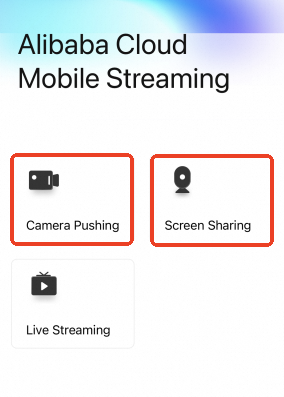
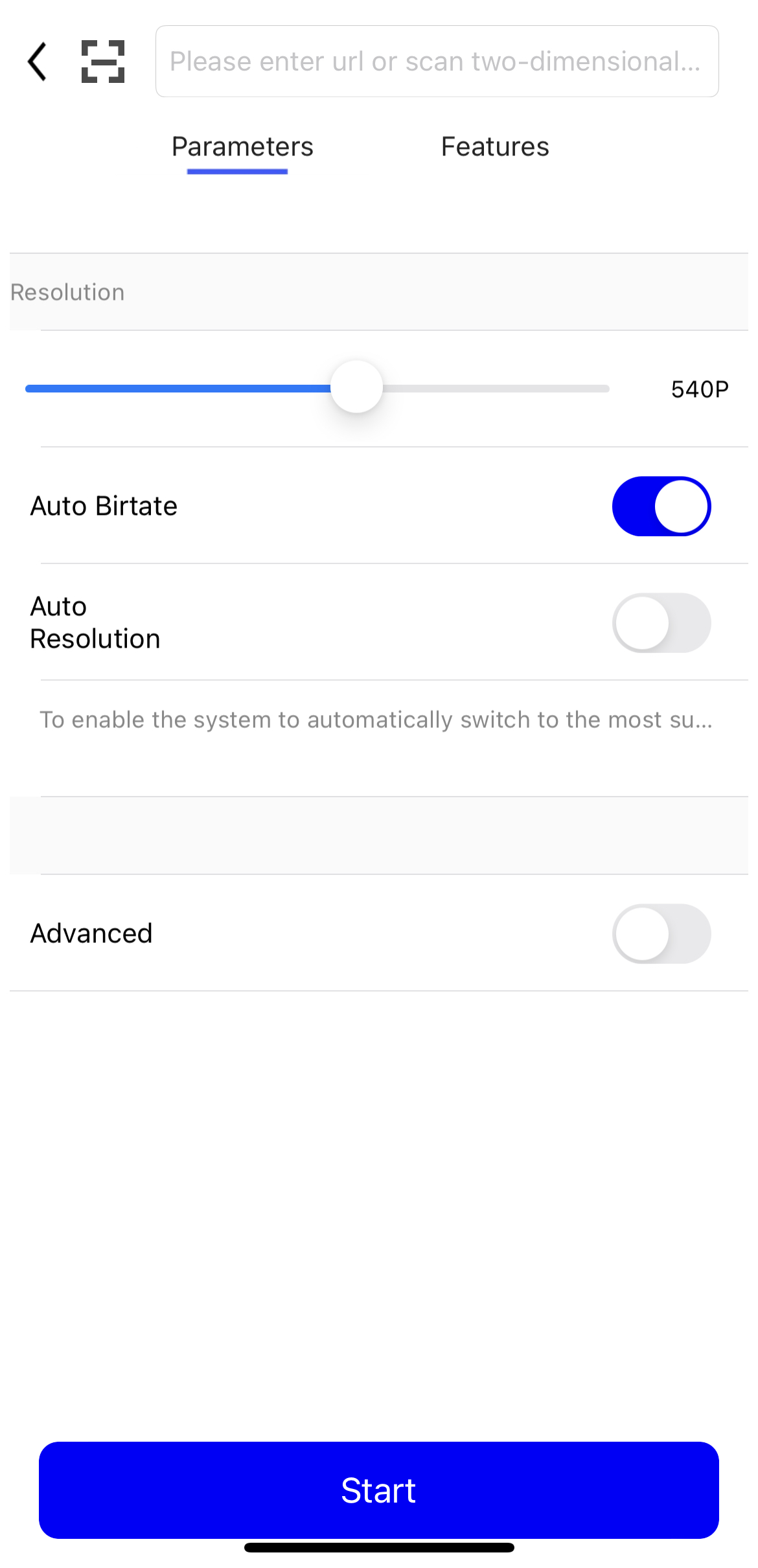
Open the demo app and select Camera or Screen Sharing. In the ingest URL field, enter the URL you generated. You can also scan the QR code from the console to auto-fill the URL.
-
Tap Start. You have now started the live stream.
You can go to the Stream Management page in the ApsaraVideo Live console to view the active stream. If the stream is not displayed, review the previous steps to ensure they were completed correctly.
Verify the streaming URL
To play the stream, ensure the ingest client is actively streaming. Otherwise, playback will fail.
-
Download and install VLC media player.
-
Open VLC media player.
-
From the menu bar, select Media > Open Network Stream.
-
On the Network tab, enter the streaming URL you generated. Example:
rtmp://pull-singapore.cloud-example.net/testApp/testStream?auth_key=1750150177-0-0-9b7*******31acc543a99c69********Click Play. If VLC media player successfully fetches and plays the stream, your ingest and playback setup is working correctly.
Verify by calling an API
If you push and pull streams through APIs or CLI commands without a GUI, call the DescribeLiveStreamsOnlineList operation to query the list of active streams and confirm whether the stream is being ingested normally.
CLI example:
aliyun live DescribeLiveStreamsOnlineList --RegionId cn-hangzhou --DomainName <your streaming domain> --AppName <your app name> --StreamName <your stream name>Parameters:
-
DomainName: The streaming domain. This parameter is required. -
AppName: The name of the application. -
StreamName: The name of the stream. -
StreamType: The type of the stream. Valid values:all(default),raw(raw stream), andtrans(transcoded stream).
Response fields:
-
StreamName: The name of the stream. -
AppName: The name of the application. -
PublishTime: The time when the stream started being ingested.
The operation returns a list of active streams. If the stream that you specified is included in the list and is active, the ingest is working correctly. This method complements viewing the active stream on the Stream Management page in the ApsaraVideo Live console.
Troubleshooting
If you encounter issues during stream ingest or playback, use the troubleshooting tool to validate the URL and authentication information.