Live streaming domain names
ApsaraVideo Live provides live stream ingest, distribution, and real-time media processing services. You must add and configure live streaming domain names to use these services. Learn about domain types, how to add and associate domains, and which feature configurations apply to each type.
Overview
Live streaming domain names include ingest domain names and streaming domain names.
An Ingest Domain is used for stream ingest. When you add an ingest domain, you must set Domain Type to Ingest Domain.
A Streaming Domain is used for live stream playback. When you add a streaming domain, you must set Domain Type to Streaming Domain.
You must add and associate at least one ingest domain and one streaming domain before using ApsaraVideo Live. A domain name can serve as either an ingest domain or a streaming domain, but not both.
Limits
Each Alibaba Cloud account supports up to 20 accelerated domain names. To increase this limit, submit a ticket. For more information, see Contact us.
Add a domain name
To add a domain name to ApsaraVideo Live:
Confirm that the domain name meets the admission criteria
ApsaraVideo Live uses the Global Real-time Transport Network (GRTN) for video distribution and acceleration. Review the domain name admission criteria to ensure your domain complies with the requirements.
Verify domain name ownership
When you add a domain name for the first time, verify its ownership. Verify domain name ownership.
Add a domain name. You can add a domain name in the console or by calling the AddLiveDomain API operation.
When you add a domain name, you must configure the Domain Name, Live Center, Domain Type, and Acceleration Region.
Console Parameter
API Parameter
Description
Domain Name
DomainName
The domain name to add. A domain name already added to this or another Alibaba Cloud service cannot be added again.
Console: Subdomain names are supported. Wildcard domain names are not supported.
API: Wildcard domain names are supported. A wildcard domain name must start with a period (.).
Live Center
Region
The live center region. Associated ingest and streaming domains must be in the same live center. This setting cannot be changed after configuration.
Domain Type
LiveDomainType
The acceleration type. Ingest domains handle ingest acceleration; streaming domains handle streaming acceleration. This setting cannot be changed after configuration.
Acceleration Region
Scope
The regions where acceleration is available for the domain name.
Chinese Mainland, domestic:
If the streamer is in the Chinese mainland, select the Chinese mainland for the ingest domain.
If the viewers are in the Chinese mainland, select the Chinese mainland for the streaming domain.
The domain name requires an Internet Content Provider (ICP) filing.
Global, global:
If the streamer is in the Chinese mainland, Hong Kong (China), Macao (China), Taiwan (China), or other countries and regions, select Global Accelerator for the ingest domain.
If the viewers are in the Chinese mainland, Hong Kong (China), Macao (China), Taiwan (China), or other countries and regions, select Global Accelerator for the streaming domain.
The domain name requires an ICP filing.
Outside Chinese Mainland, overseas:
If the streamer is in a region outside the Chinese mainland, such as Hong Kong (China), Macao (China), or Taiwan (China), select Acceleration for regions outside the Chinese mainland for the ingest domain.
If the viewers are in a region outside the Chinese mainland, such as Hong Kong (China), Macao (China), or Taiwan (China), select Acceleration for regions outside the Chinese mainland for the streaming domain.
The domain name does not require an ICP filing.
NoteDifferent acceleration regions have different bandwidth and traffic unit prices. You are charged only for regions from which playback requests originate. For example, if you select Global Accelerator but viewers are only in the Chinese mainland, you are not charged for regions outside the Chinese mainland. For billing details, see Standard ApsaraVideo Live pricing and the Pricing page.
Configure domain name resolution
After you add a domain name, map it to the CNAME address assigned by ApsaraVideo Live to route requests to edge nodes for acceleration. Configure a CNAME record for a domain name.
NoteWhat is domain name resolution? covers the basics of A records and CNAME records.
After you add the domain names, configure CNAME records for both the ingest domain and the streaming domain before use.
Due to local DNS caching, CNAME changes may take about 10 minutes to take effect.
Associate domain names
After adding the ingest and streaming domains, associate them to enable ApsaraVideo Live.
ApsaraVideo Live uses edge ingest to push streams to the optimal acceleration node for best uplink performance. This requires associating the ingest domain with the streaming domain.
ApsaraVideo Live is phasing out legacy live center ingest. For streaming domains added after February 21, 2019, live center ingest is no longer supported. You must associate the ingest and streaming domains.
ApsaraVideo Live supports multiple ingest-to-streaming domain associations. The following figure shows the supported relationships, including ingest-streaming associations and primary-secondary streaming domain associations.
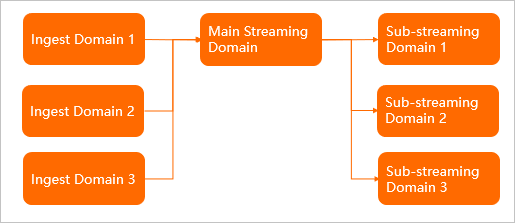
Associate ingest and streaming domain names: Multiple ingest domains can be associated with a single streaming domain.
An ingest domain can be associated with only one primary streaming domain. To play the same stream through multiple domains, configure one primary and multiple secondary streaming domains.
Perform this operation in the console or by calling the AddLiveDomainMapping API operation.
Associate primary and secondary streaming domains: A single ingest domain can be associated with multiple streaming domains.
A secondary streaming domain inherits ingest and transcoding configurations from the primary domain — configuring these features on the secondary domain has no effect. Configure transcoding templates on the primary domain. Feature configuration applicability for live streaming domain names.
Perform this operation in the console or by calling the AddLiveDomainPlayMapping API operation.
Feature configuration applicability for live streaming domain names
After you configure your live streaming domain names, some features must be configured on the primary streaming domain, while others on the secondary streaming domain.
Feature | Applies to primary streaming domain | Applies to secondary streaming domain | |
Live stream management | View live streams (active, historical, and disabled streams) | √ | - |
Disable streams | √ | - | |
File management | Query recording files | √ | - |
Edit videos from recording indexes | √ | - | |
Query snapshot files | √ | - | |
Domain name management | Modify acceleration region | - | √ |
Add or delete ingest information | √ | - | |
Add secondary streaming domain name | √ | Secondary streaming domains cannot be nested. | |
HTTP Live Streaming (HLS) origin fetch HOST | √ | The origin fetch HOST header for a secondary domain name must be set to the primary domain name. | |
Latency configuration (high, medium, and low) | - | √ | |
HTTP header configuration | - | √ | |
Security settings (Hypertext Transfer Protocol Secure (HTTPS) settings, hotlink protection, URL signing, and IP blacklists and whitelists) | - | √ | |
Peak bandwidth monitoring | - | √ | |
IPv6 settings | - | √ | |
Live stream processing configuration | Transcoding template configuration | √ | - |
Recording configuration (recording template and callback configuration) | √ | - | |
Snapshot configuration (snapshot and callback configuration) | √ | - | |
Content moderation configuration (moderation and callback configuration) | √ | - | |
Time shifting | √ | - | |
Live stream latency configuration | √ | - | |
Stream pulling configuration | √ | - | |
Data monitoring | Resource Monitoring - Outbound bandwidth | - | √ |
Resource Monitoring - Origin fetch statistics | - | √ | |
Resource monitoring - HTTPCODE | - | √ | |
Real-time monitoring - bandwidth | - | √ | |
Real-time monitoring - Quality monitoring | - | Yes | |
Access statistics | Unique visitors | - | Supported |
User distribution | - | √ | |
Usage query | Playback bandwidth/Traffic | - | √ |
Number of ingest endpoints | √ | - | |
Transcoding length | √ | - | |
Number of screenshots | ✓ | - | |
Time shifting | √ | - | |
Log management | Log download | - | √ |
Real-time log delivery | - | √ | |